active directory
39 TopicsLooking for an on-prem MFA solution for Active Directory and RDP
Hi everyone, We're reviewing options for adding MFA to our on-premises Active Directory environment. Most of our users authenticate with Active Directory, while administrators also use RDP for managing Windows servers. Because part of our infrastructure is isolated from the Internet, we'd prefer an on-premises MFA solution instead of relying on a cloud-only service. Has anyone implemented something similar recently? I'm interested in hearing: Which solution did you choose? How difficult was the deployment? Did you run into any compatibility or performance issues? Is there anything you'd do differently if you were deploying it again? Any real-world experience or recommendations would be greatly appreciated. Thanks!685Views1like6Comments
Can the built-in "No account? Create one" link redirect to a custom sign-up page?
I'm using Microsoft Entra External ID with a built-in sign-in/sign-up user flow. On the Microsoft-hosted sign-in page, the "No account? Create one" link always redirects users to the default Entra sign-up page. I already have a custom registration page and would like this built-in link to redirect to my custom URL instead. Is there any supported way to customize the destination of this link in a built-in user flow? If not, could someone confirm whether this behavior is fixed by design? Thanks!449Views0likes2Comments
Using Cloud sync to sync AD to existing Entra Accounts
I want to sync in premise AD accounts with existing Entra accounts. The email on both accounts is the same, and I added the Entra/o365 suffix to the domain and set the UPN to that suffix, making both UPN(s) the same. It did not sync. It created a NEW Entra account. I thought I covered all my bases. How can I get on premise AD and existing Entra accounts to sync? thank youSolved559Views0likes5CommentsRegistering user becomes local admin on Joined Devices
This setting works exactly as named, but the confusion is understandable because the privilege is invisible in the places people normally look. Per Microsoft's official docs (assign-local-admin): at the moment of Microsoft Entra join, two principals get added to the local administrators group — the Microsoft Entra Joined Device Local Administrator role and the user performing the join. This happens only during the join operation itself. It's not a directory role assignment, so it won't show up in role assignments, audit logs, or under "Device Administrators" — that's by design. Critically: users aren't directly listed in the local admin group; the privilege is delivered through the Primary Refresh Token (PRT) at sign-in. So: To validate on the device itself, sign in as the user and run whoami /groups — you should see the device-local Administrators SID. If you just changed the setting and want to force re-evaluation, run dsregcmd /refreshprt, then sign out and back in (lock/unlock won't trigger it — you need a fresh PRT, which can take up to ~4 hours to propagate otherwise). This setting only applies to joined devices, not registered (workplace-joined) ones — so your distinction there is correct. The "Manage Additional local administrators on all Microsoft Entra joined devices" link is a separate, tenant-wide mechanism (the same Device Administrator role) — it can't be scoped to specific devices, which is also worth knowing if you're trying to limit blast radius. If you want to stop this going forward for new joins without ripping out existing admins, set "Registering user is added as local administrator" to None, and consider a Windows Autopilot profile or Intune Local Users and Groups policy to manage membership going forward — existing devices won't be retroactively changed.376Views0likes1CommentHybrid Join Lifecycle Model
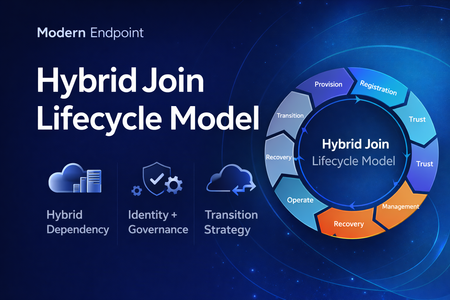
Microsoft Entra hybrid join is still a common reality in enterprise environments. For many organizations, it remains necessary because legacy applications still rely on Active Directory machine authentication, Group Policy is still in use, and on-premises operational dependencies have not fully been retired. At the same time, the long-term direction for endpoint identity is increasingly cloud-native. That creates an important architectural question: Should hybrid join be treated as a permanent device state, or as a lifecycle stage in a broader modernization journey? In practice, hybrid join is often discussed as a binary condition: the device is either hybrid joined or it is not. But from an operational perspective, that view is too limited. In real enterprise environments, hybrid join behaves much more like a lifecycle. A device moves through provisioning, registration, trust establishment, management attachment, steady-state operation, recovery, retirement, and eventually transition. That distinction matters because most hybrid join issues do not fail loudly. They usually appear as stale objects, pending registrations, broken trust, inconsistent management ownership, and environments that remain temporarily hybrid far longer than intended. Why a lifecycle model is useful Treating hybrid join as a lifecycle helps explain why so many organizations struggle with it even when the initial implementation appears technically correct. The challenge is usually not the first successful join. The challenge is everything that happens around it: Provisioning quality Trust validation Management ownership Drift detection Stale object cleanup Exit criteria for transition to Entra join Without that lifecycle view, hybrid join often becomes a static design decision with no clear operational model behind it. The eight phases 1. Provisioning The lifecycle starts when the device is built, imaged, or provisioned. This stage is more important than it looks. If the device is provisioned from a contaminated image, or if cloning and snapshot practices are not handled carefully, later identity issues are often inherited rather than newly created. Provisioning should be treated as an identity-controlled event, not just an OS deployment task. 2. Registration The device becomes known to Microsoft Entra. This is where many environments confuse visibility with readiness. A device object may exist in the cloud, but that does not automatically mean the hybrid identity state is healthy or operationally usable. 3. Trust Establishment This is the point where hybrid join becomes real. A device should not be considered fully onboarded until both sides of trust are present and healthy. In operational terms, this means the device is not only registered, but also capable of supporting the expected sign-in and identity flows. 4. Management Attachment Once trust exists, governance becomes the next question. Many organizations still balance Group Policy, Configuration Manager, Intune, and legacy application dependencies at the same time. That is exactly why hybrid join often persists. But if management ownership is not clearly defined, organizations end up with overlapping policy planes, inconsistent control, and unclear accountability. 5. Operational Steady State Hybrid join does not stop at successful registration. The device must remain healthy over time, and that means monitoring trust health, registration state, token health, line-of-sight to required infrastructure, and management consistency. A device that was healthy once is not necessarily healthy now. 6. Recovery Every real environment eventually encounters drift. Pending states, broken trust, orphaned records, reimaged devices, and inconsistent registration scenarios should not be treated as unusual edge cases. They should be expected and handled with formal recovery playbooks. Recovery is not an exception to the lifecycle. It is part of the lifecycle. 7. Retirement Retirement is one of the weakest areas in many hybrid environments. Devices are replaced or decommissioned, but their identity records often remain behind. That leads to stale objects, inventory noise, and administrative confusion. A proper lifecycle model should include a controlled retirement sequence rather than ad hoc cleanup. 8. Transition This is the most important strategic phase. The key question is no longer whether a device can remain hybrid joined, but whether there is still a justified reason to keep it there. Hybrid join may still be necessary in many environments today, but in many cases it should be treated as transitional architecture rather than the target end state. Practical takeaway Looking at hybrid join as a lifecycle creates a more useful framework for architecture decisions, operational ownership, troubleshooting, directory hygiene, governance, and transition planning toward Microsoft Entra join. That is the real value of this model. It does not replace technical implementation guidance, but it helps organizations think more clearly about why hybrid join exists, how it should be operated, and when it should eventually be retired. Final thought Hybrid join is still relevant in many enterprise environments, but it should not automatically be treated as a default destination. In many cases, it works best when it is managed as a lifecycle-driven operating model with defined phases, controls, and exit criteria. That makes it easier to stabilize operations today, while also creating a clearer path toward a more cloud-native endpoint identity model tomorrow. Full article: https://www.modernendpoint.tech/hybrid-join-lifecycle-model360Views1like0Comments
Introducing the Entra Helpdesk Portal: A Zero-Trust, Dockerized ITSM Interface for Tier 1 Support
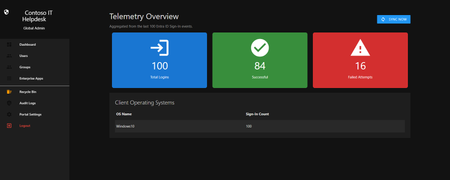
Hello everyone, If you manage identity in Microsoft Entra ID at an enterprise scale, you know the struggle: delegating day-to-day operational tasks (like password resets, session revocations, and MFA management) to Tier 1 and Tier 2 support staff is inherently risky. The native Azure/Entra portal is incredibly powerful, but it’s complex and lacks mandatory ITSM enforcement. Giving a helpdesk technician the "Helpdesk Administrator" role grants them access to a portal where a single misclick can cause a major headache. To solve this, I’ve developed the Entra Helpdesk Portal (Community Edition)—an open-source, containerized application designed to act as an isolated "airlock" between your support team and your Entra ID tenant. Why This Adds Value to Your Tenant Instead of having technicians log into the Azure portal, they log into this clean, Material Design web interface. It leverages a backend Service Principal (using MSAL and the Graph API) to execute commands on their behalf. Strict Zero Trust: Logging in via Microsoft SSO isn’t enough. The app intercepts the token and checks the user’s UPN against a hardcoded ALLOWED_ADMINS whitelist in your Docker environment file. Mandatory ITSM Ticketing: You cannot enforce ticketing in the native Azure Portal. In this app, every write action prompts a modal requiring a valid ticket number (e.g., INC-123456). Local Audit Logging: All actions, along with the actor, timestamp, and ticket number, are written to an immutable local SQLite database (audit.db) inside the container volume. Performance: Heavy Graph API reads are cached in-memory with a Time-To-Live (TTL) and smart invalidation. Searching for users or loading Enterprise Apps takes milliseconds. What Can It Do? Identity Lifecycle: Create users, auto-generate secure 16-character passwords, revoke sign-in sessions, reset passwords, and delete specific MFA methods to force re-registration. Diagnostics: View a user's last 5 sign-in logs, translating Microsoft error codes into plain English. Group Management: Add/remove members to Security and M365 groups. App/SPN Management: Lazy-load raw requiredResourceAccess Graph API payloads to audit app permissions, and instantly rotate client secrets. Universal Restore: Paste the Object ID of any soft-deleted item into the Recycle Bin tab to instantly resurrect it. How Easy Is It to Setup? I wanted this to be universally deployable, so I compiled it as a multi-architecture Docker image (linux/amd64 and linux/arm64). It will run on a massive Windows Server or a simple Raspberry Pi. Setup takes less than 5 minutes: Create an App Registration in Entra ID and grant it the necessary Graph API Application Permissions (e.g., User.ReadWrite.All, AuditLog.Read.All). Create a docker-compose.yml file. Define your feature toggles. You can literally turn off features (like User Deletion) by setting an environment variable to false. version: '3.8' services: helpdesk-portal: image: jahmed22/entra-helpdesk:latest container_name: entra_helpdesk restart: unless-stopped ports: - "8000:8000" environment: # CORE IDENTITY - TENANT_ID=your_tenant_id_here - CLIENT_ID=your_client_id_here - CLIENT_SECRET=your_client_secret_here - BASE_URL=https://entradesk.jahmed.cloud - ALLOWED_ADMINS=email address removed for privacy reasons # CUSTOMIZATION & FEATURE FLAGS - APP_NAME=Entra Help Desk - ENABLE_PASSWORD_RESET=true - ENABLE_MFA_MANAGEMENT=true - ENABLE_USER_DELETION=false - ENABLE_GROUP_MANAGEMENT=true - ENABLE_APP_MANAGEMENT=true volumes: - entra_helpdesk_data:/app/static/uploads - entra_helpdesk_db:/app volumes: entra_helpdesk_data: entra_helpdesk_db: 4.Run docker compose up -d and you are done! I built this to give back to the community and help secure our Tier 1 operations. If you are interested in testing it out in your dev tenants or want to see the full architecture breakdown, you can read the complete documentation on my website here I’d love to hear your thoughts, feedback, or any feature requests you might have!292Views0likes0CommentsWindows Hello for Business: Internet Requirement for On-Premises Login Using Cloud Kerberos Trust
Hello everyone, I've recently begun testing Windows Hello for Business in our environment, where we utilise Microsoft Entra hybrid join authentication with cloud Kerberos trust. I suspect that our on-premises physical firewall may be contributing to several issues we're experiencing, and I would like to clarify my understanding of hybrid join authentication using cloud Kerberos trust. To access the internet, we use SSO with our firewall, meaning that after validating local AD credentials, the user gains access to the public network. My question is: Is internet access required for on-premises logins when using Windows Hello for Business? From my research on Microsoft's https://learn.microsoft.com/en-us/windows/security/identity-protection/hello-for-business/how-it-works-authentication#microsoft-entra-hybrid-join-authentication-using-cloud-kerberos-trust, it appears that if you're using cloud Kerberos trust and the PC is blocked from the internet, the Windows Hello for Business sign-in will fail. Essentially, the on-premises Domain Controller can only issue the final Ticket Granting Ticket (TGT) after receiving a valid Partial TGT from Microsoft Entra ID. This would imply that if the machine cannot reach Microsoft Entra ID due to firewall restrictions, the user will be unable to log in. In our case, the user successfully enrolled the device on-premises, but the next morning they encountered the error "PIN isn't available: 0xc000005e 0x0." Could anyone confirm whether my understanding is correct? Thank you for your assistance!Solved1.8KViews1like2CommentsDisplay On-prem Password Policy on SSPR Page
Hi All We are beginning to rollout SSPR with on-prem writeback. So far so good. Is there a way we can display our on-prem password policy requirements on the SSPR screen? I have seen the MS docs, but can't really make any sense of them so any help would be greatly appreciated. SK530Views1like3Comments
Force user to reset password in hybrid
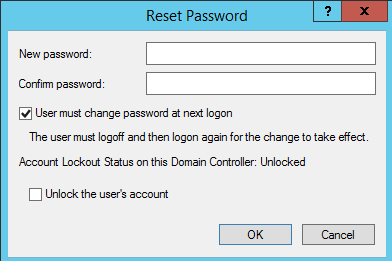
Hi, we work in a hybrid environment at the moment, and it has been discovered that if you are using classic AD and reset a user's password and leave the tick-box saying user must change password at next logon, the password reset works! But, if you were to select the tick-box with the intention to make the user change their password, the password does not get reset and the user never gets asked to reset their password? Also, if you try and reset the user's password on AAD, you get the following error message: Because we cannot force the user to reset their password by AD or AAD, we have to tell the user to do it themselves by the classic Ctrl-Alt-Del method or set their personal password for them over the phone. So, what my question is, is why can I not force the user to change their password from either AD or AAD?Solved777Views0likes2Comments