kql
320 Topics
Windows Forwarded Events connector with Windows Security Events NRT rules
Hello, We are testing Microsoft Sentinel using the official Windows Forwarded Events connector. Environment - Windows Server WEC - Windows Event Forwarding - Azure Arc - Azure Monitor Agent - Windows Forwarded Events connector Everything works correctly. Forwarded security events are successfully ingested into the WindowsEvent table. For example: - Event ID 1102 - Event ID 4732 However, the built-in Windows Security Events NRT Analytics Rules (Content Hub version 1.0.1) query only the SecurityEvent table. Example: NRT Security Event log cleared SecurityEvent | where EventID == 1102 As a result, forwarded events received through the Windows Forwarded Events connector never trigger these NRT rules. Question: Is this expected behavior? Should Windows Forwarded Events customers use a different set of analytics rules (ASIM or other templates), or should these built-in NRT rules also support WindowsEvent? Thank you.467Views0likes4CommentsSentinel Foundry - MCP Server (Github Community Release)
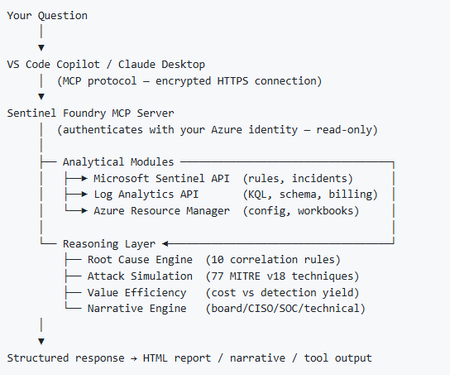
I’ve been cooking something that a lot of people in SOC have been struggling with — especially on the engineering side of Microsoft Sentinel. Thanks to the Microsoft Security team for shaping the capabilities of Sentinel even better with Sentinel Data Lake & Modern SecOps. Today’s the day I can finally share it. Note: This is not an official Microsoft product, but it is designed to make the Sentinel Build even better (complement) with much more intelligence. 🚀 Sentinel Foundry is now in public preview with 43 tools. (Sentinel Foundry - MCP Server) It’s an MCP server built to act like the brain of a strong Sentinel engineer — helping make building, improving, and operating Sentinel far more practical, faster, and honestly more enjoyable. For a lot of teams, the challenge is not understanding what Sentinel can do. The hard part is the engineering work around it: -> Deciding what data should actually be ingested -> Building a clean, scalable Sentinel foundation -> Writing useful detections instead of noisy ones -> Balancing security value with cost -> Turning ideas into deployable engineering outputs That is exactly why I built Sentinel Foundry to help communities grow stronger. It helps with the real engineering tasks behind Sentinel — from architecture thinking to detection design, deployment planning, ingestion strategy, automation ideas, and many of the workflows outlined in the GitHub project. How does it work? Here’s one of the flagship prompts I ran with it: “Give me a complete security posture report for our workspace. Score each pillar and tell me what to prioritise.” And within seconds, it produced a structured engineering blueprint that would normally take a lot longer to pull together manually. You can see the example prompts here in what it can do: https://github.com/prabhukiranveesam/Sentinel-Foundry#what-can-it-do I want building Sentinel to feel less like repetitive engineering overhead — and more like real security engineering that is fast, creative, and enjoyable. If you work with Sentinel as a SOC L2 analyst, engineer, detection engineer, consultant, or architect, I’d genuinely love for you to try it and tell me what you think. 🔗 Public Preview: https://github.com/prabhukiranveesam/Sentinel-Foundry This is just the start of an AI era — and I’m excited to keep shaping it with more powerful features over the coming days. This is very easy to set up and will be available to all of you at no cost during this month as part of the public preview, and your feedback is extremely valuable to shape this as a powerful solution.971Views0likes2CommentsHunting AI Agent Configuration Drift with Microsoft Sentinel
Four KQL patterns for detecting instruction changes, new MCP servers, ownership changes, and organization-wide sharing I recently authored and contributed four new Microsoft Sentinel hunting queries for detecting security-relevant configuration drift in AI agents. They have been reviewed, approved, and merged into Microsoft's public Azure-Sentinel repository. I built the queries around four changes that can materially affect an agent's behavior, access, or exposure: instructions being modified, MCP servers being connected, owners being added, and sharing being expanded to the entire organization. Each modification may be legitimate, but each deserves enough context for a security team to verify that it was expected and authorized. For a security operations team, the difficult question is often not what does this agent look like now? It is what changed since the last known state? Microsoft Sentinel's AgentsInfo table provides inventory-style snapshots of AI agents and their associated configuration. That makes it useful for more than posture reporting. By comparing a recent snapshot with an earlier baseline, we can hunt for configuration drift that deserves investigation. This post walks through four practical hunting scenarios: Instructions changed on a previously published agent A newly observed MCP server on an existing agent An owner added to an MCP-enabled agent Sharing expanded from a restricted scope to the entire organization The complete hunting queries are available in Microsoft's public https://github.com/Azure/Azure-Sentinel/tree/master/Hunting%20Queries/AI%20Agents. The focus here is the detection design behind them, the KQL patterns they share, and the investigation questions they help answer. What I contributed I wrote the four standalone hunting queries discussed in this article and submitted them to Azure/Azure-Sentinel in https://github.com/Azure/Azure-Sentinel/pull/14702: AI Agents - Instructions changed on previously published agent AI Agents - Newly observed MCP server on existing agent AI Agents - Owner added to MCP-enabled agent AI Agents - Sharing expanded to organization-wide The contribution went through several rounds of technical review. Across six commits, I aligned the queries with the unified AgentsInfo schema, added schema-tolerant IdentityInfo enrichment, improved entity mappings, bounded the identity lookback, expanded all owner values, and kept the ATT&CK mappings limited to scenarios where a precise technique could be defended. Repository collaborator v-atulyadav approved the final revision, and the four queries were merged into master on July 20, 2026. This article explains the detection logic and engineering decisions behind that contribution rather than simply reproducing the final YAML files. Why current-state queries are not enough A current-state query can answer questions such as: Which agents are published? Which agents have MCP servers configured? Which agents are shared with the organization? Who owns a particular agent? Those are important posture questions, but they do not tell us whether the state is new. An agent with an MCP server might have been reviewed and approved months ago. The same MCP server appearing for the first time today is a different security signal. Configuration-drift hunting adds the missing time dimension. Instead of treating a risky-looking property as an event, it compares two states of the same agent and reports only meaningful transitions. The common detection pattern I used the same basic time model across all four hunts: let lookback = 14d; let recent = 2d; The latest snapshot observed during the last two days becomes the current state. The latest snapshot from the preceding portion of the 14-day lookback becomes the baseline. Conceptually, the comparison looks like this: let CurrentState = AgentsInfo | where Timestamp > ago(recent) | summarize arg_max(Timestamp, *) by AgentId | where LifecycleStatus != "Deleted"; let BaselineState = AgentsInfo | where Timestamp between (ago(lookback) .. ago(recent)) | where LifecycleStatus != "Deleted" | summarize arg_max(Timestamp, *) by AgentId; CurrentState | join kind=inner BaselineState on AgentId Several details matter here: arg_max(Timestamp, *) by AgentId selects the latest available state for each agent in the relevant time range. The inner join restricts results to agents that exist in both periods. A newly created agent is therefore not automatically treated as configuration drift on an existing agent. Deleted lifecycle snapshots are excluded so that a deletion record does not become the effective baseline or current configuration. The two-day current window is operationally significant. To retain coverage, these hunts should run within two days of a change. The 14-day and two-day values are practical defaults, not universal constants. Environments with different ingestion cadence or retention requirements can adjust them, but the current and baseline windows must remain non-overlapping. Scenario 1: Instructions changed on a published agent An agent's instructions define its default behavior, persona, and operating boundaries. Changing them can be part of normal development, but it can also weaken restrictions, redirect the agent's behavior, or modify how it uses connected capabilities. The first hunt compares the current and previous instruction values only when the agent was published in both snapshots: CurrentState | join kind=inner BaselineState on AgentId | where CurrentInstructions != PreviousInstructions | extend PreviousInstructionsHash = hash_sha256(PreviousInstructions), CurrentInstructionsHash = hash_sha256(CurrentInstructions), InstructionsLengthDelta = strlen(CurrentInstructions) - strlen(PreviousInstructions) I deliberately chose to expose hashes and a length delta rather than returning both instruction bodies in plaintext. This confirms that a change occurred without unnecessarily spreading potentially sensitive prompts through query results, exports, or screenshots. Useful investigation questions include: Was the change associated with an approved development or release process? Did the agent remain published while the instructions changed? Were guardrails, declared tools, permissions, or sharing settings modified around the same time? Do audit records identify an expected actor and change path? The query maps well to an integrity-focused investigation. Its MITRE ATT&CK mapping is T1565.001 (Stored Data Manipulation), but the result is still a hunting lead rather than proof of malicious manipulation. https://github.com/Azure/Azure-Sentinel/blob/master/Hunting%20Queries/AI%20Agents/AgentsInfoInstructionsChangedOnPublishedAgent.yaml Scenario 2: A newly observed MCP server Model Context Protocol servers can extend an agent with external tools, data sources, or actions. From a defender's perspective, the important transition is not simply that an MCP server exists. It is that a server name appears in the current configuration but was absent from the baseline. The query expands the dynamic McpServers array and builds a set of server names for each agent: let CurrentMcp = CurrentRaw | mv-expand Mcp = McpServers | extend McpName = tostring(Mcp.name) | where isnotempty(McpName) | summarize CurrentMcpServers = make_set(McpName) by AgentI It performs the same normalization for the baseline, then calculates the difference: | extend AddedMcpServers = set_difference(CurrentMcpServers, BaselineMcpServers) | where array_length(AddedMcpServers) > 0 Using set_difference() avoids raising a result merely because the order of array elements changed. The hunt reports only MCP server names present in the current set and absent from the previous set. An analyst should validate more than the displayed name: Is the MCP integration part of the approved inventory? What endpoint, authentication method, and permissions are associated with it? Which tools or data can the server expose to the agent? Was the integration introduced through an expected deployment path? Did ownership, instructions, or sharing change in the same period? I did not assign an ATT&CK technique to this query. Adding an MCP server does not, by itself, prove command execution, persistence, or a specific attacker behavior. Avoiding an overly broad mapping keeps the signal honest. https://github.com/Azure/Azure-Sentinel/blob/master/Hunting%20Queries/AI%20Agents/AgentsInfoNewlyObservedMcpServer.yaml Scenario 3: An owner added to an MCP-enabled agent Ownership is a control-plane relationship. A newly added owner may be able to modify an agent's configuration, instructions, integrations, or publication state. The risk becomes more interesting when the agent already has MCP servers configured. The hunt first limits the current state to MCP-enabled agents: | where array_length(coalesce(McpServers, dynamic([]))) > 0 | project AgentId, Timestamp, Name, Platform, CreatedDateTime, CurrentOwners = coalesce(Owners, dynamic([])), McpServers It then compares the owner arrays as sets: | extend AddedOwners = set_difference(CurrentOwners, PreviousOwners) | where array_length(AddedOwners) > 0 | mv-expand AddedOwnerId = AddedOwners to typeof(string) Expanding AddedOwners produces one row per newly observed owner. This is more useful than returning one opaque dynamic array because every added identity can be enriched, mapped, and investigated independently. I kept the raw object identifier in the result even when identity enrichment fails: | extend AddedOwnerUpn = AccountUpn, UnresolvedAddedOwnerId = iff(isempty(AccountUpn), AddedOwnerId, "") That fallback matters. A missing UPN should not hide the underlying ownership change. Investigation should establish: Is the added owner an expected person, service identity, or administrative group? Does the identity's role and business function justify control of this agent? Was the owner added before other configuration changes? Does the identity appear in related sign-in, audit, or privileged-access activity? Should ownership be removed while the change is reviewed? This query maps to T1098 (Account Manipulation) under Persistence and Privilege Escalation. As with the instruction-change hunt, the mapping frames an investigation hypothesis; it does not label every ownership change as malicious. https://github.com/Azure/Azure-Sentinel/blob/master/Hunting%20Queries/AI%20Agents/AgentsInfoOwnerAddedToMcpAgent.yaml Scenario 4: Sharing expanded to the entire organization An agent can move from a limited audience to organization-wide availability without changing its underlying tools or instructions. That transition can materially increase exposure, especially when the agent has MCP integrations or declared tools. The hunt treats "*" in SharedWith as the organization-wide state. The current snapshot must contain it, while the baseline must not: // Current state | where set_has_element(coalesce(SharedWith, dynamic([])), "*") // Baseline state | where not(set_has_element(coalesce(SharedWith, dynamic([])), "*")) The result also counts MCP servers and declared tools: | extend McpServerCount = array_length(coalesce(McpServers, dynamic([]))), DeclaredToolCount = array_length(coalesce(DeclaredTools, dynamic([]))) | extend HasElevatedCapabilities = McpServerCount > 0 or DeclaredToolCount > 0 | sort by HasElevatedCapabilities desc, Timestamp desc I use HasElevatedCapabilities as a prioritization field, not a verdict. It brings agents with connected capabilities to the top of the result set so analysts can review the potentially larger blast radius first. Questions for triage include: Was organization-wide publication explicitly approved? Is the agent intended for every user, or was a group-based scope expected? What data sources, tools, and MCP servers can organization-wide users reach through it? Do the instructions contain assumptions that were safe only for a restricted audience? Were access reviews or user-acceptance tests completed before the expansion? No ATT&CK mapping is assigned because a broader sharing scope is a security-relevant exposure change, but not a sufficiently precise adversary technique on its own. https://github.com/Azure/Azure-Sentinel/blob/master/Hunting%20Queries/AI%20Agents/AgentsInfoSharingExpandedToOrgWide.yaml Resolving owners without making the hunt schema-fragile The Owners field contains identifiers. Human-readable identity context makes results easier to triage, and entity mappings make those identities more useful in Sentinel investigations. I built a small, materialized IdentityInfo lookup that is shared by the four hunts: let IdentityIdtoUPN = materialize( IdentityInfo | extend ResolvedAccountUpn = tostring( column_ifexists("AccountUpn", column_ifexists("AccountUPN", ""))), IdentityTimestamp = todatetime( column_ifexists("Timestamp", column_ifexists("TimeGenerated", datetime(null)))) | where IdentityTimestamp >= ago(lookback) | where isnotempty(AccountObjectId) and isnotempty(ResolvedAccountUpn) | summarize arg_max(IdentityTimestamp, ResolvedAccountUpn) by AccountObjectId | project AccountObjectId = tostring(AccountObjectId), AccountUpn = ResolvedAccountUpn); There are three design choices worth noting: column_ifexists() accommodates observed IdentityInfo naming variants without maintaining separate query versions. The lookup is bounded by the same lookback period instead of scanning unbounded identity history. arg_max() keeps the latest usable identity record for each object ID. After enrichment, the queries map the account using the UPN components and the Entra object ID: entityMappings: - entityType: Account fieldMappings: - identifier: Name columnName: OwnerAccountName - identifier: UPNSuffix columnName: OwnerAccountUPNSuffix - identifier: AadUserId columnName: OwnerId The strong AadUserId identifier remains valuable even when display information changes. Microsoft Sentinel can use mapped entities in bookmarks and investigation experiences, so mapping the changed owner is more than cosmetic enrichment. Turning a result into an investigation These queries intentionally stop at the configuration transition. AgentsInfo tells us that two snapshots differ; it does not necessarily tell us who performed the change, through which interface, or whether the action was authorized. A practical investigation workflow is: Confirm that the two snapshots represent the expected agent and time period. Review the exact changed property and the agent's current capabilities. Identify the owner or newly added owner through IdentityInfo and Entra ID context. Correlate the transition with the relevant audit source for actor attribution. Check for related changes to permissions, tools, data sources, publication state, and sharing. Validate the change against an approved request, release, or ownership process. Restrict, unpublish, or revert the agent if the exposure cannot be justified. Expected changes can still be useful findings. Repeated legitimate results may reveal that a deployment process lacks a stable change window, that ownership is managed through noisy automation, or that the hunt's timing needs to be aligned with release activity. Tuning the hunts for your environment Before operational use, consider the following adjustments: Run cadence: Execute within the two-day current window. A daily cadence provides overlap without blending current and baseline periods. Lookback: Increase the 14-day lookback only if snapshot history and query cost support it. A longer lookback does not compensate for missing the current window. Known change windows: Add watchlists or environment-specific suppression logic for well-controlled automated deployments, while retaining enough context to audit the change. Agent scope: Filter by platform, business unit, agent naming convention, or owner if different teams require separate triage queues. Risk prioritization: Raise agents with sensitive declared data sources, powerful tools, privileged owners, or broad availability to the top of the result set. Audit correlation: Keep attribution logic separate unless the audit source and join keys are stable in your environment. This makes the configuration-drift hunt reusable while allowing each organization to attach its own control-plane evidence. Test with representative snapshots before treating any hunt as an operational control. In particular, validate array shapes for Owners, McpServers, and SharedWith, confirm the identity fields present in your workspace, and exercise both changed and unchanged states. Using the queries The four YAML definitions have been merged into the Hunting Queries/AI Agents folder of Microsoft's Azure-Sentinel repository. Each file contains the complete KQL, description, entity mappings, and ATT&CK mappings where a precise technique applies. https://github.com/Azure/Azure-Sentinel/blob/master/Hunting%20Queries/AI%20Agents/AgentsInfoInstructionsChangedOnPublishedAgent.yaml https://github.com/Azure/Azure-Sentinel/blob/master/Hunting%20Queries/AI%20Agents/AgentsInfoNewlyObservedMcpServer.yaml https://github.com/Azure/Azure-Sentinel/blob/master/Hunting%20Queries/AI%20Agents/AgentsInfoOwnerAddedToMcpAgent.yaml https://github.com/Azure/Azure-Sentinel/blob/master/Hunting%20Queries/AI%20Agents/AgentsInfoSharingExpandedToOrgWide.yaml The broader pattern is reusable beyond these four scenarios: select a stable current snapshot, select a non-overlapping baseline, normalize dynamic properties into comparable sets, calculate the transition, and enrich only after the drift has been identified. That keeps the core detection explainable and gives the analyst the before-and-after context needed for a defensible investigation. References https://learn.microsoft.com/en-us/azure/azure-monitor/reference/tables/agentsinfo https://learn.microsoft.com/en-us/azure/azure-monitor/reference/queries/agentsinfo https://learn.microsoft.com/en-us/azure/azure-monitor/reference/tables/identityinfo https://learn.microsoft.com/en-us/azure/sentinel/entities-reference https://github.com/Azure/Azure-Sentinel/pull/14702 I authored the four hunting queries discussed in this article and contributed them to Microsoft's Azure-Sentinel repository as https://github.com/Azure/Azure-Sentinel/pull/14702. The complete implementations and review history are publicly available through the links above.566Views1like2CommentsSentinel - Defender XDR KQL Queries Library
Hello all, I’ve been building something over the past few weeks that I think the security community might find useful. https://goxdr.fyi is a searchable KQL query library for Microsoft Sentinel and Defender XDR. The name comes from a nickname my colleagues gave me (GoX) combined with XDR. I also picked up https://goxdr.fyi as a short and easy to remember domain for it. You can check it out here: https://goxdr.fyi The idea came from my own day to day work as someone working in IAM and SOC operations. I constantly find myself writing and refining KQL queries for threat hunting, detection engineering and incident investigation. Over time I realized I had a growing collection of queries that I kept going back to and I thought why not make these available to others? It currently has 117 queries covering identity security, BEC/AiTM detection, NTLM and LDAP attack hunting, OAuth governance, AI/Copilot security, Sentinel alert trending, SOC performance metrics and more. Some of these queries are ones I wrote from scratch based on real scenarios I encountered in production environments. Others are community queries I tested and validated in my own setup. Only the ones I found genuinely useful and that actually worked against real data made it in. Each query comes with a description explaining what it detects and why it matters, along with severity levels, platform tags (Sentinel, XDR or both) and a copy button so you can paste it directly into Advanced Hunting or use it as the basis for an Analytics Rule. The site is open source, hosted on GitHub Pages and licensed under CC BY 4.0. No sign-up, no paywall, no tracking. The source is available. I’ll keep adding queries as new scenarios come up. If there’s enough interest I’m also considering adding Cortex XQL queries for Palo Alto environments. Suggestions, feedback or ideas for new detections are always welcome. Feel free to reach out. Thanks166Views0likes0Comments
At-Scale Failure Reporting for Azure Update Manager
Introduction Azure Update Manager simplifies patching across Azure virtual machines and Azure Arc-enabled servers by providing a centralized platform for patch assessment and installation. However, as environments scale, a key challenge emerges—efficiently identifying and troubleshooting patch failures across large fleets of machines. While Azure Update Manager surfaces detailed error messages in the Azure portal, this information is typically available only at an individual machine level. In enterprise environments managing hundreds or thousands of systems, drilling into each VM to find error details quickly becomes impractical. In this article, we walk through a real-world use case and demonstrate how to leverage Azure Resource Graph (ARG) to extract failed machines along with their error details for a specific maintenance run—using a single query. The Challenge: Scaling Patch Failure Visibility In a large enterprise deployment, Azure Update Manager was configured to manage patching across: Windows and Linux virtual machines Azure cloud VMs and Arc-enabled on‑premises servers Multiple regions and subscriptions While patching operations were largely successful, a subset of machines experienced failures. The key challenges faced by the operations team were: Error messages were visible only by drilling into each failed VM in the portal No built‑in way to aggregate failures across all machines Lack of a simple mechanism to export: Failed VMs Error codes Error messages The team needed a scalable, query‑driven approach to analyze failures across an entire maintenance run. Key Insight: Where Azure Update Manager Stores Data Azure Update Manager does not rely on Log Analytics to store operational results. Instead: Patch assessment and installation results are stored in Azure Resource Graph Azure Resource Graph acts as a centralized, queryable store for update operations This design enables powerful querying without requiring additional ingestion, configuration, or cost overhead. Understanding Maintenance Runs and Correlation IDs Each Azure Update Manager maintenance run generates a unique identifier: properties.correlationId represents the maintenance (schedule) run ID All machines involved in the same patch cycle share this ID This allows all machines within a single patch execution to be correlated and queried collectively. The Solution: Query Failed VMs with Error Messages Azure Resource Graph allows querying failures at scale using the maintenanceresources dataset. Core Query (Kusto Query Language) 1 maintenanceresources 2 | where type =~ "microsoft.maintenance/applyupdates" 3 | where tostring(properties.correlationId) contains "<YourMaintenanceRunID>" 4 | where tostring(properties.status) =~ "Failed" 5 | project properties.resourceId, properties.errorCode, properties.errorMessage What This Query Delivers All machines that failed in a specific maintenance run Error codes for troubleshooting Full error messages that are otherwise visible only in the Azure portal Note: Property names for error information can vary by environment. Validate available fields using Azure Resource Graph Explorer and adjust the project clause if required. Sample Output (Conceptual) Resource ID Error Code Error Message vm-01 0x80244007 Windows Update API failed vm-02 0x80072f8f Connectivity issue vm-03 1C WSUS configuration issue Advanced Scenario: Automatically Detecting the Latest Failed Maintenance Run In real-world scenarios, you may not always know the maintenance run ID. The following query dynamically identifies the most recent maintenance run that had failures, and then retrieves all failed machines from that run. 1 // Step 1: Identify the latest maintenance run ID with failures 2 let lastFailedRun = toscalar( 3 maintenanceresources 4 | extend runId = extract(@"applyupdates/(\d+)$", 1, properties.correlationId) 5 | where type =~ "microsoft.maintenance/applyupdates" 6 | where tostring(properties.status) =~ "Failed" 7 | order by tostring(properties.startDateTime) desc 8 | take 1 9 | project runId 10 ); 11 // Step 2: Query all failed VMs from that run 12 maintenanceresources 13 | where type =~ "microsoft.maintenance/applyupdates" 14 | where tostring(properties.correlationId) contains lastFailedRun 15 | where tostring(properties.status) =~ "Failed" 16 | project properties.resourceId, properties.errorCode, properties.errorMessage This approach is ideal for automation, scheduled reporting, and dashboard scenarios. Why This Approach Matters Operational Efficiency Eliminates manual portal navigation Provides consolidated failure insights in seconds Scalability Works across large, distributed environments Supports both Azure and hybrid (Arc‑enabled) machines Automation Ready Can be integrated into scripts, dashboards, and reporting pipelines Enables proactive monitoring and alerting scenarios Best Practices for Enterprise Patch Reporting To maximize the value of this approach: Capture and track maintenance run IDs Use Azure Resource Graph as the primary reporting layer Build reusable queries for different patch scenarios Export reports for compliance and auditing Correlate failures with root‑cause trends over time Conclusion As organizations scale patching operations with Azure Update Manager, visibility, speed, and automation become essential. While the Azure portal is effective for per‑machine troubleshooting, it is not optimized for fleet‑level analysis. Azure Resource Graph fills this gap by enabling a shift from manual troubleshooting to automated, query‑driven failure analysis at scale. By adopting this approach, teams can significantly improve operational efficiency, reduce mean time to resolution, and build a more mature patch management strategy. Final takeaway: Don’t rely only on the portal Leverage Azure Resource Graph to operationalize patch insights at enterprise scale References Azure Update Manager – Query resources with Azure Resource Graph https://learn.microsoft.com/azure/update-manager/query-logs Azure Update Manager – Troubleshooting guide https://learn.microsoft.com/azure/update-manager/troubleshoot Sample Azure Resource Graph queries for Azure Update Manager https://github.com/MicrosoftDocs/azure-docs/blob/main/articles/update-manager/sample-query-logs.mdDetecting AI agents and non-human identities in Microsoft Sentinel: the classic-agent blind spot
Build 2026 made the direction official. The industry is moving from the app era into the agent era, and Microsoft spent a real share of the keynote on securing agents across their lifecycle, from discovering what is exploitable to governing what is running in production. On the identity side the centerpiece is Microsoft Entra Agent ID, now generally available, which gives AI agents first-class identities and extends Conditional Access, Identity Protection, and full audit logging to them. That is good news for agents you build the new way. It is not the whole picture, and the gap is where most SOCs will get hurt first. Modern agents are covered. Classic agents are not. Entra Agent ID draws a hard line between two kinds of agent. Modern agents are created through the Agent ID platform, each backed by an agent identity blueprint. They carry a proper Agent ID, a full audit trail, and the complete set of governance capabilities, including Identity Protection for Agents, which establishes a baseline for an agent's normal activity and flags anomalies automatically. Classic agents are everything that came before, or that gets built outside the platform: AI agents implemented as ordinary service principals or app registrations, for example Copilot Studio agents created before Agent ID was enabled, or any home-grown automation calling Graph with client credentials. In the Entra agent registry they appear with "Has Agent ID: No," and that flag matters, because the Agent ID protections apply to identities that actually hold an Agent ID. Classic agents sit outside Identity Protection for Agents and Conditional Access for Agents. Here is the uncomfortable part. The non-human identities you already run, the service principals behind your pipelines, your integrations, your scripts, your pre-platform Copilot Studio bots, are almost all classic agents. They tend to outnumber your human accounts, they have no MFA in any meaningful sense, and a credential added to one does not show up in the Azure portal. The new platform protections do not reach them. Until you migrate them, the only place you get detection coverage on that population is your SIEM. So this is the job Sentinel does that Agent ID does not: detect risky behavior on the classic, service-principal-backed agents that the platform cannot yet protect. The telemetry you have, and the one switch people forget Three tables carry most of the signal. AADServicePrincipalSignInLogs records service principal authentications, the client-credentials sign-ins your agents and automation use. No user, no MFA, just an app proving it holds a secret or certificate. AADManagedIdentitySignInLogs does the same for managed identities. AuditLogs records directory changes, including the one that matters most for persistence: a new credential added to an application or service principal. One practical warning before any of this works. Service principal and managed identity sign-in logs are not streamed by default. You have to enable those categories explicitly in the Entra diagnostic settings feeding your workspace. Plenty of teams write the detection, never check, and never notice the table is empty. Verify that first. Detection 1: a new credential on a service principal or app Adding a secret or certificate to an existing service principal is one of the cleanest persistence techniques in a Microsoft cloud. The attacker compromises a privileged user or app, drops a fresh credential on a service principal that already holds useful Graph permissions, and now has access that survives password resets and session revocation. It maps to MITRE T1098.001, Account Manipulation: Additional Cloud Credentials. For a classic agent it is especially nasty, because there is no Identity Protection baseline watching it. // Detection 1: new secret or certificate added to an application or service principal // MITRE T1098.001 - Account Manipulation: Additional Cloud Credentials AuditLogs | where OperationName has_any ("Add service principal", "Certificates and secrets management") | where Result =~ "success" | extend Initiator = coalesce( tostring(InitiatedBy.user.userPrincipalName), tostring(InitiatedBy.app.displayName)) | extend InitiatorIp = tostring(InitiatedBy.user.ipAddress) | mv-apply Target = TargetResources on ( where Target.type =~ "Application" | extend TargetName = tostring(Target.displayName), TargetId = tostring(Target.id), KeyChanges = Target.modifiedProperties ) | mv-apply Prop = KeyChanges on ( where tostring(Prop.displayName) =~ "KeyDescription" | extend NewKeys = parse_json(tostring(Prop.newValue)), OldKeys = parse_json(tostring(Prop.oldValue)) ) | extend AddedKeys = set_difference(NewKeys, OldKeys) | where array_length(AddedKeys) > 0 | project TimeGenerated, Initiator, InitiatorIp, TargetName, TargetId, AddedKeys | order by TimeGenerated desc The operation filter catches the three shapes this event takes in the log: "Add service principal," "Add service principal credentials," and "Update application - Certificates and secrets management." The modifiedProperties parsing isolates the KeyDescription change, and set_difference confirms a key was actually added rather than removed, so rotating out an old credential does not, on its own, fire the rule. False positives come from legitimate rotation and from automation that provisions app credentials (CI/CD, infrastructure as code). The initiator is the discriminant. A credential added by your deployment pipeline's service account at the usual time is routine. The same change initiated by an interactive admin out of hours, or by an account that never normally touches app credentials, is what you want to surface. Allow-list the expected initiators, not the targets. Detection 2: a classic agent signing in from a first-seen IP A service principal that has only ever authenticated from your Azure regions and suddenly signs in from somewhere new is a strong signal that its credential has been lifted and is being used elsewhere. Service principals have stable, boring network behavior, which makes a first-seen IP a far cleaner indicator for them than it is for roaming human users. This is the behavioral baseline Identity Protection gives you for free on modern agents, rebuilt in KQL for the classic ones it ignores. MITRE T1078.004, Valid Accounts: Cloud Accounts. // Detection 2: classic-agent service principal signing in from a previously unseen IP // MITRE T1078.004 - Valid Accounts: Cloud Accounts let baseline = 14d; let detection = 1d; let KnownIPs = AADServicePrincipalSignInLogs | where TimeGenerated between (ago(baseline + detection) .. ago(detection)) | where tostring(ResultType) == "0" | summarize KnownIPSet = make_set(IPAddress) by AppId; AADServicePrincipalSignInLogs | where TimeGenerated > ago(detection) | where tostring(ResultType) == "0" | lookup kind=leftouter KnownIPs on AppId | where set_has_element(KnownIPSet, IPAddress) == false | summarize FirstSeen = min(TimeGenerated), Resources = make_set(ResourceDisplayName, 10) by ServicePrincipalName, AppId, IPAddress | order by FirstSeen desc The query builds a per-application baseline of source IPs over the previous two weeks, then flags any successful sign-in today from an address outside that set. Two tuning notes. Brand-new service principals have no baseline, so they surface on first use. That is usually worth seeing once, but you can exclude AppIds younger than the baseline window if it gets noisy. And if your agents egress through shifting cloud IP ranges, widen the comparison from an exact IP to the autonomous system number or a known-range allow-list, otherwise you will chase your own infrastructure. This complements Agent ID, it does not replace it! The endgame is not to run these rules forever. It is to shrink the population they apply to. Inventory your tenant for agents marked "Has Agent ID: No," prioritize the ones holding sensitive Graph permissions, and migrate them onto the Agent ID platform, where Identity Protection and Conditional Access take over the baselining you are doing here by hand. Microsoft has signaled a migration path from classic to modern agents. Treat these two detections as the coverage you need in the meantime, and as a permanent safety net for anything that never makes the move. If you do one thing this week: enable the service principal sign-in log category, deploy detection 1, and pull a list of every service principal that had a credential added in the last 90 days. That list alone tends to be more interesting than people expect. Cheers, Marcel588Views0likes0Comments
XdrLogRaider Defender XDR portal telemetry
A Microsoft Sentinel custom data connector that ingests Microsoft Defender XDR portal-only telemetry — configuration, compliance, drift, exposure, governance — that public Microsoft APIs (Graph Security, Microsoft 365 Defender, MDE) don't expose. https://github.com/akefallonitis/xdrlograider— Defender XDR portal telemetry Happy Hunting 🥳 🎉301Views0likes2Comments
Understand New Sentinel Pricing Model with Sentinel Data Lake Tier
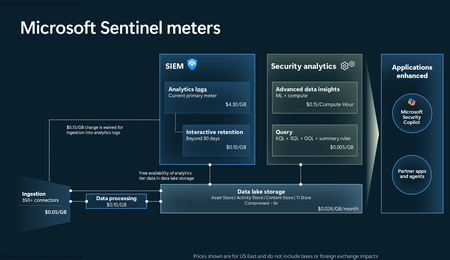
Introduction on Sentinel and its New Pricing Model Microsoft Sentinel is a cloud-native Security Information and Event Management (SIEM) and Security Orchestration, Automation, and Response (SOAR) platform that collects, analyzes, and correlates security data from across your environment to detect threats and automate response. Traditionally, Sentinel stored all ingested data in the Analytics tier (Log Analytics workspace), which is powerful but expensive for high-volume logs. To reduce cost and enable customers to retain all security data without compromise, Microsoft introduced a new dual-tier pricing model consisting of the Analytics tier and the Data Lake tier. The Analytics tier continues to support fast, real-time querying and analytics for core security scenarios, while the new Data Lake tier provides very low-cost storage for long-term retention and high-volume datasets. Customers can now choose where each data type lands—analytics for high-value detections and investigations, and data lake for large or archival types—allowing organizations to significantly lower cost while still retaining all their security data for analytics, compliance, and hunting. Please flow diagram depicts new sentinel pricing model: Now let's understand this new pricing model with below scenarios: Scenario 1A (PAY GO) Scenario 1B (Usage Commitment) Scenario 2 (Data Lake Tier Only) Scenario 1A (PAY GO) Requirement Suppose you need to ingest 10 GB of data per day, and you must retain that data for 2 years. However, you will only frequently use, query, and analyze the data for the first 6 months. Solution To optimize cost, you can ingest the data into the Analytics tier and retain it there for the first 6 months, where active querying and investigation happen. After that period, the remaining 18 months of retention can be shifted to the Data Lake tier, which provides low-cost storage for compliance and auditing needs. But you will be charged separately for data lake tier querying and analytics which depicted as Compute (D) in pricing flow diagram. Pricing Flow / Notes The first 10 GB/day ingested into the Analytics tier is free for 31 days under the Analytics logs plan. All data ingested into the Analytics tier is automatically mirrored to the Data Lake tier at no additional ingestion or retention cost. For the first 6 months, you pay only for Analytics tier ingestion and retention, excluding any free capacity. For the next 18 months, you pay only for Data Lake tier retention, which is significantly cheaper. Azure Pricing Calculator Equivalent Assuming no data is queried or analyzed during the 18-month Data Lake tier retention period: Although the Analytics tier retention is set to 6 months, the first 3 months of retention fall under the free retention limit, so retention charges apply only for the remaining 3 months of the analytics retention window. Azure pricing calculator will adjust accordingly. Scenario 1B (Usage Commitment) Now, suppose you are ingesting 100 GB per day. If you follow the same pay-as-you-go pricing model described above, your estimated cost would be approximately $15,204 per month. However, you can reduce this cost by choosing a Commitment Tier, where Analytics tier ingestion is billed at a discounted rate. Note that the discount applies only to Analytics tier ingestion—it does not apply to Analytics tier retention costs or to any Data Lake tier–related charges. Please refer to the pricing flow and the equivalent pricing calculator results shown below. Monthly cost savings: $15,204 – $11,184 = $4,020 per month Now the question is: What happens if your usage reaches 150 GB per day? Will the additional 50 GB be billed at the Pay-As-You-Go rate? No. The entire 150 GB/day will still be billed at the discounted rate associated with the 100 GB/day commitment tier bucket. Azure Pricing Calculator Equivalent (100 GB/ Day) Azure Pricing Calculator Equivalent (150 GB/ Day) Scenario 2 (Data Lake Tier Only) Requirement Suppose you need to store certain audit or compliance logs amounting to 10 GB per day. These logs are not used for querying, analytics, or investigations on a regular basis, but must be retained for 2 years as per your organization’s compliance or forensic policies. Solution Since these logs are not actively analyzed, you should avoid ingesting them into the Analytics tier, which is more expensive and optimized for active querying. Instead, send them directly to the Data Lake tier, where they can be retained cost-effectively for future audit, compliance, or forensic needs. Pricing Flow Because the data is ingested directly into the Data Lake tier, you pay both ingestion and retention costs there for the entire 2-year period. If, at any point in the future, you need to perform advanced analytics, querying, or search, you will incur additional compute charges, based on actual usage. Even with occasional compute charges, the cost remains significantly lower than storing the same data in the Analytics tier. Realized Savings Scenario Cost per Month Scenario 1: 10 GB/day in Analytics tier $1,520.40 Scenario 2: 10 GB/day directly into Data Lake tier $202.20 (without compute) $257.20 (with sample compute price) Savings with no compute activity: $1,520.40 – $202.20 = $1,318.20 per month Savings with some compute activity (sample value): $1,520.40 – $257.20 = $1,263.20 per month Azure calculator equivalent without compute Azure calculator equivalent with Sample Compute Conclusion The combination of the Analytics tier and the Data Lake tier in Microsoft Sentinel enables organizations to optimize cost based on how their security data is used. High-value logs that require frequent querying, real-time analytics, and investigation can be stored in the Analytics tier, which provides powerful search performance and built-in detection capabilities. At the same time, large-volume or infrequently accessed logs—such as audit, compliance, or long-term retention data—can be directed to the Data Lake tier, which offers dramatically lower storage and ingestion costs. Because all Analytics tier data is automatically mirrored to the Data Lake tier at no extra cost, customers can use the Analytics tier only for the period they actively query data, and rely on the Data Lake tier for the remaining retention. This tiered model allows different scenarios—active investigation, archival storage, compliance retention, or large-scale telemetry ingestion—to be handled at the most cost-effective layer, ultimately delivering substantial savings without sacrificing visibility, retention, or future analytical capabilities.Solved3.5KViews2likes6Comments
How Should a Fresher Learn Microsoft Sentinel Properly?
Hello everyone, I am a fresher interested in learning Microsoft Sentinel and preparing for SOC roles. Since Sentinel is a cloud-native enterprise tool and usually used inside organizations, I am unsure how individuals without company access are expected to gain real hands-on experience. I would like to hear from professionals who actively use Sentinel: - How do freshers typically learn and practice Sentinel? - What learning resources or environments are commonly used by beginners? - What level of hands-on experience is realistically expected at entry level? I am looking for guidance based on real industry practice. Thank you for your time.439Views0likes2Comments