azure active directory (aad)
1570 Topics
Need Microsoft support to resolve a historical tenant association with a domain I recently acquired
Hello, I recently became the legitimate and independent registrant of a domain that had previously been owned or used by an unrelated organization. I have no affiliation whatsoever with the previous domain holder or that organization. I have now received a Microsoft Power Platform notification at an email address under my domain concerning a Default environment belonging to the previous organization. The notification includes a Tenant ID and Environment ID, and the environment name corresponds to that organization. I do not own, administer, or have access to this tenant or Power Platform environment, and I am not seeking access to or control over it. My main concern is that there may still be a historical association between my domain or its email addresses and the previous organization's Microsoft tenant or related services. I would like Microsoft to investigate this and, where necessary, properly separate my domain and its email addresses from any unrelated historical Microsoft accounts, tenants, directories, or services. Most importantly, I want to ensure that this historical association will not adversely affect my ability in the future to use my domain and its business email addresses to create, verify, and use my own Microsoft 365, Microsoft Entra, Power Platform, or other Microsoft business services. At present, I do not have a Microsoft business account, Microsoft 365 tenant, or Power Platform tenant of my own. As a result, I appear to be unable to use some of the normal business support channels that require an existing tenant or administrator account. Could someone please advise me on the appropriate way to get this matter reviewed by Microsoft Support? If a Microsoft employee or official support representative can assist or direct me to the appropriate private support channel, I would greatly appreciate it. For privacy and security reasons, I have intentionally not posted the actual domain name, email address, Tenant ID, or Environment ID publicly. I am happy to provide all of the relevant details privately to an authorized Microsoft support representative if required. Thank you for any guidance.146Views0likes1CommentDisabled account OU
Hello We have a scenario for which I need help User account was disabled and was in Disabled account OU when she joined back it was enabled and moved to proper user account OU.This is synched from onpremise in O365 The earlier mailbox is converted from user mailbox to a cloud mailbox.This is a incloud object How do we proceed here We want the shared mailbox to be linked to the user account which was disabled earlier. Regards,128Views0likes2Comments
Best practices: Open OneDrive/SharePoint sharing but restrict Teams guest access by domain
Hi all, Since SharePoint Online and OneDrive moved fully to Microsoft Entra B2B for external sharing, we've run into a policy conflict and would like to hear how others are handling it. Our requirements Enable OneDrive and SharePoint file sharing with external users, regardless of their email domain. Restrict Microsoft Teams guest access to a predefined list of approved partner domains. Continue allowing Teams external access (federated chat and meetings) for all domains. The problem: Teams guests, SharePoint guests, and OneDrive guests are now governed by the same Microsoft Entra B2B invitation framework and the single Collaboration restrictions allow/deny list under: External Identities → External collaboration settings As a result, restricting guest invitations by domain also restricts OneDrive and SharePoint sharing for domains not on the allowlist. According to Microsoft's response in the following Q&A, this behavior is currently by design: https://learn.microsoft.com/en-us/answers/questions/5954975/onedrive-external-sharing-no-longer-working-with-a Questions to the community Has anyone implemented a solution where OneDrive/SharePoint sharing remains open to all domains while Teams guest access is restricted to approved domains only? Are there recommended approaches using Entitlement Management, Access Packages, Connected Organizations, or other Entra capabilities? Is there any roadmap item for workload-specific collaboration restrictions (e.g., separate policies for Teams guest invitations and SharePoint/OneDrive sharing)? Any real-world experience or best practices would be greatly appreciated. Thanks, Bejhan279Views0likes6CommentsPHS staged rollout works for existing users but not new synced users
We are troubleshooting an Entra ID PHS staged rollout issue with a federated domain using a third-party WS-Fed IdP. The intended behavior is that normal federated users redirect to the IdP, while users in the PHS staged rollout group receive the Microsoft/Entra password prompt instead. Existing users in the staged rollout group continue to work correctly. They enter their UPN and receive the Microsoft password prompt. One known-good test user is not provisioned in the third-party IdP and still signs in successfully through the Entra password prompt, so the working path does not require the user to exist in the IdP. The issue is only with newly created AD-synced users. Newly synced users in the same staged rollout group are still being routed to the federated IdP at HRD instead of receiving the Entra password prompt. We’ve verified the staged rollout policy and group membership from Graph, confirmed the affected users are properly AD-synced with clean immutableID/sourceAnchor, and confirmed PHS is working. Federation metadata and HRD policies also look clean. Seamless SSO/AZUREADSSOACC was checked and remediated, but the behavior did not change. For failed attempts, there is no Entra sign-in log entry, including tenant-wide interactive and non-interactive logs. However, the federated IdP logs show a WS-Fed inbound request from login.microsoftonline.com for the affected user. That makes it look like Entra HRD is routing the user to federation before sign-in logging or token issuance. The issue started around an Entra Connect AD connector/DC-path change. We have since reverted the connector to the previous known-good configuration. After reverting, we created a clean-room test user with the correct UPN set before first sync, confirmed sync/PHS/sourceAnchor, added the user directly to the staged rollout group, and waited 60+ minutes. The clean-room user still redirected to the federated IdP instead of getting the Entra password prompt. So the current behavior is that established staged-rollout users still get the Entra password prompt, but newly created synced staged-rollout users are sent to the federated IdP by HRD. Has anyone seen staged rollout get into this state, where existing users work but new synced users remain on the federated HRD path despite valid rollout policy, group membership, synced password hash, and clean immutableID/sourceAnchor? Is there any known backend cache/state reset or escalation path for HRD/staged rollout routing?557Views1like5Comments
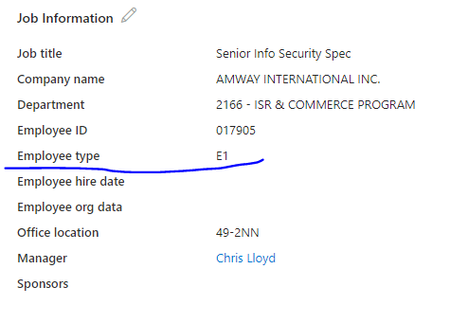
Am trying to create group with dynamic user membership using attribute "Employee Type"
Am trying to create group with dynamic user membership using attribute "Employee Type", tried to get details from Extension attribute but didn't find any option, Did anyone tried this and able to do ? I found a posting where it said to create a custom attribute that would be populated by the 'employee Type' field. That just seems a little strange to me to to create an attribute to be exactly like the one that is already there.1.5KViews2likes6Comments
Can External ID (CIAM) federate to an Azure AD/Entra ID tenant using SAML?
What I'm trying to achieve I'm setting up SAML federation FROM my External ID tenant (CIAM) TO a partner's Entra ID tenant (regular organizational tenant) for a hybrid CIAM/B2B setup where: Business users authenticate via their corporate accounts (OIDC or SAML) Individual customers use username/password or social providers (OIDC) Tenant details / Terminology: CIAM tenant: External ID tenant for customer-facing applications IdP tenant: Example Partner's organizational Entra ID tenant with business accounts Custom domain: mycustomdomain.com (example domain for the IdP tenant) Configuration steps taken Step 1: IdP Tenant (Entra ID) - Created SAML App Set up Enterprise App with SAML SSO Entity ID: https://login.microsoftonline.com/<CIAM_TENANT_ID>/ Reply URL: https://<CIAM_TENANT_ID>.ciamlogin.com/login.srf NameID: Persistent format Claim mapping: emailaddress → user.mail Step 2: CIAM Tenant (External ID) - Added SAML IdP (Initially imported from the SAML metadata URL from the above setup) Federating domain: mycustomdomain.com Issuer URI: https://sts.windows.net/<IDP_TENANT_ID>/ Passive endpoint: https://login.microsoftonline.com/mycustomdomain.com/saml2 DNS TXT record added: DirectFedAuthUrl=https://login.microsoftonline.com/mycustomdomain.com/saml2 Step 3: Attached to User Flow Added SAML IdP to user flow under "Other identity providers" Saved configuration and waited for propagation The problem It doesn't work. When testing via "Run user flow": No SAML button appears (should display "Sign in with mycustomdomain") Entering email address removed for privacy reasons doesn't trigger federation The SAML provider appears configured but never shows up in the actual flow Also tried using the tenant GUID in the passive endpoint instead of the domain - same result My question Is SAML federation from External ID to regular Entra ID tenants actually possible? I know OIDC federation to Microsoft tenants is (currently, august 2025) explicitly blocked (microsoftonline.com domains are rejected). Is SAML similarly restricted? The portal lets me configure everything without throwing any errors, but it never actually works. Am I missing something in my configuration? The documentation for this use case is limited and I've had to piece together the setup from various sources. Or is this a fundamental limitation where External ID simply can't federate to ANY Microsoft tenant regardless of the protocol used?584Views1like4CommentsOrphaned TPM-bound Entra Workplace Join device — no tenant access, backend deletion required
I have a personal Windows device that remains stuck in a TPM-protected Workplace Join to a former Microsoft Entra ID tenant. I no longer have tenant access and am not an admin. Local remediation completed: - dsregcmd /leave executed as SYSTEM - All MS-Organization / AAD certificates removed - Device still reports WorkplaceJoined : YES Azure Support ticket creation fails with: AADSTS160021 – interaction_required Application requested a user session which does not exist. Tenant inaccessible / user not present in tenant. This is an orphaned Entra ID device object. Requesting guidance or escalation for backend deletion. Tenant ID: 99f9b903-8447-4711-a2df-c5bd1ad1adf7 Device ID: f47987f4-a20b-4c34-a5f7-40ab0f593c6c206Views0likes1CommentMade a self-hosted Entra ID governance portal for app/identity sprawl (open source)
Our tenant ended up with hundreds of app registrations and enterprise apps, and the native portal makes you dig through a separate blade for every basic question. Who owns this app? Which secrets die next month? What hasn't been signed into in a year? Which ones have scary Graph permissions? There's no single view for any of it, and half the ownership info was missing anyway. Entra ID Governance, access reviews, PIM all exist, but they felt heavy (and licensed) for what I actually wanted, which was just a fast list I could scan for routine cleanup. So I built one. Lightweight portal that runs entirely in your own subscription: One grid for App Registrations, Enterprise Apps, Managed Identities and Privileged Users Risk flags per identity: expiring/expired creds, high-risk permissions, no owner, stale sign-in, no CA coverage Ownership tracking, review and owner-change workflow, CSV export Tenant health score and a consent posture dashboard Optional expiry email notifications (needs a SendGrid key) Reads Graph through a managed identity, so no app secrets for data access and nothing leaves your tenant Runs about $26-30/month (one B2 App Service plan). B1 is also supported, but it's noticeably slower. It's not a replacement for Entra ID Governance or PIM, more of a cheap everyday hygiene thing. Full disclosure, I used AI building this and writing this up. I designed the architecture and functionality, tested it and ran it against my own tenant. It's open source and deployable with Azure DevOps or an Azure CLI script. Data never leaves your own tenant. Repo (screenshots + setup): https://github.com/nicolaibaralmueller/entra-identity-governance-portal Would love feedback, especially what you'd want it to flag that it doesn't, or where the risk scoring feels off. Been building it on and off for a few months with a lot of iteration. Hopefully this could be useful for others as well.185Views0likes2Comments
CA policy when does it apply
Is this correct statement? "CA policies are evaluated only when a user authenticates?" I created a CA policy that enforces device compliance with Intune. I noticed that an un-enrolled device was still able to access O365 app, even after the CA policy was turned on. Only after forcing users to logout of all O365 apps and re-authenticate were the users prompted to enroll the device. This tells me that the CA policy that forces device compliance wasn't evaluated until the user had to reauthenticate. Looking for confirmation on thisSolved2.5KViews0likes3Comments
Fido passkeys blocked by policy
Hi all I'm helping out a customer with deploying physical passkeys and I'm running into a weird error. I've activated the sign in method and selected the two AAGuids for the Authenticator app and I've added the right AAGuid for the brand and model of passkey we are using. We can select the authentication method and enroll the security correctly but when trying to sign in using it we get the error as displayed in the attached picture. When checking the sign in logs i get this error message FIDO sign-in is disabled via policy and the error code is: 135016 I've not been able to track down any policy that would be blocking passkeys. anyone got any ideas?6.3KViews0likes8Comments