microsoft entra
141 TopicsMicrosoft Ignite 2025: Top Security Innovations You Need to Know
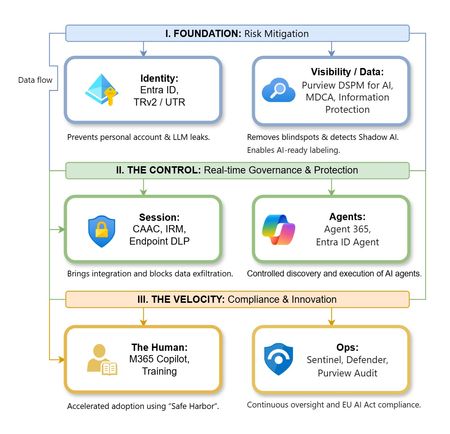
đ¤ Security & AI -The Big Story This Year 2025 marks a turning point for cybersecurity. Rapid adoption of AI across enterprises has unlocked innovation but introduced new risks. AI agents are now part of everyday workflows-automating tasks and interacting with sensitive dataâcreating new attack surfaces that traditional security models cannot fully address. Threat actors are leveraging AI to accelerate attacks, making speed and automation critical for defense. Organizations need solutions that deliver visibility, governance, and proactive risk management for both human and machine identities. Microsoft Ignite 2025 reflects this shift with announcements focused on securing AI at scale, extending Zero Trust principles to AI agents, and embedding intelligent automation into security operations. As a Senior Cybersecurity Solution Architect, Iâve curated the top security announcements from Microsoft Ignite 2025 to help you stay ahead of evolving threats and understand the latest innovations in enterprise security. Agent 365: Control Plane for AI Agents Agent 365 is a centralized platform that gives organizations full visibility, governance, and risk management over AI agents across Microsoft and third-party ecosystems. Why it matters: Unmanaged AI agents can introduce compliance gaps and security risks. Agent 365 ensures full lifecycle control. Key Features: Complete agent registry and discovery Access control and conditional policies Visualization of agent interactions and risk posture Built-in integration with Defender, Entra, and Purview Available via the Frontier Program Microsoft Agent 365: The control plane for AI agents Deep dive blog on Agent 365 Entra Agent ID: Zero Trust for AI Identities Microsoft Entra is the identity and access management suite (covering Azure AD, permissions, and secure access). Entra Agent ID extends Zero Trust identity principles to AI agents, ensuring they are governed like human identities. Why it matters: Unmanaged or over-privileged AI agents can create major security gaps. Agent ID enforces identity governance on AI agents and reduces automation risks. Key Features: Provides unique identities for AI agents Lifecycle governance and sponsorship for agents Conditional access policies applied to agent activity Integrated with open SDKs/APIs for thirdâparty platforms Microsoft Entra Agent ID Overview Entra Ignite 2025 announcements Public Preview details Security Copilot Expansion Security Copilot is Microsoftâs AI assistant for security teams, now expanded to automate threat hunting, phishing triage, identity risk remediation, and compliance tasks. Why it matters: Security teams face alert fatigue and resource constraints. Copilot accelerates response and reduces manual effort. Key Features: 12 new Microsoft-built agents across Defender, Entra, Intune, and Purview. 30+ partner-built agents available in the Microsoft Security Store. Automates threat hunting, phishing triage, identity risk remediation, and compliance tasks. Included for Microsoft 365 E5 customers at no extra cost. Security Copilot inclusion in Microsoft 365 E5 Security Copilot Ignite blog Security Dashboard for AI A unified dashboard for CISOs and risk leaders to monitor AI risks, aggregate signals from Microsoft security services, and assign tasks via Security Copilot - included at no extra cost. Why it matters: Provides a single pane of glass for AI risk management, improving visibility and decision-making. Key Features: Aggregates signals from Entra, Defender, and Purview Supports natural language queries for risk insights Enables task assignment via Security Copilot Ignite Session: Securing AI at Scale Microsoft Security Blog Microsoft Defender Innovations Microsoft Defender serves as Microsoftâs CNAPP solution, offering comprehensive, AI-driven threat protection that spans endpoints, email, cloud workloads, and SIEM/SOAR integrations. Why It Matters Modern attacks target multi-cloud environments and software supply chains. These innovations provide proactive defense, reduce breach risks before exploitation, and extend protection beyond Microsoft ecosystems-helping organizations secure endpoints, identities, and workloads at scale. Key Features: Predictive Shielding: Proactively hardens attack paths before adversaries pivot. Automatic Attack Disruption: Extended to AWS, Okta, and Proofpoint via Sentinel. Supply Chain Security: Defender for Cloud now integrates with GitHub Advanced Security. Whatâs new in Microsoft Defender at Ignite Defender for Cloud innovations Global Secure Access & AI Gateway Part of Microsoft Entraâs secure access portfolio, providing secure connectivity and inspection for web and AI traffic. Why it matters: Protects against lateral movement and AI-specific threats while maintaining secure connectivity. Key Features: TLS inspection, URL/file filtering AI Prompt Injection protection Private access for domain controllers to prevent lateral movement attacks. Learn about Secure Web and AI Gateway for agents Microsoft Entra: Whatâs new in secure access on the AI frontier Purview Enhancements Microsoft Purview is the data governance and compliance platform, ensuring sensitive data is classified, protected, and monitored. Why it matters: Ensures sensitive data remains protected and compliant in AI-driven environments. Key Features: AI Observability: Monitor agent activities and prevent sensitive data leakage. Compliance Guardrails: Communication compliance for AI interactions. Expanded DSPM: Data Security Posture Management for AI workloads. Announcing new Microsoft Purview capabilities to protect GenAI agents Intune Updates Microsoft Intune is a cloud-based endpoint device management solution that secures apps, devices, and data across platforms. It simplifies endpoint security management and accelerates response to device risks using AI. Why it matters: Endpoint security is critical as organizations manage diverse devices in hybrid environments. These updates reduce complexity, speed up remediation, and leverage AI-driven automation-helping security teams stay ahead of evolving threats. Key Features: Security Copilot agents automate policy reviews, device offboarding, and risk-based remediation. Enhanced remote management for Windows Recovery Environment (WinRE). Policy Configuration Agent in Intune lets IT admins create and validate policies with natural language Whatâs new in Microsoft Intune at Ignite Your guide to Intune at Ignite Closing Thoughts Microsoft Ignite 2025 signals the start of an AI-driven security era. From visibility and governance for AI agents to Zero Trust for machine identities, automation in security operations, and stronger compliance for AI workloads-these innovations empower organizations to anticipate threats, simplify governance, and accelerate secure AI adoption without compromising compliance or control. đ Full Coverage: Microsoft Ignite 2025 Book of NewsWelcome to the Microsoft Security Community!
Protect it all with Microsoft Security Eliminate gaps and get the simplified, comprehensive protection, expertise, and AI-powered solutions you need to innovate and grow in a changing world. The Microsoft Security Community is your gateway to connect, learn, and collaborate with peers, experts, and product teams. Gain access to technical discussions, webinars, and help shape Microsoftâs security products. Get there fast To stay up to date on upcoming opportunities and the latest Microsoft Security Community news, make sure to subscribe to our email list. Find the latest skilling content and on-demand videos â subscribe to the Microsoft Security Community YouTube channel. Catch the latest announcements and connect with us on LinkedIn â Microsoft Security Community and Microsoft Entra Community. Index Community Calls: December 2025 | January 2026 | February 2026 Upcoming Community Calls December 2025 Dec. 8 | 9:00am | Microsoft Security Store | Security, Simplified: A look inside the Security Store Welcome to Microsoft Security Store! During this session, youâll learn all about this centralized destination where customers can discover, deploy, and manage trusted security solutions built to extend Microsoftâs security platforms like Defender, Sentinel, Entra, Purview, and Intune. Dec. 9 | 8:00am | Microsoft Defender XDR | A Deep Dive into Automated Attack Disruption⯠Learn whatâs new in Microsoft Sentinel! See deeper Defender integration, evolving data lake capabilities for scalable security, plus demos and real-world use cases to help you stay ahead. Dec. 9 | 9:00am | Microsoft Sentinel | Part 1: Stop Waiting, Start Onboarding: Get Sentinel Defender-Ready Today The Microsoft Sentinel portal retires July 2026âexplore the Defender unified portal! Learn to manage incidents in a unified queue, enrich investigations with UEBA and Threat Intelligence, and leverage automation and dashboards for smarter SOC operations. Dec. 10 | 8:00am | Azure Network Security | Deep Dive into Azure DDoS Protection Explore Azure DDoS Protection! Learn to secure apps and infrastructure with end-to-end architecture, detection and mitigation flow, telemetry, analytics, and seamless integration for visibility and protection. Dec. 10 | 9:00am | Microsoft Defender for Cloud | Expose Less, Protect More with Microsoft Security Exposure Management Join us for an in-depth look at how Microsoft Security Exposure Management helps organizations reduce risk by identifying and prioritizing exposures before attackers can exploit them. Learn practical strategies to minimize your attack surface, strengthen defenses, and protect what matters most. Dec. 11 | 8:00am | Microsoft Defender for Cloud | Modernizing Cloud Security with Next Generation Microsoft Defender for Cloud Discover how Microsoft Defender for Cloud simplifies multi-cloud security. Learn to streamline posture management and threat protection across Azure, AWS, and GCP, improving efficiency, reducing risk, and enabling smarter prioritization. Dec. 11 | 9:00am | Microsoft Sentinel data lake | Transforming data collection for AI-ready security operations with Microsoft Sentinel See how Microsoft Sentinel transforms multi-cloud/multiplatform data collection. Learn a unified, cloud-native approach; ingest from on-prem, Microsoft workloads, and multicloud via codeless connectors (350+; App Assure), plus the roadmap for scaling to AI driven SecOps. Dec. 15 | 9:00am | Microsoft Entra | Diving into the New Microsoft Entra Agent ID Join our first session in the Microsoft Entra Agent ID series to learn why agent identity matters, explore core concepts, and see how it fits into Microsoftâs identity ecosystem. Perfect for developers and product owners building AI agents. Dec. 16 | 8:00am | Microsoft Defender for Office 365 | Ask the Experts: Tips and Tricks Engage in this interactive panel with Microsoft MVPs! Get answers to real-world Defender for Office 365 scenarios, best practices, and tips on migration, SOC optimization, Teams protection, and more. Bring your toughest questions for the live discussion. Dec. 16 | 9:00am | Microsoft Sentinel | Part 2: Donât Get Left Behind: Complete Your Sentinel Move to Defender Prepare for the July 2026 transition! Unlock Microsoft Defenderâs full potential with data onboarding, retention, governance, Content Hub, analytic rules, MTO for simplified management, and Security Copilot for AI-driven insights. Dec. 18 | 8:00am | Security Copilot Skilling Series | What's New in Security Copilot for Defender Discover the latest innovations in Microsoft Security Copilot embedded in Defender that are transforming how organizations detect, investigate, and respond to threats. This session will showcase powerful new capabilities like AI-driven incident response, contextual insights, and automated workflows that help security teams stop attacks faster and simplify operations. January 2026 Jan 14. | 8:00am | 425 Show | Microsoft MCP Server for Enterprise: Transforming User, Security & Identity Tasks with AI See Microsoftâs MCP Server in action! Discover how AI-powered workflows simplify tasks and strengthen security. Packed with demos, this session shows how to operationalize AI across your organization. Jan. 20 | 8:00am | Microsoft Defender for Cloud | Whatâs New in Microsoft Defender CSPM Cloud security posture management (CSPM) continues to evolve, and Microsoft Defender CSPM is leading the way with powerful enhancements introduced at Microsoft Ignite. This session will showcase the latest innovations designed to help security teams strengthen their posture and streamline operations. Jan. 22 | 8:00am | Azure Network Security | Advancing web application Protection with Azure WAF: Ruleset and Security Enhancements Explore the latest Azure WAF ruleset and security enhancements. Learn to fine-tune configurations, reduce false positives, gain threat visibility, and ensure consistent protection for web workloadsâwhether starting fresh or optimizing deployments. RESCHEDULED for Jan.27 | 9:00am | Microsoft Sentinel | AI-Powered Entity Analysis in Sentinelâs MCP Server Simplify entity risk assessment with Entity Analyzer. Eliminate complex playbooks; get unified, AI-driven analysis using Sentinelâs semantic understanding. Accelerate automation and enrich SOAR workflows with native Logic Apps integration. February 2026 Feb. 26 | 9:00am | Azure Network Security | Azure Firewall Integration with Microsoft Sentinel Learn how Azure Firewall integrates with Microsoft Sentinel to enhance threat visibility and streamline security investigations. This webinar will demonstrate how firewall logs and insights can be ingested into Sentinel to correlate network activity with broader security signals, enabling faster detection, deeper context, and more effective incident response. Looking for more? Join the Microsoft Customer Connection Program (MCCP)! As a MCCP member, youâll gain early visibility into product roadmaps, participate in focus groups, and access private preview features before public release. Youâll have a direct channel to share feedback with engineering teams, influencing the direction of Microsoft Security products. The program also offers opportunities to collaborate and network with fellow security experts and Microsoft product teams. Join the MCCP that best fits your interests:âŻwww.aka.ms/joincommunity. Additional resources Microsoft Security Hub on Tech Community Virtual Ninja Training Courses Microsoft Security Documentation Azure Network Security GitHub Microsoft Defender for Cloud GitHub Microsoft Sentinel GitHub Microsoft Defender XDR GitHub Microsoft Defender for Cloud Apps GitHub Microsoft Defender for Identity GitHub Microsoft Purview GitHub5.3KViews3likes1CommentGlobal Secure Access - Conditional Access Require GSA - Android Blocked
Hello all, I am currently working on deploying Global Secure Access client with Microsoft Forward Traffic profile and a conditional access policy to block access to M365 services unless connected through the GSA client. I have this working as I want it for Windows and mobile devices in a tenant we use for development. However, when I set this up at our live tenant, I cannot get the Android device to work. My setup is a Personally Owned Work Profile with the Defender app deployed and configured to enable GSA. I can connect to Global Secure Access and it does show some traffic tunneling to Microsoft. However, when I go to login to another app like Outlook, it blocks the sign-in. This is not the case for an iPhone I have personally enrolled and my Entra Joined laptop. Upon investigation of any differences between our development tenant (working fully) and our tenant (Android not working) I found that in the GSA section under Services, there is an extra service called âMicrosoft Entra Channel Accessâ. This service does not show up when I am logged in our developer tenant. Even on the same phone by removing work profiles and signing in to both tenants, our live tenant shows the new channel, and the developer tenant does not have it. I did some log review with the advanced diagnostics feature and the app and noted a few things I am lead to believe that the issue is with this new Entra Channel that has been deployed to our live tenant and not to our dev tenant yet. When I go to sign-in to the Outlook application in the work profile for the developer tenant, I can see the authentication traffic being tunneled through the Microsoft 365 profile. (login.live.com, login.microsoftonline.com, and aadcdn.msftauth.net). However, in our production tenant when doing the same test I do not see those destinations being tunneled at all. I do see the traffic being collected in the âHostnameâ section, but is not being tunneled. Another interesting point with this is that on an iPhone I am testing; I do see the authentication destinations being tunneled through the Entra Channel. Here are the screenshots of my findings. https://imgur.com/a/82r3HQC I have an open Microsoft support case and hoping to get the attention of a Microsoft employee or MVP who may be able to get this in front of the Entra product team to see if this is a bug.24Views0likes0CommentsBlock all 365 apps except Outlook via CA
Trying to block 365 for a subset of users, except email. The old app-based CA rules made this easy. The new 'resource' based setup... I'm not even sure if it's possible. CoPilot just keeps telling me to use the old version of CA, because it hasn't clued into Microsoft's downgrade cycle. If I try to filter by resource attribute, I'm told I don't have permission to do so. I'm the global admin. Here's what searching for Outlook gives me and Exchange Advice? We ARE intune licensed, but i'm not sure App Protection Policies will help here. The intention is to block BYOD from accessing anything but Outlook / Exchange. That is, Mobile devices that aren't (whatever param I decide on)67Views0likes4CommentsSecurity as the core primitive - Securing AI agents and apps
This week at Microsoft Ignite, we shared our vision for Microsoft security -- In the agentic era, security must be ambient and autonomous, like the AI it protects. It must be woven into and around everything we buildâfrom silicon to OS, to agents, apps, data, platforms, and cloudsâand throughout everything we do. In this blog, we are going to dive deeper into many of the new innovations we are introducing this week to secure AI agents and apps. As I spend time with our customers and partners, there are four consistent themes that have emerged as core security challenges to secure AI workloads. These are: preventing agent sprawl and access to resources, protecting against data oversharing and data leaks, defending against new AI threats and vulnerabilities, and adhering to evolving regulations. Addressing these challenges holistically requires a coordinated effort across IT, developers, and security leaders, not just within security teams and to enable this, we are introducing several new innovations: Microsoft Agent 365 for IT, Foundry Control Plane in Microsoft Foundry for developers, and the Security Dashboard for AI for security leaders. In addition, we are releasing several new purpose-built capabilities to protect and govern AI apps and agents across Microsoft Defender, Microsoft Entra, and Microsoft Purview. Observability at every layer of the stack To facilitate the organization-wide effort that it takes to secure and govern AI agents and apps â IT, developers, and security leaders need observability (security, management, and monitoring) at every level. IT teams need to enable the development and deployment of any agent in their environment. To ensure the responsible and secure deployment of agents into an organization, IT needs a unified agent registry, the ability to assign an identity to every agent, manage the agentâs access to data and resources, and manage the agentâs entire lifecycle. In addition, IT needs to be able to assign access to common productivity and collaboration tools, such as email and file storage, and be able to observe their entire agent estate for risks such as over-permissioned agents. Development teams need to build and test agents, apply security and compliance controls by default, and ensure AI models are evaluated for safety guardrails and security vulnerabilities. Post deployment, development teams must observe agents to ensure they are staying on task, accessing applications and data sources appropriately, and operating within their cost and performance expectations. Security & compliance teams must ensure overall security of their AI estate, including their AI infrastructure, platforms, data, apps, and agents. They need comprehensive visibility into all their security risks- including agent sprawl and resource access, data oversharing and leaks, AI threats and vulnerabilities, and complying with global regulations. They want to address these risks by extending their existing security investments that they are already invested in and familiar with, rather than using siloed or bolt-on tools. These teams can be most effective in delivering trustworthy AI to their organizations if security is natively integrated into the tools and platforms that they use every day, and if those tools and platforms share consistent security primitives such as agent identities from Entra; data security and compliance controls from Purview; and security posture, detections, and protections from Defender. With the new capabilities being released today, we are delivering observability at every layer of the AI stack, meeting IT, developers, and security teams where they are in the tools they already use to innovate with confidence. For IT Teams - Introducing Microsoft Agent 365, the control plane for agents, now in preview The best infrastructure for managing your agents is the one you already use to manage your users. With Agent 365, organizations can extend familiar tools and policies to confidently deploy and secure agents, without reinventing the wheel. By using the same trusted Microsoft 365 infrastructure, productivity apps, and protections, organizations can now apply consistent and familiar governance and security controls that are purpose-built to protect against agent-specific threats and risks. gement and governance of agents across organizations Microsoft Agent 365 delivers a unified agent Registry, Access Control, Visualization, Interoperability, and Security capabilities for your organization. These capabilities work together to help organizations manage agents and drive business value. The Registry powered by the Entra provides a complete and unified inventory of all the agents deployed and used in your organization including both Microsoft and third-party agents. Access Control allows you to limit the access privileges of your agents to only the resources that they need and protect their access to resources in real time. Visualization gives organizations the ability to see what matters most and gain insights through a unified dashboard, advanced analytics, and role-based reporting. Interop allows agents to access organizational data through Work IQ for added context, and to integrate with Microsoft 365 apps such as Outlook, Word, and Excel so they can create and collaborate alongside users. Security enables the proactive detection of vulnerabilities and misconfigurations, protects against common attacks such as prompt injections, prevents agents from processing or leaking sensitive data, and gives organizations the ability to audit agent interactions, assess compliance readiness and policy violations, and recommend controls for evolving regulatory requirements. Microsoft Agent 365 also includes the Agent 365 SDK, part of Microsoft Agent Framework, which empowers developers and ISVs to build agents on their own AI stack. The SDK enables agents to automatically inherit Microsoft's security and governance protections, such as identity controls, data security policies, and compliance capabilities, without the need for custom integration. For more details on Agent 365, read the blog here. For Developers - Introducing Microsoft Foundry Control Plane to observe, secure and manage agents, now in preview Developers are moving fast to bring agents into production, but operating them at scale introduces new challenges and responsibilities. Agents can access tools, take actions, and make decisions in real time, which means development teams must ensure that every agent behaves safely, securely, and consistently. Today, developers need to work across multiple disparate tools to get a holistic picture of the cybersecurity and safety risks that their agents may have. Once they understand the risk, they then need a unified and simplified way to monitor and manage their entire agent fleet and apply controls and guardrails as needed. Microsoft Foundry provides a unified platform for developers to build, evaluate and deploy AI apps and agents in a responsible way. Today we are excited to announce that Foundry Control Plane is available in preview. This enables developers to observe, secure, and manage their agent fleets with built-in security, and centralized governance controls. With this unified approach, developers can now identify risks and correlate disparate signals across their models, agents, and tools; enforce consistent policies and quality gates; and continuously monitor task adherence and runtime risks. Foundry Control Plane is deeply integrated with Microsoftâs security portfolio to provide a âsecure by designâ foundation for developers. With Microsoft Entra, developers can ensure an agent identity (Agent ID) and access controls are built into every agent, mitigating the risk of unmanaged agents and over permissioned resources. With Microsoft Defender built in, developers gain contextualized alerts and posture recommendations for agents directly within the Foundry Control Plane. This integration proactively prevents configuration and access risks, while also defending agents from runtime threats in real time. Microsoft Purviewâs native integration into Foundry Control Plane makes it easy to enable data security and compliance for every Foundry-built application or agent. This allows Purview to discover data security and compliance risks and apply policies to prevent user prompts and AI responses from safety and policy violations. In addition, agent interactions can be logged and searched for compliance and legal audits. This integration of the shared security capabilities, including identity and access, data security and compliance, and threat protection and posture ensures that security is not an afterthought; itâs embedded at every stage of the agent lifecycle, enabling you to start secure and stay secure. For more details, read the blog. For Security Teams - Introducing Security Dashboard for AI - unified risk visibility for CISOs and AI risk leaders, coming soon AI proliferation in the enterprise, combined with the emergence of AI governance committees and evolving AI regulations, leaves CISOs and AI risk leaders needing a clear view of their AI risks, such as data leaks, model vulnerabilities, misconfigurations, and unethical agent actions across their entire AI estate, spanning AI platforms, apps, and agents. 90% of security professionals, including CISOs, report that their responsibilities have expanded to include data governance and AI oversight within the past year. 1 At the same time, 86% of risk managers say disconnected data and systems lead to duplicated efforts and gaps in risk coverage. 2 To address these needs, we are excited to introduce the Security Dashboard for AI. This serves as a unified dashboard that aggregates posture and real-time risk signals from Microsoft Defender, Microsoft Entra, and Microsoft Purview. This unified dashboard allows CISOs and AI risk leaders to discover agents and AI apps, track AI posture and drift, and correlate risk signals to investigate and act across their entire AI ecosystem. For example, you can see your full AI inventory and get visibility into a quarantined agent, flagged for high data risk due to oversharing sensitive information in Purview. The dashboard then correlates that signal with identity insights from Entra and threat protection alerts from Defender to provide a complete picture of exposure. From there, you can delegate tasks to the appropriate teams to enforce policies and remediate issues quickly. With the Security Dashboard for AI, CISOs and risk leaders gain a clear, consolidated view of AI risks across agents, apps, and platformsâeliminating fragmented visibility, disconnected posture insights, and governance gaps as AI adoption scales. Best of all, thereâs nothing new to buy. If youâre already using Microsoft security products to secure AI, youâre already a Security Dashboard for AI customer. Figure 5: Security Dashboard for AI provides CISOs and AI risk leaders with a unified view of their AI risk by bringing together their AI inventory, AI risk, and security recommendations to strengthen overall posture Together, these innovations deliver observability and security across IT, development, and security teams, powered by Microsoftâs shared security capabilities. With Microsoft Agent 365, IT teams can manage and secure agents alongside users. Foundry Control Plane gives developers unified governance and lifecycle controls for agent fleets. Security Dashboard for AI provides CISOs and AI risk leaders with a consolidated view of AI risks across platforms, apps, and agents. Added innovation to secure and govern your AI workloads In addition to the IT, developer, and security leader-focused innovations outlined above, we continue to accelerate our pace of innovation in Microsoft Entra, Microsoft Purview, and Microsoft Defender to address the most pressing needs for securing and governing your AI workloads. These needs are: Manage agent sprawl and resource access e.g. managing agent identity, access to resources, and permissions lifecycle at scale Prevent data oversharing and leaks e.g. protecting sensitive information shared in prompts, responses, and agent interactions Defend against shadow AI, new threats, and vulnerabilities e.g. managing unsanctioned applications, preventing prompt injection attacks, and detecting AI supply chain vulnerabilities Enable AI governance for regulatory compliance e.g. ensuring AI development, operations, and usage comply with evolving global regulations and frameworks Manage agent sprawl and resource access 76% of business leaders expect employees to manage agents within the next 2â3 years. 3 Widespread adoption of agents is driving the need for visibility and control, which includes the need for a unified registry, agent identities, lifecycle governance, and secure access to resources. Today, Microsoft Entra provides robust identity protection and secure access for applications and users. However, organizations lack a unified way to manage, govern, and protect agents in the same way they manage their users. Organizations need a purpose-built identity and access framework for agents. Introducing Microsoft Entra Agent ID, now in preview Microsoft Entra Agent ID offers enterprise-grade capabilities that enable organizations to prevent agent sprawl and protect agent identities and their access to resources. These new purpose-built capabilities enable organizations to: Register and manage agents: Get a complete inventory of the agent fleet and ensure all new agents are created with an identity built-in and are automatically protected by organization policies to accelerate adoption. Govern agent identities and lifecycle: Keep the agent fleet under control with lifecycle management and IT-defined guardrails for both agents and people who create and manage them. Protect agent access to resources: Reduce risk of breaches, block risky agents, and prevent agent access to malicious resources with conditional access and traffic inspection. Agents built in Microsoft Copilot Studio, Microsoft Foundry, and Security Copilot get an Entra Agent ID built-in at creation. Developers can also adopt Entra Agent ID for agents they build through Microsoft Agent Framework, Microsoft Agent 365 SDK, or Microsoft Entra Agent ID SDK. Read the Microsoft Entra blog to learn more. Prevent data oversharing and leaks Data security is more complex than ever. Information Security Media Group (ISMG) reports that 80% of leaders cite leakage of sensitive data as their top concern. 4 In addition to data security and compliance risks of generative AI (GenAI) apps, agents introduces new data risks such as unsupervised data access, highlighting the need to protect all types of corporate data, whether it is accessed by employees or agents. To mitigate these risks, we are introducing new Microsoft Purview data security and compliance capabilities for Microsoft 365 Copilot and for agents and AI apps built with Copilot Studio and Microsoft Foundry, providing unified protection, visibility, and control for users, AI Apps, and Agents. New Microsoft Purview controls safeguard Microsoft 365 Copilot with real-time protection and bulk remediation of oversharing risks Microsoft Purview and Microsoft 365 Copilot deliver a fully integrated solution for protecting sensitive data in AI workflows. Based on ongoing customer feedback, weâre introducing new capabilities to deliver real-time protection for sensitive data in M365 Copilot and accelerated remediation of oversharing risks: Data risk assessments: Previously, admins could monitor oversharing risks such as SharePoint sites with unprotected sensitive data. Now, they can perform item-level investigations and bulk remediation for overshared files in SharePoint and OneDrive to quickly reduce oversharing exposure. Data Loss Prevention (DLP) for M365 Copilot: DLP previously excluded files with sensitivity labels from Copilot processing. Now in preview, DLP also prevents prompts that include sensitive data from being processed in M365 Copilot, Copilot Chat, and Copilot agents, and prevents Copilot from using sensitive data in prompts for web grounding. Priority cleanup for M365 Copilot assets: Many organizations have org-wide policies to retain or delete data. Priority cleanup, now generally available, lets admins delete assets that are frequently processed by Copilot, such as meeting transcripts and recordings, on an independent schedule from the org-wide policies while maintaining regulatory compliance. On-demand classification for meeting transcripts: Purview can now detect sensitive information in meeting transcripts on-demand. This enables data security admins to apply DLP policies and enforce Priority cleanup based on the sensitive information detected. & bulk remediation Read the full Data Security blog to learn more. Introducing new Microsoft Purview data security capabilities for agents and apps built with Copilot Studio and Microsoft Foundry, now in preview Microsoft Purview now extends the same data security and compliance for users and Copilots to agents and apps. These new capabilities are: Enhanced Data Security Posture Management: A centralized DSPM dashboard that provides observability, risk assessment, and guided remediation across users, AI apps, and agents. Insider Risk Management (IRM) for Agents: Uniquely designed for agents, using dedicated behavioral analytics, Purview dynamically assigns risk levels to agents based on their risky handing of sensitive data and enables admins to apply conditional policies based on that risk level. Sensitive data protection with Azure AI Search: Azure AI Search enables fast, AI-driven retrieval across large document collections, essential for building AI Apps. When apps or agents use Azure AI Search to index or retrieve data, Purview sensitivity labels are preserved in the search index, ensuring that any sensitive information remains protected under the organizationâs data security & compliance policies. For more information on preventing data oversharing and data leaks - Learn how Purview protects and governs agents in the Data Security and Compliance for Agents blog. Defend against shadow AI, new threats, and vulnerabilities AI workloads are subject to new AI-specific threats like prompt injections attacks, model poisoning, and data exfiltration of AI generated content. Although security admins and SOC analysts have similar tasks when securing agents, the attack methods and surfaces differ significantly. To help customers defend against these novel attacks, we are introducing new capabilities in Microsoft Defender that deliver end-to-end protection, from security posture management to runtime defense. Introducing Security Posture Management for agents, now in preview As organizations adopt AI agents to automate critical workflows, they become high-value targets and potential points of compromise, creating a critical need to ensure agents are hardened, compliant, and resilient by preventing misconfigurations and safeguarding against adversarial manipulation. Security Posture Management for agents in Microsoft Defender now provides an agent inventory for security teams across Microsoft Foundry and Copilot Studio agents. Here, analysts can assess the overall security posture of an agent, easily implement security recommendations, and identify vulnerabilities such as misconfigurations and excessive permissions, all aligned to the MITRE ATT&CK framework. Additionally, the new agent attack path analysis visualizes how an agentâs weak security posture can create broader organizational risk, so you can quickly limit exposure and prevent lateral movement. Introducing Threat Protection for agents, now in preview Attack techniques and attack surfaces for agents are fundamentally different from other assets in your environment. Thatâs why Defender is delivering purpose-built protections and detections to help defend against them. Defender is introducing runtime protection for Copilot Studio agents that automatically block prompt injection attacks in real time. In addition, we are announcing agent-specific threat detections for Copilot Studio and Microsoft Foundry agents coming soon. Defender automatically correlates these alerts with Microsoftâs industry-leading threat intelligence and cross-domain security signals to deliver richer, contextualized alerts and security incident views for the SOC analyst. Defenderâs risk and threat signals are natively integrated into the new Microsoft Foundry Control Plane, giving development teams full observability and the ability to act directly from within their familiar environment. Finally, security analysts will be able to hunt across all agent telemetry in the Advanced Hunting experience in Defender, and the new Agent 365 SDK extends Defenderâs visibility and hunting capabilities to third-party agents, starting with Genspark and Kasisto, giving security teams even more coverage across their AI landscape. To learn more about how you can harden the security posture of your agents and defend against threats, read the Microsoft Defender blog. Enable AI governance for regulatory compliance Global AI regulations like the EU AI Act and NIST AI RMF are evolving rapidly; yet, according to ISMG, 55% of leaders report lacking clarity on current and future AI regulatory requirements. 5 As enterprises adopt AI, they must ensure that their AI innovation aligns with global regulations and standards to avoid costly compliance gaps. Introducing new Microsoft Purview Compliance Manager capabilities to stay ahead of evolving AI regulations, now in preview Today, Purview Compliance Manager provides over 300 pre-built assessments for common industry, regional, and global standards and regulations. However, the pace of change for new AI regulations requires controls to be continuously re-evaluated and updated so that organizations can adapt to ongoing changes in regulations and stay compliant. To address this need, Compliance Manager now includes AI-powered regulatory templates. AI-powered regulatory templates enable real-time ingestion and analysis of global regulatory documents, allowing compliance teams to quickly adapt to changes as they happen. As regulations evolve, the updated regulatory documents can be uploaded to Compliance Manager, and the new requirements are automatically mapped to applicable recommended actions to implement controls across Microsoft Defender, Microsoft Entra, Microsoft Purview, Microsoft 365, and Microsoft Foundry. Automated actions by Compliance Manager further streamline governance, reduce manual workload, and strengthen regulatory accountability. Introducing expanded Microsoft Purview compliance capabilities for agents and AI apps now in preview Microsoft Purview now extends its compliance capabilities across agent-generated interactions, ensuring responsible use and regulatory alignment as AI becomes deeply embedded across business processes. New capabilities include expanded coverage for: Audit: Surface agent interactions, lifecycle events, and data usage with Purview Audit. Unified audit logs across user and agent activities, paired with traceability for every agent using an Entra Agent ID, support investigation, anomaly detection, and regulatory reporting. Communication Compliance: Detect prompts sent to agents and agent-generated responses containing inappropriate, unethical, or risky language, including attempts to manipulate agents into bypassing policies, generating risky content, or producing noncompliant outputs. When issues arise, data security admins get full context, including the prompt, the agentâs output, and relevant metadata, so they can investigate and take corrective action Data Lifecycle Management: Apply retention and deletion policies to agent-generated content and communication flows to automate lifecycle controls and reduce regulatory risk. Read about Microsoft Purview data security for agents to learn more. Finally, we are extending our data security, threat protection, and identity access capabilities to third-party apps and agents via the network. Advancing Microsoft Entra Internet Access Secure Web + AI Gateway - extend runtime protections to the network, now in preview Microsoft Entra Internet Access, part of the Microsoft Entra Suite, has new capabilities to secure access to and usage of GenAI at the network level, marking a transition from Secure Web Gateway to Secure Web and AI Gateway. Enterprises can accelerate GenAI adoption while maintaining compliance and reducing risk, empowering employees to experiment with new AI tools safely. The new capabilities include: Prompt injection protection which blocks malicious prompts in real time by extending Azure AI Prompt Shields to the network layer. Network file filtering which extends Microsoft Purview to inspect files in transit and prevents regulated or confidential data from being uploaded to unsanctioned AI services. Shadow AI Detection that provides visibility into unsanctioned AI applications through Cloud Application Analytics and Defender for Cloud Apps risk scoring, empowering security teams to monitor usage trends, apply Conditional Access, or block high-risk apps instantly. Unsanctioned MCP server blocking prevents access to MCP servers from unauthorized agents. With these controls, you can accelerate GenAI adoption while maintaining compliance and reducing risk, so employees can experiment with new AI tools safely. Read the Microsoft Entra blog to learn more. As AI transforms the enterprise, security must evolve to meet new challengesâspanning agent sprawl, data protection, emerging threats, and regulatory compliance. Our approach is to empower IT, developers, and security leaders with purpose-built innovations like Agent 365, Foundry Control Plane, and the Security Dashboard for AI. These solutions bring observability, governance, and protection to every layer of the AI stack, leveraging familiar tools and integrated controls across Microsoft Defender, Microsoft Entra, and Microsoft Purview. The future of security is ambient, autonomous, and deeply woven into the fabric of how we build, deploy, and govern AI systems. Explore additional resources Learn more about Security for AI solutions on our webpage Learn more about Microsoft Agent 365 Learn more about Microsoft Entra Agent ID Get started with Microsoft 365 Copilot Get started with Microsoft Copilot Studio Get started with Microsoft Foundry Get started with Microsoft Defender for Cloud Get started with Microsoft Entra Get started with Microsoft Purview Get started with Microsoft Purview Compliance Manager Sign up for a freeâŻMicrosoft 365 E5 Security TrialâŻandâŻMicrosoft Purview Trial⯠1 Bedrock Security, 2025 Data Security Confidence Index, published Mar 17, 2025. 2 AuditBoard & Ascend2, Connected Risk Report 2024; as cited by MIT Sloan Management Review, Spring 2025. 3 KPMG AI Quarterly Pulse Survey | Q3 2025. September 2025. n= 130 U.S.-based C-suite and business leaders representing organizations with annual revenue of $1 billion or moreâ 4 First Annual Generative AI study: Business Rewards vs. Security Risks, , Q3 2023, ISMG, N=400 5 First Annual Generative AI study: Business Rewards vs. Security Risks, Q3 2023, ISMG, N=400Windows Hello passkeys dialog appearing and cannot remove or suppress it.
Hi everyone, Iâm dealing with a persistent Windows Hello and passkey issue in Chrome and Brave and yes this is relevant as they're the only browsers having this issue whilst Edge for example is fine, and at this point Iâm trying to understand whether this is expected behavior, a bug, or a design oversight. PS. Yes, I'm in contact with related browser support teams but since they seem utterly hopeless i'm asking here, since its at least partially Windows Hello issue. Problem description Even with: Password managers disabled in browser settings, Windows Hello disabled in Chrome/Brave settings, Windows Hello PIN enabled only for device login, Passkeys still stored under chrome://settings/passkeys (which I cannot delete since its used for logging on the device), The devices are connected to Entra ID but this is not required to reproduce the issue although a buisness account configuration creates a Passkey with Windows Hello afaik. Observed behavior When I attempt to sign in on office.com, Windows Hello automatically triggers a dialog offering authentication via passkeys, even though: I donât want passkeys used for browser logins, passkeys are turned off everywhere they can be, Windows Hello is intended only for local device authentication. The dialog cannot be suppressed, disabled, or hidden(trust me, i tried for weeks). It effectively forces the Windows Hello prompt as a primary option, which causes problems both personally and in business contexts (wrong credential signaling, misleading users that are supposed to use a dedicated password manager solution insted of browser password managers, enforcing an unwanted authentication flow, etc.). What I already verified Many, many, (too many) Windows registry workarounds that never worked. Dug through almost all flags on those browsers. Chrome/Brave â Password Manager: disabled Chrome/Brave â Windows Hello toggle: off Looked through what feels like almost every related option in Windows Settings. Tried gpedit.msc local rules System up to date Windows Hello configured to use PIN, but stores "passkeys used to log on to this device" Why this is a problem Windows Hello automatically assumes that the device-level Windows Hello credentials should always be available as a WebAuthn authenticator. This feels like a big security and UX issue due to: unexpected authentication dialogs, Inability to controll where and how passkey credential are shared to applications, inability to turn the feature off, no administrative or local option to disable Hello for WebAuthn separately from device login. Buisness users either having issues with keeping passwords in order (our buissnes uses a dedicated Password Manager but this behaviour covers its dialog option) or not having PIN to their devices (when I disable windows hello entierly, since when there is no passkeys the option doesn't appear) Questions Is there any supported way to disable Windows Hello as a WebAuthn/passkey option in browsers, while keeping Hello enabled for local device login? Is this expected behavior from the Windows Hello, or is it considered a bug? Are there registry/policy settings (documented or upcoming) that allow disabling the Windows platform authenticator specifically for browsers like Chrome and Brave? Is Microsoft aware of this issue? If so, is it tracked anywhere? Additional notes This issue replicates 100% across (as long as there are passkeys configured): Windows 11 devices i've managed to get my hands on, Chrome and Brave (latest versions), multiple Microsoft accounts and tenants, multiple clean installations. Any guidance or clarification from the Windows security or identity teams would be greatly appreciated. And honestly if there is any more info i could possibly provide PLEASE ask away.152Views1like0CommentsSecurity Best Practices for Bookings Page's Mailbox Objects in Entra ID
Hi, are there any recommendations / best practices for hardening the user objects that are created in Entra ID when I create a new Microsoft Bookings page? Unlike regular shared mailboxes, the sign-in is enabled by default, I can simply reset the password, sign in via Outlook Web and see the Microsoft Bookings calendar. Bad actors could brute force this sign-in, register the MFA authentication method of their choice and gather data of the customers that used my public bookings page. What is the recommeded way to handle these objects in Entra ID? Conditional Access settings? Azure Monitoring alerts for sign-ins? Defender alerts for when an inbox rule is created? Kind regards, YaseminSolved486Views0likes4CommentsEnterprise Strategy for Secure Agentic AI: From Compliance to Implementation
Imagine an AI system that doesnât just answer questions but takes action querying your databases, updating records, triggering workflows, even processing refunds without human intervention. Thatâs Agentic AI and itâs here. But with great power comes great responsibility. This autonomy introduces new attack surfaces and regulatory obligations. The Model Context Protocol (MCP) Server the gateway between your AI agent and critical systems becomes your Tier-0 control point. If it fails, the blast radius is enormous. This is the story of how enterprises can secure Agentic AI, stay compliant and implement Zero Trust architectures using Azure AI Foundry. Think of it as a roadmap a journey with three milestones - Milestone 1: Securing the Foundation Our journey starts with understanding the paradigm shift. Traditional AI with RAG (Retrieval-Augmented Generation) is like a librarian: It retrieves pre-indexed data. It summarizes information. It never changes the books or places orders. Security here is simple: protect the index, validate queries, prevent data leaks. But Agentic AI? Itâs a staffer with system access. It can: Execute tools and business logic autonomously. Chain operations: read â analyze â write â notify. Modify data and trigger workflows. Bottom line: RAG is a âsmart librarian.â Agentic AI is a âstaffer with system access.â Treat the security model accordingly. And that means new risks: unauthorized access, privilege escalation, financial impact, data corruption. So whatâs the defense? Ten critical security controls your first line of protection: Hereâs what a productionâgrade, Zero Trust MCP gateway needs. Its intentionally simplified in the demo (e.g., no auth) to highlight where you must harden in production. (https://github.com/davisanc/ai-foundry-mcp-gateway) Authentication Demo: None Prod: Microsoft Entra ID, JWT validation, Managed Identity, automatic credential rotation Authorization & RBAC Demo: None Prod: Toolâlevel RBAC via Entra; least privilege; explicit allowâlists per agent/capability Input Validation Demo: Basic (ext whitelist, 10MB, filename sanitize) Prod: JSON Schema validation, injection guards (SQL/command), businessârule checks Rate Limiting Demo: None Prod: Multiâtier (perâagent, perâtool, global), adaptive throttling, backoff Audit Logging Demo: Console â App Service logs Prod: Structured logs w/ correlation IDs, compliance metadata, PII redaction Session Management Demo: Inâmemory UUID sessions Prod: Encrypted distributed storage (Redis/Cosmos DB), tenant isolation, expirations File Upload Security Demo: Ext whitelist, size limits, memoryâonly Prod: 7âlayer defense (validate, MIME, malware scanning via Defender for Storage), encryption at rest, signed URLs Network Security Demo: Public App Service + HTTPS Prod: Private Endpoints, VNet integration, NSGs, Azure Firewall no public exposure Secrets Management Demo: App Service env vars (not in code) Prod: Azure Key Vault + Managed Identity, rotation, access audit Observability & Threat Detection (5âLayer Stack) Layer 1: Application Insights (requests, dependencies, custom security events) Layer 2: Azure AI Content Safety (harmful content, jailbreaks) Layer 3: Microsoft Defender for AI (prompt injection incl. ASCII smuggling, credential theft, anomalous tool usage) Layer 4: Microsoft Purview for AI (PII/PHI classification, DLP on outputs, lineage, policy) Layer 5: Microsoft Sentinel (SIEM correlation, custom rules, automated response) Note: Azure AI Content Safety is built into Azure AI Foundry for realâtime filtering on both prompts and completions. Picture this as an airport security model: multiple checkpoints, each catching what the previous missed. Thatâs defense-in-depth. Zero Trust in Practice ~ A Day in the Life of a Prompt Every agent request passes through 8 sequential checkpoints, mapped to MITRE ATLAS tactics/mitigations (e.g., AML.M0011 Input Validation, AML.M0004 Output Filtering, AML.M0015 Adversarial Input Detection). The design goal is defenseâinâdepth: multiple independent controls, different detection signals, and layered failure modes. Checkpoints 1â7: Enforcement (deny/contain before business systems) Checkpoint 8: Monitoring (detect/respond, hunt, learn, harden) AML.M0009 â Control Access to ML Models AML.M0011 â Validate ML Model Inputs AML.M0000 â Limit ML Model Availability AML.M0014 â ML Artifact Logging AML.M0004 â Output Filtering AML.M0015 â Adversarial Input Detection If one control slips, the others still stand. Resilience is the product of layers. Milestone 2: Navigating Compliance Next stop: regulatory readiness. The EU AI Act is the worldâs first comprehensive AI law. If your AI system operates in or impacts the EU market, compliance isnât optional, itâs mandatory. Agentic AI often falls under high-risk classification. That means: Risk management systems. Technical documentation. Logging and traceability. Transparency and human oversight. Fail to comply? Fines up to âŹ30M or 6% of global turnover. Azure helps you meet these obligations: Entra ID for identity and RBAC. Purview for data classification and DLP. Defender for AI for prompt injection detection. Content Safety for harmful content filtering. Sentinel for SIEM correlation and incident response. And this isnât just about today. Future regulations are coming US AI Executive Orders, UK AI Roadmap, ISO/IEC 42001 standards. The trend is clear: transparency, explainability, and continuous monitoring will be universal. Milestone 3: Implementation Deep-Dive Now, the hands-on part. How do you build this strategy into reality? Step 1: Entra ID Authentication Register your MCP app in Entra ID. Configure OAuth2 and JWT validation. Enable Managed Identity for downstream resources. Step 2: Apply the 10 Controls RBAC: Tool-level access checks. Validation: JSON schema + injection prevention. Rate Limiting: Express middleware or Azure API Management. Audit Logging: Structured logs with correlation IDs. Session Mgmt: Redis with encryption. File Security: MIME checks + Defender for Storage. Network: Private Endpoints + VNet. Secrets: Azure Key Vault. Observability: App Insights + Defender for AI + Purview + Sentinel. Step 3: Secure CI/CD Pipelines Embed compliance checks in Azure DevOps: Pre-build: Secret scanning. Build: RBAC & validation tests. Deploy: Managed Identity for service connections. Post-deploy: Compliance scans via Azure Policy. Step 4: Build the 5-Layer Observability Stack App Insights â Telemetry. Content Safety â Harmful content detection. Defender for AI â Prompt injection monitoring. Purview â PII/PHI classification and lineage. Sentinel â SIEM correlation and automated response. The Destination: A Secure, Compliant Future By now, youâve seen the full roadmap: Secure the foundation with Zero Trust and layered controls. Navigate compliance with EU AI Act and prepare for global regulations. Implement the strategy using Azure-native tools and CI/CD best practices. Because in the world of Agentic AI, security isnât optional, compliance isnât negotiable, and observability is your lifeline. Resources https://learn.microsoft.com/en-us/azure/ai-foundry/what-is-azure-ai-foundry https://learn.microsoft.com/en-us/azure/defender-for-cloud/ai-threat-protection https://learn.microsoft.com/en-us/purview/ai-microsoft-purview https://atlas.mitre.org/ https://digital-strategy.ec.europa.eu/en/policies/european-approach-artificial-intelligence https://techcommunity.microsoft.com/blog/microsoft-security-blog/microsoft-sentinel-mcp-server---generally-available-with-exciting-new-capabiliti/4470125116Views1like1CommentAsia Pacific and Japan- Become an Entra Insider!
Get insider access and influence product development with your feedback. Connect with Microsoft Security engineers, engage in private previews and focus groups, and network with community members like you! https://aka.ms/JoinAPJCommunity50Views0likes0CommentsUncover hidden security risks with Microsoft Sentinel graph
Earlier this fall, we launched Microsoft Sentinel graph â and today, we are pleased to announce that Sentinel graph is generally available starting December 1, 2025. Microsoft Sentinel graph maps the interconnections across activity, asset, and threat intelligence data. This enables comprehensive graph-based security and analysis across pre-and post-breach scenarios in both Microsoft Defender and Microsoft Purview. Customers are already seeing the impact of the graph-powered experiences that is providing insights beyond tabular queries. "The predefined scenarios in Sentinel graph are excellent... it definitely shows where I would need to look as an investigator to figure out what's happening in my environment, who has access to it, not only directly, but also indirectly, a couple of hops away. And that's something that you really can't get through a standard KQL query..." - Gary Bushey, Security Architect, Cyclotron, Inc. Building on this foundation, we are taking Sentinel graph to the next level and are excited to announce the public preview of the following new capabilities. Graph MCP Tools Building on the hunting graph and blast radius analysis capabilities in Microsoft Defender portal. We are excited to announce preview of purpose-built Sentinel graph MCP tools (Blast Radius, Path Discovery, and Exposure Perimeter) that make the graph-powered insights accessible to the AI agents. Using these purpose-built Sentinel graph MCP tools, you will be able to use and build AI agents to get insights from the graph in natural language (figure 1): âWhat is the blast radius from âLaura Hanakâ?â âIs there a path from user Mark Gafarov to key vault wg-prod?â âWho can all get to wg-prod key vault?â You can sign up here for a free preview of Sentinel graph MCP tools, which will also roll out starting December 1, 2025. Custom Graphs The security operations teams, including Tier-3 analysts, threat intelligence specialists, and security researchers play a critical role in investigating sophisticated attacks and addressing systemic security issues. Their responsibilities range from uncovering design vulnerabilities and tracing historical exploitation, to analyzing types of abuse and recommending effective solutions. These experts strive to identify hidden patterns within organizational data and struggle with the right tools that can help them differentiate between normal vs. abnormal, keep-up with the changing attack patterns, and handle massive and complex datasets at scale. This requires a high level of flexibility and customization to rapidly iterate on the analysis. Weâre taking Microsoft Sentinel graph to the next level and are thrilled to announce the public preview of custom graphs with two new powerful approaches designed specifically for security: ephemeral custom graphs and materialized custom graphs. These innovative approaches empower defenders to create and analyze graphs tailored and tuned to their unique security scenarios to find hidden risks and patterns in their security data available in the Sentinel data lake. Using their data in the lake, defenders will be able author notebooks (figure 2) to model, build, visualize, traverse, and run advanced graph analyses like Chokepoint/Centrality, Blast Radius/Reachability, Prioritized Path/Ranked, and K-hop. Itâs a transformative leap in graph analytics, fundamentally changing how security teams understand and mitigate organizational risk by connecting the dots in their data. Figure 2: Custom graphs using Notebook in VS Code You can sign up here for a free preview of custom graph capability, which will also roll out starting December 1, 2025. Ephemeral Custom Graphs Ephemeral custom graphs are for one-time investigations requiring quick pattern examination and rapidly changing large scale data that doesn't justify materialization for reuse. For example, in a typical SOC investigation, brute-force attempts or privilege escalations appear as isolated incidents. But in reality, attackers move laterally through interconnected credentials and resources. Letâs assume, a service account (svc-backup) used by a legacy database is compromised. It holds group membership in âDataOps-Admins,â which shares access with âEngineering-All.â A developer reuses their personal access token across staging and production clusters. Individually, these facts seem harmless. Together, they form a multi-hop credential exposure chain that can only be detected through graph traversal. Sentinel graph helps you to build ad-hoc graphs for an investigation and discarded afterward (not kept in a database for reuse). You can pull the data from the Sentinel data lake and build a graph to explore relationships, run analytics, iterate on nodes/edges, and refine queries in an interactive loop. Here are some additional scenarios where ephemeral custom graphs can expose hidden patterns: Sign-in anomaly hunting: An analyst graphs user logins against source IPs and timestamps to identify unusual patterns (like a single IP connecting to many accounts). By iterating on the graph (filtering nodes, adding context like geolocation), they can spot suspicious login clusters or a credential theft scenario. TTP (Tactics, Techniques, Procedures) investigation: For a specific threat (e.g., a known APTâs techniques), the hunter might use a graph template to map related events. Microsoft Sentinel, for instance, can provide hunting notebook templates for scenarios like investigating lateral movement or scanning logs for leaked credentials, so analysts quickly construct a graph of relevant evidence. Audit log pattern discovery: By graphing Office 365 activity logs or admin audit logs, defenders can apply advanced graph algorithms (like betweenness centrality) to find outliers â e.g., an account that intermediates many rare files access relationships might indicate insider abuse. Materialized Custom Graphs Materialized custom graphs are graph datasets that are stored and maintained over time, often updated at intervals (e.g., daily or hourly). Instead of being thrown away each session, these graphs will be materialized in the graph database for running graph analytics and visualization. Materialized custom graphs will enable organizations to create their custom enterprise knowledge graphs for various use cases, such as every organization already has an identity graph â they just havenât visualized it yet. Imagine a large enterprise where users, devices, service principals, and applications are constantly changing. New credentials are issued, groups evolve, and permissions shift by the hour. Over time, this churn creates a complex web of implicit trust and shared access that no static tool can capture. Organizations can now build their own identity graphs and materialize them. These materialized custom graphs can continuously map relationships across Azure AD Domain Services, Entra ID, AWS IAM, SaaS platforms, and custom applications, updating daily or hourly to reflect the organizationâs true security topology. Organizations can query these graphs and run various advanced graph algorithms and understand the chokepoint, blast radius, attack paths, and so on. This helps detect the gradual buildup of privilege overlap â when identities that were once isolated begin to share access paths through evolving group memberships, role assignments, or inherited permissions. Over weeks or months, these subtle shifts expand the blast radius of any single compromise. Behind the scenes We are partnering with our friends in Microsoft Fabric to bring these new capabilities to market. Mapping a large digital estate into a graph requires new scale out approach and that is what graph in Microsoft Fabric enables. âDiscovering modern security risks is a massive data challenge. It requires connecting the dots across an entire digital estate, which can only be achieved with a graph at hyperscale. This is why our Fabric team's partnership with the Sentinel graph team is so critical. Weâve collaborated to build a scale-out graph solution capable of processing billion nodes and edges, delivering the performance and scale our largest security customers need to stay ahead of threats.â - Yitzhak Kesselman, CVP, Fabric Real-Time Intelligence Getting started Check out this video to learn more. To get access to the preview capabilities, please sign-up here. Reference links Data lake blog MCP server blog1.7KViews0likes0Comments