microsoft entra
262 Topics
Synced iCloud Keychain passkey registration succeeds despite Device-Bound-only passkey profile
a { text-decoration: none; color: #464feb; } tr th, tr td { border: 1px solid #e6e6e6; } tr th { background-color: #f5f5f5; } We have Microsoft Entra passkeys enabled only for a pilot group. The assigned Default Passkey Profile is configured as: Passkey Type = Device-bound Key Restrictions enabled Microsoft Authenticator iOS and Android AAGUIDs only Despite this, a pilot account successfully registered a synced iCloud Keychain passkey. The Security Info page explicitly shows: "Passkey (Synced) - iCloud Keychain" The tenant also displays a warning banner stating: "All users enabled for SMS or voice authentication are in scope for passkey auto-enablement and will be assigned to a system-managed passkey profile that allows all passkey types without restrictions." Can Microsoft explain how tenant-managed passkey profiles interact with the system-managed passkey auto-enablement profile? Is the system-managed profile overriding or supplementing tenant-defined passkey restrictions?50Views0likes4CommentsFeature Request: Extend Security Copilot inclusion (M365 E5) to M365 A5 Education tenants
Background At Ignite 2025, Microsoft announced that Security Copilot is included for all Microsoft 365 E5 customers, with a phased rollout starting November 18, 2025. This is a significant step forward for security operations. The gap Microsoft 365 A5 for Education is the academic equivalent of E5 — it includes the same core security stack: Microsoft Defender, Entra, Intune, and Purview. However, the Security Copilot inclusion explicitly covers only commercial E5 customers. There is no public roadmap or timeline for extending this benefit to A5 education tenants. Why this matters Education institutions face the same cybersecurity threats as commercial organizations — often with fewer dedicated security resources. The A5 license was positioned as the premium security offering for education. Excluding it from Security Copilot inclusion creates an inequity between commercial and education customers holding functionally equivalent license tiers. Request We would like Microsoft to: Confirm whether Security Copilot inclusion will be extended to M365 A5 Education tenants If yes, provide an indicative timeline If no, clarify the rationale and what alternative paths exist for education customers Are other EDU admins in the same situation? Would appreciate any upvotes or comments to help raise visibility with the product team.1.3KViews16likes4Comments
From “No” to “Now”: A 7-Layer Strategy for Enterprise AI Safety
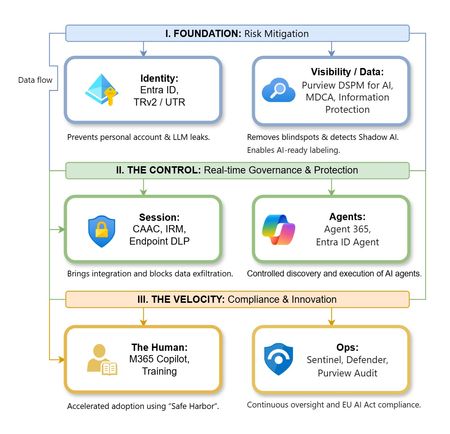
The “block” posture on Generative AI has failed. In a global enterprise, banning these tools doesn't stop usage; it simply pushes intellectual property into unmanaged channels and creates a massive visibility gap in corporate telemetry. The priority has now shifted from stopping AI to hardening the environment so that innovation can run at velocity without compromising data sovereignty. Traditional security perimeters are ineffective against the “slow bleed” of AI leakage - where data moves through prompts, clipboards, and autonomous agents rather than bulk file transfers. To secure this environment, a 7-layer defense-in-depth model is required to treat the conversation itself as the new perimeter. 1. Identity: The Only Verifiable Perimeter Identity is the primary control plane. Access to AI services must be treated with the same rigor as administrative access to core infrastructure. The strategy centers on enforcing device-bound Conditional Access, where access is strictly contingent on device health. To solve the "Account Leak" problem, the deployment of Tenant Restrictions v2 (TRv2) is essential to prevent users from signing into personal tenants using corporate-managed devices. For enhanced coverage, Universal Tenant Restrictions (UTR) via Global Secure Access (GSA) allows for consistent enforcement at the cloud edge. While TRv2 authentication-plane is GA, data-plane protection is GA for the Microsoft 365 admin center and remains in preview for other workloads such as SharePoint and Teams. 2. Eliminating the Visibility Gap (Shadow AI) You can’t secure what you can't see. Microsoft Defender for Cloud Apps (MDCA) serves to discover and govern the enterprise AI footprint, while Purview DSPM for AI (formerly AI Hub) monitors Copilot and third-party interactions. By categorizing tools using MDCA risk scores and compliance attributes, organizations can apply automated sanctioning decisions and enforce session controls for high-risk endpoints. 3. Data Hygiene: Hardening the “Work IQ” AI acts as a mirror of internal permissions. In a "flat" environment, AI acts like a search engine for your over-shared data. Hardening the foundation requires automated sensitivity labeling in Purview Information Protection. Identifying PII and proprietary code before assigning AI licenses ensures that labels travel with the data, preventing labeled content from being exfiltrated via prompts or unauthorized sharing. 4. Session Governance: Solving the “Clipboard Leak” The most common leak in 2025 is not a file upload; it’s a simple copy-paste action or a USB transfer. Deploying Conditional Access App Control (CAAC) via MDCA session policies allows sanctioned apps to function while specifically blocking cut/copy/paste. This is complemented by Endpoint DLP, which extends governance to the physical device level, preventing sensitive data from being moved to unmanaged USB storage or printers during an AI-assisted workflow. Purview Information Protection with IRM rounds this out by enforcing encryption and usage rights on the files themselves. When a user tries to print a "Do Not Print" document, Purview triggers an alert that flows into Microsoft Sentinel. This gives the SOC visibility into actual policy violations instead of them having to hunt through generic activity logs. 5. The “Agentic” Era: Agent 365 & Sharing Controls Now that we're moving from "Chat" to "Agents", Agent 365 and Entra Agent ID provide the necessary identity and control plane for autonomous entities. A quick tip: in large-scale tenants, default settings often present a governance risk. A critical first step is navigating to the Microsoft 365 admin center (Copilot > Agents) to disable the default “Anyone in organization” sharing option. Restricting agent creation and sharing to a validated security group is essential to prevent unvetted agent sprawl and ensure that only compliant agents are discoverable. 6. The Human Layer: “Safe Harbors” over Bans Security fails when it creates more friction than the risk it seeks to mitigate. Instead of an outright ban, investment in AI skilling-teaching users context minimization (redacting specifics before interacting with a model) - is the better path. Providing a sanctioned, enterprise-grade "Safe Harbor" like M365 Copilot offers a superior tool that naturally cuts down the use of Shadow AI. 7. Continuous Ops: Monitoring & Regulatory Audit Security is not a “set and forget” project, particularly with the EU AI Act on the horizon. Correlating AI interactions and DLP alerts in Microsoft Sentinel using Purview Audit (specifically the CopilotInteraction logs) data allows for real-time responses. Automated SOAR playbooks can then trigger protective actions - such as revoking an Agent ID - if an entity attempts to access sensitive HR or financial data. Final Thoughts Securing AI at scale is an architectural shift. By layering Identity, Session Governance, and Agentic Identity, AI moves from being a fragmented risk to a governed tool that actually works for the modern workplace.
How to Configure Temporary Access Pass (TAP) to Prevent Lockouts
As organizations move toward passwordless authentication and stronger identity protection, having a reliable fallback mechanism becomes essential. That’s where Temporary Access Pass (TAP) comes in. TAP provides a time-limited passcode that users can use to register passwordless methods—such as Passkeys (FIDO2), Microsoft Authenticator, or certificate-based authentication—without requiring their existing password or MFA methods. For nonprofits and mission-driven organizations, TAP helps reduce account lockouts, simplifies onboarding, and strengthens security. What Is Temporary Access Pass (TAP)? Temporary Access Pass is a secure, limited-duration authentication method that allows: Secure onboarding of new users Recovery when users lose access to authentication methods Registration of passwordless sign-in methods Key characteristics: Time-limited Single-use or multi-use Assigned to specific users or groups Automatically expires and cannot be reused ✅ Licensing requirement: Microsoft Entra ID P1 or higher (included in Microsoft 365 Business Premium). Why TAP Prevents Lockouts TAP addresses common access issues: Lost MFA device: Users can reconfigure authentication methods Forgotten password: Users can move directly to passwordless sign-in New user setup: No need to share passwords insecurely Recovery scenarios: Provides an alternate path when normal sign-in fails Step 1: Enable TAP in Microsoft Entra Admin Center Open the Microsoft Entra admin center Navigate to: Entra ID → Authentication methods → Policies Select Temporary Access Pass Set Enable → On Assign to selected users or groups Start with a pilot group before broader rollout. Step 2: Configure TAP Policy Settings Lifetime settings Default: 1 hour Maximum: up to 8 hours (or more, if required) (Although Microsoft allows longer durations, shorter lifetimes increase security.) Usage Type One-time (recommended): Admin recovery Sensitive or privileged access Multi-use: Bulk onboarding Temporary workforce Assignments Recommended groups: Administrators Helpdesk staff (trained) New user onboarding groups Avoid assigning to all users without proper controls. Step 3: Create a TAP for a User Go to Entra ID → Users Select the user Choose Authentication methods Click Add authentication method Select Temporary Access Pass Configure: Lifetime One-time or multi-use Start time Select Add Security note: Deliver the TAP securely—never via email or unsecured messaging. Step 4: Use TAP for Secure Registration or Recovery Users redeem TAP at: https://aka.ms/mysecurityinfo This portal allows users to do the following by simplifying adding a sign-in method: Register passkeys (FIDO2) Set up Microsoft Authenticator Configure Windows Hello Recover access if MFA is unavailable TAP enables users to sign in without needing their existing password or MFA methods, providing a secure, time-limited path for onboarding and account recovery. Best Practices for Nonprofits Using TAP 1. Restrict who can issue TAP Limit to: Global/Admin roles Security or helpdesk staff 2. Use Just-In-Time generation Create TAP only when needed Never store or reuse codes 3. Enforce expiration discipline Keep lifetimes short Avoid long-lived passes 4. Monitor all usage Review sign-in logs Monitor authentication method activity 5. Align with Conditional Access Use TAP during Report-only testing Ensure policies allow TAP as a valid authentication method Conclusion Temporary Access Pass is one of the most effective tools organizations can use to: Prevent account lockouts Simplify onboarding Accelerate passwordless adoption Strengthen identity security When combined with Conditional Access and emergency access accounts, TAP becomes a key part of a resilient identity strategy. To learn how to fully configure Temporary Access Pass (TAP), refer to the official Microsoft documentation: Configure a Temporary Access Pass in Microsoft Entra ID to register passwordless authentication methods - Microsoft Entra ID | Microsoft Learn875Views0likes1Comment
Entra ID 53003: How to identify primary authentication when Authentication Details are empty?
We are investigating repeated interactive Microsoft Entra ID sign-ins with the following pattern: - ErrorCode: 53003 (BlockedByConditionalAccess) - isInteractive: true - AppDisplayName: OfficeHome - Authentication requirement: Multifactor authentication Conditional Access correctly blocks these requests because they originate outside our trusted locations. We have already confirmed through controlled testing that the authentication flow can reach 53003 after the correct credentials are provided. Our current problem is different: We need to determine what mechanism satisfied the primary/first authentication factor for the observed 53003 events. For these events, Authentication Details are empty: - Authentication method: empty - Authentication method detail: empty - Result detail: empty Therefore, we cannot determine whether primary authentication was performed using a password, an existing token/session claim, PHS, PTA, federation, Seamless SSO, or another mechanism. Our questions are: 1. Is there any tenant-visible telemetry that can identify the primary authentication mechanism when AuthenticationDetails is empty? 2. Can fields such as AuthenticationProcessingDetails, AuthenticationProtocol, IncomingTokenType, OriginalTransferMethod, or AuthenticationMethodsUsed reliably distinguish between password validation and reuse of an existing authentication/token? 3. If additional authentication infrastructure is used: - can PTA Authentication Agent logs be correlated using RequestId or CorrelationId? - should Seamless SSO generate a corresponding Kerberos 4769 event for AZUREADSSOACC$? - should federated authentication be traceable in AD FS logs? 4. For Password Hash Synchronization, is there any tenant-visible telemetry confirming that Entra ID actually validated the password for a specific sign-in request? 5. If this information is not exposed to the tenant, can Microsoft Support retrieve backend authentication telemetry for a specific Sign-in ID / RequestId / CorrelationId and determine how primary authentication was satisfied? Our goal is not to determine why Conditional Access generated 53003 — that part is already understood. We specifically need to identify what satisfied primary authentication before the Conditional Access evaluation.102Views0likes0Comments
Single group for TEAM AND Lighthouse (Security Group + 'Unified' group)
Trying to simplify our groups, since we are a 20+ year old firm, the variety of groups we have has bloated over the years. I'm trying to clean these up, but I've met a hitch. Our Service Desk dept has their own Internal team. Aka a 365 Group. Aka a 'unified' group. We use Lighthouse, which only takes Security Groups - it can't take the above 365 Group. First instinct is to create a Security group that can be used for both. But I can't seem to find a way to do this. The 365 Group is unable to nest a Security group. The Security group is unable to nest a 365 Group. So there's no single source of truth. I thought I could use Dynamic Grouping as a workaround - using the MemberOf property. But according to this, this Preview Feature is being abandoned and disabled. Anyone have workarounds/advice? Here's the output I get, when trying to do this via EOM PS C:\Users\lmtpo\Downloads> New-MgGroupMember -GroupID (team) -DirectoryObjectId (sec) New-MgGroupMember : Non-Unified Security Groups cannot be added to Unified Groups. paramName: Members, paramValue... PS C:\Users\lmtpo\Downloads> New-MgGroupMember -GroupID (sec) -DirectoryObjectId (team) New-MgGroupMember : A Unified Group cannot be added as a member of a Distribution List or Security Group or Elevated Group. paramName: Members, paramValue: , objectType: Microsoft.Online.DirectoryServices.Group92Views0likes0CommentsEntra External ID email OTP send event requestType always set to "signIn" regardless of user action
Hi, In a recent workload, I'm assisting a client with implementation of Entra External ID for identity management and app authentication, which includes sending OTP codes with customized email templates. To accomplish this, a custom authentication extension has been created that authorizes the request and then communicates with an email service via an event-driven, loosely coupled architecture. While implementing and testing this feature together with the client, we noticed that it seems like the different modes or states in the user flows are not reflected in the requestType property in the request payload posted to the OnOtpSend auth extension configured. E.g., if a user tries to sign in but has forgotten their password and navigates to the password reset view and requests to send the OTP code to their email address to reset the password, the following payload is sent to the auth extension endpoint (the original payload below was logged with Application Insights, with identifiers below then redacted and formatted, otherwise intact): { "type": "microsoft.graph.authenticationEvent.emailOtpSend", "source": "/tenants/aaaaaaaa-bbbb-cccc-dddd-eeeeeeeeeeee/applications/11111111-2222-3333-4444-555555555555", "data": { "@odata.type": "microsoft.graph.onOtpSendCalloutData", "otpContext": { "identifier": "email address removed for privacy reasons", "oneTimeCode": "<REDACTED>" }, "tenantId": "aaaaaaaa-bbbb-cccc-dddd-eeeeeeeeeeee", "authenticationEventListenerId": "22222222-3333-4444-5555-666666666666", "customAuthenticationExtensionId": "33333333-4444-5555-6666-777777777777", "authenticationContext": { "correlationId": "44444444-5555-6666-7777-888888888888", "client": { "ip": "192.0.2.10", "locale": "en-gb", "market": "en-gb" }, "protocol": "UNDEFINED", "requestType": "signIn", "clientServicePrincipal": { "id": "55555555-6666-7777-8888-999999999999", "appId": "11111111-2222-3333-4444-555555555555", "appDisplayName": "Example Web App", "displayName": "Example Web App" }, "resourceServicePrincipal": { "id": "55555555-6666-7777-8888-999999999999", "appId": "11111111-2222-3333-4444-555555555555", "appDisplayName": "<client-app-name>-Web", "displayName": "<client-app-name>-Web" } } } } The above payload was captured using browser-based authentication (native auth is not used), with the below parameters passed (identifiers, tenant name etc. redacted, otherwise intact): https://example.ciamlogin.com/ aaaaaaaa-bbbb-cccc-dddd-eeeeeeeeeeee/oauth2/v2.0/authorize ?response_type=code &client_id=11111111-2222-3333-4444-555555555555 &redirect_uri=https%3A%2F%2Fexample.com%2Fsignin%2Fcallback%2F &scope=openid+profile+email &state=<REDACTED> &prompt=login &ui_locales=de-DE &mkt=de-DE &nonce=<REDACTED> &code_challenge=<REDACTED> &code_challenge_method=S256 Following having navigated to the authorize endpoint above, the issue can be reproduced by entering an email address or an existing user identity, then on the password entry view, press the “Forgot Password?” link under the password input field, and then press the button/element “Email code to <user-email>”. I have looked at using the requestType in the email OTP send event payload to determine which email template and email content are used as per client requirement, but noted that the requestType seemingly always contains the value "signIn" even if the OTP code was sent as part of a password reset operation. At first glance, it would seem like this property indicates which step in the UI the user is currently at, even though I’m not certain whether that is what the property is actually meant to represent or indicate or not. However, for the above scenario and requirement, some identifier or value indicating the action would be needed in order to tailor the email content. The alternatives to having a reliable context property in the payload to indicate user action would require more or less significant additional components and infrastructure, thus increasing the complexity of the solution. Based on its name and values, it would seem like the requestType property appears be a good candidate to carry a user action context identifier. A suitable alternative solution has been adopted currently, using a generalized OTP template, which works well, but the requirement that it would be preferable to tailor the content based on user context and intent, e.g., whether the request was triggered as part of a password reset action or for another authentication scenario, is still present, ideally via the event payload sent from Entra External ID to the auth extension. If there would be any further/follow-up questions on the above, e.g., to clarify the requirement, or further explain the reproduction steps and behaviour observed, or anything else, please tell, and I'll ensure to get back as soon as possible. Also, would someone have some input on potential other/additional ways to make the requestType include a context identifier, that would be much appreciated as well, thanks! Regards Kristoffer128Views0likes0CommentsAuthorization and Governance for AI Agents: Runtime Authorization Beyond Identity at Scale
Designing Authorization‑Aware AI Agents at Scale Enforcing Runtime RBAC + ABAC with Approval Injection (JIT) Microsoft Entra Agent Identity enables organizations to govern and manage AI agent identities in Copilot Studio, improving visibility and identity-level control. However, as enterprises deploy multiple autonomous AI agents, identity and OAuth permissions alone cannot answer a more critical question: “Should this action be executed now, by this agent, for this user, under the current business and regulatory context?” This post introduces a reusable Authorization Fabric—combining a Policy Enforcement Point (PEP) and Policy Decision Point (PDP)—implemented as a Microsoft Entra‑protected endpoint using Azure Functions/App Service authentication. Every AI agent (Copilot Studio or AI Foundry/Semantic Kernel) calls this fabric before tool execution, receiving a deterministic runtime decision: ALLOW / DENY / REQUIRE_APPROVAL / MASK Who this is for Anyone building AI agents (Copilot Studio, AI Foundry/Semantic Kernel) that call tools, workflows, or APIs Organizations scaling to multiple agents and needing consistent runtime controls Teams operating in regulated or security‑sensitive environments, where decisions must be deterministic and auditable Why a V2? Identity is necessary—runtime authorization is missing Entra Agent Identity (preview) integrates Copilot Studio agents with Microsoft Entra so that newly created agents automatically get an Entra agent identity, manageable in the Entra admin center, and identity activity is logged in Entra. That solves who the agent is and improves identity governance visibility. But multi-agent deployments introduce a new risk class: Autonomous execution sprawl — many agents, operating with delegated privileges, invoking the same backends independently. OAuth and API permissions answer “can the agent call this API?” They do not answer “should the agent execute this action under business policy, compliance constraints, data boundaries, and approval thresholds?” This is where a runtime authorization decision plane becomes essential. The pattern: Microsoft Entra‑Protected Authorization Fabric (PEP + PDP) Instead of embedding RBAC logic independently inside every agent, use a shared fabric: PEP (Policy Enforcement Point): Gatekeeper invoked before any tool/action PDP (Policy Decision Point): Evaluates RBAC + ABAC + approval policies Decision output: ALLOW / DENY / REQUIRE_APPROVAL / MASK This Authorization Fabric functions as a shared enterprise control plane, decoupling authorization logic from individual agents and enforcing policies consistently across all autonomous execution paths. Architecture (POC reference architecture) Use a single runtime decision plane that sits between agents and tools. What’s important here Every agent (Copilot Studio or AI Foundry/SK) calls the Authorization Fabric API first The fabric is a protected endpoint (Microsoft Entra‑protected endpoint required) Tools (Graph/ERP/CRM/custom APIs) are invoked only after an ALLOW decision (or approval) Trust boundaries enforced by this architecture Agents never call business tools directly without a prior authorization decision The Authorization Fabric validates caller identity via Microsoft Entra Authorization decisions are centralized, consistent, and auditable Approval workflows act as a runtime “break-glass” control for high-impact actions This ensures identity, intent, and execution are independently enforced, rather than implicitly trusted. Runtime flow (Decision → Approval → Execution) Here is the runtime sequence as a simple flow (you can keep your Mermaid diagram too). ```mermaid flowchart TD START(["START"]) --> S1["[1] User Request"] S1 --> S2["[2] Agent Extracts Intent\n(action, resource, attributes)"] S2 --> S3["[3] Call /authorize\n(Entra protected)"] S3 --> S4 subgraph S4["[4] PDP Evaluation"] ABAC["ABAC: Tenant · Region · Data Sensitivity"] RBAC["RBAC: Entitlement Check"] Threshold["Approval Threshold"] ABAC --> RBAC --> Threshold end S4 --> Decision{"[5] Decision?"} Decision -->|"ALLOW"| Exec["Execute Tool / API"] Decision -->|"MASK"| Masked["Execute with Masked Data"] Decision -->|"DENY"| Block["Block Request"] Decision -->|"REQUIRE_APPROVAL"| Approve{"[6] Approval Flow"} Approve -->|"Approved"| Exec Approve -->|"Rejected"| Block Exec --> Audit["[7] Audit & Telemetry"] Masked --> Audit Block --> Audit Audit --> ENDNODE(["END"]) style START fill:#4A90D9,stroke:#333,color:#fff style ENDNODE fill:#4A90D9,stroke:#333,color:#fff style S1 fill:#5B5FC7,stroke:#333,color:#fff style S2 fill:#5B5FC7,stroke:#333,color:#fff style S3 fill:#E8A838,stroke:#333,color:#fff style S4 fill:#FFF3E0,stroke:#E8A838,stroke-width:2px style ABAC fill:#FCE4B2,stroke:#999 style RBAC fill:#FCE4B2,stroke:#999 style Threshold fill:#FCE4B2,stroke:#999 style Decision fill:#fff,stroke:#333 style Exec fill:#2ECC71,stroke:#333,color:#fff style Masked fill:#27AE60,stroke:#333,color:#fff style Block fill:#C0392B,stroke:#333,color:#fff style Approve fill:#F39C12,stroke:#333,color:#fff style Audit fill:#3498DB,stroke:#333,color:#fff ``` Design principle: No tool execution occurs until the Authorization Fabric returns ALLOW or REQUIRE_APPROVAL is satisfied via an approval workflow. Where Power Automate fits (important for readers) In most Copilot Studio implementations, Agents calls Power Automate (agent flows), is the practical integration layer that calls enterprise services and APIs. Copilot Studio supports “agent flows” as a way to extend agent capabilities with low-code workflows. For this pattern, Power Automate typically: acquires/uses the right identity context for the call (depending on your tenant setup), and calls the /authorize endpoint of the Authorization Fabric, returns the decision payload to the agent for branching. Copilot Studio also supports calling REST endpoints directly using the HTTP Request node, including passing headers such as Authorization: Bearer <token>. Protected endpoint only: Securing the Authorization Fabric with Microsoft Entra For this V2 pattern, the Authorization Fabric must be protected using Microsoft Entra‑protected endpoint on Azure Functions/App Service (built‑in auth). Microsoft Learn provides the configuration guidance for enabling Microsoft Entra as the authentication provider for Azure App Service / Azure Functions. Step 1 — Create the Authorization Fabric API (Azure Function) Expose an authorization endpoint: HTTP Step 2 — Enable Microsoft Entra‑protected endpoint on the Function App In Azure Portal: Function App → Authentication Add identity provider → Microsoft Choose Workforce configuration (enterprise tenant) Set Require authentication for all requests This ensures the Authorization Fabric is not callable without a valid Entra token. Step 3 — Optional hardening (recommended) Depending on enterprise posture, layer: IP restrictions / Private endpoints APIM in front of the Function for rate limiting, request normalization, centralized logging (For a POC, keep it minimal—add hardening incrementally.) Externalizing policy (so governance scales) To make this pattern reusable across multiple agents, policies should not be hardcoded inside each agent. Instead, store policy definitions in a central policy store such as Cosmos DB (or equivalent configuration store), and have the PDP load/evaluate policies at runtime. Why this matters: Policy changes apply across all agents instantly (no agent republish) Central governance + versioning + rollback becomes possible Audit and reporting become consistent across environments (For the POC, a single JSON document per policy pack in Cosmos DB is sufficient. For production, add versioning and staged rollout.) Store one PolicyPack JSON document per environment (dev/test/prod). Include version, effectiveFrom, priority for safe rollout/rollback. Minimal decision contract (standard request / response) To keep the fabric reusable across agents, standardize the request payload. Request payload (example) Decision response (deterministic) Example scenario (1 minute to understand) Scenario: A user asks a Finance agent to create a Purchase Order for 70,000. Even if the user has API permission and the agent can technically call the ERP API, runtime policy should return: REQUIRE_APPROVAL (threshold exceeded) trigger an approval workflow execute only after approval is granted This is the difference between API access and authorized business execution. Sample Policy Model (RBAC + ABAC + Approval) This POC policy model intentionally stays simple while demonstrating both coarse and fine-grained governance. 1) Coarse‑grained RBAC (roles → actions) FinanceAnalyst CreatePO up to 50,000 ViewVendor FinanceManager CreatePO up to 100,000 and/or approve higher spend 2) Fine‑grained ABAC (conditions at runtime) ABAC evaluates context such as region, classification, tenant boundary, and risk: 3) Approval injection (Agent‑level JIT execution) For higher-risk/high-impact actions, the fabric returns REQUIRE_APPROVAL rather than hard deny (when appropriate): How policies should be evaluated (deterministic order) To ensure predictable and auditable behavior, evaluate in a deterministic order: Tenant isolation & residency (ABAC hard deny first) Classification rules (deny or mask) RBAC entitlement validation Threshold/risk evaluation Approval injection (JIT step-up) This prevents approval workflows from bypassing foundational security boundaries such as tenant isolation or data sovereignty. Copilot Studio integration (enforcing runtime authorization) Copilot Studio can call external REST APIs using the HTTP Request node, including passing headers such as Authorization: Bearer <token> and binding response schema for branching logic. Copilot Studio also supports using flows with agents (“agent flows”) to extend capabilities and orchestrate actions. Option A (Recommended): Copilot Studio → Agent Flow (Power Automate) → Authorization Fabric Why: Flows are a practical place to handle token acquisition patterns, approval orchestration, and standardized logging. Topic flow: Extract user intent + parameters Call an agent flow that: calls /authorize returns decision payload Branch in the topic: If ALLOW → proceed to tool call If REQUIRE_APPROVAL → trigger approval flow; proceed only if approved If DENY → stop and explain policy reason Important: Tool execution must never be reachable through an alternate topic path that bypasses the authorization check. Option B: Direct HTTP Request node to Authorization Fabric Use the Send HTTP request node to call the authorization endpoint and branch using the response schema. This approach is clean, but token acquisition and secure secretless authentication are often simpler when handled via a managed integration layer (flow + connector). AI Foundry / Semantic Kernel integration (tool invocation gate) For Foundry/SK agents, the integration point is before tool execution. Semantic Kernel supports Azure AI agent patterns and tool integration, making it a natural place to enforce a pre-tool authorization check. Pseudo-pattern: Agent extracts intent + context Calls Authorization Fabric Enforces decision Executes tool only when allowed (or after approval) Telemetry & audit (what Security Architects will ask for) Even the best policy engine is incomplete without audit trails. At minimum, log: agentId, userUPN, action, resource decision + reason + policyIds approval outcome (if any) correlationId for downstream tool execution Why it matters: you now have a defensible answer to: “Why did an autonomous agent execute this action?” Security signal bonus: Denials, unusual approval rates, and repeated policy mismatches can also indicate prompt injection attempts, mis-scoped agents, or governance drift. What this enables (and why it scales) With a shared Authorization Fabric: Avoid duplicating authorization logic across agents Standardize decisions across Copilot Studio + Foundry agents Update governance once (policy change) and apply everywhere Make autonomy safer without blocking productivity Closing: Identity gets you who. Runtime authorization gets you whether/when/how. Copilot Studio can automatically create Entra agent identities (preview), improving identity governance and visibility for agents. But safe autonomy requires a runtime decision plane. Securing that plane as an Entra-protected endpoint is foundational for enterprise deployments. In enterprise environments, autonomous execution without runtime authorization is equivalent to privileged access without PIM—powerful, fast, and operationally risky.An Entra app credential is expiring. Which workload still uses it?
A credential rotation ticket often starts with three things: an application name, an expiry date and a deadline. That is enough to know something must happen, but not enough to rotate safely. Before touching the credential, I want to know whether that exact key is still requesting tokens, which resources it accesses and where those requests appear to come from. If Microsoft Entra sign-in logs are already connected to Log Analytics or Microsoft Sentinel, KQL can answer most of that without changing anything in the tenant. This is the workflow I use. What needs to be in the workspace The important diagnostic category is ServicePrincipalSignInLogs. In Log Analytics it becomes the AADServicePrincipalSignInLogs table. Normal SigninLogs are for interactive user sign-ins and are not the right data source for an app authenticating with its own secret or certificate. The diagnostic setting is configured under: Microsoft Entra ID > Monitoring & health > Diagnostic settings Make sure ServicePrincipalSignInLogs is being sent to the workspace you are querying. Microsoft documents the available log categories and their purpose here: https://learn.microsoft.com/en-us/entra/identity/monitoring-health/concept-diagnostic-settings-logs-options From the Entra recommendation or the affected application, copy the Application (client) ID. Do not confuse it with the application object ID or the service principal object ID. In the Kusto table: AppId is the Application (client) ID. ServicePrincipalId is the object ID of the service principal in the tenant. ServicePrincipalCredentialKeyId identifies the secret or certificate key used for the token request. ServicePrincipalCredentialThumbprint can help identify a certificate. ResourceDisplayName and ResourceServicePrincipalId identify the target resource. Those fields are part of the documented AADServicePrincipalSignInLogs schema: https://learn.microsoft.com/en-us/azure/azure-monitor/reference/tables/aadserviceprincipalsigninlogs Step 1: See every credential recently used by the application Replace TargetAppId with the Application (client) ID from Entra: let Lookback = 30d; let TargetAppId = "00000000-0000-0000-0000-000000000000"; AADServicePrincipalSignInLogs | where TimeGenerated >= ago(Lookback) | extend SignInTime = coalesce(CreatedDateTime, TimeGenerated) | where SignInTime >= ago(Lookback) | where AppId =~ TargetAppId | extend SignInSucceeded = tostring(ResultType) == "0" | summarize FirstSeen = min(SignInTime), LastSeen = max(SignInTime), Attempts = count(), SuccessfulSignIns = countif(SignInSucceeded), FailedSignIns = countif(SignInSucceeded == false), CredentialTypes = make_set(ClientCredentialType, 10), SourceIPs = make_set(IPAddress, 20), UserAgents = make_set(UserAgent, 10), TargetResources = make_set( strcat(ResourceDisplayName, " [", ResourceServicePrincipalId, "]"), 20 ) by AppId, ServicePrincipalId, ServicePrincipalName, ServicePrincipalCredentialKeyId, ServicePrincipalCredentialThumbprint, FederatedCredentialId | order by LastSeen desc This gives me a short usage map for the application. If the expiring credential's key ID appears in the result, that exact credential was used for at least one recorded token request during the selected lookback period. The target resources show what it requested a token for. Source IPs and user agents usually help narrow down the workload. They are clues, not host identification. A source IP might be a NAT gateway, proxy or shared outbound address, and user-agent strings are neither guaranteed nor trustworthy. I use them to narrow the search in deployment settings, automation jobs, Key Vault references and CI/CD configuration, not as final proof of where the workload runs. Rows with a populated FederatedCredentialId represent workload identity federation. They should not be mistaken for use of the expiring secret or certificate. Step 2: Inspect the exact credential Once the expiring key ID is known, this query shows the individual sign-in records for that key: let Lookback = 30d; let TargetAppId = "00000000-0000-0000-0000-000000000000"; let ExpiringCredentialKeyId = "11111111-1111-1111-1111-111111111111"; AADServicePrincipalSignInLogs | where TimeGenerated >= ago(Lookback) | extend SignInTime = coalesce(CreatedDateTime, TimeGenerated) | where SignInTime >= ago(Lookback) | where AppId =~ TargetAppId | where ServicePrincipalCredentialKeyId =~ ExpiringCredentialKeyId | extend Result = iff(tostring(ResultType) == "0", "Success", "Failure") | project SignInTime, Result, ResultType, ResultDescription, ServicePrincipalName, ServicePrincipalId, ClientCredentialType, ServicePrincipalCredentialKeyId, ServicePrincipalCredentialThumbprint, IPAddress, UserAgent, ResourceDisplayName, ResourceServicePrincipalId, CorrelationId | order by SignInTime desc A successful row is direct evidence that Entra accepted that credential for a token request at that time. Repeated failures can also be useful: they might show an incomplete rotation, an expired credential that is still configured somewhere, or a forgotten workload that keeps retrying. No rows do not mean "safe to delete." They only mean that no matching event exists in the data currently available to this workspace for the selected period. The workload might run monthly, the event might be outside retention, the diagnostic category might have been enabled recently, or the relevant logs might be routed elsewhere. The table also does not contain the application's business owner. I confirm ownership on the application or enterprise application in Entra, or enrich the result from an existing CMDB or Sentinel watchlist. I would not invent an owner from the last source IP or from whoever originally created the app. Step 3: Prove the replacement is actually in use After adding the replacement credential and updating the workload, I use the cutover time plus the old and new key IDs to verify the change: let CutoverTime = datetime(2026-08-26T12:00:00Z); let TargetAppId = "00000000-0000-0000-0000-000000000000"; let OldCredentialKeyId = "11111111-1111-1111-1111-111111111111"; let NewCredentialKeyId = "22222222-2222-2222-2222-222222222222"; AADServicePrincipalSignInLogs | where TimeGenerated >= CutoverTime | extend SignInTime = coalesce(CreatedDateTime, TimeGenerated) | where SignInTime >= CutoverTime | where AppId =~ TargetAppId | where ServicePrincipalCredentialKeyId in~ (OldCredentialKeyId, NewCredentialKeyId) | extend Credential = case( ServicePrincipalCredentialKeyId =~ OldCredentialKeyId, "old", ServicePrincipalCredentialKeyId =~ NewCredentialKeyId, "new", "other" ) | where Credential != "other" | summarize FirstSeen = min(SignInTime), LastSeen = max(SignInTime), Attempts = count(), SuccessfulSignIns = countif(tostring(ResultType) == "0"), FailedSignIns = countif(tostring(ResultType) != "0"), SourceIPs = make_set(IPAddress, 20), TargetResources = make_set(ResourceDisplayName, 20) by Credential, ServicePrincipalCredentialKeyId | order by LastSeen desc Before I remove the old credential, I want to see a successful token request with the new key ID after the cutover. I also run a real operation against the intended resource. A generic process health check is not enough if it never exercises the dependency that uses Entra authentication. Continued sign-ins with the old key after the cutover are a clear sign that another instance, deployment slot or workload still has the old value. An absence of old-key sign-ins becomes meaningful only after the expected workload schedule has been covered and the logs have arrived in the workspace. One final trap is token caching. Service principal sign-in logs show token requests, not every API call made with a token. Removing the old client credential prevents it from obtaining new tokens, but an access token already issued by Microsoft Entra normally remains valid until it expires. The rotation test must therefore force the workload to acquire a fresh token. Access token documentation: https://learn.microsoft.com/en-us/entra/identity-platform/access-tokens My rotation order is simple: Identify the exact old credential and the workload using it. Add the replacement while the old credential is still valid. Deploy the new credential to the workload's secret store. Force a fresh token request and execute a real operation. Confirm the new key ID in AADServicePrincipalSignInLogs. Watch for unexpected use of the old key for an appropriate period. Remove the old credential after the evidence and rollback window are sufficient for that workload. Microsoft Entra's preview recommendations for expiring application credentials and expiring service principal credentials are useful starting points. For me, the KQL correlation is the part that turns the warning into a controlled change instead of a blind rotation. Recommendation documentation: https://learn.microsoft.com/en-us/entra/identity/monitoring-health/recommendation-renew-expiring-application-credential https://learn.microsoft.com/en-us/entra/identity/monitoring-health/recommendation-renew-expiring-service-principal-credential How are you carrying application ownership into Sentinel? A maintained watchlist works, but it can easily become just another stale inventory.214Views0likes0CommentsAsk Microsoft Anything: Why Cybersecurity Needs a New Security Stack for the AI Era with David Weston
David Weston leads Agentic Security at Microsoft, where he and his team build the AI models, autonomous agents, and evaluation systems redefining how defenders operate. At Microsoft since the Windows 7 era, he has worked across exploit mitigation design, malware analysis, APT research, and led security engineering for Windows, Xbox, Azure OS, and Microsoft's Offensive Security Research & Engineering group. His current work is leading teams training frontier security models, agentic security systems for defenders, and pushing AI-driven vulnerability discovery through Microsoft's Multi-Model Agentic Scanning Harness (MDASH). A longtime member of the research community and former CISA technical advisor, David is a regular presenter at BlueHat, Black Hat, and DEF CON. Key areas Dave and his team can discuss: The vision behind Project Perception How AI is changing the economics of cyber offense and defense Lessons learned from building MDASH and Microsoft's AI security initiatives Security-first AI development and deployment What's next for defenders as agentic systems become mainstream This will be a TEXT-BASED AMA, so ask your questions in the comment section down below and David and team will be answering via comment replies during the live hour!4.7KViews9likes16Comments