User Profile

FabvE
Iron Contributor
Joined Jul 29, 2020


User Widgets
Recent Discussions
Lists: Threshold error with filtered view (<5000 items)
Hi, I have a SPO List with ~40000 entries. To work with it I created a view which gives me less than 100 entries at a time. I can set a filter on a field called "localID" and also modifying the URL to have a different localID works for me (owner of the SPO site). However, other owner of the site are NOT able to use the list nor the filtered view. They get the famous threshold error. The permissions are not changed and are still the same as on the site level. Anyone else encountered this behaviour and how did you overcome it? Best regardsLists: open item in new Forms in edit mode
Hi all, SharePoint Lists has these fancy new Forms which can be sent to other users to create a new list item. Is there a way to open an existing list item in a new Forms to allow users to update a data set? I already tried to append ?ID=[itemnumber] to the sharing link but that did not work. Any suggestions? :) Greetings304Views0likes1CommentRe: SharePoint Migration Tool after failed copying
Hi HaidariHammad , thank you for the reply. Unfortunately it's the other way round: the user worked on the files on SharePoint not on the network drive. So I need to keep/protect the files on SharePoint and migrate the rest from network. Imho your suggested settings migrates only th files from the network which were created/modified after the specified date. This should overwrite newer files on SPO.183Views0likes0CommentsSharePoint Migration Tool after failed copying
Hi, a user tried to migrate a local storage to SharePoint Online. He set up a sync between his Windows Explorer and the SharePoint library and did a plain copy of all folders & files from the network storage to the synced library. Now not all files or folders arrived on SharePoint but he already started to worked in the synced folder. Can I re-migrate fromn the network drive to SharePoint with the SPMT and keep the newer versions of the files? If so, how do I have to set up the SPMT? Thx and best regards486Views0likes3CommentsCan't edit view in copied SharePoint List
Hi, I created a new modern SharePoint List based on a previously created List on another SharePoint. When I try to edit the views in the new (copied) List I get an error saying "Something went wrong". There's no way to edit some parts of the view, I can only edit the layout in the list view and save it there but the menue in the List settings throw that error. I already tried to create new views but I can't edit those either. Any ideas how to solve it? Best regards115Views0likes2CommentsPower Query: convert table type column to JSON string
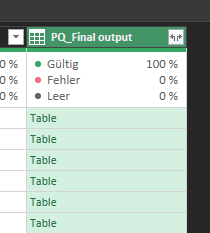
Hi, I have generated a query in PQ with aggregates a column of mail adresses to the unique mails. Now the other columns are put together in one single column of type "table": When clicking on such a Table link I get How can i convert that into a JSON string? Ferom my knowledge it should look like: [ { "Path": "\\xyz", "Server": "xyz", "owner_count": "0" }, { "Path": "\\abc", "Server": "abc", "owner_count": "2" } ] (and so on...) Any idea how to achieve that? The parse option is greyed out... Thanks in advanceSolved201Views0likes1CommentPeople App: Contact groups not migrated
Hi, we recently migrated to New Teams. Now the former contact list under chats is replaced by the new People App. Unfortunately groups, which where created in the classic Teams contacts, are not migrated to the people app. Is this a known bug or more a "feature"? Best regards348Views0likes0Comments- 1.3KViews0likes0Comments
SharePoint folder "modified" date not accurate
Hi, the date in the system column "modified" for folders is not accurate. Although new files are created within the folder or modified, the folders modified date does not change. Which events trigger the modified date of a folder? Thx for your help. 🙂 Best regards11KViews2likes13CommentsRe: What exactly happen when users Follow a site
Since the followed sites now appear under the globe icon in the SharePoint vertical navigation there seems to be a difference between the site and the navigation. We have a user that clearly follows a site. It does appear in the vertical navigation under "Follow" but is not listed within the tiles on the site. Do both parts fetch their information from different sources? Unfollow & follow again did not heal the problem.26KViews0likes0CommentsWord: mark "main" version
Hello, since Word 365 saves thousands of versions for a Office file on SharePoint/OneDrive I wonder if it's possible to mark/name special versions? For example I want to publish a Word doc as PDF and mark my work status in the version history. Any chances or do I have to mark it as final and work on with a copy? Best regards862Views0likes0CommentsApply sensitivity labels to one/multiple files in SharePoint Online
Hi @all, how can I apply a sensitivity label in SharePoint Online to one or multiple files in a library without opening the file? With the AIP plugin in Windows I can do this via the context menue of a file, a similar options seems to be missing in SPO. Best regardsNumber of comments wrong
Hi, I have a strange issue on a SharePoint site with enabled comments. The comment count says "10 comments" but visible is only one + an answer = 2 comments. I did a test if deleting a comment affects the counter. When posting a comment, the counter increases, when deleting it the counter decreases again. So where are the other 8 missing comments? 🙂 Best regards523Views0likes0Comments3D file viewer webpart background
Hi all, when designing a SharePoint website we can add a 3D file in the file viewer. The babylon.js engine just displays a "neutral" grey background with basic lighting. Is there a chance to change the background/lighting to a custom image / HDRI? Any tips and tricks are welcome. Best regards793Views0likes0CommentsHTTP: get meta value from HTML body of website
Hi, I'm trying to build a flow which checks if a website has been updated within the last x days. For this I use a HTTP connector: I searched the sites source code and found this under the meta data: <meta name="lastModifiedDate" content="2021-10-13T17:42:22.686Z"/> Is there a chance to get the content value of the meta "lastModifiedDate" with the HTTP connector? The rest of the Flow would be a conversion to a date/time format and check if the date is younger than x days. Greetings

Recent Blog Articles
No content to show