microsoft information protection
822 TopicsThe CISO Cheat Sheet to Microsoft Digital Defense Report 2026
I know we’re all busy, so I’ve pulled the most important data from this year’s Microsoft Digital Defense Report into one short read. The full report is well worth exploring, but this article focuses on the numbers and trends most relevant to security leaders. This year’s edition shows that AI is lowering the time, expertise and cost required to discover and exploit weaknesses, enabling attackers to operate with greater speed, scale and autonomy. The report describes this as AI “changing the physics of cybersecurity”: attack timelines are compressing and agentic systems are beginning to automate more of the attack lifecycle. Trend 1: Time has collapsed The clearest finding is about speed. Vulnerability discovery is increasingly running ahead of remediation, while the time from discovery to weaponisation is shrinking. In the AI era, weaponisation can follow in hours. Vulnerability discovery and weaponisation now often needs only a well-written prompt. The median time from discovery in the wild to weaponisation is below 24 hours. Vulnerabilities were on track for a record estimated 72,000 CVEs in 2026. The report expects a multi-year period in which the number of known but unpatched vulnerabilities rises sharply before eventually declining. The median time from container start to first exploit attempt is 5.3 hours. The ransomware actor Storm-1175 moved from web-facing exploitation to deploying Medusa ransomware in as little as 24 hours. CISA added over 110 CVEs to its Known Exploited Vulnerabilities catalogue between November 2025 and May 2026, most within a week of disclosure. The mismatch with enterprise reality is the uncomfortable part. The report says the disclosure-to-exploitation window has shrunk to single-digit days. Between November 2025 and May 2026, CISA added more than 110 vulnerabilities to its Known Exploited Vulnerabilities catalogue, most within a week of disclosure. In one example, Storm-1175 moved from exploiting a web-facing vulnerability to deploying Medusa ransomware in as little as 24 hours. Microsoft’s Red Team makes an important point: a patch is also a disclosure. Every fix points attackers towards the flaw it closes. As AI-assisted analysis makes reversing patches faster and more reliable, the report argues that patch velocity, not simply patch availability, becomes the control that matters. Trend 2: Attack chains are gaining autonomy The report charts a clear progression: September–November 2025: AI assists in orchestrating a campaign, as in the Anthropic-reported espionage case. April–June 2026: Full-chain autonomy is demonstrated in labs. July 2026: Real-world autonomous attacks of increasing complexity appear. Two frontier models, Mythos and GPT-5.5, completed a 32-step attack chain against an emulated enterprise with no human help. The test environment had no defenders. The UK AI Security Institute reached a similar finding independently. GPT-5.5 was the second model to solve its end-to-end corporate network attack simulation, a task AISI estimates would take a human about 20 hours. Open-weight models lag closed models at orchestrating attacks by about seven months. In the wild, early July 2026 saw the first documented automated ransomware extortion attack, named JADEPUFFER by Sysdig. Microsoft has seen AI-orchestrated intrusions that share elements with it. Initial access consistently came from internet-exposed services running known-vulnerable software. The report is measured on this point. Volumes of AI-orchestrated activity remain low. In most observed real-world operations, complex end-to-end intrusions still retain meaningful human direction. The Red Team's framing is the most useful one: AI doesn't create a new class of attack, it collapses the effort needed to find and exploit existing attack paths. Trend 3: AI has become an attack surface The report's second takeaway is that attackers are already targeting AI itself. The adoption numbers explain why. 88% of enterprises are experimenting with agents, and 82% of leaders plan broader rollouts within 12–18 months. The report cites industry projections of roughly 1.3 billion agents in production by 2028. What attackers are doing to AI systems: Four techniques accounted for roughly 90% of observed attack activity in telemetry from Azure AI workloads: malicious link injection (52%), jailbreaks (16%), tool and agent abuse (12%), and identity and credential abuse (10%). Memory poisoning: An attacker who can place content anywhere an agent reads can often place it where the agent remembers. Email is the dominant pathway the Red Team has observed. Human-in-the-loop isn't a complete control: Red team testing saw approval prompts ignored, or bypassed by a policy stored in poisoned memory. Developer tools turned against their owners: The "s1ngularity" malware hijacked locally installed AI command-line tools to hunt for secrets. It leaked about 2,000 secrets and 20,000 files across 225 victims. AI browsers: In daily use at more than 40% of organisations in Microsoft's dataset, they were the initial infection vector in incidents involving 57 malware families in a May 2026 analysis. Chat histories as a target: Malicious AI-assistant extensions reached nearly 900,000 installs and more than 20,000 enterprise tenants, harvesting AI chat histories that often contain code, architecture and credentials. The identity implications are direct. Each agent needs its own identity, not one borrowed from an employee, and a named human sponsor. The report also treats revocation latency, the time to cut off a compromised agent, as a measured outcome. Trend 4: The front door is still identity AI changes the speed and personalisation of social engineering. It hasn't changed where attacks start. Initial access in Defender Experts data: User execution: 30% Valid accounts: 20% Malicious copy-and-paste: 13% Phishing: 11% Together, user execution and valid accounts account for over half of observed activity. In incident response engagements, phishing as an initial access vector jumped from 7% to 23% year on year. The standout numbers: ClickFix: Defender saw user-pasted malicious commands on more than 1.1 million unique devices between February and early May 2026, roughly an 8x increase. AiTM: URLs accounted for 45% of the identified phishing techniques in the report’s breakdown. Separately, the share of AiTM phishing and token-theft attacks more than doubled during the first six months of 2026, although the report notes that their overall share remained comparatively small. Teams vishing: Weekly confirmed malicious volume increased 502% year on year. Per attempt, 48% of vishing calls kept the victim engaged for more than 20 seconds, and 30% lasted more than one minute. When a call succeeds, attackers can persuade the victim to install a remote-management tool and complete reconnaissance in two minutes or less. Business contact impersonation (BCI): The report introduces this term for conversations that start with a trusted-looking contact. Microsoft detected more than 46 million attacks in 12 months, with a 121% spike in April 2026. The share of first-contact messages that explicitly asked for money or documents fell from 17% to 3%. The first message is deliberately bland, like "Are you at your desk?" Password attacks declined 26% year on year, which the report describes as strong evidence that MFA and passkeys are forcing attackers to pivot. That pivot includes techniques such as fatigue attacks, AiTM phishing and token theft designed to circumvent conventional MFA. Trend 5: Attackers are inheriting trust rather than breaking in The report's headline theme is that risk is increasingly interconnected. Threats travel through the trusted relationships between identities, software supply chains, partners and cloud platforms. The numbers: Supply chain: Major open-source ecosystems saw attacks roughly every ten days, accelerating through Q2 2026. Shai-Hulud 2.0 affected 25,000 repositories. Megalodon backdoored 5,561 GitHub repositories in under six hours. Trusted signing: In May 2026, Microsoft disrupted Fox Tempest, a "malware-signing-as-a-service" operation that obtained genuine certificates for ransomware loaders and infostealers. Microsoft revoked over a thousand fraudulent code-signing certificates. Legitimate access: An unsanctioned remote monitoring tool is now one of the most reliable mid-stage indicators of a human-operated intrusion. Cloud identity: Cloud identity abuse was the most observed technique against critical infrastructure, representing 78% of the technique mix in Microsoft’s data for March to June 2026. Hybrid intrusions: The Storm-2885 case showed an attacker using a privileged cloud identity to close and downgrade security alerts. The report says identity governance and alert-handling workflows deserve Tier 0 treatment. Dwell time: DART data shows a statistically significant increase in dwell time year on year, meaning organisations took longer to detect intrusions. Ransomware shows the same ecosystem pattern. Qilin led leak-site data with 16.4% of victims, up 386%. Defender detections tell a different story, with Akira at 22%. Trend 6: Defence works best when it's connected The report is not only a catalogue of threats. The strongest defensive evidence: Disruption works. Following the March 2026 disruption, Tycoon2FA activity had fallen 95% from its November 2025 peak by June. Its share of CAPTCHA-gated phishing declined from 76% in December 2025 to 12% in June 2026. Correlation is the highest-leverage variable. The report argues that how well defenders share and correlate signals across endpoint, identity, cloud, email and network is one of the highest-leverage strategic variables under their control. AI is also changing defensive operations. The report describes AI-assisted triage, incident summarisation, hunting-query generation and detection engineering as ways to accelerate investigations and allow analysts to concentrate on higher-value work. Automated disruption can compress response time. The report says that when a correlated incident reaches a defined confidence threshold, defensive systems can automatically isolate devices, disable compromised accounts, revoke sessions or quarantine affected cloud resources. It also stresses the importance of appropriate governance and human oversight for high-risk AI actions. The report also recommends changing what leaders measure. It suggests moving from patches deployed to exposure reduced, detection coverage increased and time-to-mitigate compressed. What the MDDR recommends: ten security priorities The report starts its recommendations with the foundations: Secure by Design, Secure by Default and Secure Operations, applied through identity-centric Zero Trust. Microsoft says these keep the priorities below durable as AI adds more identities, applications, agents and dependencies to govern. Govern cyber risk at leadership level. Report identity exposure, patch latency, agent permissions, critical dependencies, dwell time and recovery readiness to the board. Defend identity as the primary control plane. Deploy passkeys and phishing-resistant MFA, reduce privilege and govern human and non-human identities. Invalidate and rotate tokens and session credentials quickly. Establish governance, visibility and data controls for AI. Keep visibility of approved AI tools, services and agents, and monitor for unauthorised or unmanaged use. Apply sensitivity-aware access and data protection to the data those systems can reach. Reduce exposure and edge risk. Continuously discover internet-facing assets and patch edge devices quickly. Centralise high-fidelity logging, enforce strong authentication and combine network visibility with threat intelligence. Focus on cross-signal correlation. Correlate endpoint, identity, cloud, application, email and network signals to detect intrusions earlier. Correlation also helps defenders anticipate attack paths and likely targets. Enact a continuous threat and vulnerability management model. Combine asset visibility, vulnerability identification, threat detection and AI-accelerated insight into a single continuous programme. Validate exposure through proactive testing. Run assume-breach exercises on cloud services, SaaS platforms, APIs and workflow automation. Prioritise them by where your highest-value data is stored, accessed or aggregated. Secure software dependencies. Harden software installation, keep a software inventory and validate provenance. Monitor packages and prepare for rapid containment. Participate in collective defence. Share actionable threat indicators and victim-informed intelligence with trusted partners and law enforcement. This supports coordinated tracking, investigation and disruption. Prepare for long-horizon technology transitions. Build a cryptographic inventory and advance post-quantum planning alongside AI governance. Read together, the numbers tell one story: the attacker’s workflow is becoming faster and less expensive. AI can shorten vulnerability discovery, exploitation, secret discovery and lateral movement, while organisations still face the slower operational work of testing, coordinating and deploying safe changes across complex environments. At the same time, agent identities can proliferate faster than organisations can inventory, govern and revoke them The defining question for boards today is not whether disruption will occur, but whether the organization can continue operating, contain harm, recover quickly, and maintain trust when it does. Source: Microsoft Digital Defense Report 2026, Version 1.1. Reporting period: July 2025–June 2026.
Protecting Organizations from External Email Risks in Microsoft 365 Copilot
Introduction As organizations embrace Microsoft 365 Copilot (Copilot), a new category of risk emerges: what happens when Copilot grounds its responses in untrusted external emails? Messages from external or unverified senders can carry content Copilot shouldn’t rely on. A new policy in Microsoft Purview Data Loss Prevention (DLP) addresses exactly this challenge. It lets organizations ground Copilot in trusted internal email only—reducing the risk of cross-prompt injection, while keeping everyday work uninterrupted. Why This Matters: The Risk of External Email in Copilot Grounding Copilot is built to integrate deeply with your organizational data—emails, files, meetings, and more—to generate intelligent and context-aware responses. However, not all mailbox content is equally reliable. External emails—messages originating from outside your organization’s trusted domains—can introduce risks such as: Prompt injection (or cross prompt injection) attempts disguised as legitimate communication Manipulated or misleading content aimed at influencing Copilot-generated outputs Unverified information or instructions that may lead to inaccurate responses Social engineering content that could be amplified through Copilot summarization Without proper safeguards, Copilot may inadvertently reference or summarize this content, potentially impacting decision-making or exposing users to biased or manipulated information. Consider a common scenario: an employee receives a message from an outside address that looks like a routine vendor note but contains hidden text instructing any AI assistant to ignore prior guidance and surface the recipient’s recent internal updates. Later, the employee asks Copilot to "summarize my inbox." Without this policy, that external message is eligible for grounding, and its planted instructions could influence the summary. With this new policy enabled, the external email is excluded from grounding entirely—Copilot never reads it as a source, so the injected instructions have no effect. How It Works: Under the Hood The feature operates through a DLP policy configured in the Microsoft Purview portal using the "Microsoft 365 Copilot and Copilot Chat" policy location with the "Email is received from > External users" condition. Here is how Copilot enforces the policy at runtime: Metadata Evaluation: Copilot evaluates email metadata and it checks the sender’s domain against your tenant’s accepted domains to determine whether an email is internal or external. Importantly, the body of the email is not inspected—only sender metadata is evaluated. External Emails Excluded from Grounding: Emails received from an external sender are excluded from Copilot grounding (source) data. This means when a user asks Copilot to summarize their inbox or reason over recent communications, those external emails are not referenced, summarized, or cited in the response. Other Grounding Sources Remain Available: Results from other grounding sources, such as web search, Word documents, Excel files, PowerPoint presentations, and internal emails, continue to show up in Copilot responses as normal. The policy is surgical in scope. No Impact on Email Access: User access to email remains completely unchanged. Users can still read, reply to, forward, and manage all their external emails as they always have. No Impact on Mail Flow: The policy does not affect mail flow, delivery, or retention. It operates exclusively at the Copilot grounding layer, not at the transport or storage layer. Things to Keep in Mind A few points help set the right expectations before you deploy: Metadata-only evaluation: The policy evaluates sender metadata, not message content. It does not scan or analyze the body of any email. Scoped to the grounding layer: The policy affects only what Copilot can use as a grounding source. It does not change mail flow, delivery, retention, or a user’s ability to access their email. Other sources are unaffected: Internal emails, files, and web results remain available to Copilot, so most everyday scenarios are unchanged. Validate before enforcing: Assess where external email is important to business workflows, then use simulation mode to validate impact and apply the protection only where it is relevant and needed. Key Benefits for Your Organization Mitigates Cross-Prompt Injection Risk: By excluding untrusted external email from Copilot’s grounding data, organizations significantly reduce the attack surface for prompt injection attempts embedded in incoming email. Applies protection where it is needed: Organizations can use the policy when external email presents a meaningful risk to Copilot grounding, while leaving external email available in scenarios where it is relevant and trusted. Ensures Copilot Responses Are Grounded in Trusted Data: Copilot responses reflect only your organization’s internal, verified communications, building greater confidence in Copilot generated insights. Minimal Disruption to Productivity: The feature keeps everyday work uninterrupted. Users retain full access to all their emails, and Copilot continues to function using all other permitted data sources. Simple Policy-Based Administration: Configured through familiar Microsoft Purview DLP policy workflows, making it easy for compliance and security teams to deploy and manage. Transparent User Experience: Users receive clear notifications when organizational policies restrict content, maintaining trust and transparency in the Copilot experience. Prerequisites Before you begin, make sure you have: Permissions: An account with the Compliance Administrator or Data Loss Prevention administrator role, or equivalent permissions to create DLP policies in the Microsoft Purview portal. Accepted domains: Your tenant’s accepted (internal) domains configured correctly, since these determine which senders are treated as internal versus external. How to Set It Up Setting up this protection is straightforward: Sign in to the Microsoft Purview portal (https://purview.microsoft.com). Navigate to Data Loss Prevention > Policies and select + Create policy. Choose the Custom template, then Custom policy. On the Locations page, enable the Microsoft 365 Copilot and Copilot Chat location. Add a rule with the condition "Email is received from," and set the value to External users. Set the action to "Prevent Copilot from processing content". Deploy the policy in simulation (test) mode first, and review the impact to confirm only the intended external email is affected. Once validated, save and activate (enforce) the policy. Conclusion As M365 Copilot becomes central to enterprise productivity, organizations must control what data feeds its responses. This new policy features adds a critical layer of defense, grounding M365 Copilot in trusted internal data while keeping the door open to seamless collaboration. By deploying this DLP policy, you protect more than data—you protect the integrity and trustworthiness of every Copilot-generated insight your organization relies on. Ready to get started? Create the policy in simulation mode today, validate the impact, and enforce it once you’re confident—so every Copilot response your organization relies on is grounded in data you trust. Learn more: https://learn.microsoft.com/en-us/purview/dlp-microsoft365-copilot-location-learn-aboutWhy DLP for External Web Search in Microsoft 365 Copilot Matters?
Introduction Microsoft 365 Copilot (Copilot) grounds its responses in your organizational data—emails, files, chats—and, optionally, the public web. With web search enabled, Copilot fetches real-time information from the Bing search service to deliver richer, more current answers. But what happens when a user’s prompt contains sensitive data such as credit card numbers, passport numbers, or Social Security numbers? That’s where a new feature in Microsoft Purview Data Loss Prevention (DLP) becomes essential: it keeps sensitive information from reaching external web search during Copilot’s query generation, preventing inadvertent data leakage while preserving the productivity benefits of AI. At a Glance In short: admin and user toggles decide whether Copilot can search the web; Microsoft Purview DLP decides what data may leave when it does. . Admin and user toggles are binary on/off controls—they aren’t aware of sensitive data. Prevents Copilot from using external web search as a grounding source for that prompt. It does not block the prompt itself or prevent Copilot from generating a response using permitted sources. It works regardless of your web search configuration,even as a safety net if web search is disabled. The Web Search Landscape in Copilot Before diving into the DLP feature, it’s important to understand the web search controls already available in Copilot and how they interact with this DLP feature. How Web Search Works in Copilot When web search is enabled, Copilot parses user prompts and generates search queries sent to the Bing search service. These generated queries are different from the user’s original prompt—they consist of a few words informed by the prompt. Importantly: The user’s entire prompt is NOT sent to Bing (unless it’s very short) Entire Microsoft 365 files (emails, documents) are NOT included in the search query User and tenant identifiers are removed before queries reach Bing Web search queries are not used to improve Bing, create advertising profiles, or train AI models Queries are treated as customer confidential information Admin Controls for Web Search IT administrators have several options to manage web search through the "Allow web search in Copilot" policy in Cloud Policy service for Microsoft 365: Enabled in Microsoft 365 Copilot and Microsoft 365 Copilot Chat: Web search is available across all Copilot experiences. Users get the Web content toggle to control it personally. Disabled in Microsoft 365 Copilot and Microsoft 365 Copilot Chat: Web search is completely turned off. The Web content toggle is dimmed and unavailable to users. Disabled in Work mode; Enabled in Web mode and Copilot Chat: A hybrid approach where web search is blocked in Work mode (where organizational data is accessed) but available in Web mode and Copilot Chat. User-Level Control: The Web Content Toggle When the admin enables web search, users in Copilot (Work chat) have a "Web content" toggle that is ON by default. Users can turn it off to exclude web content from their Copilot responses. This toggle is NOT available in Copilot Chat. The Gap: Why Admin Controls and User Toggles Are Not Enough Here’s the critical question: What if your organization has web search enabled (for good reasons—better answers, real-time data, improved productivity) but a user inadvertently includes sensitive information in their prompt? Consider these scenarios: A user asks Copilot: "What are the compliance requirements for processing credit card number 4532-XXXX-XXXX-1234?" An employee types: "Find regulations related to passport number AB1234567 for our international transfer." A prompt includes a customer’s Social Security number while asking about tax filing procedures. In each case, if web search is enabled, Copilot might generate a search query informed by the sensitive data in the prompt. Even though Copilot doesn’t send the entire prompt to Bing, the generated search query could still be influenced by or contain fragments of sensitive information. This is the gap that DLP for external web search fills—and it works regardless of which web search configuration option your admin has chosen. The Solution: DLP Policy to Restrict Web Search When Prompts Contain Sensitive Data Microsoft Purview DLP allows you to create a policy that detects when a user’s prompt contains sensitive information types (SITs)—such as credit card numbers, passport numbers, Social Security numbers, or custom SITs defined by your organization—and automatically prevents Copilot from using external web search as a grounding source for that specific prompt. How It Works Real-Time Detection: The DLP policy evaluates each prompt in real time, checking for configured sensitive information types before Copilot generates any web search query. Surgical Blocking: Only the web search component is prevented for that specific prompt. Copilot continues to generate responses using permitted internal Microsoft 365 data sources (emails, files, chats) where applicable. Per-Prompt Enforcement: The restriction applies only to prompts that actually contain sensitive data. The next prompt from the same user (without sensitive data) will use web search normally. Supports various available SIT Types: Works with Microsoft-provided SITs (credit cards, passports, SSNs, etc.) and custom SITs defined by your organization. Clear User Notification: Users are informed that web search was restricted for their prompt due to organizational policy, maintaining transparency. Why This Feature Is Critical, Regardless of Your Web Search Configuration This is the key insight that every security and compliance team must understand: The DLP policy for external web search provides a fundamentally different layer of protection than the admin toggle or user toggle for web search. Scenario 1: Web Search Fully Enabled With web search enabled across all Copilot experiences—the most common setup—the DLP policy acts as a safety net. Normal prompts get full web-grounded answers, but the moment a prompt contains sensitive data, web search is blocked for that prompt alone. External web grounding is prevented for that prompt when the policy detects configured sensitive content. Scenario 2: Web Search Disabled in Work Mode, Enabled in Web Mode Even here, users in Web mode and Copilot Chat still have web search active. The mode-level toggle is binary (on/off) and can’t tell safe prompts from sensitive ones—so if a prompt in these modes contains sensitive data, DLP adds prompt-level, data-aware protection beyond binary web-search controls.. Scenario 3: Web Search Enabled with User Toggle Available Expecting users to toggle off web search before every sensitive prompt is unrealistic—they don’t always know when content counts as sensitive by compliance standards. The DLP policy removes that human error, detecting and blocking automatically on a per-prompt basis. Scenario 4: Even When Web Search Is Fully Disabled Even with web search disabled entirely, the DLP policy adds defense-in-depth. Configurations change, policies get modified, and new users join groups with different settings. If web search is ever re-enabled—intentionally or not—the policy keeps sensitive data protected. Comparing the Controls: A Side-by-Side View Control Scope Granularity Sensitive Data Aware? Admin Policy (Allow web search) Tenant/User Group Binary: On or Off per mode No User Web Content Toggle Individual User Binary: On or Off No DLP: Block Web Search for SITs (Recommended) Per Prompt (Real-Time) Layered defense-in-depth; Conditional Block: Only when SITs detected Yes Key Takeaway: The admin toggle and user toggle control whether web search is available. The DLP policy controls what data can be sent when web search is available. These are complementary, not overlapping controls. Prerequisites Before you configure the policy, make sure you have: Licensing: Microsoft 365 Copilot licenses for your users, plus Microsoft Purview Data Loss Prevention (included with Microsoft 365 E5 or E5 Compliance, or an equivalent plan). Permissions: An account with a role that can create DLP policies for the Copilot location, e.g. Compliance Administrator or the Purview Data Security AI Admin role. Sensitive information types: The Microsoft-provided or custom SITs you want to detect (credit card numbers, passport numbers, SSNs, and so on) identified ahead of time. How to Configure the DLP Policy Follow these steps to set up the protection in Microsoft Purview: Sign in to the Microsoft Purview portal (https://purview.microsoft.com). Go to Data Loss Prevention > Policies and select + Create policy. Select the Custom template, then Custom policy. On the Locations page, set the Microsoft 365 Copilot and Copilot Chat location to On. Add a rule with the "Content contains" > "Sensitive information types" condition and choose the SITs you want to detect (e.g., Credit Card Number, Passport Number, SSN, or custom SITs). In the same rule, set the action to "Prevent Copilot from processing content" > "Performing Web Searches". Save and turn on the policy. Policy Design note: Conditions based on sensitive information types and sensitivity labels must be configured in separate rules within the same policy. Note: DLP policy changes can take up to 4-8 hours to take effect in Copilot. Deploy in simulation (test) mode first to review the impact before you enforce the policy. Real-World Use Case: Contoso Contoso wants employees to use Copilot for productivity and has web search enabled to provide the best possible responses. However, they don’t want sensitive customer data—such as credit card numbers or national identification numbers—to be sent to external web search when Copilot grounds responses on the web. They configure a DLP policy targeting the Microsoft 365 Copilot and Copilot Chat location with a rule that detects their relevant SITs and sets the action to "Prevent Copilot from processing content" > "Performing Web Searches". Result: When a user submits a prompt containing those SITs, Copilot does not send the prompt to external web search. Copilot still returns a response grounded in internal Microsoft 365 data sources where the user has access. For all other prompts, web search works normally. Other prompts can continue to use web search, subject to applicable settings and policies Best Practices Deploy the DLP web search policy alongside your existing web search admin controls for defense-in-depth. Include both Microsoft-provided and custom SITs relevant to your industry and data classification. Use simulation mode first to understand the impact before enforcing the policy. Combine with the "Prevent sensitive information types in prompts" DLP action for comprehensive protection (note: these must be separate rules within the same policy). Regularly review DLP alerts to identify patterns of sensitive data in prompts that may indicate user training needs. Document your layered approach: admin toggle for broad control, DLP for data-aware conditional control. Conclusion The “Restrict Microsoft 365 Copilot from using external web search when prompts contain sensitive data” DLP capability fills a critical gap. Admin policies and user toggles give broad on/off control over web search availability, but they can’t tell a prompt that’s safe to ground on the web from one carrying sensitive information that must never leave your Microsoft 365 boundary. This DLP feature adds intelligent, real-time, per-prompt protection that works regardless of your web search configuration. Users keep the productivity benefits of web-grounded Copilot responses without compromising data security—a clear example of security enabling productivity rather than restricting it. Bottom line: If your organization uses M365 Copilot with web search in any capacity, this DLP policy isn’t optional—it’s essential. References DLP for Microsoft 365 Copilot, Copilot Chat and Cowork: https://learn.microsoft.com/en-us/purview/dlp-microsoft365-copilot-location-learn-about Data, Privacy, and Security for Web Search in Copilot: https://learn.microsoft.com/en-us/microsoft-365/copilot/manage-public-web-access
From “No” to “Now”: A 7-Layer Strategy for Enterprise AI Safety
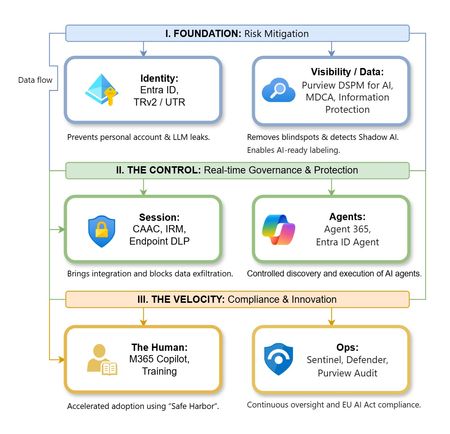
The “block” posture on Generative AI has failed. In a global enterprise, banning these tools doesn't stop usage; it simply pushes intellectual property into unmanaged channels and creates a massive visibility gap in corporate telemetry. The priority has now shifted from stopping AI to hardening the environment so that innovation can run at velocity without compromising data sovereignty. Traditional security perimeters are ineffective against the “slow bleed” of AI leakage - where data moves through prompts, clipboards, and autonomous agents rather than bulk file transfers. To secure this environment, a 7-layer defense-in-depth model is required to treat the conversation itself as the new perimeter. 1. Identity: The Only Verifiable Perimeter Identity is the primary control plane. Access to AI services must be treated with the same rigor as administrative access to core infrastructure. The strategy centers on enforcing device-bound Conditional Access, where access is strictly contingent on device health. To solve the "Account Leak" problem, the deployment of Tenant Restrictions v2 (TRv2) is essential to prevent users from signing into personal tenants using corporate-managed devices. For enhanced coverage, Universal Tenant Restrictions (UTR) via Global Secure Access (GSA) allows for consistent enforcement at the cloud edge. While TRv2 authentication-plane is GA, data-plane protection is GA for the Microsoft 365 admin center and remains in preview for other workloads such as SharePoint and Teams. 2. Eliminating the Visibility Gap (Shadow AI) You can’t secure what you can't see. Microsoft Defender for Cloud Apps (MDCA) serves to discover and govern the enterprise AI footprint, while Purview DSPM for AI (formerly AI Hub) monitors Copilot and third-party interactions. By categorizing tools using MDCA risk scores and compliance attributes, organizations can apply automated sanctioning decisions and enforce session controls for high-risk endpoints. 3. Data Hygiene: Hardening the “Work IQ” AI acts as a mirror of internal permissions. In a "flat" environment, AI acts like a search engine for your over-shared data. Hardening the foundation requires automated sensitivity labeling in Purview Information Protection. Identifying PII and proprietary code before assigning AI licenses ensures that labels travel with the data, preventing labeled content from being exfiltrated via prompts or unauthorized sharing. 4. Session Governance: Solving the “Clipboard Leak” The most common leak in 2025 is not a file upload; it’s a simple copy-paste action or a USB transfer. Deploying Conditional Access App Control (CAAC) via MDCA session policies allows sanctioned apps to function while specifically blocking cut/copy/paste. This is complemented by Endpoint DLP, which extends governance to the physical device level, preventing sensitive data from being moved to unmanaged USB storage or printers during an AI-assisted workflow. Purview Information Protection with IRM rounds this out by enforcing encryption and usage rights on the files themselves. When a user tries to print a "Do Not Print" document, Purview triggers an alert that flows into Microsoft Sentinel. This gives the SOC visibility into actual policy violations instead of them having to hunt through generic activity logs. 5. The “Agentic” Era: Agent 365 & Sharing Controls Now that we're moving from "Chat" to "Agents", Agent 365 and Entra Agent ID provide the necessary identity and control plane for autonomous entities. A quick tip: in large-scale tenants, default settings often present a governance risk. A critical first step is navigating to the Microsoft 365 admin center (Copilot > Agents) to disable the default “Anyone in organization” sharing option. Restricting agent creation and sharing to a validated security group is essential to prevent unvetted agent sprawl and ensure that only compliant agents are discoverable. 6. The Human Layer: “Safe Harbors” over Bans Security fails when it creates more friction than the risk it seeks to mitigate. Instead of an outright ban, investment in AI skilling-teaching users context minimization (redacting specifics before interacting with a model) - is the better path. Providing a sanctioned, enterprise-grade "Safe Harbor" like M365 Copilot offers a superior tool that naturally cuts down the use of Shadow AI. 7. Continuous Ops: Monitoring & Regulatory Audit Security is not a “set and forget” project, particularly with the EU AI Act on the horizon. Correlating AI interactions and DLP alerts in Microsoft Sentinel using Purview Audit (specifically the CopilotInteraction logs) data allows for real-time responses. Automated SOAR playbooks can then trigger protective actions - such as revoking an Agent ID - if an entity attempts to access sensitive HR or financial data. Final Thoughts Securing AI at scale is an architectural shift. By layering Identity, Session Governance, and Agentic Identity, AI moves from being a fragmented risk to a governed tool that actually works for the modern workplace.Sensitivity Auto-labelling via Document Property
Why is this needed? Sensitivity labels are generally relevant within an organisation only. If a file is labelled within one environment and then moved to another environment, sensitivity label content markings may be visible, but by default, the applied sensitivity label will not be understood. This can lead to scenarios where information that has been generated externally is not adequately protected. My favourite analogy for these scenarios is to consider the parallels between receiving sensitive information and unpacking groceries. When unpacking groceries, you might sit your grocery bag on a counter or on the floor next to the pantry. You’ll likely then unpack each item, take a look at it and then decide where to place it. Without looking at an item to determine its correct location, you might place it in the wrong location. Porridge might be safe from the kids on the bottom shelf. If you place items that need to be protected, such as chocolate, on the bottom shelf, it’s not likely to last very long. So, I affectionately refer to information that hasn’t been evaluated as ‘porridge’, as until it has been checked, it will end up on the bottom shelf of the pantry where it is quite accessible. Label-based security controls, such as Data Loss Prevention (DLP) policies using conditions of ‘content contains sensitivity label’ will not apply to these items. To ensure the security of any contained sensitive information, we should look for potential clues to its sensitivity and then utilize these clues to ensure that the contained information is adequately protected - We take a closer look at the ‘porridge’, determine whether it’s an item that needs protection and if so, move it to a higher shelf in the pantry so that it’s out of reach for the kids. Effective use of Purview revolves around the use of ‘know your data’ strategies. We should be using as many methods as possible to try to determine the sensitivity of items. This can include the use of Sensitive Information Types (SITs) containing keyword or pattern-based classifiers, trainable classifiers, Exact Data Match, Document fingerprinting, etc. Matching items via SITs present in the items content can be problematic due to false positives. Keywords like ‘Sensitive’ or ‘Protected’ may be mentioned out of context, such as when referring to a classification or an environment. When classifications have been stamped via a property, it allows us to match via context rather than content. We don’t need to guess at an item’s sensitivity if another system has already established what the item’s classification is. These methods are much less prone to false positives. Why isn’t everyone doing this? Document properties are often not considered in Purview deployments. SharePoint metadata management seems to be a dying artform and most compliance or security resources completing Purview configurations don’t have this skill set. There’s also a lack of understanding of the relevance of checking for item properties. Microsoft haven’t helped as the documentation in this space is somewhat lacking and needs to be unpicked via some aligning DLP guidance (Create a DLP policy to protect documents with FCI or other properties). Many of these configurations will also be tied to regional requirements. Document properties being used by systems where I’m from, in Australia, will likely be very different to those used in other parts of the world. In the following sections, we’ll take a look at applicable use cases and walk through how to enable these configurations. Scenarios for use Labelling via document property isn’t for everyone. If your organisation is new to classification or you don’t have external partners that you collaborate with at higher sensitivity levels, then this likely isn’t for you. For those that collaborate heavily and have a shared classification framework, as is often seen across government, this is a must! This approach will also be highly relevant to multi-tenant organisations or conglomerates where information is regularly shared between environments. The following scenarios are examples of where this configuration will be relevant: 1. Migrating from 3 rd party classification tools If an item has been previously stamped by a 3 rd party classification tool, then evaluating its applied document properties will provide a clear picture of its security classification. These properties can then be used in service-based auto-labelling policies to effectively transition items from 3 rd party tools to Microsoft Purview sensitivity labels. As labels are applied to items, they will be brought into scope of label-based controls. 2. Detecting data spill Data spill is a term that is used to define situations where information that is of a higher than permitted security classification land in an environment. Consider a Microsoft 365 tenant that is approved for the storage of Official information but Top Secret files are uploaded to it. Document properties that align with higher than permitted classifications provide us with an almost guaranteed method of identifying spilled items. Pairing this document property with an auto-labelling policy allows for the application of encryption to lock unauthorized users out of the items. Tools like Content Explorer and eDiscovery can then be used to easily perform cleanup activities. If using document properties and auto-labelling for this purpose, keep in mind that you’ll need to create sensitivity labels for higher than permitted classifications in order to catch spilled items. These labels won’t impact usability as you won’t publish them to users. You will, however, need to publish them to a single user or break glass account so that they’re not ignored by auto-labelling. 3. Blocking access by AI tools If your organization was concerned about items with certain properties applied being accessed by generative AI tools, such as Copilot, you could use Auto-labelling to apply a sensitivity label that restricts EXTRACT permissions. You can find some information on this at Microsoft 365 Copilot data protection architecture | Microsoft Learn. This should be relevant for spilled data, but might also be useful in situations where there are certain records that have been marked via properties and which should not be Copilot accessible. 4. External Microsoft Purview Configurations Sensitivity labels are relevant internally only. A label, in its raw form, is essentially a piece of metadata with an ID (or GUID) that we stamp on pieces of information. These GUIDs are understood by your tenant only. If an item marked with a GUID shows up in another Microsoft 365 tenant, the GUID won’t correspond with any of that tenant’s labels or label-based controls. The art in Microsoft Purview lies in interpreting the sensitivity of items based on content markings and other identifiers, so that data security can be maintained. Document properties applied by Purview, such as ClassificationContentMarkingHeaderText are not relevant to a specific tenant, which makes them portable. We can use these properties to help maintain classifications as items move between environments. 5. Utilizing metadata applied by Records Management solutions Some EDRMS, Records or Content Management solutions will apply properties to items. If an item has been previously managed and then stamped with properties, potentially including a security classification, via one of these systems, we could use this information to inform sensitivity label application. 6. 3 rd party classification tools used externally Even if your organisation hasn’t been using 3rd party classification tools, you should consider that partner organisations, such as other Government departments, might be. Evaluating the properties applied by external organisations to items that you receive will allow you to extend protections to these items. If classification tools like Janus or Titus are used in your geography/industry, then you may want to consider checking for their properties. Regarding the use of auto-classification tools Some organisations, particularly those in Government, will have organisational policies that prevent the use of automatic classification capabilities. These policies are intended to ensure that each item is assessed by an actual person for risk of disclosure rather than via an automated service that could be prone to error. However, when auto-labelling is used to interpret and honour existing classifications, we are lowering rather than raising the risk profile. If the item’s existing classification (applied via property) is ignored, the item will be treated as porridge and is likely to be at risk. If auto-labelling is able to identify a high-risk item and apply the relevant label, it will then be within scope of Purview’s data security controls, including label-based DLP, groups and sites data out of place alerting, and potentially even item encryption. The outcome is that, through the use of auto-labelling, we are able to significantly reduce risk of inappropriate or unintended disclosure. Configuration Process Setting up document property-based auto-labelling is fairly straightforward. We need to setup a managed property and then utilize it an auto-labelling policy. Below, I've split this process into 6 steps: Step 1 – Prepare your files In order to make use of document properties, an item with the properties applied will first need to be indexed by SharePoint. SharePoint will record the properties as ‘crawled properties’, which we’ll then need to convert into ‘managed properties’ to make them useful. If you already have items with the relevant properties stored in SharePoint, then they are likely already indexed. If not, you’ll need to upload or create an item or items with the properties applied. For testing, you’ll want to create a file with each property/value combination so that you can confirm that your auto-labelling policies are all working correctly. This could require quite a few files depending on the number of properties you’re looking for. To kick off your crawled property generation though, you could create or upload a single file with the correct properties applied. For example: In the above, I’ve created properties for ClassificationContentMarkingHeaderText and ClassificationContentMarkingFooterText, which you’ll often see applied by Purview when an item has a sensitivity label content marking applied to it. I’ve also included properties to help identify items classified via JanusSeal, Titus and Objective. Step 2 – Index the files After creating or uploading your file, we then need SharePoint to index it. This should happen fairly quickly depending on the size of your environment. I'd expect to wait sometime between 10 minutes and 24 hrs. If you're not in a hurry, then I'd recommend just checking back the next day. You'll know when this has been completed when you head into SharePoint Admin > Search > Managed Search Schema > Crawled Properties and can find your newly indexed properties: Step 3 – Configure managed properties Next, the properties need to be configured as managed properties. To do this, go to SharePoint Admin > More features > Search > Managed Search Schema > Managed Properties. Create a new managed property and give it a name. Note that there are some character restrictions in naming, but you should be able to get it close to your document property name. Set the property’s type to text, select queryable and retrievable. Under ‘mappings to crawled properties’, choose add mapping, search for and select the property indexed from the file property. Note that the crawled property will have the same name as your document property, so there’s no need to browse through all of them: Repeat this so that you have a managed property for each document property that you want to look for. Step 4 – Configure Auto-labelling policies Next up, create some auto-labelling policies. You’ll need one for each label that you want to apply, not one per property as you can check multiple properties within the one auto-labelling policy. - From within Purview, head to Information Protection > Policies > Auto-labelling policies. - Create a new policy using the custom policy template. - Give your policy an appropriate name (e.g. Label PROTECTED via property). - Select the label that you want to apply (e.g. PROTECTED). - Select SharePoint based services (SharePoint and OneDrive). - Name your auto-labelling rules appropriately (e.g. SPO – Contains PROTECTED property) - Enter your conditions as a long string with property and value separated via a colon and multiple entries separated with a comma. For example: ClassificationContentMarkingHeaderText:PROTECTED,ClassificationContentMarkingFooterText:PROTECTED,Objective-Classification:PROTECTED,PMDisplay:PROTECTED,TitusSEC:PROTECTED Note that the properties that you are referencing are the Managed Property rather than the document property. This will be relevant if your managed property ended up having a different name due to character restrictions. After pasting in your string into the UI, the resultant rule should look something like this: When done, you can either leave your policy in simulation mode or save it and then turn it on from the auto-labelling policies screen. Just be aware of any potential impacts, such as accidently locking users out by automatically deploying a label with encryption configuration. You can reduce any potential impact by targeting your auto-labelling policy at a site or set of sites initially and then expanding its scope after testing. Step 5 - Test Testing your configuration will be as easy as uploading or creating a set of files with the relevant document properties in place. Once uploaded, you’ll need to give SharePoint some time to index the items and then the auto-labelling policy some time to apply sensitivity labels to them. To confirm label application, you can head to the document library where your test files are located and enable the sensitivity column. Files that have been auto-labelled will have their label listed: You could also check for auto-labelling activity in Purview via Activity explorer: Step 6 – Expand into DLP If you’ve spent the time setting up managed properties, then you really should consider capitalizing on them in your DLP configurations. DLP policy conditions can be configured in the same manner that we configured Auto-labelling in Step 3 above. The document property also gives us an anchor for DLP conditions that is independent of an item’s sensitivity label. You may wish to consider the following: DLP policies blocking external sharing of items with certain properties applied. This might be handy for situations where auto-labelling hasn’t yet labelled an item. DLP policies blocking the external sharing of items where the applied sensitivity label doesn’t match the applied document property. This could provide an indication of risky label downgrade. You could extend such policies into Insider Risk Management (IRM) by creating IRM policies that are aligned with the above DLP policies. This will allow for document properties to be considered in user risk calculation, which can inform controls like Adaptive Protection. Here's an example of a policy from the DLP rule summary screen that shows conditions of item contains a label or one of our configured document properties: Thanks for reading and I hope this article has been of use. If you have any questions or feedback, please feel free to reach out.4.8KViews9likes9CommentsRegistration Open: Community-Led Purview Lightning Talks
Get ready for an electrifying event! The Microsoft Security Community proudly presents Purview Lightning Talks; an action-packed series featuring your fellow Microsoft users, partners and passionate Microsoft Security community members of all sorts. Each 3-12 minute talk cuts straight to the chase, delivering expert insights, real-world use cases, and even a few game-changing tips and tricks. Don’t miss this opportunity to learn, connect, and be inspired! Secure your spot now for the big day: April 30th at 8am Redmond Time. See agenda details below and follow this blog post (sign in and click the "follow" heart in the upper right) to receive notifications. ❗UPDATE❗This event is expected to last around 2 hours and 15 minutes, due to the incredible number of community sessions that were submitted! 💖 Please see the timing table below broken out into sections of four talks each, and plan to arrive 10 minutes before the section that interests you, OR stay for the whole time! Speakers will be available in the chat to answer your questions; please ask your questions during their session. Spillover Q&A forum links will also be shared. The full session recording will be indexed and posted to Microsoft Security Community YouTube within 24 hours after the event. Bookmark this page or follow this blog post for updates! Agenda Legend ↩️ Data Lifecycle Management 🔐 Information Protection 🚫 Data Loss Prevention (DLP) 🦾 Data Security Posture Management (DSPM) for AI 🤖 Purview for AI 👁️ Insider Risk Management (IRM) 🔍 eDiscovery 📊 Governance 🗒️ Compliance Manager 🛡️ Data Security All times are listed in US Pacific/Redmond Time. Session lengths are rounded to the nearest minute. AGENDA Section 1 - approximately 8:00 am - 8:43 am ↩️ The Day Offboarding Exposed Infinite Retention — Nikki Chapple Length: 10 minutes | Topic: Data Lifecycle Management A routine Purview request led to an unexpected discovery: more than 9,000 orphaned OneDrives and thousands of inactive mailboxes still storing content long after employees had left. This talk explains how a retain-only policy created hidden retention debt and how Adaptive Scopes can help organisations separate active users from leavers to avoid similar pitfalls. 🔐 The Purview Label Engine: Automated Classification, Translation, and co-Documentation for Enterprise Tenants — Michael Kirst-Neshva Length: 12 minutes | Topic: Information Protection Global enterprises face the challenge of implementing uniform data protection standards across borders and languages. In this talk, I’ll present a framework that makes Microsoft Purview labels truly scalable. Discover how to roll out parent and child label logics automatically, manage priorities with a single click, and generate instant compliance documentation for every business unit. 🗒️ What's In My Compliance Manager Toolbox: A Cloud Security Architect's Perspective — Jerrad Dahlager Length: 8 minutes | Topic: Compliance Manager A practical walkthrough of how I use Compliance Manager across real client engagements to map controls, track improvement actions, and simplify multi-framework compliance. No theory, just what works in the field. 🛡️ Stop, Think, Protect: Data Security in Real Life with Purview — Oliver Sahlmann Length: 8 minutes | Topic: Data Security With simple labels and matching DLP policies, Purview offers a practical and accessible way to approach data security. This lightning talk uses a real-life traffic light concept to show how a low barrier to adoption can still drive meaningful protection and awareness. Section 2 - approximately 8:44 am - 9:15 am 🔐 Using Purview to prevent oversharing with AI services — Viktor Hedberg Length: 10 minutes | Topic: Information Protection In this day and age, AI is the big thing. However, Copilot has access to everything you can access, including potentially sensitive data. In this session we will look at how to prevent Copilot to access highly sensitive data, using Information Protection. 🦾 How I Helped My Customers Understand their AI Usage (and protect their sensitive data) — Bram de Jager Length: 5 minutes | Topic: Data Security Posture Management (DSPM) for AI As AI tools explode across the web, many organizations still have no idea what’s actually happening in the browser—where employees type prompts, paste sensitive data, or visit public AI sites outside corporate governance. In this lightning talk, I’ll share how I helped customers shine a light on this issue. We’ll explore how Purview Data Security Posture Management (DSPM) can reveal which AI tools employees use, what types of data they input, and where sensitive information may leak through prompts. I’ll walk through real customer scenario where we detected risky AI usage patterns—such as employees pasting confidential documents into public chatbots. 🔐 Four Labels Max for Daily Use: Which Ones & Why? — Romain Dalle Length: 8 minutes | Topic: Information Protection Sensitivity labels are one of the most critical parts of a Purview Risk and compliance deployment, if not the most critical, because it directly impacts how end-users and business units should allow or restrict themselves to share their business data, internally and externally, on a daily basis. Labels have not other options than being precise, meaningful, and balanced in terms of embedded data security. Setting the right taxonomy is core to success, and is everything but a one-time project. 🚫 Data-driven Endpoint DLP Solution with Advanced Hunting — Tatu Seppälä Length: 8 minutes | Topic: Data Loss Prevention (DLP) This lightning talk shows you how to use KQL queries in advanced hunting to easily build initial sensitive service domain groups for authorized and unauthorized domains based on your organization's usage patterns. The same approach can be used for numerous other similar solution refinement and design purposes. Section 3 - approximately 9:16 am - 9:46 am 🔐 The Purview Hack No One Talks About: Container Sensitivity Labels That Fix Oversharing Fast — Nikki Chapple Length: 10 minutes | Topic: Information Protection Most organizations tackle oversharing with manual fixes, but the fastest solution is often overlooked. In this lightning talk, I show how container sensitivity labels automatically apply the right sharing and collaboration controls, ensuring every new Group, Team or SharePoint site starts secure by default. 🔍 Does M365 Support eDiscovery? — Julian Kusenberg Length: 11 minutes | Topic: eDiscovery A myth-busting session that separates perception from reality when it comes to Microsoft 365 eDiscovery capabilities. 📊 Improving Discovery, Trust, and Reuse of Analytics with Purview Data Products — Craig Wyndowe Length: 5 minutes | Topic: Governance This talk shows how bringing Power BI and Fabric assets into Microsoft Purview Governance Domains and Data Products creates a single, trusted view of enterprise analytics. By connecting reports, semantic models, and underlying data with shared metadata, ownership, and business context, organizations can make existing assets easy to discover and safe to reuse. 🔐 Why You Should Create Your Own Sensitive Information Types (SITs) — Niels Jakobsen Length: 5 minutes | Topic: Information Protection An in depth analysis of why Microsoft SITs are not one-size-fits-all, and how to create your own using what Microsoft has already built for you. Section 4 - approximately 9:47 am-10:30 am 👁️ From Zero to First Signal: Insider Risk Management Prerequisites That Actually Matter — Sathish Veerapandian Length: 8 minutes | Topic: Insider Risk Management (IRM) A focused live demo showing the real world prerequisites required for Microsoft Purview Insider Risk Management to work effectively. This session highlights the critical Entra ID, Intune, Microsoft Defender for Endpoint, and Purview DLP configurations that must be in place before creating IRM policies. 🤖 Securing data in the age of AI — Júlio César Gonçalves Vasconcelos Length: 11 minutes | Topic: Purview for AI AI will transform business as we know it; but without proper governance, it can introduce serious risks. We’ll show you how Microsoft Purview enables organizations to accelerate AI adoption while maintaining security, compliance, and transparency. 🔍 Beyond eDiscovery - Purview DSI for Security Investigation — Susantha Silva Length: 11 minutes | Topic: eDiscovery Most people hear “Microsoft Purview” and immediately think compliance, eDiscovery, or legal holds. But this session highlights Data Security Investigations, showing how DSI lets you take a DLP alert or insider risk signal and turn it into a structured investigation. 🚫 Elevating Purview DLP with a real world use case — Victor Wingsing Length: 14 minutes | Topic: Data Loss Prevention (DLP) Learn how I hardened Microsoft Purview DLP beyond out of the box defaults—closing real world data loss gaps, tuning policies to actual user behavior, and turning noisy alerts into protection that really blocks exfiltration. - Quick Closing/ Resource Sharing2.8KViews7likes2CommentsWhy “Data in Switzerland” Is Not Enough
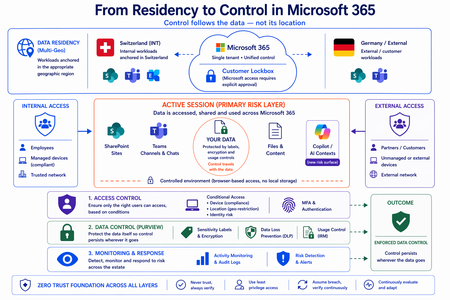
Moving from Residency to Control in Microsoft 365 Every conversation about data sovereignty in regulated industries tends to start the same way: “We use Multi-Geo. The data stays in Switzerland.” It’s the right starting point. Microsoft 365 Multi-Geo allows organizations to place selected workloads - SharePoint sites, OneDrive accounts, Teams data, or Exchange mailboxes - into specific regions, including Switzerland, while maintaining a single global tenant. This makes it possible to align sensitive data with regulatory or customer requirements without fragmenting the overall environment. But it only answers one question: Where is the data stored? It does not answer who accessed the data, from where, under which conditions, or what happened after access. That is where the real problem begins. A scenario that happens every day A Swiss engineering firm stores sensitive project documentation in Switzerland using Multi-Geo. An external contractor - working from an unmanaged device outside Switzerland - is granted access to review a file. The document opens. The data is now on a screen in an unknown location, on a device with no compliance posture, in a session with no restrictions. From the platform’s perspective, residency was enforced. From a sovereignty perspective, control was lost the moment access was granted without conditions. The file never left Switzerland. But sovereignty did. Residency is static. Control is not. The moment a document is opened, storage location stops being the relevant boundary. The file is no longer just “in Switzerland.” It moves instantly across endpoints and browsers, collaboration tools like Teams, external users and partners, and increasingly AI-driven contexts. The infrastructure remains unchanged. The data does not. From the platform’s perspective, everything is working as designed - access was granted, residency was enforced - and control was lost. Most “data in Switzerland” strategies fail at exactly this moment: when the data is used. The shift: from location to conditions If data sovereignty is the goal, the question must change. Not “Where is the data stored?” but: Under which conditions can data be accessed and used? This shift fundamentally changes the architecture. Control must be applied across three distinct layers - and all three must be connected. Layer 1: Access is conditional, not static Conditional Access extends control beyond authentication and turns it into continuous evaluation. Access decisions can depend on: Device compliance Location (geo-restriction) Identity and risk signals Multi-Geo ensures data is placed correctly. Conditional Access ensures it is reachable only under defined conditions. The two must work together - residency without access governance is an incomplete control. Layer 2: The session is the real risk surface Even with strict access controls, risk remains. A session is an exposure surface by design. During an active session, data is viewed, copied, shared, processed by applications, and connected to AI prompts. The gap does not appear at storage or authentication. It appears during active usage - inside the session. This is the layer most architectures do not explicitly address. Controls must extend into the session itself: limiting data transfer and replication, restricting interaction patterns, and enforcing policies in real time. Access is no longer a one-time event. It becomes continuously governed. This becomes even more critical as AI assistants consume content across SharePoint, Teams, Exchange, and other Microsoft 365 services. The question is no longer only where the source document resides - but whether the AI interaction itself is governed by the same access and protection controls as direct access. Layer 3: The document becomes the control point The most durable control does not sit in the network or in the session. It sits in the data itself. In regulated industries, organizations often arrive at this architecture having first evaluated sovereign or national encryption solutions. The decision to rely on native Microsoft 365 Purview encryption rather than a separate layer comes down to integration: AES-256 protection operating natively at file, user, and SharePoint level - including geo-based access restrictions - without an additional system to maintain. When protection is applied directly to the document through Microsoft Purview: Sensitivity labels define classification - automatically assigned based on content Encryption enforces access - AES-256, bound to the file itself IRM controls usage - view, copy, print, share, and presentation rights DLP governs movement across services - preventing data from leaving defined boundaries Dynamic watermarking tracks exposure - applied on open, view, or print At that point, access is enforced by the file, usage restrictions travel with it, and control persists regardless of location. The document becomes the perimeter. Platform control: limiting provider access One dimension often overlooked in sovereignty discussions is platform access itself. Even a perfectly configured tenant is only as sovereign as the controls placed on the operator. Customer Lockbox ensures that even Microsoft support cannot access customer data without explicit, logged, time-bound approval. Every access request is visible, auditable, and subject to customer veto. Data control applies not only to users - but also to the platform operating the service. Enforcement requires an integrated architecture Most organizations already have the required capabilities: Multi-Geo, Conditional Access, session control, Purview (labels, encryption, DLP, IRM), and monitoring. The issue is not capability. It is fragmentation. In practice, fragmentation looks like this: residency is configured in one project, Conditional Access policies are managed by a different team, and Purview labels were applied during a compliance initiative that never connected to the access layer. The tools exist. The signals do not flow between them. When designed as a single architecture: Data is placed intentionally - residency aligned to regulatory requirements Access is governed by context - device, location, and identity evaluated continuously Usage is controlled dynamically - session-level restrictions enforced in real time Protection is embedded in the document - encryption and IRM travel with the file Signals are connected across the platform - monitoring feeds access policy, not just audit logs “Data in Switzerland” becomes not just a statement - but an enforceable system property. Closing thought Placing data in Switzerland is the right first step. Multi-Geo makes it possible, even in global environments. But residency alone is not control. Data residency answers where information is stored. Data sovereignty requires proving who can access it, under which conditions, and what controls remain in place after access is granted. In Microsoft 365, sovereignty is no longer defined by geography alone. It is defined by the ability to enforce control wherever the data travels.Microsoft Purview enables developers with strong data security across AI apps and agents
Today, developers are at the center of a new wave of innovation—building AI applications and agents that are deeply connected to enterprise data. But with this opportunity comes a new and complex set of security challenges. AI systems operate across cloud platforms, third-party services, and even local and on-premises development environments, interacting dynamically with sensitive data such as customer records, financial information, and intellectual property. Traditional security approaches weren’t designed for this level of scale, autonomy, or fluid data movement—leaving developers to navigate fragmented tools, unclear policies, and the risk of unintentionally exposing sensitive information. At the same time, expectations are rising. Organizations need to ensure that AI applications and agents are compliant, auditable, and secure by default on an enterprise-level—not retrofitted after deployment. But for developers, adding security often means additional complexity, custom integrations, and slower time to market. This tension between speed and control has become one of the biggest barriers to moving AI from experimentation into production. Microsoft Purview is designed to help with this challenge by embedding data security and compliance controls across the development cycle. Purview provides a consistent way to govern how data is accessed, used, and shared—without requiring developers to become security experts. The result is a simpler path to building AI systems that are secure, compliant, and enterprise-ready by design. Extending data security and compliance to local agents and claws Local and endpoint agents, built in platforms such as GitHub Copilot CLI and OpenClaw, introduce a new class of data security challenges as they operate outside traditional control planes and directly on user machines. Unlike cloud systems, these agents can access local files, credentials, terminals, and enterprise apps simultaneously—often moving data across tools and environments. This expands data risks, from sensitive data being unintentionally stored, copied, or shared, to API keys and tokens being exposed, and autonomous workflows triggering data movement without explicit user intent. At the same time, many existing security controls were designed for browser or cloud-based activity, leaving a growing blind spot at the endpoint where agents are increasingly running. The result is a widening gap between how developers build agents to operate locally in the users machines, and how organizations can detect, govern, and protect the data those agents interact with. Microsoft Security and Windows are integrating management and security capabilities directly into the local agents’ development workflow, enabling security as an architectural guarantee rather than an implementation choice. At Build, we are thrilled to be extending Purview visibility and protection capabilities to local agents developed on GitHub Copilot CLI, Claude Code, OpenAI Codex, and OpenClaw - in Public Preview. Unlike traditional cloud applications, these agents operate closer to the data and often create new risks for data exposure. Purview addresses this challenge across all types of agent interactions with a clear, simplified set of scenarios: ▪ Observability: Visibility on Purview Data Security Posture Management (DSPM) across agent inventory, as well as into how local agents interact with sensitive data—across prompts, responses, and actions. ▪ Runtime data protection: Purview Data Loss Prevention (DLP) controls enforced directly into the agent execution flow, inspecting prompts and tool calls in real time to prevent sensitive data exfiltration. ▪ Agentic risk detection: Risky or anomalous agent behaviors detected through Insider Risk Management (IRM) signals, helping teams detect unsafe interactions early. ▪ Audit: Comprehensive, end-to-end logging of all local agent interactions—capturing prompts, responses, data access, and actions for data context. For example, a developer is using a local coding agent to generate code and accidentally includes sensitive credentials in a prompt. AI observability in DSPM surfaces the interaction and shows what data the agent accessed. DLP detects the sensitive data in real time and blocks it from being sent or processed (or sensitive files from being accessed and exfiltrated). At the same time, agentic risk detection flags the session as high risk based on the behavior pattern. All of this activity is captured in audit logs, enabling the security team to investigate and take action quickly. Developers and security teams gain visibility into agent activity and data interactions, while policies prevent sensitive data leakage. This ensures consistent security outcomes across both cloud and endpoint environments, without disrupting developer workflows. Strengthening visibility and controls for Foundry agents Foundry gives developers a central place to build and manage AI agents, but it also creates a need for data security context directly in that workflow—especially as prompts, model interactions, and downstream actions increasingly involve sensitive enterprise data. At Build, we are excited to announce the expansion of the Foundry integration with Purview. This includes Purview DLP runtime controls for prompt processing in Foundry, in Public Preview. As agents and applications built on Foundry increasingly interact with sensitive data, Purview ensures those interactions are governed by trusted controls, identifying Sensitive Information Types (SITs) in real time to detect and protect confidential data embedded in prompts. For example, if a user includes customer PII or financial data in a prompt, Purview can automatically identify the sensitive content and block that prompt from being processed by the model. This ensures that all Foundry apps and agents, regardless of how they’re built or deployed, inherit consistent data protection – allowing organizations to reduce risk of inadvertent data exposure, centralize compliance enforcement across AI workloads, and confidently scale AI adoption knowing sensitive data is protected by design. We’re also building up on the Purview coverage for Foundry shared at the last Microsoft Ignite by announcing Purview insights embedded directly into the Foundry Control Plane, in General Availability, bringing rich data security context to the plane where developers already work. Purview surfaces crucial signals—such as SITs detected in the agentic interactions, % of agentic interactions involving sensitive data, and spread of high-risk users — so Foundry admins can know how AI apps and agents are built in their environment. This shift enables developers to make faster, better decisions in the moment, reducing rework and closing security gaps early on. For customers, the value is clear: stronger security by design and at enterprise scale, accelerated development cycles, and reduced risk of data leaks or compliance issues—without slowing down innovation. Innovating for developers everywhere, at the pace of AI growth Microsoft is also expanding Purview’s reach across the broader developer ecosystem. New integrations help organizations apply consistent oversight to AI tools and platforms developers already use, without adding separate compliance workflows. GitHub Copilot is a critical productivity layer for developers, accelerating how code is written and shipped—making it equally important that developer interactions with GitHub Copilot are governed and secured with the same rigor as enterprise data. Microsoft Purview now extends data governance and compliance capabilities to GitHub Copilot interactions, in Public Preview, enabling GitHub Enterprise customers with Entra SSO to stream audit logs directly into Purview. This brings centralized visibility for AI activity, allowing security and compliance teams to analyze GitHub Copilot agent session activity alongside other AI workloads. With this native integration into GitHub workflows, Purview audits Copilot activity across repositories, pull requests, and developer sessions—ensuring AI-generated code aligns with enterprise data policies, compliance requirements, and secure development standards. By integrating Purview into existing workflows, organizations can govern GitHub AI usage without building parallel pipelines—reducing complexity while ensuring consistent compliance coverage across their entire data estate. Today’s AI agents aren’t built in just one ecosystem—they span custom apps, third-party platforms, and open-source frameworks. Without consistent controls, this creates blind spots where sensitive data can be exposed outside enterprise guardrails. That’s why extending Purview protection beyond Microsoft environments is critical: it ensures developers can apply the same data security, DLP policies, and compliance controls to any agent, anywhere—so innovation can scale without increasing risk. Developers already use Microsoft Purview APIs to embed data protection into enterprise workflows. Today, we’re introducing the Microsoft Purview SDK for .NET — a simple, drop-in toolkit that brings Purview capabilities directly into any application, in Public Preview. Instead of weeks spent wiring APIs, authentication, and error handling, developers can add content scanning, DLP checks, and sensitivity labeling in just a few lines of code. The SDK handles the heavy lifting — including auth, retries, caching, and telemetry — so teams can focus on building experiences. For AI apps and agents built outside of the Microsoft AI platforms, SDK adds built-in support and can evaluate prompts and responses in real time against DLP and content policies — helping prevent data exposure at runtime without custom logic. Designed for both real-time and asynchronous patterns, and for authenticated or anonymous flows, the SDK also feeds activity back into Purview to give security teams centralized visibility and control. The bottom line is- the Microsoft Purview SDK enables developers to build AI apps and agents that are secure and compliant by default — cutting integration time from weeks to days while ensuring data protection scales with AI. The SDK will be available in public preview within the next month. Together, these announcements represent a significant step forward in how developers build secure AI systems. Microsoft Purview is no longer just a data security and compliance solution—it is a first-class layer of the development process by protecting data across AI applications and agents, and enables a bridge between developers and security teams. As AI becomes more agentic, distributed, and deeply connected to enterprise data, the need for built-in security will only grow. With Purview, developers no longer must choose between speed and security—they can build both into every application from the start Getting connected with Microsoft Purview and learn more Learn more about Microsoft Purview on our website and Microsoft Learn. Explore Agent 365. Try Microsoft Purview data security. Learn more about Microsoft Purview SDK.Safeguarding Sensitive Data in Microsoft 365 Copilot Interactions: DLP for Microsoft 365 Copilot
Microsoft 365 Copilot is redefining how organizations work, bringing the power of generative AI directly into our secure productivity tools. As Copilot adoption accelerates, we’ve heard that you want more control over how your sensitive data can be used in interactions with Copilot. At Ignite 2025, Microsoft announced a major enhancement: Microsoft Purview Data Loss Prevention for Microsoft 365 Copilot to safeguard Microsoft 365 Copilot and Copilot Chat prompts, now entering General Availability. Even better, this capability is included for all users of Microsoft 365 Copilot and Copilot Chat. Why DLP for Copilot Prompts Is a Game-Changer As organizations adopt Copilot, their ways of sharing, creating, and interacting with data expand. With just a prompt, users can have Copilot summarize documents, analyze spreadsheets, or help brainstorm presentations. However, it raises an important question: what if the prompt includes sensitive information, like project code names, financial account numbers, health records, or other sensitive data? Over the last 2 years, Microsoft has been building a set of Data Loss Prevention (DLP) controls specifically designed for Copilot. Below is a quick overview of these related capabilities — ranging from already available to newly in preview — before we dive deep into today's GA announcement: Prevent Copilot processing of files & emails based on sensitivity labels In November 2024, Microsoft introduced the ability to create a DLP policy to restrict Microsoft 365 Copilot and Copilot Chat from processing sensitive files and emails using Sensitivity Labels for grounding data. This capability gives you control over whether content with the sensitivity labels you specify is restricted from being used in Microsoft 365 Copilot and Copilot Chat to generate summaries and responses. Prevent web searches for prompts containing Sensitive Information Types (SITs) The latest feature entering Public Preview is DLP for Microsoft 365 Copilot and Copilot Chat to prevent web searches for prompts containing sensitive data. This real-time control helps organizations mitigate data leakage and oversharing risks by preventing Microsoft 365 Copilot and agents from using sensitive data for external web searches. If a sensitive information type (SIT) is detected in a user prompt, Copilot can still leverage your enterprise data to form a response without sending the sensitive data to external search engines for web grounding. This capability extends to Microsoft 365 Copilot and agents built in Copilot Studio that are published to Microsoft 365 Copilot. DLP to Safeguard Copilot Prompts with Sensitive Information Types (SITs) The rest of this blog focuses on a key addition to this capability set: DLP for Microsoft 365 Copilot + Copilot Chat prompts to prevent processing of prompts containing sensitive information, now entering General Availability. Unlike the web search capability above, which prevents sensitive data from being sent externally during a web query, this capability evaluates the user’s text input directly, before processing occurs, to determine whether both enterprise data and web grounding can proceed. This feature uses Sensitive Information Types (SITs) as a condition within a Purview DLP policy to assess whether a user prompt sent to Copilot contains sensitive data, even if the data is unlabeled. With DLP for Copilot prompts, a user’s text input is scanned in real time for SITs, whether built-in (like Social Security Numbers, credit card numbers, etc.) or custom-defined by your organization (such as confidential terms or project names). If a text prompt contains one of the SITs you specify, Copilot restricts processing, halts any Graph or web grounding, and displays a clear message to the end user that the request cannot be completed. A user enters a prompt in Microsoft 365 Copilot Chat containing sensitive information. How DLP for Copilot Protects Prompts: Real-Time, Intelligent Protection The new DLP capability integrates seamlessly with Microsoft Purview, leveraging its powerful data classification & detection engine for sensitive information types. Here’s how it works: Input: When a user submits a prompt, Copilot checks the prompt for sensitive information using built-in or organization-defined sensitive information types (SITs). Immediate Action: If a SIT is detected, Copilot restricts the prompt from being processed. No AI response is generated, and no data is sent for Graph or web grounding. Output: Users receive a clear notification that their request cannot be completed due to company policies. This real-time protection ensures that sensitive data is not leaked or overshared, even as users explore new ways to work with AI. Setting Up DLP for Copilot Prompts: Data Security Admin Experience The easiest way to get started is through the new Microsoft Purview Data Security Posture Management (DSPM) portal, which provides a guided, one-click setup experience: 1. In Purview, go to Solutions > DSPM (preview) 2. Select the "Prevent data exposure in Microsoft 365 Copilot and Microsoft Copilot interactions" objective. 3. Follow the guided workflow and apply the recommended one-click DLP policy. The policy starts in simulation mode so you can review activity before enforcing it. Alternatively, you can configure and customize this policy directly from the Purview DLP portal Policies page or enable it from the Microsoft 365 Admin Center. view the remediation plan. view policy details and review. Then click the button, create a custom policy in DLP simulation mode to protect sensitive data referenced in Microsoft 365 Copilot and Microsoft Copilot. the confidence level and instance count. Practical Scenarios: Protecting What Matters Most Protect PII, financial data, and intellectual property: Financial institutions can block prompts containing deal terms, account numbers, or other sensitive data, preventing leaks through AI interactions. Similarly, healthcare organizations can safeguard patient information, and manufacturers can secure intellectual property and trade secrets from exposure, along with many other practical use cases. Once the prompt is detected and blocked, Microsoft Graph grounding and Bing web grounding is restricted. Safeguard sensitive non-public information: Imagine an organization involved in a confidential merger. By using DLP for Copilot prompts, administrators can set up a custom SIT that includes the project’s code name. If a user asks Copilot about the merger using the project’s code name, their request will be blocked, keeping sensitive information secure and protected. Visibility into DLP for M365 Copilot Prompts When a user’s prompt triggers a DLP policy, notifications and alerts are surfaced directly in the Microsoft Purview and Defender portals for security administrators. These alerts provide detailed information about which policy was activated, the type of sensitive information detected, and the context of the attempted Copilot interaction. Using these alert queues in Purview and Defender XDR, administrators can efficiently track policy activity, investigate potential incidents, and refine DLP rules to better align with organizational needs. The ability to review historical alerts and track ongoing enforcement empowers admins to maintain strong data security and proactively safeguard sensitive information. Defender XDR portal investigation of prompt DLP based incident. Takeaways The introduction of this latest enhancement to DLP for Copilot represents a key advancement in secure Copilot deployment and adoption. By empowering organizations to block sensitive data at the prompt level, Microsoft is helping customers unlock the full potential of Copilot, without compromising security or compliance. This innovation reflects Microsoft’s commitment to responsible AI, continuous improvement, and customer-driven development. As Copilot evolves, so will the tools to protect your data, ensuring that productivity and security go hand in hand. For more details, stay tuned for updates to the Product Roadmap and Learn documentation. Learn about using DLP to protect interactions with Microsoft 365 Copilot and Copilot Chat Learn about the default DLP policy for Microsoft 365 Copilot location | Microsoft Learn Permissions to create or edit a DLP policy to safeguard Microsoft 365 Copilot and Copilot Chat Learn about the new Microsoft Purview Data Security Posture Management (DSPM) | Microsoft Learn Roadmap Item: DLP for Microsoft 365 Copilot to safeguard prompts Roadmap Item: DLP to safeguard web search in Microsoft 365 CopilotSecuring AI Agents End‑to‑End: Connecting Purview DSPM, Agent 365, and the AI Security Dashboard
The Challenge: Organizations deploying Microsoft Copilot and custom AI agents face a critical gap: security visibility is fragmented across data protection, identity governance, and threat detection tools. While Microsoft provides powerful capabilities through Purview Data Security Posture Management (DSPM), Agent 365, and the AI Security Dashboard, practitioners often struggle to understand how these components work together to deliver unified AI security posture management. This blog provides an architectural and operational blueprint for connecting these three pillars into a cohesive security framework that security architects can implement today. The Three Pillars: Capabilities Overview Microsoft Purview DSPM for AI Purview DSPM extends data‑centric security controls to AI interactions. Its key capabilities include: Sensitivity labels with EXTRACT usage rights that govern whether AI agents can read and process sensitive content Data Loss Prevention (DLP) policies that block or audit AI interactions involving confidential data across Copilot, SharePoint, OneDrive, and Teams Comprehensive audit logging that captures AI‑to‑data interactions, including user identity, agent identity, data classification, and the action taken Insider Risk Management integration that detects anomalous agent behavior patterns, such as bulk or unusual data access DSPM operates at the data layer, answering a foundational question: What sensitive information can this agent access, and what is it doing with that data? Microsoft Agent 365 Agent 365 provides a unified control plane for governing AI agent identity, access, and lifecycle across the Microsoft 365 ecosystem. Core components include: Agent Registry, backed by Entra Agent IDs, providing a unique identity for every Copilot Studio agent, custom agent, and supported third‑party AI integration Conditional Access policies that enforce real‑time access controls based on agent identity, user context, device compliance, and risk signals Centralized observability, with dashboards showing agent‑to‑agent interactions, agent‑to‑human conversations, and near real‑time telemetry Governance workflows that support agent approval, lifecycle management, suspension, and decommissioning Agent 365 operates at the identity and control layer, answering: Which agents exist, who authorized them, and what access boundaries are enforced? AI Security Dashboard The AI Security Dashboard aggregates security signals from Entra, Purview, and Defender to provide a unified risk view across all AI assets. It delivers: AI asset inventory, cataloging Copilot instances, custom agents, and third‑party models with associated risk context Misconfiguration detection, identifying agents with excessive permissions, missing conditional access policies, or DLP coverage gaps Attack path visualization, showing how compromised agents could pivot to sensitive data or escalate privileges Integration with Microsoft Security Copilot, enabling natural‑language investigation of AI security risks and incidents The Dashboard operates at the aggregation and recommendation layer, answering: What is my overall AI security posture, and where should remediation be prioritized? The Unified Architecture: How Signals Flow End-to-End Understanding the technical integration requires mapping how identity, data, and security signals flow across these three systems. Identity Foundation (Microsoft Entra): Every AI agent is assigned a unique Entra Agent ID at creation. This identity becomes the anchor for all security controls—conditional access policies in Agent 365, audit attribution in Purview, and risk correlation in the AI Security Dashboard. When a Copilot Studio agent is deployed, Entra automatically registers it with Agent 365 and propagates identity metadata to connected security services. Data Interaction Telemetry (Microsoft Purview): When an agent accesses SharePoint files, reads emails, or queries structured data, Purview captures detailed audit events that include agent identity, user context, data classification labels, and enforcement outcomes. These events flow into Purview’s unified audit log and are accessible through the Compliance portal, Microsoft Graph, and SIEM integrations. Crucially, Purview enforces sensitivity labels with EXTRACT usage rights—if a document is labeled Confidential without EXTRACT permission, the agent’s request is blocked before content reaches the AI model. Control Plane Enforcement (Agent 365): Agent 365 applies identity‑based governance by evaluating Entra signals and surfaced risk indicators. During policy evaluation, the control plane verifies whether the agent is registered, whether the invoking user satisfies authentication requirements, and whether recent signals (such as DLP violations) warrant blocking execution. Agent 365 also provides observability views that correlate agent activity with security events, helping administrators identify unmanaged or unauthorized (“shadow”) agents. Aggregated Risk View (AI Security Dashboard): The AI Security Dashboard correlates telemetry from: Entra — conditional access decisions, authentication anomalies, and privileged identity usage Purview — DLP violations, sensitivity label mismatches, and Insider Risk Management signals Defender — threat detections, application posture assessments, and suspicious activity indicators These signals are correlated by agent identity and time, then surfaced as risk cards with contextual severity and recommended remediation actions. The Dashboard does not replace the underlying tools; instead, it provides a consolidated view that helps teams focus on the most impactful risks. The diagram below illustrates how identity, data, and threat signals flow across the three AI security pillars. Figure 1: End‑to‑end AI security architecture. Enforcement happens at the data layer (Purview) and identity layer (Agent 365 via Entra). The AI Security Dashboard aggregates—rather than replaces—underlying security controls. From Architecture to Action: Telemetry & Enforcement Flow Understanding architecture is essential—but practitioners need to know when and where enforcement occurs during a real agent invocation. The sequence below illustrates runtime interaction between a user, an AI agent, and the three security pillars. The Critical Distinction: Two Enforcement Layers Enforcement occurs at two distinct points in the request lifecycle. First, Microsoft Entra validates agent identity and evaluates conditional access policies before execution begins. If the agent is not registered, if the user fails authentication requirements, or if policy conditions require blocking, execution is denied immediately. Second, when execution is permitted, Purview DSPM enforces data access controls inline. Every attempt to access documents, emails, or structured data is evaluated in real time. If a document is labeled Confidential without EXTRACT rights, Purview blocks the request and returns no sensitive content to the agent. Telemetry Generation Across the Stack Each step produces structured telemetry. Entra logs authentication attempts and policy decisions. Purview records AI interaction audit events, including enforcement outcomes. Agent 365 correlates identity and behavior signals to maintain agent posture and observability. These combined signals are surfaced in the AI Security Dashboard, which correlates activity across time and identity to present prioritized risk insights. Make the “where enforcement happens” distinction explicit (data vs. identity). Figure 2: Purview enforces data controls inline, Agent 365 enforces identity and execution controls, and the AI Security Dashboard correlates signals for prioritization. Practitioner Scenario: Detecting and Blocking Agent Data Exposure Context: Your organization deploys a custom Copilot Studio agent to summarize sales proposals stored in SharePoint. Several documents contain customer PII labeled "Highly Confidential" with no EXTRACT usage rights granted. Incident Timeline: Agent Data Exposure Detection → Remediation Detection The agent attempts to access SharePoint files through Microsoft Graph. Purview DSPM evaluates sensitivity labels and identifies restricted documents. A DLP policy blocks access and logs a violation with full context. The audit event appears in the Purview unified audit log within minutes. Visibility Agent 365 flags the blocked interaction in its observability dashboard. The AI Security Dashboard surfaces a High‑severity risk card titled “Agent accessing restricted data.” Security teams investigate the agent using Security Copilot to determine scope and recurrence. Remediation An administrator applies an Entra conditional access policy to suspend the agent. Data permissions are adjusted to restrict access or explicitly grant EXTRACT rights where justified. The AI Security Dashboard reflects a reduced risk score once controls are validated. Outcome: The incident is contained quickly, audit evidence is preserved, and the agent is restored with least‑privilege access—without disrupting legitimate business workflows. Figure 3: A single DLP violation triggers coordinated detection, investigation, and remediation across Purview, Agent 365, and the AI Security Dashboard within 30 minutes. Division of Responsibility: What Each Tool Does Tool Primary Function Key Signals Enforcement Capability Purview DSPM Data-layer protection and audit Sensitivity labels, DLP violations, data access patterns Blocks API calls violating DLP or label policies Agent 365 Identity and lifecycle governance Agent registry, conditional access hits, observability telemetry Denies agent invocation based on Entra policies AI Security Dashboard Unified risk aggregation Cross-product signals from Entra, Purview, Defender No direct enforcement—provides recommendations and prioritization Critical Distinction: Enforcement happens at two layers—Purview blocks data access violations, while Agent 365 (via Entra) blocks agent invocation. The Dashboard does not enforce policies but accelerates investigation and remediation by correlating signals that would otherwise require manual analysis across three separate consoles. Key Takeaways for Practitioners Agent identity is the integration anchor. Every security control—DLP policies, conditional access, audit logs, risk scoring—relies on Entra Agent IDs. Ensure all agents are properly registered in Agent 365 before production deployment. Purview enforces at the data layer, Agent 365 at the identity layer. Use both—Purview prevents unauthorized data exfiltration, while Agent 365 prevents unauthorized agent execution. Neither is redundant. The AI Security Dashboard is for prioritization, not replacement. Continue using Purview Compliance Portal for detailed DLP investigations and Agent 365 registry for operational monitoring. Use the Dashboard to identify which risks warrant immediate attention. Audit logs are your ground truth. All three tools consume Purview audit events. Integrate these logs with Microsoft Sentinel or your SIEM for long-term retention and advanced threat hunting. Shadow agents are your blind spot. Regularly audit the Agent 365 registry against actual AI deployments (Copilot Studio, Azure OpenAI, third-party integrations) to identify unregistered instances. As AI agents become embedded in everyday work, security teams must move beyond feature‑level understanding and adopt an end‑to‑end enforcement mindset. The combination of Purview DSPM, Agent 365, and the AI Security Dashboard provides the building blocks—but value is realized only when they are implemented as a unified model. How are you governing AI agents in your environment today? Share your experiences and patterns in the comments—especially where identity, data, and security signals intersect.4.8KViews4likes0Comments