error
224 Topics
Microsoft Sign In Loop
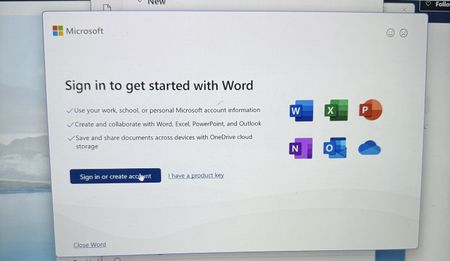
I am trying to sing into Microsoft 365, but every time I do, it takes me back to the login screen. I sing in with my outlook account, but I can't reach the applications. I can sign in on the browser, but not the applications on my computer. I have tried uninstalling and reinstalling M365, but the issue still persists206Views0likes1Comment
Teams stuck in "Loading latest updates..." error
I have been having the same error with Teams for the past few months, across two different computers, and with me having uninstalled and reinstalled Teams several times. Effectively, Teams works fine the first time it is reinstalled, but when I go to use it the following day, even if the computer has not been shut down in the meantime, I get a "Loading latest updates... in the meantime, you can still send and respond to messages" line in the toolbar. I cannot actually send or respond to messages (or receive them) while this is going on, though. If anyone has any suggestions, I would really appreciate the guidance - Teams is effectively unusable for me right now, which is a problem given how much we use it to communicate in my department.43KViews9likes17CommentsFeature Enablement for Windows (Ge) 26H2 -KB5121794 update broken
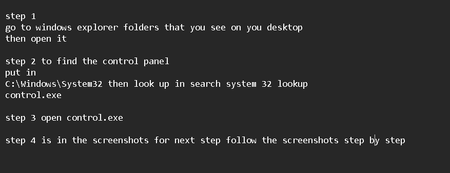
Feature Enablement for Windows (Ge) 26H2 -KB5121794 and Feature Enablement for Windows (Ge) 26H2-KB5121794 - 2026.07 D there was a error that came out and i have gave the steps on how to fix it i hope this fix the problem this is what the bad update looks like i all ready put steps in here how fix it164Views1like0CommentsError: The provided client secret keys are expired
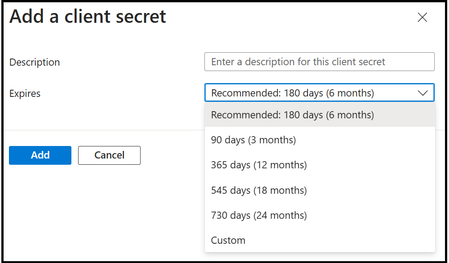
If you have been using Microsoft Graph Data Connect for a while, you might have configured a recurring pipeline that has been running for several months. In that case, you might run into this error: Operation on target task_name failed: ErrorCode=UserErrorOffice365SinkValidationError, 'Type=Microsoft.DataTransfer.Common.Shared.HybridDeliveryException, Message=Office365 data loading job failed to validate the sink data store. Possible causes are the name of the data store or its folder path is invalid, or the provided credentials do not have enough permission to access the folder. Detailed error: ADLS Gen2 operation failed for: Failed to get access token by using service principal. Error: invalid_client, Error Message: A configuration issue is preventing authentication – check the error message from the server for details. You can modify the configuration in the application registration portal. See https://aka.ms/msal-net-invalid-client for details. Original exception: AADSTS7000222: The provided client secret keys for app 'xxxxxxxx-xxxx-xxxx-xxxx-xxxxxxxxxxxx' are expired. Visit the Azure portal to create new keys for your app: https://aka.ms/NewClientSecret, or consider using certificate credentials for added security: https://aka.ms/certCreds. Trace ID: xxxxxxxx-xxxx-xxxx-xxxx-xxxxxxxxxxxx Correlation ID: xxxxxxxx-xxxx-xxxx-xxxx-xxxxxxxxxxxx Timestamp: 2024-11-26 18:35:23Z. Account: 'account_name'. FileSystem: 'container_name'. Path: 'folder_name'., Source=Microsoft.DataTransfer.ClientLibrary,' The main error is really "The provided client secret keys for app 'x' are expired." The solution is simple. Go back to Azure Entra ID to configure a new secret for the App Registration. You can follow the instructions at step 1b in our Synapse step-by-step instructions to add a new secret. Finally, be sure to add the new secret to the link services of the pipeline (you need to update both the source (Source/MGDC) and the destination (Sink/Storage). You avoid this issue completely by keeping track of the secret expiration date and creating a new one (and updating the pipeline) ahead of time. You can have multiple secrets in place, allowing for this secret rotation to be done proactively.Error: Consent not found
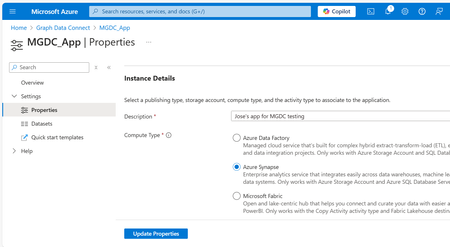
If you have been using Microsoft Graph Data Connect for a while, you might have configured a recurring pipeline that has been running for several months. In that case, you might run into this error: Operation on target <name> failed: ErrorCode=UserErrorOffice365DataLoaderError, 'Type=Microsoft.DataTransfer.Common.Shared.HybridDeliveryException, Message=Office365 data loading failed to execute. office365LoadErrorType: PermanentError. Consent not found. The consent for application [xx] was either never granted or expired. Learn more at https://aka.ms/mgdcdocs/appconsent., Source=Microsoft.DataTransfer.ClientLibrary,' The main error is really " The consent for application [x] was either never granted or expired.” If this is the first time you are running this pipeline, you could be missing the consent in Azure (it was not yet approved by your Microsoft 365 Administrator). If this was working before, it has likely been more than 6 months since it was approved, and the consent has expired. The solution is simple, done in just 2 steps: In the Azure Portal, go to the Microsoft Graph Data Connect application and update it. In the Microsoft 365 Admin Center, approve the application update. To update the application, search for the “Microsoft Graph Data Connect” service in the Azure Portal at https://portal.azure.com or navigate directly to https://aka.ms/MGDCinAzure to get started. Once there, click on the MGDC Application your created previously (that is the request for consent), click on Properties on the left navigation bar and then click on the “Update Properties” button. You do not need to change any of the properties. After you update the consent request, you need to approve the update in the Microsoft 365 Admin Center. This process is described in item “1h. Approve the Microsoft Graph Data Connect Application” in the step-by-step guide. Before you update the application properties in the Azure Portal, it will show in the list in the Microsoft 365 Admin Center as “Expired”. After you update the properties, it will show in the list as “Update Available”. Once you approve and everything is ready, it will show as “Approved.” Just click on the app and follow the steps to approve it. That is it! Now you can just run the pipeline again and everything will work as before. Until it is time to update the consent again in 6 months… You can avoid this issue completely by keeping track of the MGDC Application consent date and updating it ahead of time. You can update the application and continue to use the earlier consent until the Microsoft 365 Administrator approves the new one, allowing for this consent rotation to be done proactively. For more about MGDC for SharePoint, visit the main article at https://aka.ms/SharePointData.
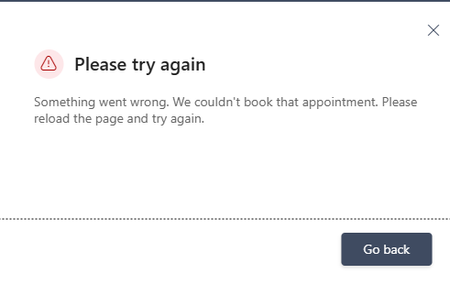
Booking Error Message
Microsoft Bookings public booking page displays “Something went wrong. We couldn't book that appointment,” but the appointment is actually created in the Bookings/Outlook calendar. The issue occurs even when using different browsers and Incognito mode. I checked availability and other things, everything looks fine. How to fix this?580Views0likes3Comments
What's wrong with my XLOOKUP formula?
I'm trying for the first time to define cells in an Excel worksheet with values selected from list, which is defined by a table. The table is in the same worksheet, to the right of my data columns. I was OK until I tried to make the cell look up the value in one table column (an ID) and display the corresponding value from another column. I'm defining the cell with data validation, type list, using this expression for source: =XLOOKUP(D2,CatTable[ID],CatTable[Categories]) Where D2 is a data cell, CatTable is the table's name, and ID and Categories are respectively the names of the ID and display columns. When I click OK, Excel says "There's a problem with this formula" (followed by some useless stuff that assumes I don't know what a formula is and entered one by mistake). What is wrong?128Views0likes3Comments
Grammar error in french
There is an grammar error in the french translation of the automatically added notice on every Forms: "When you submit this form, it will not automatically collect your details like name and email address unless you provide it yourself." It presently reads: "Lorsque vous envoyez ce formulaire, il ne collecte pas automatiquement vos détails, tels que le nom et l’adresse de courriel, sauf si vous le fournissez vous-même." There should be a "s" at the end of "vous-mêmes."159Views0likes0Comments
Can't sign in to microsoft account
I'm locked out of my microsoft account simply because I don't have access to the Authenticator App. I recently performed a factory reset on my phone with the Authenticator App on and now I can't sign in to my account. I have tried the self help forums and I got a response email saying: "It looks like you just used the Microsoft account recovery form (account.live.com) to request a password reset for e**************email address removed for privacy reasons. Because you've turned on two-step verification for your account, we ignore these requests but wanted to let you know. If you're having trouble signing in, go to (account.live.com/ResetPassword) and reset your password using security info such as your phone, alternate email address, or authenticator app." It won't let me use my phone number when I select it as a sign in option. I have tried the recovery forms to no avail.230Views0likes1Comment