error
221 Topics
What's wrong with my XLOOKUP formula?
I'm trying for the first time to define cells in an Excel worksheet with values selected from list, which is defined by a table. The table is in the same worksheet, to the right of my data columns. I was OK until I tried to make the cell look up the value in one table column (an ID) and display the corresponding value from another column. I'm defining the cell with data validation, type list, using this expression for source: =XLOOKUP(D2,CatTable[ID],CatTable[Categories]) Where D2 is a data cell, CatTable is the table's name, and ID and Categories are respectively the names of the ID and display columns. When I click OK, Excel says "There's a problem with this formula" (followed by some useless stuff that assumes I don't know what a formula is and entered one by mistake). What is wrong?53Views0likes3Comments
Booking Error Message
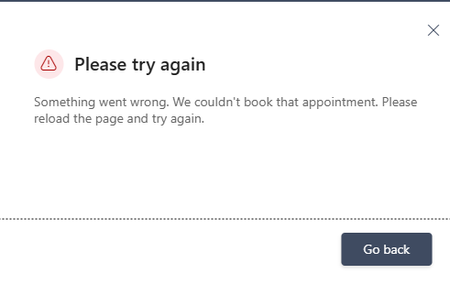
Microsoft Bookings public booking page displays “Something went wrong. We couldn't book that appointment,” but the appointment is actually created in the Bookings/Outlook calendar. The issue occurs even when using different browsers and Incognito mode. I checked availability and other things, everything looks fine. How to fix this?158Views0likes2Comments
Grammar error in french
There is an grammar error in the french translation of the automatically added notice on every Forms: "When you submit this form, it will not automatically collect your details like name and email address unless you provide it yourself." It presently reads: "Lorsque vous envoyez ce formulaire, il ne collecte pas automatiquement vos détails, tels que le nom et l’adresse de courriel, sauf si vous le fournissez vous-même." There should be a "s" at the end of "vous-mêmes."72Views0likes0Comments
Can't sign in to microsoft account
I'm locked out of my microsoft account simply because I don't have access to the Authenticator App. I recently performed a factory reset on my phone with the Authenticator App on and now I can't sign in to my account. I have tried the self help forums and I got a response email saying: "It looks like you just used the Microsoft account recovery form (account.live.com) to request a password reset for e**************email address removed for privacy reasons. Because you've turned on two-step verification for your account, we ignore these requests but wanted to let you know. If you're having trouble signing in, go to (account.live.com/ResetPassword) and reset your password using security info such as your phone, alternate email address, or authenticator app." It won't let me use my phone number when I select it as a sign in option. I have tried the recovery forms to no avail.159Views0likes1Comment
My printers don't work after I reinstalled Microsoft 365
I recently had to reinstall Microsoft 365. The software now works quite well, but I can't print a document in Microsoft Word or from anywhere in Windows 11. I have two printers: an HP Envy Inspire 7900e AIO and a Brother HL-L2420DW. Both printers worked before the reinstall, and both printers work without any problems on the Mac side of my laptop. (I use a Mac with Parallels to run Windows 11.) When I try to print from MS-Word in Windows 11, I select a printer from the list in the Print dialog. Then I have to wait for a printer connection. A few seconds later, I get a notice that the printer is "in an error state." My first thought was that I'll have to reinstall my printers in Windows 11, but I went looking for help. An AI helper I've consulted a few times walked me through a labyrinth of steps to fix the problem. The steps involved using the Command prompt or PowerShell (Administrator), but so far I've not had any luck. Seems to me I'll do as well by simply removing and reinstalling the printers. But that thought brings up more questions. I installed both printers using the manufacturer's instructions. For example, the HP AIO I installed with the full-feature software. My question: Do I need to do anything special before I reinstall the printers? Do I simply go to Printers & Scanners and delete my printers and then reinstall them? Also, will any of this affect these same printers on the Mac side?224Views0likes2Comments
Two-tier AD Certificate Services error importing cert into SubCA
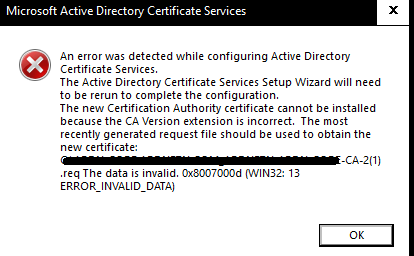
Hello, I'm new here, but excited about being able to hob nob with all you in furthering our IT goals. I'm setting up my root and Subordinate CA and I'm importing my rootCA issued, subCA certificate into the subCA. I get I get the same error when the subCA automatically exports its cert req to the root Ca and when I do it manually. I also get this error whether i'm using X.509 or p7b files. what's unusual about this error is that it seems to be referencing a .req file with a '(1)' added to the end of the title. Original .req did not have the '(1)'. any assistance I can get from the community would be appreciated.399Views0likes2Comments
Microsoft Forms interface stuck in Swedish after login – account language is Italian
Hello, Microsoft Forms is displayed in Swedish after I sign in, even though all my language settings are set to Italian (Italy). I have already checked the following: Microsoft account display language: Italian (Italy) Microsoft 365 interface: Italian Microsoft Edge preferred/display language: Italian The issue also occurs in an InPrivate session Before signing in, the Microsoft Forms website is correctly displayed in Italian. Immediately after signing in, the Forms dashboard and editor switch to Swedish. This suggests that the locale/language associated with my Microsoft Forms profile may be incorrectly stored as Swedish on the service side. I have already contacted Microsoft Consumer Support. They confirmed that they cannot access the Microsoft Forms backend or modify the Forms profile locale, and advised me to report the issue here and through the Microsoft Forms feedback function. I also tried the Feedback option inside Microsoft Forms, but clicking it does not open anything, both in normal browsing and InPrivate mode. Could someone please check whether the locale associated with my Microsoft Forms profile can be reset from Swedish to Italian (it-IT)? Thank you.835Views0likes4CommentsMajor Trouble Activating Win. 11 Pro After Hardware Change
Hello, I am trying to transfer a Windows 11 Professional product key to a different machine. It seems like no matter what I try, Windows will not reactivate. It activated just fine on the old machine. Before moving the installation to the new machine, I first signed into my Microsoft account on the old machine, per Microsoft's recommendation for hardware changes. I then signed into my Microsoft account on my new machine. When the activation failed on the new machine, I ran the troubleshooter in settings, which told me it couldn't find any devices to transfer the product key from. I then tried "slmgr /ato" which was unsuccessful but told me to call Microsoft. The chatbot told me to use a tool found here: "aka.ms/aoh". The tool said the "installation ID was unable to be activated". I'm feel like I'm out of options, however, I still want to use Windows. Any help would be greatly appreciated. Thank you.229Views0likes1CommentError after downgrading from windows 11
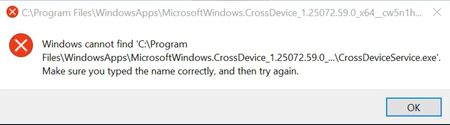
I have been getting this error for a few days now after i had upgraded to windows 11 and then downgraded back to 10 after it was very laggy. I checked the path it's asking but there are no folders with this name(no hidden ones either). Any solutions?223Views0likes2Comments