Recent Discussions

Program a cell reference from another sheet
I need to be able to take the formula "=sheet2!c12" and be able to change the "C" in the formula many times in the worksheet so I don't have to change it manually across the rows. I want a cell that will be able to change the "=sheet2!c12" C reference throughout anywhere I've programmed this. I was going to use "find and replace" but that's not only nooby, it's going to wind up being buggy. Is there where an INDIRECT formula works? I think the answer should be simple. Thanks!10Views0likes1Comment
show a due date using data from multiple columns
I have a spreadsheet in excel, such as the Table 1 below. For the 5 Due Date columns, I have conditional formatting set up to format the cells. See Image 1 for a list of rules applied to all Due Date columns. I'd like for another table to populate, showing only columns, Laboratory ID, Description, and any column that is highlighted per the conditional formatting rules. For example, I'd like the return table to look something like Table 2. Table 1. populated in cells G9:N12 ID Description Due Date 1 Due Date 2 Due Date 3 Due Date 4 Due Date 5 Out of Service? 1234 Instrument 1 11/17/2025 N/A 1/31/2027 3/11/2026 11/17/2027 FALSE 1235 Instrument 2 1/14/2026 2/17/2026 3/31/2027 1/23/2026 12/29/2027 TRUE Table 2. Conditional formatting rules applied to cells I9:M12 This Week = White font color, Red fill This Month = Red font color, Light Red fill Next Month = Dark Yellow font color, yellow fill Table 2. If today is 11/10/2025, the table will display columns ID, Description, and only column show for due dates within This Week: ID Description Due Date 1 1234 Instrument 1 11/17/2025195Views0likes7Comments
Microsoft Authenticator Passkeys for Entra ID on unmanaged devices
Hello, has anyone successfully registered passkeys on an unmanaged phone in an organisation with device compliance policies? Use case is to provide a phishing-resistant MFA option via Authenticator app for logging into apps on their desktop. Users already have authenticator app on their phone and do number matching MFA. https://learn.microsoft.com/en-us/entra/identity/authentication/how-to-register-passkey-authenticator?tabs=iOS When I select "Create a passkey" - I need to log into my account. However I'm blocked from successful authentication because I have conditional access policies to require compliant devices. As my mobile phone is not enrolled into Intune, I never get to the step where the passkey is created and registered. Based on the constraints - it seems like passkeys cannot be used for unmanaged/BYOD devices for organisations that have device compliance policies. It can only be used for users who have enrolled their mobile phone. Looking to see if anyone has tips or different experience using passkeys on unmanaged mobile phones to log into Entra?327Views0likes1Comment
Return of the Corkscrew with Spilled Arrays
I'm starting a new topic but do want to refer to PeterBartholomew1 post on accumulators here https://techcommunity.microsoft.com/t5/excel/ways-of-performing-accumulation-with-dynamic-arrays/m-p/2329035 This post was in 2021 and things have or may have moved on since then and I'm wondering if there is an easier way to achieve the following. The Corkscrew. I have seen a number of addins and other 5G functions which do far more than I want. I'm basically looking for a way to break the circularity in a corkscrew and it seems that if I can calculate the top row ie typically the opening balance without referring to the closing balance then all would be good. To add complexity I’m trying to fuse the actuals and forecasts in this single function. I have flags to determine the actuals and can use NOT actuals to get the forecasts (same flags) and can pic up the actual opening balance from the source data easily. As I will calculate all time periods for both I can then just add them (as actuals will be multiplied by the Actual flag and thus zero for forecast periods and vice versa for the forecasts. So I just need to calculate the forecast period which will be the same for the entire array block. The key is. getting the previous value. (for the inflows and outflows as they are already calculated I can just shift their arrays forward I col but adding a column in front to get the previous value so that is easy. I can then get the closing balance by adding the inflows and outflows that would fall in the middle of the corkscrew to this previous value to simulate an opening balance. The inflows and outflows can then be added easily and the closing balance simply summed. So all the clever work would go in the opening balance. The added complexity I have is that I am doing a multi row version. ie there are ‘currently’ 3 entities all with opening balances, all with inflows and outflows and closing balances. I want to calculate these in blocks of these entities – 1 row per entity but in a single dynamic array. But the corkscrew will be made up of 4 dynamic arrays – opening bal, inflows, outflows and closing. If someone has a better logic here then do let me know. I saw Jeff Robsons one from a few years back using sumifs for the middle bit. But again, I want to do these in separate blocks which does add a layer of complexity. The reason is that I can ( have) modelled with multiple entities together rather than separately which means one just needs to extend the blocks (VBA to the rescue as there will be a good number of them) as required and inputs can just be assigned to the respective entity (often locations around the world might just be a tiny rep office with hardly anything going on so no need for a fully blown model but can be detailed separately. I also have the ability to enable or disable entities so they are included or excluded from the calcs. SO back to the problem, Model attached. Blue cells mark the dynamic array function for the block. The inflows and outflows will come from other dynamic arrays. But this idea means that one can expand the middle if the top/bottom are taken care of with regard to the circularity. I’m trying to get something easy to implement ideally in a single function (with or without LET)Solved2KViews0likes32CommentsNo labs for MB-500 in skillable and xtreme labs (for all MB series)
Hi, From past few months, we are unable to find the labs for MB-500. It's causing us trouble to do the trainings. Skillable and Xtreme labs providers are saying there is a problem from Microsoft end only. Kindly advise us when can we get the labs available.6Views0likes0Comments
Multiple greyed out buttons
I have a spreadsheet that is stored on a Teams page that multiple people can access. I used to have full functionality but now a lot of the buttons are greyed out. On the Review tab, it won't let me select Unprotect Sheet as shown in the attachment. All of the toolbars, Home, Insert, Page Layout, etc. have greyed out buttons. All of the sheets are ungrouped so that doesn't seem to be the issue. Does anyone have any ideas on how to get the functionality back?40Views0likes1Commentno me funciona la barra espaciadora (solo en word)
hola, estoy teniendo un inconeveniente con la aplicaccion de word, comienzo a escribir bien normal, escribo por ejemplo (hola, todo bien) y se escribe ¨holatodobien] por mas de que toque la barra espaciadora no funciona, si hago deble clic muy fuerte si funciona pero sino no, ya probe todo, cambie el teclado no funciona, fui a aotras aplicaciones y si funciona, es solo con word el probelma, necesito si alguien sabe como hacer quee tocar, capaz toque algo yo y no se por favor ayudaaaa22Views0likes1Comment- 32Views0likes1Comment
Please update Excel to handle more than 15 digit numbers!
I'm a professional database designer, and this limitation has caused me no end of headaches. The problem: numbers that are more than 15 digits long have all digits after the 15th converted into zeros. Microsoft provided workaround: format the the field as text. This workaround is only useful if you are doing data entry directly into an existing Excel spreadsheet that you are able to format the cells ahead of time. It's incredibly unhelpful when you are pushing and pulling data from different data sources. For example, if I need to push data out of a program like FileMaker to Excel, and the system I am pushing from has numeric fields (in particular ID fields), excel sees them as numbers and replaces the digits after the 15th. This jacks up formulas as well as any data synching possibilities. In situations like that, I end up having to export the data as .csv file, and then pull it in to an excel sheet and then do a bunch of conversion options on import (which does not always work, btw). But this is not a practical solution for every day users who are not tech savvy. I should be able to export the data directly to excel without the data being converted. This has been a big problem for every client I have that requires data being pushed to Excel. And this problem has existed for decades. Other spreadsheet programs (like google sheets) do not appear to have this issue. Can someone please explain why Excel continues to cling to this archaic standard? Are there any plans to update Excel to handle more than 15 digits? I know I am not the only one who has run into this problem. I've seen all kinds of posts about it. But trying to let Microsoft know how much of a problem this is has been a challenge. Their article on the subject had a link to give product feedback, and that link led me to this space. So here it is: product feedback for Excel. PLEASE FIX THIS! Thank you. Chris1.4KViews3likes8Comments
Name Manager using for create name which is contain atleast two name.
Hello. I creating somthing in excel with tables. These tables has thier own name, and can be dynamic or not. Any way. I using list in cell to select each data from a tables column. For that I created names with the content of a column. Unfortunatly i had to make a kind of name which is contain atleast 2 columns. These can grow dynamicly. So I think a plus helper tabel is not the right sollution for that. I think about 3 kind of solution. 1. =UNIQUE( VSTACK( INDEX(Tabla1[#Data];0;MATCH("Type_name";Tabla1[#Headers];0)); INDEX(Tabla2[#Data];0;MATCH("Column_name";Tabla2[#Headers];0)) ) output #name? 2. =UNIQUE(VSTACK(Lista_A; Lista_B)) lista_A as a name output #name? 3. created a helper table with the existing names. Created another name and use the table in it. output was the elements contained by the helper tabel, and the lista_A and lista_B tables each dedicated column. So How can i create list for a cell or cells from two column which are dynamicly growing, without a user needs to touch the core modell? Best Balázs9Views0likes0Comments
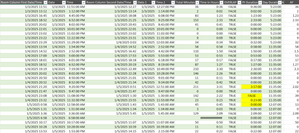
Finding time duration between a start date & time with end date & time
Hi all! I'm looking for any formula or power query to calculate a total time duration within a day, given the start date, start time, end date, end time. Most of the dates will equal the same but there are some with the end date being the next day. I'd like to be able to exclude any overlaps as well. Currently, I have a large embedded IF formula: =IF(AND($G4=$O4,$H4<$H5,$P4>=$H5,$P4<$P5,$H4<$H3),$P4-$H4,IF(AND($G4=$O4,$G4>$G3,$H4<$H3,$P4<$P3,$H4<$P3,$P4<$P5),$P4-$H4,IF(AND($G4=$O4,$H4>$H3,$H4>=$P3,$P4>$P3),$P4-$H4,IF(AND($G4=$O4,$H4=$P4),0,IF(AND($G4=$O4,$H4<$P3,$P4<=$P3),0,IF(AND($G4<$O4,$H4<$P3,$P4>$H4),($P4+1)-$P3,IF(AND($G4=$O4,$O4<$G5,$O4<$O5,$H4<$P3,$P4>$P3),$P4-$P3,IF(AND($G4=$O4,$G4>$G3,$H4>$H3,$P4>$P3,$H4>$P3),$P4-$H4,IF(AND($G4=$O4,$G4<$O5,$P4>$P3,$P4>$H5,$H4>$H3,$H4<$H5),0,IF(AND($G4=$O4,$O4=$G5,$H4<$P3,$P4>$H5,$P4>$P3,$P4>$P5,$P2>$P3),$P4-$P2,IF(AND($G4=$O4,$H4<$P3,$P4>$P3,$P4>$P5),$P4-$P3,IF(AND($G4=$O4,$H4<$P3,$P4>$P3,$H4<$H5,$P4<$P5),$P4-$P3,IF(AND($G4=$O4,$H4<$H5,$H4<$P3,$P4>$P3,$P4>$P5),$P4-$P3,IF(AND($G4=$O4,$O4=$G5,$H4<$P3,$P4>$H5,$P4>$P3),$P4-$P2,IF(AND(ISBLANK($O4),ISBLANK($P4)),0,IF(AND($G4<$O4,$H4<$P3,$P4<$H4),($P4+1)-$P3)))))))))))))))) This seems to work for the most part but there are a few that I just can't get. I also pulled up my query and started to enter in the time durations manually and it couldnt come up with anything automatic for me. There must be an easier way for me to do this other than trying to create an IF formula for each answer that turns up incorrect. I have a screen shot below.47Views0likes1CommentConditional data validation drop downs
I have a table with everyone's availability. Column A is names, Column B is Monday morning, Column C is Monday afternoon and so on. In another cell, I want a drop down list of names if they're available at that time. If( [Monday Morning] = "Available") put it in the drop down list and then do that for the whole week. When I try to do formulas in the data validation page it doesn't work.30Views0likes1CommentUnable to Print Document in Word Web
Hello Community, I’m experiencing an issue where I’m unable to print a document using Word Web. When I select the print option, nothing happens or the print dialog doesn’t respond. Here’s what I’ve already tried: Updated the printer driver to the latest version. Performed troubleshooting on my browser. Despite these steps, the issue persists. Has anyone else encountered this problem? If so, what solutions worked for you? Any guidance or official workaround from the Microsoft team would be greatly appreciated. Thank you in advance for your help!23Views0likes2Comments
Issues With PowerQuery Using 2 Tables with different Data Sets
Im having issues using power query when I try to use 2 tables to make a pivot table. I am using a sheet that pulls information from a system I use for maintenance. The first screenshot is a subset that breaks down sub items for a main "work order". The next 2 screenshots are from a separate table that show the main "work order" and has an "Equipment Pool" that shows who owns the vehicle in question. When trying to create a pivot table, a lot of information shows as blank. (see bottom screenshot) I am wondering what I am doing wrong for it not to be able to pull the "Equipment Pool" when it aligns to the "Asset ID". Any help is appreciated. (For security reasons I have not put all information from the tables, only the relevant ones)114Views0likes4CommentsData Pulling
I'm trying to figure out the best way to pull data together from multiple tabs within an excel file. The file is made so that it can track issues within reports that are discovered. I'll try to break it down the best I can to explain what I have and what I'm trying to do. Within the file there are 5 tabs that are considered locations and they are named: LX, LV, CR, HR, FL Each tab is set up the same way with the only real important information in these columns of a table Column A - PCR Date Column C - PCR Owner Column G, I, K, M - Modification Category (1-4) these fields are actually drop down options from the Category Master List Within the file there is a 6th tab that has at able in it that is called Category Master List. Column A - Options for the dropdown in the above tab Modification Category columns Column B - Breakdown into one of three main categories (Billing, Compliance, Quality) Now this is what I'm trying to do: Fiscal Year Data (September 2025-August 2026) - I need to see how many times each of the dropdown options within the Master List show up in column G, I, K, M for each of the 5 location tabs. Monthly Data - I need to see how many times each of the dropdown options within the Master List show up in column G, I, K, M for each of the 5 location tabs along with how many times there is an entry with a date within that month. I would like to try and figure out how to put everything into one data table/chart type thing so it's easier to see and compare. Currently, everything needed is across a few different pivot tables and I would really like the data to pull itself automatically instead of me having to go in and copy all the data from one spot into another just to get the pivot results. Below is what I'm having to look at currently.105Views1like2Comments
Forms not loading while presenting PPT in Teams
I created a PowerPoint presentation and added a couple of polls by selecting the Forms tab in PPT. The polls appear correctly in the slides and the polling function works when not presenting live in Teams, but once I select Present in Teams, the polling slides only show blue boxes with no other content.909Views2likes2CommentsHow to write a script or any PQ or in Excel to download the zip files from a Webpage
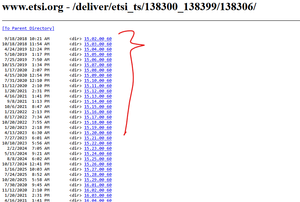
Dear Experts, Greetings! https://www.etsi.org/deliver/etsi_ts/138300_138399/138306/ Could you please help me on how to download the pdf.zip files from above for all the versions? Using a single command in Excel or PQ-option. Thanks in Advance, Br, Anupam146Views1like2Comments






Events
Recent Blogs
- This update to Microsoft OneNote on Windows gives you more flexibility over proofing languages in your notebook pages.Dec 16, 202563Views0likes0Comments
- Confidently migrate user data across tenants. Automate cutover, keep teams connected, and stay secure.Dec 16, 2025127Views1like0Comments