Recent Discussions

Signature image not showing up properly on email to other providers.
Hi, I have created a signature for my email, as I am setting up a business. I have attached my logo into the signature, which is saved locally and put into the signature via the Insert Image button. When I send test emails to my personal Gmail account, it displays as either the CID in brackets or the alt text in brackets if an alt text is set. The image is a JPG but I have also tried PNG to see if that works. How the signature looks in Outlook (and when being received in Outlook, tested with another Outlook email): How it gets received in non-Outlook email providers: It also attaches the image as an attachment rather than inserting it in the text, and it creates an attachment called noname, which opening it up seems to show HTML code along with the signature details and other things that text editors cannot display as text: Also to note, I have set up DKIM, SPF and DMARC to see if its an issue with mail authentication. Is this an Outlook or signature issue? Or is this an issue with Gmail? I tested with a different business email which also uses an image and text with formatting, and it displays as expected, with the formatting as well, in my Gmail. Thanks in advance15Views0likes1Comment
Issues signing on to outlook.com
Hello, I'm having issues signing on to outlook.com. Either through the app or web, keep getting an error. On the Outlook Mobile app, I get "An error occured during authentication". On the web I get the error below. Any suggestions appreciated. UTC Date: 2026-05-12T19:49:17.826Z Client Id: Session Id: Client Version: 20260501001.13 BootResult: fail Back Filled Errors: Unhandled Rejection: SyntaxError: Failed to execute 'json' on 'Response': Unexpected end of JSON input:undefined|undefined:undefined|undefined:undefined|undefined:undefined|undefined:undefined|undefined:undefined|undefined:undefined|undefined:undefined|Unhandled Rejection: SyntaxError: Failed to execute 'json' on 'Response': Unexpected end of JSON input:undefined|undefined:undefined|undefined:undefined|undefined:undefined|undefined:undefined|undefined:undefined|undefined:undefined|undefined:undefined|undefined:undefined|undefined:undefined|undefined:undefined|undefined:undefined|undefined:undefined|undefined:undefined|undefined:undefined|undefined:undefined|undefined:undefined|undefined:undefined|undefined:undefined|undefined:undefined|undefined:undefined|undefined:undefined|undefined:undefined|undefined:undefined|undefined:undefined|undefined:undefined|undefined:undefined|undefined:undefined err: COMException esrc: StartupData et: ServerError estack: Error: 401 at Object.w [as createStatusErrorMessage] (https://res.public.onecdn.static.microsoft/owamail/hashed-v1/scripts/owa.mailindex.06641a1a.js:1:806) at https://res.public.onecdn.static.microsoft/owamail/hashed-v1/scripts/owa.mailindex.06641a1a.js:1:183650 st: 401 ehk: X-OWA-Error efe: MW4PR03CA0157 reqid: a64783dc-2fed-f293-3a10-efba70b9cc2e cv: BDANTiCGGDAkhZfLh5/96J.3.1475Views0likes2Comments
No New Folder Creation?
I'm in Mac Outlook 16.112, using Legacy view. I'm trying to add a new sub folder and that option is disabled on every right click menu I can find, and doesn't appear in any ribbon menu. What is going on? I have quite a few subfolders, all created using the right-click option. Why is that suddenly unavailable? This is incredibly frustrating. -Monica Sandler Director of Customer Success EstateWorks Systems96Views0likes2Comments
Non-Office 365 accounts repeatedly request sign-in each time Outlook (new) is opened or restarted
My Setup : Operating System: Windows 11 (fully updated, including latest Dell laptop BIOS/firmware) Office Version: Microsoft 365 Apps (licensed under Office 365 Standard for one of the email accounts) Outlook Version Used: Primarily the New Outlook for Windows Email Accounts Involved: One Office 365 Exchange account: email address removed for privacy reasons (credentials persist without issues) Multiple Gmail/IMAP/SMTP accounts (e.g., email address removed for privacy reasons, email address removed for privacy reasons, email address removed for privacy reasons, email address removed for privacy reasons) (all require reauth every time Outlook is opened) Symptoms Non-Office 365 accounts repeatedly request sign-in each time Outlook is opened or restarted. No error messages—just continuous web auth prompts for Gmail, SMTP, and IMAP accounts. The single licensed Office 365 account retains its credentials without issues. Troubleshooting Steps Already Tried Uninstalled/Reinstalled Office 365 Completely removed Microsoft 365 (via Apps & Features or Control Panel). Reinstalled Office 365—accounts still persisted upon first launch of Outlook, leading to repeated sign-in prompts again. Cleared Windows Credential Manager Removed all stored credentials related to Outlook, MicrosoftOffice16_Data:OAUTH2, Gmail/IMAP references, etc. Verified credentials were gone before relaunching Outlook. Removed Registry Keys & Data Under HKEY_CURRENT_USER\Software\Microsoft\Office\16.0\Common\Identity, deleted leftover Identities referencing old accounts. Under HKEY_CURRENT_USER\Software\Microsoft\Office\Outlook\Settings, removed the Accounts key containing JSON references to old addresses. Removed/cleaned up values in the Data subkey referencing _AccountSignaturesMigrated, _UserOptionsMigrationState, etc. Deleted Local AppData & Roaming Outlook Folders %LOCALAPPDATA%\\Microsoft\\Outlook %APPDATA%\\Microsoft\\Outlook Checked/removed possible OST/PST data in %USERPROFILE%\\Documents\\Outlook Files Removed Email & Accounts in Windows Settings Under Windows 11 Settings → Accounts → Email & accounts, confirmed the problematic addresses were removed. Checked for Security Software Conflicts No third-party antivirus, firewall, or VPN is interfering. Tried “New Outlook” Command-Line Wipe Attempted outlook.exe --clearLocalState (or olk.exe --clearLocalState) to remove local cache. Re-launched Outlook, re-added accounts—still facing reauth loops. Ensured Windows & Dell Firmware/Bios Up to Date Double-checked the system is fully updated (Windows Updates, Dell updates). Result Issue Not Resolved: Gmail/IMAP accounts continue prompting for sign-in each time Outlook starts. Only the Office 365 Exchange account retains its credentials as expected. After exhaustive attempts, reverted to Classic Outlook because it does not prompt for repeated sign-ins. Please let me know if this is a known bug that Microsoft is actively addressing. Are there any other steps I can take beyond local registry/credential cleanup to permanently resolve the repeated OAuth prompts?2.5KViews0likes3Comments
Microsoft Authenticator - after toggling Screen Lock on Phone
Hello all, I am going crazy over this and really need help urgently. I made my account 'passwordless' and depended on 'MS Authenticator App' to login. I was trying to take back up of my phone and thus turned off screen lock temporarily. When I turned it On again, MS Auth app won't let me sign-in. So, I tried to use the copilot and it asked me to use my 'account recovery code'... which I did and then this is the message I get: ---------------------------------------------------- Because you turned on two-step verification, you need up-to-date security info to sign in to your account. During the waiting period you will not be able to sign in to sites or services with your Microsoft account, but will be able to sign in to devices or use your existing app passwords. You can avoid the wait by: Using a trusted device. If you have a device that doesn't require codes, use it now and update your security info. Finding your security info. Any chance it isn't entirely lost? [I just need to reattach/re-enable phone auth/my account using a QR scan] ------------------------------------------------------- Copilot also asked me to remove the hotmail account from my auth-app, restart the phone and try to access the security page to scan the QR code and re-enable the auth through phone. Now here's the thing. Although I am in my email account [it was already open in my browser - and it did not log-off automatically] I am unable to access the security page on my microsoft account unless I approve it via my Auth App. And my Auth App doesn't have the Hotmail account, because Copilot asked me to remove it and re-attach it. I'm stuck in a loop. Text Messages are limited to few attempts, so no luck there either.82Views0likes2Comments
Safe senders list for a Shared Mailbox
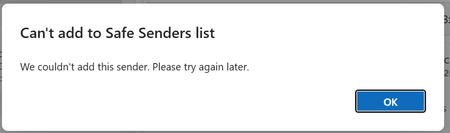
Good morning We have a shared mailbox for support. When we reply to a customer, we include this email address in CC. A member of the team accidently marked the shared box as spam - and can we get it back to a "safe sender"???? NO! I cannot believe how difficult this task seems to have been so far. We've tried setting rules, looked in Defender and Exchange, even tried Powershell stuff. If our support email is included in TO or CC it drops into Junk. If we manually move the message or ask it to be unblocked we just get the following: I don't understand why we cannot add ourselves as a safe sender. Can anyone PLEASE help practially to help us? Many thanks.65Views0likes1CommentNew Outlook Comes With New Workflows: What Is Still Missing for You?
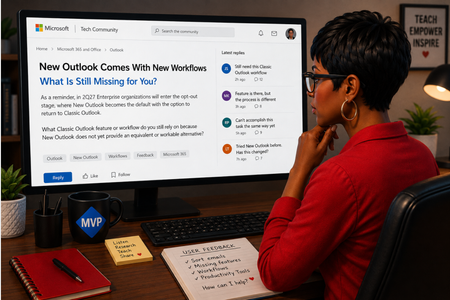
As a reminder, in March 2027, Enterprise organizations will enter the opt-out stage (Message ID 949965), where New Outlook becomes the default with the option to return to Classic Outlook. That is not too far away, especially if you need time to get your workflows and systems in place. That is why I keep coming back to this: New Outlook comes with new workflows. So I’m curious about where New Outlook workflows still fall short for you. A lot has changed. Users now have mail merge, Quick Parts, Unified Inbox, and partial PST support, with Advanced Mail Merge also on the way. New Outlook also has 30+ features and capabilities that are not available in Classic Outlook. What do you still do in Classic Outlook that you cannot accomplish, or cannot accomplish well, in New Outlook today? And if you tried New Outlook a year or two ago and went back to Classic Outlook, I’d be especially interested in what is still keeping you there now. I’m not looking for “I hate New Outlook.” I already know plenty of people do. I want to know the specific feature or workflow that still matters to you. PS: And be kind to me. I don’t work for Microsoft. I’m an MVP who teaches their products. 😉 traccreations4e-p26 8/26/2026
Legacy Outlook for Mac from 01 October 2026
The following points summarise my concerns regarding key Legacy Outlook for Mac issues arising from the Exchange Web Services (EWS) retirement on 01 October 2026: I route my Gmail account via IMAP/POP to my subscription Microsoft 365 Family Outlook for Mac, Legacy version. The Legacy version is great because I use plenty of my own “On My Computer” folders, subfolders & client-side rules for routing incoming messages. Whereas the New version loses this important functionality. I’m confused & concerned by the only official MS Support advice on this subject below that the Legacy version will not continue from 01 October 2026 when EWS for Exchange Online accounts is retiring: https://support.microsoft.com/en-us/outlook/end-of-support-for-legacy-outlook-for-mac I understand that Gmail is not an Exchange Online account & AI suggests this EWS retirement will not impact my Legacy Outlook. However, it’s not crystal clear that I will maintain full functionality - particularly my folders & client-side rules, contacts, calendar, tasks & notes, etc. And when I receive my regular MS 365 updates from October, will I still receive updates for Outlook generally, but not the Legacy component, or will I not receive any updates for Outlook whatsoever? As a safeguard, should I save my very large Outlook for Mac data on 30 September & if so, what would be the best format? I guess we won’t know how it will really work until October, but I welcome feedback from anyone that’s dealt with this dilemma already & I especially look forward to definitive clarifications from MS technical staff. 🤞 Much obliged...91Views0likes2CommentsHow to turn off email forwarding that I did not set.
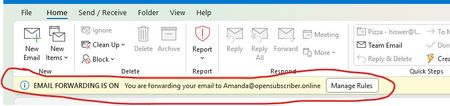
Started classic outlook this morning to find this in the header in a yellow band... "i EMAIL FORWARDING IS ON You are forwarding your email to mailto:Amanda@opensubscriber.online" I have NO idea who that is, nor did I set it. How to I remove it/fix it?? Dennis5mile291Views1like11CommentsOutlook Meeting Updated, But the Forwarded Attendee Never Received It
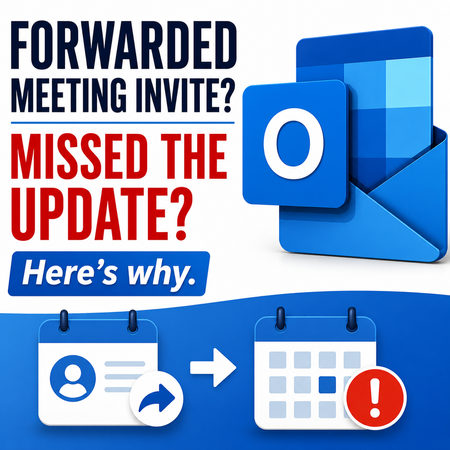
Accepted a forwarded Outlook meeting invitation but never received the meeting update when the organizer made changes? This behavior surprises many Outlook users and is often misunderstood. Learn why it happens and how organizers can prevent attendees from missing future updates. https://traccreations4e.com/forwarded-outlook-meetings-dont-receive-meeting-updates/ #traccreations4e 6/23/2026
Conditional Formatting to New Outlook Calendar
Please bring Conditional Formatting to the New Outlook Calendar. This is a feature we have in Classic Outlook and something I use regularly to help maintain my organization. I've programmed it to color Work Time separate from Travel Time and various meeting categories so that visually I know a lot about the appointment just by the color.Solved839Views1like3CommentsNew Outlook: "Changing the ImapRemoteServerInfo is not allowed" after host migration
Hi everyone! I've migrated my domain/mailbox from one IMAP host to another in May. It cannot be added to New Outlook for Windows — fails instantly with INVALID_CREDENTIALS INTERACTION_REQUIRED, even when I deliberately enter a wrong password (so it's failing before authentication is even attempted). Using DevTools (olk.exe -devtools), the Network tab shows the real rejection from Microsoft's backend: Changing the ImapRemoteServerInfo is not allowed. Attempted to change it from imap.olddomain.sk to imap.newdomain.sk So New Outlook has a cloud-mailbox / connected-account shadow record for this address, pinned to the old host from a previous add attempt, and the backend refuses to update it. What I've confirmed: Webmail and a second mailbox on the same domain/host both work fine → not credentials, not the host. The account does not appear in Settings → Accounts (so I can't use "Remove from all devices" which worked on my first account). It's on no other device or client. App reset didn't help (record is server-side, not local). It's been ~7 weeks, so any 30-day inactivity purge hasn't cleared it How do I get this stuck cloud-mailbox / connected-account record purged when it isn't attached to any removable account? Is there a way to force it, or does this need Microsoft backend action?188Views0likes5CommentsExcessive Spam, Junk Mail from "geeksquad" email address?
Experiencing some frustration with the following, and thought to see if anyone else is having this issue and/or have found a solution. I've been getting an excessive amount of spam/junk for the last two months, and the majority of it is arriving directly in my inbox. While some of the messages do not have email addresses that I can see (and thus, I frustratingly can't add them/their domain to my spam/block list), the largest number is coming from the email address mailto:geeksquad@emailinfo.geeksquad.com This is obviously a "known" and "safe" email address for BestBuy's Geeksquad. I was reluctant to add it to my "Blocked Senders and Domains" list because I wouldn't want any legitimate BestBuy purchase/reminder/receipt emails being permanently blocked. Sadly, the number of emails haven't gotten so bad, I unfortunately ended up doing just that. What's more, I also removed the same email address from my "Safe Senders and Domains" list. Despite this, I'm still getting tons of spam from the above email address, and most is still arriving directly to my inbox. I'd be happy to just have these email redirected to my junk/spam folder at this point, but it's all becoming quit maddening and annoying. Has anyone else experienced this phenomenon and/or was able to "fix" this from happening? Thank you, and appreciate your collective insight.77KViews5likes95CommentsNew Outlook Office.js Html body insert fails with error 9011 HtmlSanitizationFailure
I am building an Outlook web add-in for New Outlook on Windows. Calling mailbox.item.body.setSelectedDataAsync, prependAsync, or setAsync with CoercionType.Html fails with HtmlSanitizationFailure code 9011 on an empty HTML compose body, even for minimal Learn-style bold markup. CoercionType.Text works on the same client. Is 9011 a known New Outlook issue? Where is this error documented? What is the supported way to insert formatted HTML from an add-in?106Views0likes1CommentAptos preset font size in new installations
Hi, Can anyone confirm what the default Aptos font size in Outlook should be on first use, before any user changes are made to the settings? I’m seeing different default sizes depending on the application: 11 pt — Microsoft 365 Outlook for Windows (Classic) 12 pt — Microsoft 365 Outlook for Windows (New Outlook) 12 pt — Outlook for iOS 12 pt — Outlook for Android Based on the above, it appears that 12 pt may be the current standard default across most Outlook clients, with Classic Outlook for Windows being the exception. However, I haven’t been able to find any definitive Microsoft documentation confirming what the intended default Aptos font size should be. Can anyone confirm whether 12 pt is the official/default size?120Views0likes1CommentOpen the first message in the list
In the past few weeks, something changed to where I no longer have the option of having the first email selected when I navigate to a folder in Outlook (desktop or web client). There used to be an option in settings "What do you want us to do when you open Outlook?" that had a setting of "open the first message in the list", but that is now missing. How do I get that option back? Is there some setting I need to enable to make that option come back? I know the new UI is being forced on us now, but I haven't seen anything indicating that this was a feature that was removed - the option of not having it auto-select the first message was always an option as well, so I don't understand why a way to toggle between the two is no longer present.207Views0likes3Comments




Events
Recent Blogs
- Hello, Outlook community. I’m Vicki Milton, a Principal Product Manager on the Outlook team. Over the last year, we’ve added important capabilities across areas such as offline support, shared mail...Jun 03, 20265.6KViews1like8Comments
- Copilot in Outlook is now agentic, taking on the ongoing work of running your inbox and calendar. It triages emails, reschedules conflicts, and surfaces what matters most before you even ask. ...Apr 27, 202663KViews10likes6Comments