outlook
24 Topics
New Account is blocked
Hi everyone, I wanted to create a new email address because I changed my lastname. Unfortunately, the process is being blocked due to alleged unusual activity. ?! I’ve already tried using other devices and networks. The technical support agent cannot help me in the Chat. Please help me. Thanks...214Views0likes3Comments
Formatting wont transfer from Excel to Outlook
The last 2 or 3 days every time I copy and paste from Excel into Outlook it drops all of the formatting. I've adjusted my settings to keep formatting, tried manually telling it to keep the formatting. It simply wont. I've googled and searched the Microsoft website to no avail.278Views0likes2CommentsNeue Kontoerstellung wird blockiert
Hallo zusammen, Wegen meiner Namensänderung wollte ich eine neue Mailadresse erstellen. Leider wird die Erstellung wegen angeblicher ungewöhnlicher Aktivitäten blockiert. Ich habe es schon über andere Geräte und Netzwerke probiert. Bitte helft mir. Danke...85Views0likes0Comments
Office 2021 Classic not showing images in Signatures
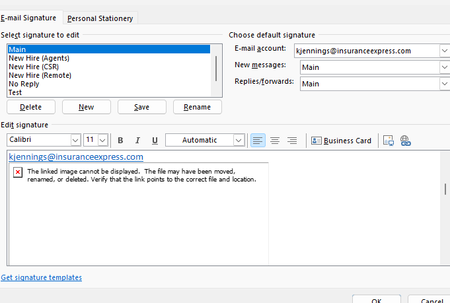
Hello I work in IT and trying to find a solution to this problem that our outlook are not showing the images in the signatures. Our Outlook 2021 Version is 2608, Build 16.0.20326.20072. This occurs even when creating a completely new signature and inserting a new local PNG/JPG using Insert Picture. The image initially appears correctly when inserted, but after saving/reopening the signature it becomes a red X with the message "The linked image cannot be displayed. The file may have been moved, renamed, or deleted." Existing signatures have the same problem. Recreating the signature does not resolve it. Here are some details we tried already. BlockHTTPimages is not configured in either the normal Office registry location or the Policies location. Uninstall Reinstalling Office didn't work We are under AD profiles, with new profiles and even rebuilding current profiles didn't solve it. Attempted a full reset of windows 10/11 didn't work. This appears to be an Outlook/Word signature-image regression rather than a corrupted signature or externally hosted image. Per Microsoft status that this should've been resolved back in June but the issue still persisted. https://support.microsoft.com/en-us/support/known-issues/images-are-not-displayed-in-emails-newsletters-or-signatures-in-classic-outlook?utm_source=chatgpt.com I did try using ChatGPT to help with the issue. I will share the thread link here if you wish to look into of all troubleshoots that was attempted. https://chatgpt.com/share/6aac0312-a08c-83ea-b1a8-2192b3677136 If anyone has any better knowledge of finding a solution as we have reported this issue to Microsoft via the help feature in outlook classic, but gotten no response since the last month since the issue started.331Views1like1CommentPhone verification is not working
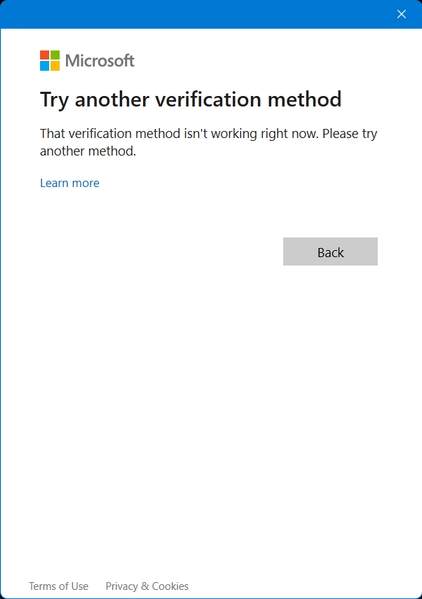
Hello. I was logged out of my accounts when I opened Outlook on Windows. I managed to log into the first one, but I forgot my password of the other one. I am struggling to log into that account. That account is not connected to an authenticator app, but is connected to my phone number. I tried resetting my password using my phone and entered last 4 digits of my phone number, but the method is NOT WORKING for some reason. I also tried verifying my account with my phone number, but I didn't get any code from Microsoft. All the accounts that I buy online with use this email account. Please help.332Views0likes4CommentsOutlook Not Syncing
Outlook is not syncing my emails properly. New emails are not coming, and sometimes sent emails stay in the outbox. I also get connection or server error messages. I have checked my internet connection and restarted Outlook, but the problem still continues. Please suggest how to fix this issue.12KViews4likes5Comments
Feature request: meeting cancellation by organizer in M365 Copilot
During a recent usage of M365 Copilot, I identified a capability gap that significantly limits calendar-related automation. Current situation Copilot can: find meetings in my calendar, identify meetings where I am the organizer, interactively ask which meetings should be processed. However, Copilot is currently not able to cancel organizer-owned Outlook meetings and send cancellation notifications, although this is a natural next step in the workflow. Requested capability Cancel individual meetings organized by the user Cancel recurring meetings or selected instances Send a custom cancellation message to attendees Support bulk processing (e.g. vacation preparation) Example use case Before a planned absence, a user asks Copilot: Find all meetings during my vacation. Show only meetings where I am the organizer. Ask me for each meeting whether it should be cancelled. Cancel the selected meetings and send a predefined message such as: "Florian planned absent." This would be a valuable productivity enhancement for Outlook and Copilot users who manage large numbers of meetings. Could you please advise whether this capability is already planned, whether a feedback channel exists, or which product team would be the appropriate owner for this request?68Views0likes0Comments"Add to Calendar" functionality in the New Outlook
When a user receives an email with a Calendar meeting attached to it, they are able to click on the dropdown in the attachment and select "Add to Calendar". This functionality is supposed to add the meeting to the calendar without opening the attachment/invite itself. However, when the user clicks on "Add to Calendar", the meeting is displayed temporarily on the Calendar and then disappears. If another calendar meeting is being "Added to Calendar", it doesn't show up at all, even temporarily. Occasionally, the second meeting is added successfully, however, the first meeting then disappears. This behaviour is reproducible using different, independent accounts and devices - personal devices, corporate devices, personal Live accounts, corp email accounts, etc. The only thing that does work is to open the attachment and use "+Add to Calendar" feature from the invite. Any ideas on what is causing this or how to address this?371Views0likes2CommentsHow do I stop Copilot from adding to my Outlook?
I'm using Outlook Classic, and every day Copilot adds itself to my Outlook. I right-click and select uninstall, but the next day it comes right back. I do not want Copilot. How do I stop Copilot from adding to my Outlook. I've included screenshots to see what I'm talking about. Version: Microsoft® Outlook® for Microsoft 365 MSO (Version 2504 Build 16.0.18730.20122) 64-bit9KViews4likes18Comments