Recent Discussions

Signature image not showing up properly on email to other providers.
Hi, I have created a signature for my email, as I am setting up a business. I have attached my logo into the signature, which is saved locally and put into the signature via the Insert Image button. When I send test emails to my personal Gmail account, it displays as either the CID in brackets or the alt text in brackets if an alt text is set. The image is a JPG but I have also tried PNG to see if that works. How the signature looks in Outlook (and when being received in Outlook, tested with another Outlook email): How it gets received in non-Outlook email providers: It also attaches the image as an attachment rather than inserting it in the text, and it creates an attachment called noname, which opening it up seems to show HTML code along with the signature details and other things that text editors cannot display as text: Also to note, I have set up DKIM, SPF and DMARC to see if its an issue with mail authentication. Is this an Outlook or signature issue? Or is this an issue with Gmail? I tested with a different business email which also uses an image and text with formatting, and it displays as expected, with the formatting as well, in my Gmail. Thanks in advance16Views0likes1Comment
Microsoft Authenticator - after toggling Screen Lock on Phone
Hello all, I am going crazy over this and really need help urgently. I made my account 'passwordless' and depended on 'MS Authenticator App' to login. I was trying to take back up of my phone and thus turned off screen lock temporarily. When I turned it On again, MS Auth app won't let me sign-in. So, I tried to use the copilot and it asked me to use my 'account recovery code'... which I did and then this is the message I get: ---------------------------------------------------- Because you turned on two-step verification, you need up-to-date security info to sign in to your account. During the waiting period you will not be able to sign in to sites or services with your Microsoft account, but will be able to sign in to devices or use your existing app passwords. You can avoid the wait by: Using a trusted device. If you have a device that doesn't require codes, use it now and update your security info. Finding your security info. Any chance it isn't entirely lost? [I just need to reattach/re-enable phone auth/my account using a QR scan] ------------------------------------------------------- Copilot also asked me to remove the hotmail account from my auth-app, restart the phone and try to access the security page to scan the QR code and re-enable the auth through phone. Now here's the thing. Although I am in my email account [it was already open in my browser - and it did not log-off automatically] I am unable to access the security page on my microsoft account unless I approve it via my Auth App. And my Auth App doesn't have the Hotmail account, because Copilot asked me to remove it and re-attach it. I'm stuck in a loop. Text Messages are limited to few attempts, so no luck there either.86Views0likes2Comments
Safe senders list for a Shared Mailbox
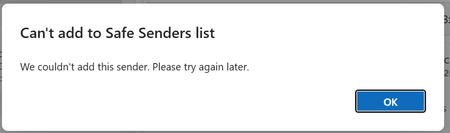
Good morning We have a shared mailbox for support. When we reply to a customer, we include this email address in CC. A member of the team accidently marked the shared box as spam - and can we get it back to a "safe sender"???? NO! I cannot believe how difficult this task seems to have been so far. We've tried setting rules, looked in Defender and Exchange, even tried Powershell stuff. If our support email is included in TO or CC it drops into Junk. If we manually move the message or ask it to be unblocked we just get the following: I don't understand why we cannot add ourselves as a safe sender. Can anyone PLEASE help practially to help us? Many thanks.65Views0likes1Comment
Legacy Outlook for Mac from 01 October 2026
The following points summarise my concerns regarding key Legacy Outlook for Mac issues arising from the Exchange Web Services (EWS) retirement on 01 October 2026: I route my Gmail account via IMAP/POP to my subscription Microsoft 365 Family Outlook for Mac, Legacy version. The Legacy version is great because I use plenty of my own “On My Computer” folders, subfolders & client-side rules for routing incoming messages. Whereas the New version loses this important functionality. I’m confused & concerned by the only official MS Support advice on this subject below that the Legacy version will not continue from 01 October 2026 when EWS for Exchange Online accounts is retiring: https://support.microsoft.com/en-us/outlook/end-of-support-for-legacy-outlook-for-mac I understand that Gmail is not an Exchange Online account & AI suggests this EWS retirement will not impact my Legacy Outlook. However, it’s not crystal clear that I will maintain full functionality - particularly my folders & client-side rules, contacts, calendar, tasks & notes, etc. And when I receive my regular MS 365 updates from October, will I still receive updates for Outlook generally, but not the Legacy component, or will I not receive any updates for Outlook whatsoever? As a safeguard, should I save my very large Outlook for Mac data on 30 September & if so, what would be the best format? I guess we won’t know how it will really work until October, but I welcome feedback from anyone that’s dealt with this dilemma already & I especially look forward to definitive clarifications from MS technical staff. 🤞 Much obliged...93Views0likes2CommentsNew Outlook Comes With New Workflows: What Is Still Missing for You?
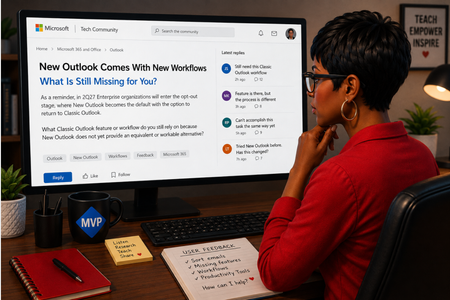
As a reminder, in March 2027, Enterprise organizations will enter the opt-out stage (Message ID 949965), where New Outlook becomes the default with the option to return to Classic Outlook. That is not too far away, especially if you need time to get your workflows and systems in place. That is why I keep coming back to this: New Outlook comes with new workflows. So I’m curious about where New Outlook workflows still fall short for you. A lot has changed. Users now have mail merge, Quick Parts, Unified Inbox, and partial PST support, with Advanced Mail Merge also on the way. New Outlook also has 30+ features and capabilities that are not available in Classic Outlook. What do you still do in Classic Outlook that you cannot accomplish, or cannot accomplish well, in New Outlook today? And if you tried New Outlook a year or two ago and went back to Classic Outlook, I’d be especially interested in what is still keeping you there now. I’m not looking for “I hate New Outlook.” I already know plenty of people do. I want to know the specific feature or workflow that still matters to you. PS: And be kind to me. I don’t work for Microsoft. I’m an MVP who teaches their products. 😉 traccreations4e-p26 8/26/2026Outlook Meeting Updated, But the Forwarded Attendee Never Received It
Accepted a forwarded Outlook meeting invitation but never received the meeting update when the organizer made changes? This behavior surprises many Outlook users and is often misunderstood. Learn why it happens and how organizers can prevent attendees from missing future updates. https://traccreations4e.com/forwarded-outlook-meetings-dont-receive-meeting-updates/ #traccreations4e 6/23/2026How to turn off email forwarding that I did not set.
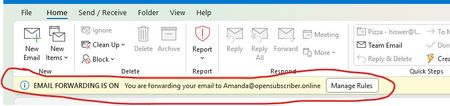
Started classic outlook this morning to find this in the header in a yellow band... "i EMAIL FORWARDING IS ON You are forwarding your email to mailto:Amanda@opensubscriber.online" I have NO idea who that is, nor did I set it. How to I remove it/fix it?? Dennis5mile292Views1like11Comments
No New Folder Creation?
I'm in Mac Outlook 16.112, using Legacy view. I'm trying to add a new sub folder and that option is disabled on every right click menu I can find, and doesn't appear in any ribbon menu. What is going on? I have quite a few subfolders, all created using the right-click option. Why is that suddenly unavailable? This is incredibly frustrating. -Monica Sandler Director of Customer Success EstateWorks Systems100Views0likes2Comments
immagini nellf firma di outlook non sono visualizzate
Le immagini nelle firme di Outlook non vengono visualizzate nell'editor "Firme e carta intestata". Il problema è stato verificato su Outlook 2019 Standard, Outlook 2021 e Outlook 2024. Le firme sono state ricreate da zero e utilizzano immagini locali presenti nella cartella %APPDATA%\Microsoft\Signatures. I file HTM vengono visualizzati correttamente nei browser e le stesse firme funzionano correttamente in Outlook per Microsoft 365. Il problema persiste anche avviando Outlook con outlook.exe /safe. La build testata di Outlook 2019 è 16.0.10417.20197 a 32 bit.102Views0likes1CommentAptos preset font size in new installations
Hi, Can anyone confirm what the default Aptos font size in Outlook should be on first use, before any user changes are made to the settings? I’m seeing different default sizes depending on the application: 11 pt — Microsoft 365 Outlook for Windows (Classic) 12 pt — Microsoft 365 Outlook for Windows (New Outlook) 12 pt — Outlook for iOS 12 pt — Outlook for Android Based on the above, it appears that 12 pt may be the current standard default across most Outlook clients, with Classic Outlook for Windows being the exception. However, I haven’t been able to find any definitive Microsoft documentation confirming what the intended default Aptos font size should be. Can anyone confirm whether 12 pt is the official/default size?120Views0likes1CommentNew Outlook Office.js CoercionType.Html body insert returns HtmlSanitizationFailure code 9011
Could you please look at the https://learn.microsoft.com/en-us/answers/questions/5975232/new-outlook-windows-office-js-coerciontype-html-bohere, because the format verification here is so resticted.29Views0likes0CommentsOWA Rich Link Preview: metadata returns HTTP 200 but preview card is never rendered
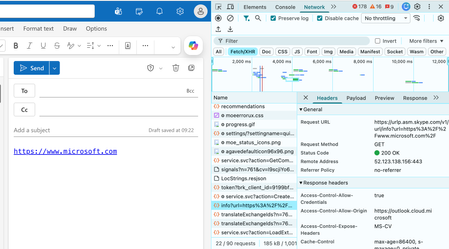
I am hoping someone from the Outlook team or anyone familiar with the Outlook on the web Link Preview pipeline can help with a reproducible issue that has already been investigated extensively through Microsoft Support. This is not a request for a new feature. It concerns the existing Rich Link Preview functionality that Microsoft currently documents and exposes through Outlook/Exchange configuration. The problem When a public URL is entered into a new Outlook on the web message, Outlook recognises the URL but displays only the normal blue hyperlink. No title, description, image or Rich Link Preview card is inserted. I have reproduced this using multiple unrelated public URLs, including: Microsoft.com Adobe(dot)com YouTube(dot)com The same behaviour occurs across multiple browsers and private/incognito sessions. Configuration already confirmed Both relevant Exchange settings are enabled: Mailbox LinkPreviewEnabled = True Organisation LinkPreviewEnabled = True The Outlook on the web Preview links in email option is also enabled and messages are composed in HTML. The important technical finding Chrome Developer Tools shows that Outlook correctly detects the URL and calls Microsoft’s own preview service: urlp.asm.skype.com/v1/url/info The request completes successfully with: HTTP 200 OK The service returns valid rich-preview metadata including: Title Description Favicon Thumbnail Large thumbnail For example, the YouTube test returned the correct YouTube title, description and valid thumbnail URLs. However, Outlook then does nothing with that successful response. The observable flow is: URL recognised → Microsoft preview service called → HTTP 200 → complete valid metadata returned → Outlook fails to insert/render the Rich Link Preview Further investigation shows: The returned title is never inserted into the compose DOM. Outlook never subsequently requests the thumbnail URL returned by the preview service. There is no LPNoLP suppression attribute on the hyperlink. The behaviour is reproducible across different URLs and browsers. This appears to place the failure after successful metadata retrieval, at the point where Outlook should instantiate or insert the preview component. Why I am raising this here An active Microsoft Support case already contains HAR traces, PowerShell outputs, screenshots, Developer Tools evidence and controlled reproductions. I have spent months troubleshooting this and have reached the point where there is very little more an end user can reasonably isolate. This also has genuine business impact. Professional email presentation matters when competing for customers. Businesses using other email platforms can present links professionally with rich previews while Outlook leaves us with plain blue hyperlinks despite the documented functionality being enabled. I would therefore really appreciate input from someone familiar with Outlook/OWA engineering: What condition or feature state could cause Outlook to successfully retrieve complete Link Preview metadata but then deliberately or incorrectly skip creation of the preview component? Could this involve an Outlook feature flag, mailbox/tenant state, rollout configuration or another client-side gate after the urlp response? I am specifically trying to get the existing documented functionality working correctly, rather than looking for a workaround. I have also submitted the issue through the official Outlook Feedback Portal: https://feedbackportal.microsoft.com/feedback/idea/dc18ed2e-119b-f111-9b47-7c1e52444ef6 If someone from Microsoft needs the existing support-case reference, I am happy to provide it privately.137Views0likes2CommentsNew Outlook Office.js Html body insert fails with error 9011 HtmlSanitizationFailure
I am building an Outlook web add-in for New Outlook on Windows. Calling mailbox.item.body.setSelectedDataAsync, prependAsync, or setAsync with CoercionType.Html fails with HtmlSanitizationFailure code 9011 on an empty HTML compose body, even for minimal Learn-style bold markup. CoercionType.Text works on the same client. Is 9011 a known New Outlook issue? Where is this error documented? What is the supported way to insert formatted HTML from an add-in?108Views0likes1Comment
Thousands of Sent Items moved to Deleted Items, no rules, no retention
Hello everyone, I'm investigating a very unusual Exchange Online mailbox issue and would appreciate any insights from anyone who has seen something similar. Environment Exchange Online (Microsoft 365) Mailbox: User mailbox Outlook for Mac Outlook for iOS Outlook Web (OWA) Incident Summary On August 13, 2026, approximately 4,997 messages were moved from: The activity occurred over roughly a 3-hour period. Mailbox audit logs show thousands of: Operation: MoveToDeletedItems events. Hourly breakdown: 01:00 - 2,046 events 02:00 - 1,540 events 03:00 - 1,408 events Audit Findings All sampled audit events show: LogonType = 0 (Owner) UserId = affected mailbox owner Result = Succeeded I sampled 5,000 records and all of them were: LogonType = 0 No events were recorded as: LogonType = 1 (Admin) LogonType = 2 (Delegate) Source and Destination Folders Examples from mailbox audit records: Folder : \Sent Items Destination : \Deleted Items Operation : MoveToDeletedItems Message Trace Findings Extended Message Trace was performed on one of the affected emails. The trace confirmed: CopiedToSentItems=True DeleteAfterSubmit=False which indicates: The email was successfully sent. The email was copied to Sent Items. Exchange did not delete the message during transport. So the message existed in Sent Items and was later moved to Deleted Items by a mailbox operation. Rules Investigation Checked: Get-InboxRule -Mailbox <mailbox> -IncludeHidden Findings: No Inbox Rules targeting Sent Items. No hidden Inbox Rules targeting Sent Items. Only two legitimate rules that delete messages from specific Jira/Confluence senders. Delegation Investigation Mailbox permissions reviewed. Known permissions exist, but mailbox audit logs show: 5000/5000 sampled events = LogonType 0 Therefore: No evidence of delegate activity. No evidence of administrative activity. Retention / Compliance Investigation Checked: Get-Mailbox Get-RetentionPolicy Get-RetentionPolicyTag Get-RetentionCompliancePolicy Get-RetentionComplianceRule Findings: No Sent Items retention tag. No retention policy targeting Sent Items. No Purview retention/compliance policy appears to explain this behavior. Activity pattern does not resemble normal retention processing. Add-ins Investigation Mailbox add-ins: Polls Share to Teams Send to OneNote Action Items Bing Maps My Templates Unsubscribe No third-party mailbox-management or archiving add-ins found. Client Information Seen During Investigation Examples observed in mailbox audit logs: Client=OutlookService;MacOutlook/16.112 a { text-decoration: none; color: #464feb; } tr th, tr td { border: 1px solid #e6e6e6; } tr th { background-color: #f5f5f5; } What Has Been Ruled Out ✅ Admin activity ✅ Delegate activity ✅ Inbox Rules ✅ Hidden Inbox Rules ✅ Outlook add-ins ✅ MRM retention policies ✅ Sent Items retention tags ✅ Purview compliance retention policies ✅ Exchange transport deleting the messages Question Has anyone encountered a similar case where: Thousands of messages were moved from Sent Items to Deleted Items Operation = MoveToDeletedItems LogonType = 0 (Owner) No rules No retention policy No delegate activity particularly involving: Outlook for iOS Outlook for Mac Client=OutlookService Any similar experiences, findings, or recommendations would be greatly appreciated. As we need to know the root cause for this issue. Thanks110Views0likes2CommentsCan I automate performance review forms to be sent automatically through Outlook?
Doesn't even necessarily have to apply to just surveys to be honest. I'm trying to set up a system where our employees automatically receive forms like surveys, performance reviews, or feedback templates in their Outlook so I don't have to be the stereotypical HR lady who constantly chases and reminds them to complete them. Warning: Not a super techy person :)69Views0likes1Comment
Account Locked: Recovery Form Automatically Rejected (Need Human Assistance)
Hello, I am trying to regain access to my old Microsoft account, br**mailto:email address removed for privacy reasons. Unfortunately, I have forgotten the password and I no longer have access to the phone number linked to the account. I completed the Microsoft account recovery form and provided as much information as possible. However, I received a message saying that the information I provided was insufficient to verify that I own the account. I understand the importance of account security, but I am not sure what else I can do to prove that the account belongs to me. Is there another way to verify my identity or contact Microsoft Support for help? Thank you for your assistance.191Views0likes2CommentsOutlook new doesn't allow to reorder folders created on pst file
Hi, when i create a new folder on a pst file, the new folder appears at the end of folder list. Although i can move the new folder to any other position in the folder list, when pst or outlook new is closed, folder appears again at the bottom of the folder list.102Views0likes2Comments






Events
Recent Blogs
- Hello, Outlook community. I’m Vicki Milton, a Principal Product Manager on the Outlook team. Over the last year, we’ve added important capabilities across areas such as offline support, shared mail...Jun 03, 20265.6KViews1like8Comments
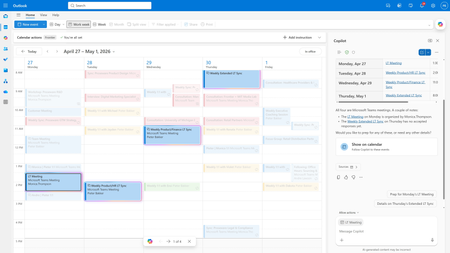
- Copilot in Outlook is now agentic, taking on the ongoing work of running your inbox and calendar. It triages emails, reschedules conflicts, and surfaces what matters most before you even ask. ...Apr 27, 202663KViews10likes6Comments