exchange
322 Topics
MS Outlook 2024 LTSC automatically gets closed and later not getting open
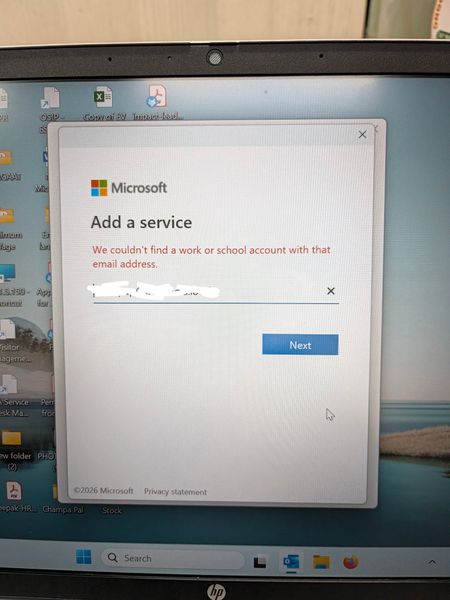
In Outlook 2024 LTSC, the application suddenly stops and closed automatically. Later troubleshooting, it is observed that it doesn't even open in safe mode. Tried to create a new profile where it is not able to search the user from exchange and automatically redirect to Microsoft 365 login page whereas our mail server works in exchange mode. Even after reinstalling the MS office 2024, it is not able to search the user and redirects to Microsoft 365 login page. What is the issue and resolution.124Views0likes2Comments
New Outlook - PST file cannot reopen and PST search not working
Hi, Issue 1 – One PST file cannot be reopened I have two PST files, PST A and PST B. PST A can currently be opened and browsed normally in New Outlook. PST B was previously opened in New Outlook and I was able to browse the folders and emails. However, after I closed/removed PST B from New Outlook, I am now unable to open/add the same PST file again. The PST file can still be opened using Classic Outlook. If the PST format is unsupported or too old for New Outlook, why was New Outlook able to open and browse it previously before I closed it? Could this be related to the PST format (ANSI vs Unicode), PST corruption, or a limitation/bug in New Outlook? Issue 2 – Unable to search emails stored in PST For PST A, I can open the PST and manually browse and read the emails in New Outlook. However, when I use Search, emails stored inside the PST do not appear in the search results. This is referring to searching for the email/message itself, not searching for attachments. The same PST can be searched using Classic Outlook. My understanding is that New Outlook now supports searching emails stored in PST files. Is PST search fully supported, or are there still limitations compared with Classic Outlook? I would appreciate any advice on how to troubleshoot both issues, especially whether there is a way to verify PST compatibility with New Outlook.190Views0likes1Comment
Intermittent “We can’t retrieve the calendar events right now” error in Outlook team calendars
We are receiving an increasing number of reports from users who are unable to view colleagues’ calendars in Outlook. The following error is displayed: “We can’t retrieve the calendar events right now. Wait a few minutes and try again.” The issue appears to be intermittent and inconsistent across Outlook clients: Some calendars work in Outlook on the web but not in New Outlook or Classic Outlook. Other calendars fail in OWA as well. A calendar may work temporarily and then fail again after restarting Outlook or switching between New and Classic Outlook. Some users first experienced the issue yesterday, while others have experienced it for more than a week. One affected user is a manager with nine direct reports. Outlook automatically displays these users under “Team: [Manager name]”. However, the number of visible team members changes after restarting Outlook or switching clients. For example, the group may contain all nine members at one point and only three at another. The Manager attribute and reporting structure have been verified in Active Directory/Entra ID and are correct for all team members. Our Service Desk has already tested the following without resolving the issue: -Outlook on the web, New Outlook and Classic Outlook -Removing and adding the affected calendars again -Adding calendars manually using the users’ primary SMTP addresses -Resetting the Outlook navigation pane -Resetting Outlook views -Creating a new Outlook profile -Verifying the users’ Manager attributes and reporting structure Because the issue also occurs intermittently in OWA and the membership of the automatically generated Manager’s Team Calendar changes, this does not appear to be limited to the local Outlook profile. Has anyone else experienced this recently? Could this be a known Exchange Online issue involving the automatically generated Manager’s Team Calendar, shared-calendar synchronization or mailbox-side calendar navigation data? Are there any additional diagnostics or supported methods for rebuilding the Manager’s Team Calendar configuration in Exchange Online?924Views4likes3Comments
can't verify my outlook account while logging in on IOS mail app
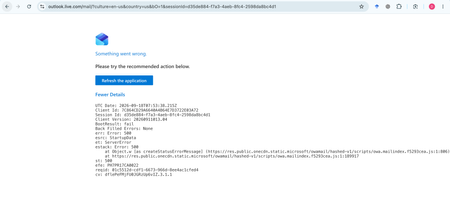
My Outlook.com mailbox cannot be opened on Outlook Web, macOS Mail, or iPhone Mail. Other accounts work normally. Outlook Web shows: HTTP 500, BootResult: fail, esrc: StartupData, et: ServerError. Please check the mailbox provisioning/backend status for my account.263Views0likes1Comment
Forgotten email password request being seen coming from a different email account
When at http://account.microsoft.com/ to reset a forgotten password for a Microsoft Exchange account with a registered domain email account the code being sent is being seen as a forgotten password reset request for my http://hotmail.com/ email address. Why is that and how can I have my forgotten password request be seen coming from my domain email account?375Views1like6Comments
Email sent from Shared Mailbox gets stuck in Outbox
Hello, I am working with a client who has a primary and shared mailbox in Outlook. They are using the newest version of classic Outlook desktop app and they have full permissions to the shared mailbox, including "send as" permissions. They can send email from their primary mailbox without issue. However, when they send email as the shared mailbox, it gets stuck in the Outbox and never sends. I have tried the following: 1. Removing the profiles re-adding 2. Deleting the Outlook data files 3. Reducing cache to as low as 3 months 4. Turning off cache but when I do the shared mailbox gets an error that it cannot connect to the Exchange server 5. Turning on auto-archive to shrink the data files 6. Switching to "New Outlook". This does seem to work but the company uses a plug-in for a program called "Mail Manager" and they don't fully support New Outlook yet Sometimes these solutions will fix the issue for a few days to a week but then it begins happening again. This issue does not happen when they are using the mobile or web clients. To me this sounds like a corrupted data file but I can't pinpoint what exactly is causing the corruption. Any suggestions? Thanks, Mike20KViews0likes6CommentsTeams Meeting Add-in Not Appearing in Outlook
The computer was rebuilt from scratch and reinstalled with a clean operating system. After the installation, all required Microsoft applications (Outlook, Teams, etc.) were installed and the user successfully signed in. However, the Teams Meeting add-in is not appearing in Outlook as expected. Within the Outlook Calendar/Appointment window, only the Skype Meeting option is visible, while the Teams Meeting option is completely missing. Checks Performed: New Microsoft Teams is installed and functioning properly. Outlook and Teams are both signed in with the user account. Outlook COM Add-ins have been checked. Disabled Items have been checked. Teams Meeting Add-in for Microsoft Office has been verified. Outlook updates have been checked. Microsoft Teams has been reinstalled. Outlook profile has been verified. Exchange mailbox is active and functioning correctly. Despite all the above checks, the Teams Meeting option is still not displayed in the Outlook Calendar/Appointment window, and only the Skype Meeting integration is available. Expected Behavior: The Teams Meeting button should be available within the Outlook Calendar/Appointment window, allowing users to create Teams meetings and automatically generate Teams meeting invitations. Request: Please why the Teams Meeting Add-in is not being loaded into Outlook and provide assistance in restoring the Teams Meeting functionality within the Outlook Calendar/Appointment interface. Attachments: Screenshot showing the current issue (Teams Meeting button missing) Screenshot showing the expected behavior (Teams Meeting button visible)6.6KViews7likes15CommentsNew Outlook Office.js Html body insert fails with error 9011 HtmlSanitizationFailure
I am building an Outlook web add-in for New Outlook on Windows. Calling mailbox.item.body.setSelectedDataAsync, prependAsync, or setAsync with CoercionType.Html fails with HtmlSanitizationFailure code 9011 on an empty HTML compose body, even for minimal Learn-style bold markup. CoercionType.Text works on the same client. Is 9011 a known New Outlook issue? Where is this error documented? What is the supported way to insert formatted HTML from an add-in?190Views0likes1CommentThousands of Sent Items moved to Deleted Items, no rules, no retention
Hello everyone, I'm investigating a very unusual Exchange Online mailbox issue and would appreciate any insights from anyone who has seen something similar. Environment Exchange Online (Microsoft 365) Mailbox: User mailbox Outlook for Mac Outlook for iOS Outlook Web (OWA) Incident Summary On August 13, 2026, approximately 4,997 messages were moved from: The activity occurred over roughly a 3-hour period. Mailbox audit logs show thousands of: Operation: MoveToDeletedItems events. Hourly breakdown: 01:00 - 2,046 events 02:00 - 1,540 events 03:00 - 1,408 events Audit Findings All sampled audit events show: LogonType = 0 (Owner) UserId = affected mailbox owner Result = Succeeded I sampled 5,000 records and all of them were: LogonType = 0 No events were recorded as: LogonType = 1 (Admin) LogonType = 2 (Delegate) Source and Destination Folders Examples from mailbox audit records: Folder : \Sent Items Destination : \Deleted Items Operation : MoveToDeletedItems Message Trace Findings Extended Message Trace was performed on one of the affected emails. The trace confirmed: CopiedToSentItems=True DeleteAfterSubmit=False which indicates: The email was successfully sent. The email was copied to Sent Items. Exchange did not delete the message during transport. So the message existed in Sent Items and was later moved to Deleted Items by a mailbox operation. Rules Investigation Checked: Get-InboxRule -Mailbox <mailbox> -IncludeHidden Findings: No Inbox Rules targeting Sent Items. No hidden Inbox Rules targeting Sent Items. Only two legitimate rules that delete messages from specific Jira/Confluence senders. Delegation Investigation Mailbox permissions reviewed. Known permissions exist, but mailbox audit logs show: 5000/5000 sampled events = LogonType 0 Therefore: No evidence of delegate activity. No evidence of administrative activity. Retention / Compliance Investigation Checked: Get-Mailbox Get-RetentionPolicy Get-RetentionPolicyTag Get-RetentionCompliancePolicy Get-RetentionComplianceRule Findings: No Sent Items retention tag. No retention policy targeting Sent Items. No Purview retention/compliance policy appears to explain this behavior. Activity pattern does not resemble normal retention processing. Add-ins Investigation Mailbox add-ins: Polls Share to Teams Send to OneNote Action Items Bing Maps My Templates Unsubscribe No third-party mailbox-management or archiving add-ins found. Client Information Seen During Investigation Examples observed in mailbox audit logs: Client=OutlookService;MacOutlook/16.112 a { text-decoration: none; color: #464feb; } tr th, tr td { border: 1px solid #e6e6e6; } tr th { background-color: #f5f5f5; } What Has Been Ruled Out ✅ Admin activity ✅ Delegate activity ✅ Inbox Rules ✅ Hidden Inbox Rules ✅ Outlook add-ins ✅ MRM retention policies ✅ Sent Items retention tags ✅ Purview compliance retention policies ✅ Exchange transport deleting the messages Question Has anyone encountered a similar case where: Thousands of messages were moved from Sent Items to Deleted Items Operation = MoveToDeletedItems LogonType = 0 (Owner) No rules No retention policy No delegate activity particularly involving: Outlook for iOS Outlook for Mac Client=OutlookService Any similar experiences, findings, or recommendations would be greatly appreciated. As we need to know the root cause for this issue. Thanks314Views0likes2Comments