Recent Discussions

Heading Style Misapplied to Body Text
Hi, I'm editing a novel manuscript. Somehow. the author applied the same heading used for the chapter numbering to the last line of text of Chapter 28, so that that short line and the Chapter 29 heading are ... linked? If I try to set the heading for the line of text to normal in the Style pane, the chapter 29 heading goes to "normal," too. If I try to apply the heading style to the chapter heading, the line of text gets that style, too. Chapter 29 has of course disappeared from the Navigation Pane in all this. Any advice is very welcome.Solved38Views0likes3CommentsCompute elapsed time
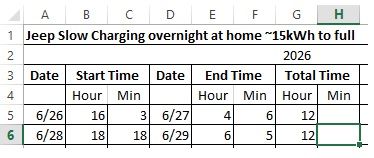
I have a spreadsheet of charging time for my Jeep. I would like to calculate the duration of the charging period but am having problems coming up with a formula that would work. It would have to account for the minutes where the start time minute is greater than the end time minute. Unless someone has another way of computing this.Solved91Views1like5Comments
Contest Scoring
I created a spreadsheet to calculate points for a Skillathon test we give to kids at our fair. On the main sheet, we input the points earned for each question. I created a second sheet to calculate the points for question 20. I have a table set up to auto-sort the teams by Amount. I want to be able to take the points from this table and have that input into the main score sheet. Need help with the function for this.Solved33Views0likes2Comments
Copy a formual, locking 1 data cell
Hello I have this formual to calculate the value in cell F11. I woul like to copy the formula down to F12, 13, 14, 15 and 16. Needing to lock the cell F5 value in the formula. Copy and paste only changes for F% to F6 to F& and so on. Thank you =(D11-(B11+F5)-(G11)+C11)/D11Solved32Views0likes2Comments
How do I get balloon commenting on the right side of the page?
I'm using Word 2024 because I don't want AI in my interface. Now commenting all appears in the tab side bar. I can click on the "Comment" pulldown in the ribbon to show comments properly, but I can't write in them. This is aggressively hostile to people with vision difficulties. Even with my glasses, that's much smaller than I'm comfortable with. How can I get the comments that were so good and useful back? If not, how can I change the type size in the sidebar so I can read and write comments? Microsoft, please, don't ruin your products because you want to make us use AI for things that it's not helpful for. I don't use Word for anything I want AI in and deal with documents I cannot legally allow to be exposed to unverified servers like AI chatbots.Solved34Views0likes1CommentFixing Hyperlinks in a Copied Worksheet (on an Apple Mac)
I have scoured this forum’s discussions about hyperlinks in a copied worksheet referencing back to the original sheet. Perhaps I missed it, but I didn’t find a solution to my specific problem, so I will start a new discussion. Apologies if a community wizard already answered it. I have a workbook with monthly worksheets, each showing the transactions into and out of a savings account. Each transaction goes into (and out of) one of several “virtual” accounts to reflect the purpose for which the money is earmarked, like property taxes, travel, etc. (called Account 1, Account 2, and so on in the attached) Each month’s worksheet has a section of hyperlinks, each of which ideally jumps to a specific account in the same worksheet. The attached example contains only four accounts, but my actual one has 23 with 31 columns and 98 rows. So the hyperlinks are helpful in navigation. Each month, I make a copy of the latest worksheet and rename it for the new month. The problem: the hyperlinks in the new, copied worksheet reference back to the “source” worksheet. With 23 hyperlinks, changing each one’s sheet reference (Edit Hyperlink...) every month is not efficient. Question: how can I (efficiently) make the hyperlinks in the new worksheet reference cells in their new worksheet? These are hyperlinks that are internal to the workbook, not to external URLs, so DonBici’s Feb 21, 2024 suggestion of a helper column doesn’t seem like it would work in this case, and I am not advanced enough for his VBA suggestion. Thanks!Solved94Views0likes9Comments
Text split
I have this informatie in a cel: WIJNVEEN 15693 | 88/38 | 31-12-2024 | [WIJNVEEN|15693] I need the two components at the end, the parts between [ and ] So one cel is "WIJNVEEN" and the second cel is "15693". Can anyone help with 1 formule for each cel, so no "in between" cels?Solved109Views0likes6CommentsAzure AD SSPR Password write back issue
Hi all, A company I work for have issues with the reset password function with AD Connect. In the SSPR audit logs in Azure AD, we face on 'Reset password (self-service)' the status reason 'OnPremisesAdminActionRequired', with a follow up event log within the AD connect server: event ID: 33004 with error "hr=80230626, message=The password could not be updated because the management agent credentials were denied access" I face this issue before and this was causing because the AD DS connector account did not have the right permissions. In this case this is not. What I have done so far: - Updated AD Connect from 2.0.89.0 to 2.0.91.0 - enforced TLS 1.2: https://docs.microsoft.com/en-us/azure/active-directory/hybrid/reference-connect-tls-enforcement - Checked AD DS connecter account 'MSOL_xxxxxxxx' permissions: https://docs.microsoft.com/en-us/azure/active-directory/authentication/troubleshoot-sspr-writeback#verify-that-azure-ad-connect-has-the-required-permissions - the user do not have the options 'password never expires' or 'user cannot change password' configured - Let AD connect talk to another DC dc02 instead of dc01 - Checked connection to SSPR service from DC's : Test-NetConnection -ComputerName ssprdedicatedsbprodscu.servicebus.windows.net -Port 443 - The action 'Change password (self-service)' are successful (via my account portal) , only action 'Reset password (self-service)' face this issue (via passwordreset.microsoftonline.com) -- both use the same OnPremisesAgent ->> AADConnect Have anyone a idea what else I can try more? Regards, RicardoSolved26KViews0likes13CommentsStock Data Type - SPCX
I have spreadsheet that pulls Stock data and it has been working fine. Bought some SPCX shares and added SPCX to the Stock cell. Selecting Stock Data Type does NOT find SPCX in the list of shares. This is on the deaktop app. I tried this wth Excel Online and SPCX is found and works fine? I have also made sure the Desktop apps are all up to date. Any potential fixes out there?Solved114Views0likes3Comments
Chart from Date, Time, Temperature and Humidity
I have data from a temperature sensor that I want to create a chart from. The data is: Date,Time,Temperature_Celsius,Relative_Humidity(%), and it arrives as a .csv file. If it's just a single date, then I can easily produce a line chart by ignoring the date column. However the data will likely be for several days at a time. So how do I create a line chart with the date and time as one value on the x-axis? If I can do that, the values on the y-axis will not be a problem. I think it could be done by combining data and time into a single value, but I can't find how to do that, and then format the x-axis so it shows each day separately with the times as minor values. Here's some of the data: Date Time Temperature_Celsius Relative_Humidity(%) 01/07/2026 12:00 am 20.8 61 01/07/2026 12:30 am 20.7 61 01/07/2026 1:00 am 20.7 61 01/07/2026 1:30 am 20.6 61 01/07/2026 2:00 am 20.5 61 01/07/2026 2:30 am 20.5 61 01/07/2026 3:00 am 20.4 61 01/07/2026 3:30 am 20.4 61 01/07/2026 4:00 am 20.3 61 01/07/2026 4:30 am 20.3 61 01/07/2026 5:00 am 20.2 61 01/07/2026 5:30 am 20.2 60 01/07/2026 6:00 am 20.1 60 01/07/2026 6:30 am 20.1 60Solved73Views0likes2CommentsWindows 11 and Outlook passwords mismatch
I am a Windows 11 and Outlook 2016 (from Office 2016 package) user. After changing the password for Windows system, the Outlook password no longer works. There is a message asking for password in Outlook. The old password doesn’t work. Is there any connection between Windows 11 and Outlook passwords? Can this be turned off?Solved34Views0likes1Comment
Device Bound Session Credentials Edge
Hi everyone, For a customer i did some research about token protection within M365. I did find a lot information what to configure within M365 to get a multi layer protection (CA, Identity Protection, device compliance, etc). What i didn't found was a solution for token/cookie protection from the browser, until i found this article: https://en.ittrip.xyz/windows/edge/edge-147-device-bound#index_id0 This article states that edge 147 supports Device Bound Session Credentials which makes it much harder to do a off-device replay of a cookie. It also is saying: If you buy rather than build, ask your identity provider or SaaS vendor a direct question: do you have a roadmap for Device Bound Session Credentials or an equivalent browser-session binding model? So my question is: Does M365 (via the browser) supports Device Bound Session Credentials or will it be supported any time soon? Hope you have a nice day! Regards, MJSolved105Views0likes2CommentsGetting data from Snowflake to Excel
Hello I have multiple no technical users and am trying to find a way to setup a snowflake query for them and then let them refresh it whenever they want or on a schedule, but I couldn't find a good solution this what i found so far: ODBC (Not great for non technical users needs setup on each user desktop) Power Automate (Needs Power Automate Premium which we don't have) Third Party tools (Expensive pricing models) Through Power BI (We want to separate this process from power bi) Any suggested solution please!Solved115Views0likes3Comments
Dynamic Pages in Mail Merge
Is there any way to dynamically turn pages in a document on or off during a mail merge? Building a welcome packet for an event, and some people need to see Page A. Others need to see Page B instead. If it were just simple text differences between the two, I could merge in the content itself, but the pages are wildly different, with images and other elements. ThanksSolved138Views0likes8CommentsNew to Access
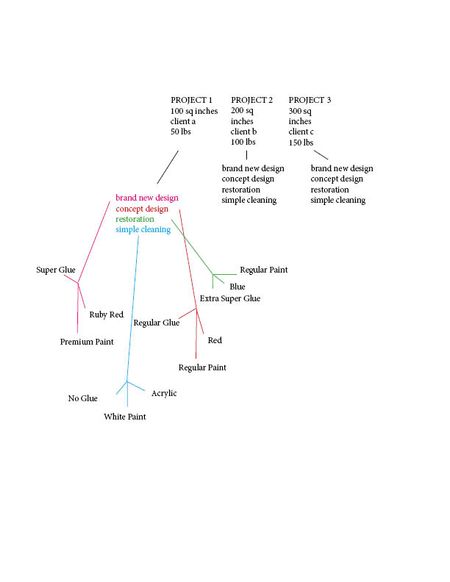
Hello! I am new to MS Access, and currently looking for some advice in working the program. In using Access, I am working with a team that has data in arts and crafts projects that fall under many different categories, which are being exported from Excel. I’ve attached an image of what this data looks like, but I’ve also explained it below. For instance, the data might be sorted into something like 5 fields, those being: project name, square inches, client name, and weight. An example would be: Project 1, 100 sq inches, Client A, 50 lbs Project 2, 200 sq inches, Client B, 100 lbs Project 3, 300 sq inches, Client C, 150 lbs Etc. Then, we’d have a second collection of data that would branch off of the first set. For instance, the data might be sorted into something like 4 fields, being: brand new design, concept design, restoration, or simple cleaning. Finally, a third set of data would branch off of this information, detailing that each of the aforementioned categories have their own data. Such as, brand new design projects use X brand of glue, Y brand of paint, and are always Z color. Whereas, simple cleaning projects might use a totally different brand of glue, paint, and color. Now, my question is, is it possible in MS Access to be presented with all of the data based on what I ask for? Such as, say, I want to view all projects that have used X brand of glue. Am I able to create a database that will pull that up? Or if I wanted to view all brands of paint used ONLY in cleaning projects? Essentially, is it possible to create a database that can show me any combination of information based on what I ask for, creating relationships with one another to search both forwards and backwards with simplicity? If so, what research should I do to approach this, or what other direction do you suggest that I go in if it is not possible? I appreciate the help :)Solved86Views0likes3Comments




Events
Recent Blogs
- SharePoint Online is introducing a new tenant-level setting that allows organizations to choose whether heading permalinks should appear on SharePoint pages.Jul 14, 2026859Views1like1Comment
- 2 MIN READPowerPoint is getting easier to use with new SmartArt, fresh themes, a cleaner Design ribbon, and a more modern file open experience.Jul 13, 20261.2KViews2likes0Comments