Recent Discussions

Storage Space for Windows Updates
Windows informs me that although the external USB drive has the capacity, I have insufficient space on my internal C: drive to initiate installing updates. 'Settings-System-Storage' shows 17.4 of 56.4GBs being used are for 'Installed Apps'. Opening 'Installed Apps' in 'Settings' identifies 55 apps and the storage space for most of them. These total under 2GB, which is a lot less than the 17.4 identified in 'Storage'. The apps for which storage space is not shown include Fotor Photo Editor and MS Edge (which I use) together with several MS 365 and OneNote apps (which I do not wish to use). Are these likely to be taking up the missing 15.4GB, or, are there other 'hidden' apps taking up the storage space that I would like to use for updates. If either of these are the case, how can I identify them and their storage capacity?1View0likes0Comments
Conditional Formatting Duplicates in Two Columns
Hello, I have a spreadsheet where I track calls my office receives. I have a table that includes the date and name for each call. Sometimes calls are entered in the spreadsheet multiple times. I would like to create a conditional formatting formula that will flag if a name is entered twice in one day. Is there a way to highlight cells that are duplicated in two rows of a table? Thank you!4Views0likes0CommentsSharePoint Online Clamps Down on Company-Wide Sharing Links
Company-wide sharing links allow any authenticated user account in a Microsoft 365 tenant to access a shared file or folder. New settings are available to create an expiration policy for company-wide sharing links, with different values supported for SharePoint Online and OneDrive for Business. The idea is to stop the potential for abuse of sharing links, including stale links that should not grant access to files and folders. https://office365itpros.com/2026/03/12/company-wide-sharing-links-limits/12Views0likes0Comments
SMS code is not sent due to blocking
Hi! Sorry, I was using a translator to write this thread. About two weeks ago, I lost access to my Microsoft account. I haven't forgotten my password, and I haven't logged in from a new device—the system simply decided something was wrong and decided to send me an SMS code to verify my identity. I currently live in Russia and have a Russian SIM card. My government has blocked receiving SMS codes from foreign companies (WhatsApp, Telegram, Microsoft, etc.). I enter the last four digits of my phone number and click "Send Code," but then it says "This feature is currently unsupported." I've submitted recovery forms numerous times, but the account is very old and some of the information has simply been lost! I was barely able to contact a live person from Xbox support, and they opened a service request for recovery. The operator handling my issue completely ignores my messages. The only response he gave was that the form I sent him by email couldn't confirm my identity. He didn't even notice that I just needed a security code for the email address I used to REGISTER the account, as I couldn't receive an SMS code due to the political situation in my country. Today, I contacted a real Microsoft employee again, and he told me to write here because engineers often respond to messages and they can send me the code by email. Please help me. This account has no material value other than a copy of Minecraft. This account is precious as a memory and something that helped me through an important period in my life. Thank you for reading this thread.20Views0likes0Comments
Technical Question: Is a Range argument passed to SUM as a Reference or an Evaluated Array?
Hi everyone, I have a technical question regarding the internal mechanics of the SUM function's arguments in Excel. Specifically, I’ve noticed that in the ODF (OpenFormula) specification, the argument is defined as a NumberSequenceList. However, I am unsure how Excel’s internal engine implements this. When a formula is written as =SUM(A1:B5), what exactly is passed to the function? I am trying to understand which of the following conceptual models is correct: Reference Passing: A Reference to the range A1:B5 is passed, and the SUM function iterates through the cells internally. Pre-evaluation: The range A1:B5 is Evaluated into a sequence (or array) of numbers before it is passed as an argument to the SUM function. I am authoring a technical manual and want to ensure I describe the relationship between cell references and function arguments accurately. Does Excel follow a similar abstraction to the ODF NumberSequenceList, or is there a different internal logic? Thank you in advance for your insights!11Views0likes1CommentRequest for Best Practices on Using Microsoft Agent 365
Hello Community, I am seeking guidance on best practices for effectively using Microsoft Agent 365. Specifically, I am interested in recommendations related to governance, security and access control, agent monitoring, and integration with Microsoft 365 services. If you have practical experience or proven approaches in these areas, your insights would be greatly appreciated. Thank you, Mohammad Shohal Bhuiyan16Views0likes0CommentsData Formatting
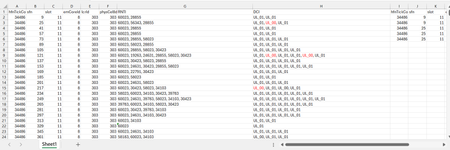
Dear Experts, I have a Data like below :- Each row can have 1 or more RNTIs( seperated by ",") and their DCI( UL_01 or UL_00), I want to put them in a format like in Col - I~P gave examples for the 1st two entries. Attached worksheet. Thanks & Regards Anupam ShrivastavaSolved124Views0likes5CommentsCorrelation Study with Filters
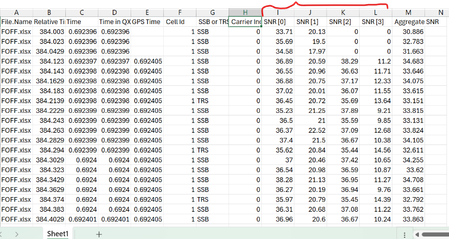
Dear Experts , I have a data like below( Attached worksheet) And want study the correlation between SNR[0~3], there will be 6 combinations as below:- I want make like this but with Filters/Slices for the "File.Name" & "SSB or TRS" & "Carrier Index", different colors for different Carrier Index(0 &1) Thanks & Regards Anupam Shrivastava36Views0likes1CommentMicrosoft 365 Backup Launches File-Level Restore
The Microsoft 365 Backup solution will soon be able to restore individual files and folders instead of complete sites. That’s a welcome upgrade to restore capabilities to cover situations like the inadvertent deletion of a file. It’s a wonder why Microsoft didn’t make more about this capability when they celebrated SharePoint’s 25th anniversary last week when they discussed departmental billing for Microsoft 365 Backup. https://office365itpros.com/2026/03/11/microsoft-365-backup-file-restore/12Views0likes0Comments
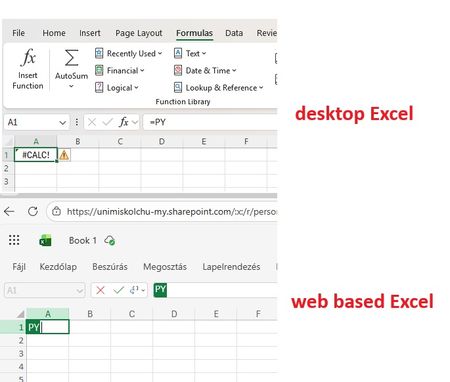
Python in Excel - Missing from desktop Excel but exist in web Excel
Good Morning! Yes, again this topic :-( When I join to a professional forum I also search for the topic I having a problem with. Found a lot of similar questions but I could not find a post with a solution. Maybe I was not enough attentive and patient but I did not. Well, we are a University in Hungary, and we have Microsoft 365 A1, A3 and A5 licenses. I attahced a screenshot which shows: in the desktop Excel I got #CALC! error msg when I type =PY and press TAB. But it works in Excel on the Web version. So the root of the problem cannot be the license, right? Of course I saw this article about "Python in Excel availability": https://support.microsoft.com/en-us/office/python-in-excel-availability-781383e6-86b9-4156-84fb-93e786f7cab0 Our licenses are based on user, not device so no, it cannot be that the computer is a device with shared license: My Excel version is on: So the version and the channel are also OK. (OK?) I am also a Global Adminisitrator in our tenant, so I could check if the Connected experiences and Optional connected experiences and all related possibilities are disabled or not: no, it is not disabled. On "Microsoft 365 Apps admin center" : https://config.office.com/ ... I did not find any policies which controls those options so in "Policies for all users" policy I modified all these settings from "Not configured" to "Configured" and "Enabled". In my Excel the Trust center related settings looks like this: Of course my Office package up to date, I ran the Update Office and Update License command from Excel. Did not help. I went also to https://admin.microsoft.com site if I can find any related setting, but did not. I also tried to Sign out and Sign back in Excel - did not help. Finally, as our computers are in Hybrid environment (so our users are logging in inti on-prem AD, and their properties are synchronised to Azure) I have cerated a Group Policy object (I am also a Domain Admin), which also allows connected and optional experiences for all domain users: I should not mention: did not help :-( I have checked if the GPO is applied or not by running GPRESULT /R, it applied, it is in the registry. But despite all the settings so far - nothing helped. The Python in Excel feature in desktop Excel do not want to work. But it does in web based Excel. I would be very happy to receive any ideas from anyone. Or if U say I should go to official Microsoft support, then I go. Have a nice day! Regards, Andras /sorry for the very detailed case description, but maybe easier and quicker if I "aswer" all usual questions in advance/32Views0likes0Comments
3044 error in Access
I have two computers networked Windows 10 together and have moved to two new computers windows 11. I have also moved from Microsoft 365 to 2024 office professional plus. Everything seems to work on the new computers except one Access database. That file has a front and back built in. I get a 3044 run error and the data base will not open. The error says it can not find the data base. I think in the transfer the old computer may have a different name than the new, It appears that is the problem. In the network I can see both new computers, it seems they are set up correctly but that could be a problem as well. I simply do not know how to fix it. I hope someone here may have a solution.25Views0likes1Comment
Excel file problem
When I download an Excel file from iCloud (on my Mac laptop), I get a message saying: "We found a problem with some content in the file. Do you want us to try to recover as much as possible? Click "yes" if you trust the source of this workbook." I click yes, but the file then opens in a corrupted or unusable state. How can I retrieve the original file as it was before? Please recommend a solution.9Views0likes0CommentsTransitioning from Barracuda to Office 365 for Modern Email Management
Migrating from Barracuda to Office 365 is a strategic step for organizations looking to modernize their email infrastructure and improve collaboration. Many businesses use Barracuda for email security, archiving, or backup, but moving to Office 365 allows them to consolidate these capabilities within a single cloud-based productivity platform. Office 365 offers advanced email services through Exchange Online along with collaboration tools like Outlook, Teams, OneDrive, and SharePoint. The migration process typically involves transferring archived emails, mailboxes, and user data from Barracuda systems into Office 365. Careful planning is required to ensure data integrity, maintain compliance requirements, and avoid disruptions to daily communication. During the migration, administrators map user accounts, validate domains, and verify that all archived data remains accessible after the transition. One of the major advantages of moving to Office 365 is the enhanced security and management capabilities. Businesses gain access to features such as advanced threat protection, data loss prevention, and centralized administration. These tools help organizations protect sensitive information while simplifying IT management. For companies planning this transition, working with experienced providers can help ensure a smooth process. Many organizations rely on Apps4Rent to support Barracuda to Office 365 migrations, ensuring secure data transfer, minimal downtime, and reliable access to Microsoft 365 services after the migration is complete.15Views0likes0CommentsMoving from Kerio to Office 365 for Modern Email and Collaboration
Migrating from Kerio to Office 365 is a practical step for businesses looking to upgrade their email and collaboration infrastructure. While Kerio Connect provides basic email, calendar, and messaging capabilities, Microsoft Office 365 offers a comprehensive cloud-based platform that includes Outlook, Exchange Online, Teams, OneDrive, and SharePoint. This transition enables organizations to benefit from enhanced productivity tools and improved communication across teams. During a Kerio to Office 365 migration, essential data such as emails, contacts, calendars, and folders are transferred from the Kerio server to Exchange Online. The process typically involves configuring Microsoft 365 accounts, securely migrating mailbox data, and updating DNS records to ensure uninterrupted email delivery. Careful planning helps minimize downtime and ensures that users maintain access to their information throughout the migration. Another key advantage of moving to Office 365 is improved security and scalability. Microsoft provides advanced protection features such as spam filtering, multi-factor authentication, data loss prevention, and built-in compliance tools. These capabilities help organizations protect sensitive information while meeting modern security standards. Businesses often rely on experienced providers like Apps4Rent to manage Kerio to Office 365 migrations efficiently. With expert planning and support, organizations can ensure a smooth transition, maintain data integrity, and fully leverage the benefits of the Microsoft 365 ecosystem.15Views0likes0CommentsWhy is my create file from OneDrive for Business node isn't working?
I have a power automate cloud flow that, in some point, gets a word .docx from my sharepoint site, then it creates the same document in onedrive so that I can convert it to PDF then returns it to sharepoint. This idea came from the necessity of converting a .docx to .pdf without the need of premium conectors. I have 2 scenarios: 1° Scenario: Flow: I get the data from the word that I need > I create the same file on OneDrive > I convert the file to .pdf > then I create the file on Sharepoint. Problem: When I run my flow, it gets a 404 error: "message": "File Not Found\r\nclientRequestId: y-f695-48b1-9556-xc\r\nserviceRequestId: x-e051-b000-efc3-y" Error image: 2° Scenario: Flow: The same as the above, the only thing I did after research, is that the node that I get content from file from my sharepoint site also returns the "$content-type", so I specified that for the create file from OneDrive I'll only want the "$content" attribute. In resume, it creates the file in onedrive but I can't open it, it appears to be corrupted, at first I thought my sharepoint file was also broken, but then I could open it with no errors as on OneDrive. Problem: When I run my flow, it gets the error that it can't convert that kind of file (as I wrote above, the file creates corrupted), the main problem is understanding why it gets corrupted, it even returs the content-type that I'm not passing anymore. Error image: Message: "message": "Error from microservice: {\"status\":406,\"message\":\"Não há suporte para a conversão desse arquivo para PDF. (cannotOpenFile / Error from Office Service. Url=https://wordcs.officeapps.live.com/document/export/pdf HttpCode=BadRequest)\",\"source\":\"api.connectorp.svc.ms\"}\r\nclientRequestId: y-13f3-4e1a-a77a-x\r\nserviceRequestId: y-a09f-b000-f272-x" NB: This flow actually worked for more than 1 year with no problems like that, the last time it ran without errors was last week (6-7 days from today).29Views0likes1CommentHow to Remove Sensitivity Labels from SharePoint Files at Scale
It’s easy to remove sensitivity labels from SharePoint Online files when only a few files are involved. Doing the same task at scale requires automation. In this article, we explain how to use the Microsoft Graph PowerShell SDK to find and remove sensitivity labels from files stored in SharePoint Online and OneDrive for Business. https://office365itpros.com/2026/03/10/remove-sensitivity-labels-from-file/18Views0likes0Comments




Events

Learn more about the capabilities of Agent 365 in this live 'Ask Microsoft Anything' with product and engineering team experts! Get your questions answered about capabilities for agent observability,...
Wednesday, Mar 18, 2026, 09:00 AM PDTOnline
3likes
203Attendees
1Comment

You’re passionate about what you do, and we’re passionate about empowering your potential. Microsoft 365 Community Conference - is your chance to keep up with AI, build game-changing skills, and take...
Tuesday, Apr 21, 2026, 08:00 AM PDTIn-Person
0likes
4Attendees
0Comments
Recent Blogs
- Quickly find Word, Excel, and PowerPoint files on the web by typing keywords in the app header search.Mar 11, 2026309Views0likes0Comments
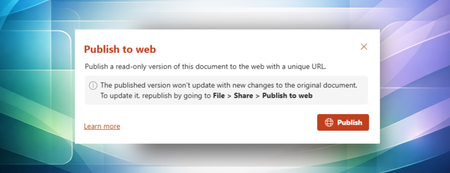
- Publish to web makes it easy to share clean, polished documents externally without revealing internal edits, comments, or version history.Mar 10, 2026477Views1like1Comment