Recent Discussions

line spacing
I'm creating a word doc (w/the help of ChatGPT). I copied and pasted from GPT into a Word doc, but I can't duplicate the spacing from one line to another. When I put the cursor behind a line and hit enter, the next line doesn't match up. Industries We Serve ✔ Medical & Clinical Laboratories ✔ Pharmaceutical & Biotech Facilities ✔ Research Laboratories ✔ Dialysis Centers ✔ Electronics Manufacturing ✔ Industrial Processing Facilities This is what happens when I put the cursor behind Laboratories. The spacing is way bigger and has no checkmark. What gives? ✔ Medical & Clinical Laboratories ✔ Pharmaceutical & Biotech Facilities ✔ Research Laboratories ✔ Dialysis Centers ✔ Electronics Manufacturing ✔ Industrial Processing FacilitiesSolved57Views0likes2Comments
Looking for help with a single Dynamic Formula Ranking Points by player and dropping lowest score
Name Finishes Andrew 1,1,2,3,7,8 Randy 2,4,5,5,8,9 Chris 1,1,2,3,7,8 Bill 1,4,6,6,7,9 Jeff 2,3,5,7,8,8 Reed 4,4,6,7,7,9 Doc 3,5,5,6,7,9 Steve 1,3,5,6,8,9 Paul 2,2,3,3,4,9 Points (1st, 2nd, etc) 165 105 75 50 35 25 20 15 10 Expected answer with lowest point dropped Name Points Chris 530 Andrew 510 Paul 410 Steve 315 Bill 285 Jeff 250 Randy 240 Doc 190 Reed 165Solved146Views0likes11Comments
User input fields in power query
I have a power query table of employees from an employees worksheet in the current workbook. First Name Last Name Address Etc. Which I feed into Power Query. I want to generate other tables in the workbook using the first and last names from the above table as a starting point, but adding user input fields. I was able to do this initially by having power query generate the first two columns, and put another table next to it with the user input fields to "fake it" and combine everything in a subsequent query. I was wondering if there was a more elegant way of creating a new Excel table (and probably a new sheet to put it on) by using the two columns from the sheet I already have, plus any additional columns I need for users to fill in. Either using standard Excel or power query, if I can stop power query from zapping the user input fields on a refresh. Note: I don't know how to have Power Query add a column without assigning it an initial value like null. That is why my user input fields are getting zapped building the entire thing in Power Query at the start.Solved112Views0likes3Comments
MS Word is throwing up 'Error 4608' I haven't a clue what to do.
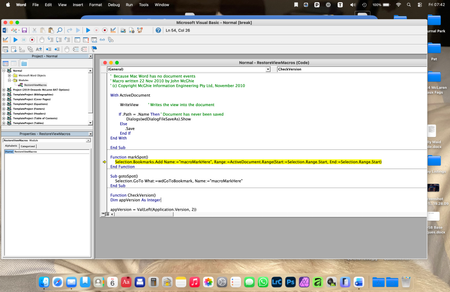
Hello, I wonder if anyone can help me here, because I am at a TOTAL los... I have a Word document that I have been updating for a few years, which is a sort of log. It has worked well up until today. Now, whenever I try to save the updated document, a very old fashioned (looks like Windows 3.1!), error message window appears which is headed 'Visual Basic for Applications' and in the window it says: Run-time error: '4608': Undefined dialogue record field There are then four buttons at the bottom labelled Help, Continue (which is greyed out), End and Debug. I have no idea what this error message means. Clicking on End gets rid of the error message, but prevents me from saving my updated document, and the next time I try to save it the error message just reappears. Clicking on Help takes me to a website with the title 'No F1 help match was found', followed by a load of technical computer-geek stuff I don't understand. Clicking on Debug seems to open a new window, but I do not know what it is... Here is a screen-shot of it: The highlighted text seems to refer to Bookmarks, which is throws me because I only associate Bookmarks with my web browser, not MS Word. I'm sure I haven't added any bookmarks to my document in any case. Can anyone enlighten me as to what is going on here please? ThanksSolved82Views0likes6Comments
Filter Function or TAKE-DROP Function
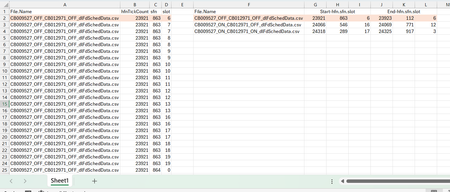
Dear Experts, I have a Data like this:- Column A -> Has the File Names, and Column B,C,D have their corresponding data, In Column F I have the unique File Names and from G/H/I -> I need the start of the hfn/sfn/slot and in J/K/L the end of the hfn/sfn/slot for that File Name as populated , How to achieve this? Thanks & Regards Anupam ShrivastavaSolved229Views0likes8CommentsNeed help autofilling.
Good morning all, Thought I posted this but I am not seeing it anywhere so I apologize if this is a repeat. I was tasked with filling in a spreadsheet with data including; Our part number, our description, supplier name, supplier number assigned by us, and supplier part number. I noticed that a lot of the part numbers repeat so I am trying to find a way so that when the column with our part number repeats it will auto fill the columns with the supplier name, supplier number and supplier part number automatically when I enter a repeating part number if possible. I am very much not excel savvy but I am pretty computer literate. I have attached the document I am working on, there is no customer data what so ever and all part numbers are internal so are not proprietary. https://gpcompinc-my.sharepoint.com/:x:/g/personal/zachv_gpcompanies_com/IQCj4grl62sHQYohshZJ9Mb2AX7_MknXYW1QiMk8wv2sdfQ?e=duyOxLSolved95Views0likes2CommentsHow do I get repeating part numbers (data) to auto fill data.
Sorry I am not very Excel savy but I was tasked with filling a spreadsheet with data of our part numbers, their description, the supplier we get them from, our assigned supplier numbers, and our suppliers part number for kits we make in our company, there are over 9000 but I have noticed that there are a lot of repeating part numbers so I was hoping there was a way so that I could have that data auto fill. I can post a link to the document it does not have any proprietary data that I can see. https://gpcompinc-my.sharepoint.com/:x:/g/personal/zachv_gpcompanies_com/IQAYSdPfHYQvRp6TRW4hg_xjAYh_4Jjl2Z_aCXX_64zMf50?e=MKDtrRSolved130Views0likes4CommentsConditional Formatting or a Specific Filter Rule
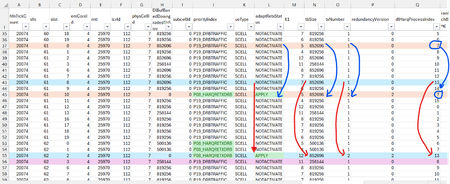
Dear Experts , I have a data like below:- here the Column-O, txNumber can go from 1,2,3 (txNum=2 and 3 means a Retransmission), I want to filter all the pairs for all Transmissions and their corresponding Retransmissions ( either by coloring them all using a conditional formatting) or using a specific filter Rule. How to identify the Transmission and it's corresponding Retransmission for a Specific HarqId( say for dlHarqProcessIndex ==7, the blue color Row-37 is my 1st transmission(txNumber ==1) for the dlHarqProcessIndex==7 with a tbSize of 852696, and adaptRetxStatus == NOTACTIVATE, and it's corresponding 2nd transmission( Retransmission , txNumber==2) Row-45, tbSize remains same(as it's corresponding 1st transmission) in all retransmissions and adaptRetxStatus changes to "APPLY" for all retrans txNumber==2,3) and similarly for other pairs like for dlHarqProcessIndex==13. Attached is the Worksheet.Solved170Views0likes5CommentsXLOOKUP search w/multiple output
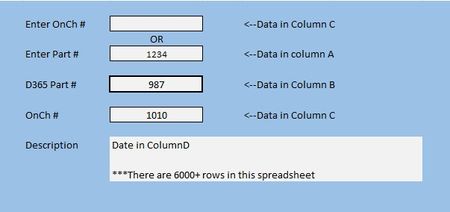
I've been working on a project and I am completely stumped. I cannot wrap my brain around how to get this to work. In the example below, I want to Enter a number in either of the top two field and have the last three fields populate. Now, I can get this to work for one, but not the other and for some reason when I switch from bottom search to the top search the old data doesn't clear and the search doesn't work. This is the formula I have so far //=XLOOKUP(H8,A2:A10606,B2:B10606) Anything I have done after has been a disasterSolved170Views0likes8Comments
EXCEL 360 COMPATABLE WITH 2010 XLSM FILES? THE MACROS IN VBA?
EXCEL 360 COMPATABLE WITH 2010 XLSM FILES? THE MACROS IN VBA? I developed a complete workbook the excel 2010 for my business and was wondering if I can use the new version of excel? Hoping that all the macros will work... Thanks for any help !! DaveSolved79Views0likes2CommentsStudent Behaviour Tracker
This is a very cheeky request for help. Now approaching 70 I've forgotten most of what I knew about Excel. I'm a Chair of Governors at an 11-16 school. I receive notifications about pupils who have been suspended (also known as fixed term exclusion). Roughly I have about 200 individual suspensions over 1 year. I want to record and analyse these. The information to record is Name: Last and First (about 30-40 students) Reason for exclusion (usually 1 or possibly 2 out of about 8 categories) Length of exclusion 1 - 15 days Flags e.g. SEND; PP, Year group: 7, 8 , 9 10, 11 Date As many of the students are repeat offenders I'd like to set the spreadsheet up so by either by typing the name or through an editable drop down list the name appears once and then the reason for the suspension and date is entered (as opposed to multiple entries appearing on the same page). I'd then like the spreadsheet to report, using an editable date range: By pupil name; the number of suspensions; total number of days and total number of days for each category of exclusion By suspension category: number of suspensions; total number of days for each category By flag: number of suspensions; total number of days for each category Year group: 7, 8 , 9 10, 11: number of suspensions; total number of days for each category I've looked at some cheap packages e.g. at Etsy but I cant see anything that does this. There are commercial packages, intended for whole school, but cost several hundred - thousand plus, pounds. Thanks in advance if you are interested and my apologies to you if you feel this is an inappropriate request. Regards NickSolved159Views2likes4CommentsExcel returns incorrect answer to simple multiplication.
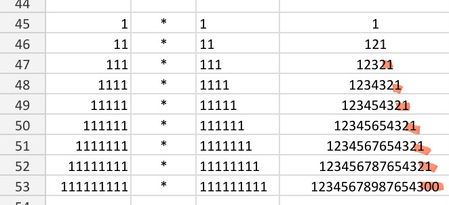
I'm saving a few favourite math examples, and ran into a problem - the last of the calculations came back with an incorrect answer. I'm using a simple =cell1*cell2 formula. It should end with 21. Please help I'm using android app. All cells formatted as numbers.Solved117Views0likes2CommentsRemoving a possible user selection from a slicer
I have a column field in Excel with 4 possible values. My slicer shows all 4, as it should. Three of the possible vales are alphabetic strings. One of the possible values is a blank field indicated by (blank) on the slicer. A blank is a valid value for this field in some situations, so I don't want to just ignore the rows where this field is a blank. But I would like to eliminate it as a user selection in the slicer itself. I thought checking the slicer setting, "Hide items with no data" would do the trick, but it doesn't appear to do so. Any tips on how that setting is supposed to work and/or why it might not be? (Maybe it has to actually be a 'null'?? No idea....)Solved97Views1like2Comments
Trying to create a form field that uses images (but not a simple one!)...
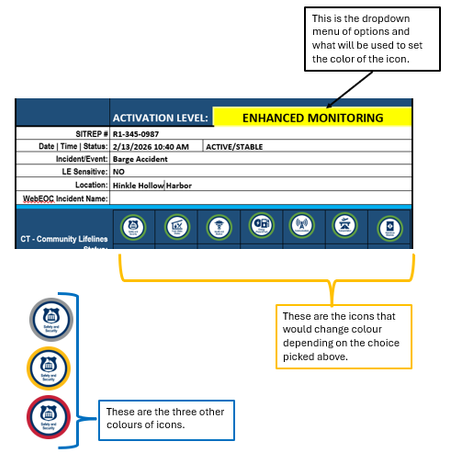
I have a Word form that uses a https://www.fema.gov/emergency-managers/practitioners/lifelines-toolkit/lifelines-icons used in the public safety community. For each icon, there are four different border colours, indicating a certain level of urgency, using the TLP model - green, yellow, red, grey. What I would like to do is create a dropdown (elsewhere on the form) where someone chooses an option in that field, and depending on the choice, the icon with the corresponding colour displays. Example: Any assistance is appreciated!Solved67Views0likes4CommentsLink 2 sheets, then sort column A on sheet 2 alphabetically and match correct data
I have two sheets on the same spreadsheet, and I want to pull in the data from 4 different columns to the second sheet and have it automatically update when there are changes or additions to the first sheet. I have a couple issues making this happen - the main one is that the data in my first sheet is custom sorted by color, but I want the new sheet to take the data from column B on sheet 1 and sort it alphabetically, and take the other columns and match them correspondingly to the correct values they match to from column B on the first sheet. Secondly, for blank cells, I want it to leave them blank instead of inputting zero, or any dates. I don't know if this is all even possible, or if I should just remove my custom filters from sheet 1 by cell color and just link it that way. I've spent hours trying to find formulas that work. Please see attached images for reference on what I've tried, and for more clarification as to exactly what I'm requesting. Sorry for the copious redacting, I wanted to be safe rather than sorry with identifiable info regarding this. Any help would be greatly appreciated.Solved278Views0likes8CommentsCancelling Microsoft Customer Agreement (MCA)
I'm a Microsoft CSP provider. My customer wants to cancel their subscriptions because they want to leave the Microsoft. Do I need to cancel their MCA or will it be cancelled automatically? If it is necessary to cancel the MCA, where should this be done? Thank you very much!Solved77Views0likes1CommentSearch and replace can't seem to delete \o or \t in URLs
I am trying to delete specific text that has been added to all of the URLs in a Word document. The added text follows a specific format: "random characters" \t "_blank" \o protect" Using search and replace (with wildcards) and show field codes (so I can see the URLs) hasn't been successful. This approach -- searching for "random*protect" and replacing it with [blank] -- does nothing. Trying to delete just the \t and \o entries by surrounding them with parentheses deletes all the t's and o's in the document. Any help getting rid of these additions would be greatly appreciated. pjsSolved55Views0likes2Comments
Excel auto-truncating timestamps sub milliseconds
I would like to leave feedback. It is very frustrating that when I try to look at logged data csv in excel, I cannot open it by double clicking, because Excel date-time format is so limited. It truncates sub millisecond data (don't save that file - or the data is lost!), so that any graphs start looking like stairs. And the work-around, to import the csv data and change the timestamp column format to text , and then convert it to a number, is very clunky. It forces me to other programs, like Matlab, which many people do not have. Example data: Timestamp,V-Output ,I-Output ,V-Normal ,I-Normal ,V-Emergency,I-Emergency,VGND ,IN , 2025-12-18 00:08:46.730845, Is it possible that you improve your product?Solved89Views0likes5Comments

Events

Learn more about the capabilities of Agent 365 in this live 'Ask Microsoft Anything' with product and engineering team experts! Get your questions answered about capabilities for agent observability,...
Wednesday, Mar 18, 2026, 09:00 AM PDTOnline
0likes
111Attendees
0Comments

You’re passionate about what you do, and we’re passionate about empowering your potential. Microsoft 365 Community Conference - is your chance to keep up with AI, build game-changing skills, and take...
Tuesday, Apr 21, 2026, 08:00 AM PDTIn-Person
0likes
3Attendees
0Comments
Recent Blogs
- Microsoft Most Valuable Professionals (MVPs) are the heartbeat of the Microsoft ecosystem—and at Microsoft 365 Community Conference 2026, your impact takes center stage. Imagine connecting face-to-...Mar 06, 2026253Views0likes0Comments
- Edit images directly in PowerPoint to enhance, refine, and perfect visuals without leaving your deck.Mar 06, 20263.1KViews5likes1Comment