Recent Discussions

Can't access Microsoft Authenticator for business accounts
Hello. I am the tech support for a small church, where I am the admin for our MS 365 accounts, which are set up as "business accounts". I have been using Microsoft Authenticator for MFA for years. Recently I switched to a new phone and installed Microsoft Authenticator. All of my personal Authenticator accounts transferred over just fine, but all of the church's business accounts say "Scan the QR Code provided by your organization to finish recovering this account". The thing is, I am the "organization" and I don't know how to generate any QR code to recover the accounts. It was suggested that I could do something about this by logging into my Microsoft 365 administrator account, but when I try to log into my admin account, the only MFA option is "enter the code from Microsoft Authenticator". It's not offering a text or alternate email, only Microsoft Authenticator, which is what I'm locked out of. So I'm stuck in a loop. I opened a ticket with Microsoft Support nine days ago. I have received one phone call since then. The support person insisted that they needed to talk to the account's "alternate administrator", which I set up as my pastor, who is pretty computer savvy but not a deep IT person. They tried to call him one time, but he was not available to answer right then. There has been no communication since then. I'm hoping someone in this group can help me figure this out.4Views0likes0CommentsMicrosoft Teams – “Save this message” feature missing in both Desktop and Web clients
a { text-decoration: none; color: #464feb; } tr th, tr td { border: 1px solid #e6e6e6; } tr th { background-color: #f5f5f5; } Hello, We are experiencing an issue in our Microsoft 365 tenant where the “Save this message” feature in Microsoft Teams is not available, neither in the Teams desktop app nor in Teams Web. Details The feature should be available globally, as Microsoft planned full rollout between August and October 2025 (Microsoft 365 Roadmap ID 496369). This is confirmed in multiple official and community‑published sources. https://m365admin.handsontek.net/microsoft-teams-users-can-save-chats-channel-messages-later/, https://supersimple365.com/teams-save-chats-and-channel-messages-for-later/ Microsoft also stated that no admin controls exist to disable this feature and no configuration is required in the tenant. https://m365admin.handsontek.net/microsoft-teams-users-can-save-chats-channel-messages-later/ Despite this, the option does not appear at all in the message overflow menu (… → More actions) in both: Microsoft Teams Desktop (version 26032.206.4355.6508) Microsoft Teams Web (teams.microsoft.com) Troubleshooting already performed Full cache removal for the new Teams client under: %localappdata%\Packages\MSTeams_8wekyb3d8bbwe\LocalCache Log out / sign‑in cycle Full Teams desktop restart Verification across different clients (desktop + web) Verification from multiple messages and channels24Views0likes1CommentPlanner’s Newly Redesigned Interface
Microsoft has launched a redesigned user interface for the Planner app. The big news is the inclusion of task chat. Goals are also available, but only to people with a Microsoft 365 Copilot or Planner Premium licenses. Task Chat is a nice feature, and I am sure that it will be popular. UX redesigns often disappoint. At least this one offers new features. https://office365itpros.com/2026/02/27/planner-new-ux/20Views0likes0Comments
#Connect Error in Excel for StockHistory Function
Evening, I am an O365 subscriber and am trying to set up an Excel sheet as a VAR template, and I wanted to populate my workbook with some historical data without uploading a CSV. Figured I would try out the StockHistory function. I keep getting "#connect" for my cells, and I am not sure why. I am not in developer mode, do not have any crazy add-ins, I am signed in, and connected to the internet. Do I need to be connected to a source? I am fairly new to learning about the StockHistory Function. Any thoughts on the matter are welcome. I tried all that I could from this site below: https://support.microsoft.com/en-us/office/how-to-correct-a-connect-error-584f7de9-b238-480c-8e8f-de0ba2c1aac94Views0likes0Comments
Excel Drag and Fill Handle not working as I would like
I am copying references from one workbook to another for organization. Both Workbooks are organized in tables. Earlier today I was able to filter table 2, by category in Column I, and paste the new Reference code in the correspoding Column M cell. For example I would filter by Column I in Book 2, Table 2, and the copy the reference from book 1, table 1. I would paste the reference into Cell M2. Because I had the filter applied I wanted to apply the reference to the end of the table in column M. So I was able to double click the drag and fill handle, and it would populate the rest of column M below in the table with identical references. Now, when I use the exact same method, double-clicking the drag and fill handle changes th reference entirely to previous reference no longer needed. The only options I have accessed were "Special" trying to clear formulas in other columns while leaving the text. Enable Fill handle and cell drag and drop, and Automatic Flash fill are both enabled. what is causing my issue, and how do I fix it?33Views0likes1Comment
Cell Use from one sheet to Another
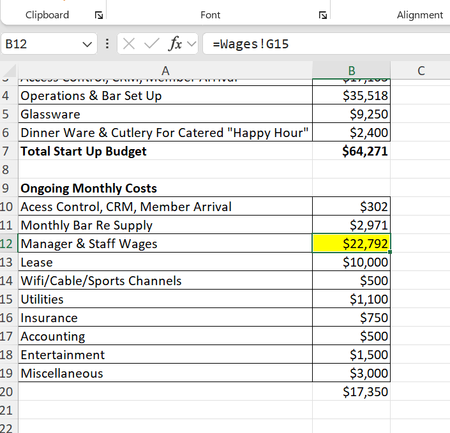
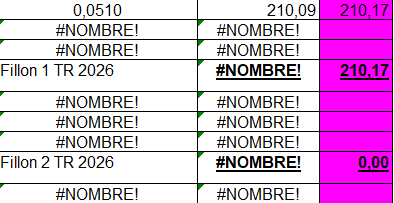
Hello. I have a multi-page workbook that requires using cells from one sheet on other sheets in the same workbook. I have one instance that in trying to work it out, has caused a second issue. When I try to add the cell from the one sheet to the next sheet using +=, then clicking on the sheet and cell to acquire it, when it posts is a 0. In trying to solve my issue and going to the sheet and cell in question, this is what I see. Highlighted cell. So, initially I was able to total that column. Now I can't because it no produceds a 0. It seems for some reason that cell does not show as =+'Wages'!G15, if I manually input that in the cell I need it in (on the other sheet) it still posts as 0. The source sheet for Wages is below this sheet. Can anyone help me get this worked out so I can use the required cell on the sheet i need to use it on?40Views0likes1Comment
I am getting the message "WORD did not save the document C:\...\AutoRecovery save of...
Recently I am getting the message "WORD did not save the document C:\...\AutoRecovery save of..." This happens when I am working on large WORD documents, of about 700 pages. I have gotten the message when using WORD on two computers, in different locations. I have worked on these large documents for months without getting this message. I will appreciate advice.26Views0likes2Comments
Excel not publishing OLE
Excel no longer publishes any OLE clipboard formats in build 16.0.19725.20078. Copying a cell and using Paste Special in Word/OneNote shows no “Paste Link” and no “Microsoft Excel Worksheet Object.” Only text/HTML/bitmap formats appear. This blocks creation of linked or embedded Excel objects. Issue is fully reproducible: new workbook, enter value, copy, open Word → Paste Special. Expected: Paste Link + Excel object formats. Actual: missing. Verified after full repair, reinstall, Safe Mode, new profile, add‑ins disabled. Excel→Excel copy works; Excel→external OLE formats do not. This appears to be a regression in the OLE clipboard publishing pipeline for this build family.17Views0likes0Comments
Update changed open settings
I don't know if it was an Excel update or OneDrive update, but I no longer have my favorites or recent files that I saved on my computer showing up in the home screen. Now it just defaults to the One Drive location even though I have turned off save to One Drive and turned on save to computer and given it a default location. I am at a loss any help will be appreciated. I thought I published this earlier, but cannot find it so am trying again. Thank you for any help and take care.35Views0likes1CommentStill learning Excel and got an update that changed my open screen
It looks like Excel updated last time I closed it and now when I start it all my favorites are gone as well as recent files. I don't use One Drive and it just defaults to looking at One Drive. Even after I have opened different files on my computer they do not show up in the Recent files. How can I reset this so I can get back to my old screens and set up favorites again as well as see my recent files opened and not default to One Drive. I have changed the settings in the Save Options so it does not save to the cloud and the default location is not One Drive, but I can't seem to get the opening screen to show recent files or my favorites. Any help will be appreciated. Thank you in advance for this. Take care.55Views0likes2CommentsExtending Protection for Confidential SharePoint Online Files
Sensitivity labels offer great protection against unauthorized access, but sometimes files that aren’t encrypted escape from a document library. SharePoint Online can now use sensitivity labels configured with user-defined permissions (UDP) to extend protection to downloaded files. The magic works by configuring permissions on download based on the membership of the user who downloads a file. https://office365itpros.com/2026/02/26/sensitivity-label-extend-protection/21Views0likes0CommentsOnly Powerpoint templates in Create in Office.com
Why do I see only our Organisation Powerpoint templates in https://m365.cloud.microsoft/create/?auth=2 In the desktopapp alle are accesible Word, Powerpoint, Excel, but not online. Anyone? This: Connect-SPOService Set-SPOTenant ` -OrganizationAssetsLibraryUrl https://tenant.sharepoint.com/sites/sjablonen/OfficeTemplates ` -OrganizationAssetsLibraryType OfficeTemplateLibrary28Views0likes4CommentsMacros open server file hyperlinks in 2nd instance
Macros open server file hyperlinks in 2nd instance, preventing macros from seeing and interacting with the newly opened file. Manual clicking of hyperlink opens the files in the same instance as expected. Users with fresh login have no trouble with the macros opening the files in the same instance. Esoteric macro and/or Microsoft 365 Active Directory problem. Macros using hyperlink in a cell to .follow them to open. Then the next line is a sheet selection of a sheet in the new workbook. Error thrown because the new workbook is not visible to the macro and does not see the sheet name. This works for everyone everywhere. Including on fresh logins. Recently User1 started having the 2nd instance problem. I thought it was isolated and fixed it by removing and recreating his profile. Worked fine for a week. Then it came back. Then User2 logged in on the same machine had the issue. Then the next day User3 on a separate machine had the issue. All 3 users have no issues if they just use a clean login on a different machine. If you manually open all the necessary files, THEN run the macro, it still errors because when it tries to open the already-open-file, it gives the standard Read only Notify me Cancel dialogue. It says [self user] is using it and the file is locked. So is it even a macro problem or is it a server problem? Our server admin says it's not his problem and he has no idea what's happening and it's probably our crappy macros. Yes, our macros are crappy, recorded decades ago. But they work as expected except in these rare but spreading cases, seemingly due to some background environment development.8Views0likes0CommentsHow to public mobile layout to web
Hi, I have prepared a Power BI dashboard using the mobile layout, and we would like to make this mobile view available on the web. However, I can only see it working in the Power BI mobile app, and I am experiencing difficulties when trying to implement it on a web page. Is there any way to publish the mobile layout on the web? If so, how? Thanks.2Views0likes0CommentsHow to Use Scoped Graph Permissions with SharePoint Lists
This article explains how to use scoped Graph permissions to restrict app access to lists and list items in SharePoint Online and OneDrive for Business sites. It's a follow-up to other articles covering how to restrict app access to SharePoint Online sites and files. Scoping app access to specific objects is important because otherwise apps can access everything in SharePoint Online, and that isn't good. https://office365itpros.com/2026/02/25/scoped-graph-permission-lists/14Views0likes0Comments
Outlook web UTF-8 charset
Outlook Web sends emails in my organization using the ISO-8859-1 character set. However, Copilot claims: "Outlook Web (Outlook on the Web, OWA) does not generate your messages in ISO-8859-1. It always uses UTF-8." My Outlook Web only switches to the UTF-8 character set if the email contains Unicode characters that cannot be displayed in ISO-8859-1. How can I enforce UTF-8 globally for my organization?35Views0likes1Comment
XLOOKUP search w/multiple output
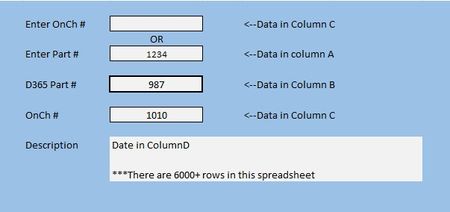
I've been working on a project and I am completely stumped. I cannot wrap my brain around how to get this to work. In the example below, I want to Enter a number in either of the top two field and have the last three fields populate. Now, I can get this to work for one, but not the other and for some reason when I switch from bottom search to the top search the old data doesn't clear and the search doesn't work. This is the formula I have so far //=XLOOKUP(H8,A2:A10606,B2:B10606) Anything I have done after has been a disaster31Views0likes3Comments



Events

You’re passionate about what you do, and we’re passionate about empowering your potential. Microsoft 365 Community Conference - is your chance to keep up with AI, build game-changing skills, and take...
Tuesday, Apr 21, 2026, 08:00 AM PDTIn-Person
0likes
3Attendees
0Comments
Recent Blogs
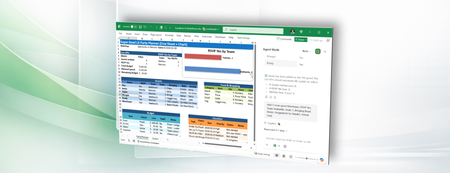
- Agent mode in Microsoft 365 Copilot Chat now enables you to query locally stored Excel workbooks on Windows and Mac desktop.Feb 27, 2026119Views1like0Comments
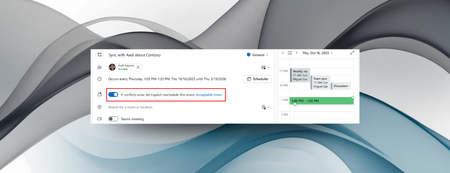
- You can now have Copilot in Outlook reschedule personal appointments and one-on-one meetings if a conflicting event arises that takes priority.Feb 27, 2026173Views0likes0Comments