Recent Discussions

[DataFormat.Error] We received a malformed web response and credentials issue
Hi team :) Happy Friday !! There is an excel spreadsheet being connected with data sources and shared with users. Upon, hitting data refreshes it asks every user to edit credentials every time they hit data refresh or shows dataformat.error with malformed web response. There is no data format error though. Can anyone please assist here or know how to solve this issue ?? Thanks Happy18Views0likes0Comments
Bad registrar on 365 side
Hello, We created a Microsoft 365 tenant several years ago but never used the online email services. We added and verifed our domain, which was registered with Orange at the time, and then created some users manually to use PowerBI. Today, we begin to migrate to Exchange Online. We have installed AD Connect and synchronized some users. Since creating the tenant, we have changed registrars (to Gandi), but I've noticed that the registrar hasn't been updated in the tenant 365. An `nslookup` correctly identifies Gandi as our current registrar. Microsoft has remained with Orange... and this is causing errors in the hybrid Exchange configuration assistant due to bad autodiscover. How can we "refresh" the registrar on the Microsoft 365 side ? Thanks for your advises Nicolas15Views0likes0CommentsDLP Extends Its Ability to Control Copilot Processing
A new action for the DLP Policy for Copilot allows Microsoft 365 tenants to block Copilot from performing (Bing) web searches if a prompt contains sensitive information types. The new action allows Copilot to continue to process prompts using Microsoft 365 content (if the user has a Microsoft 365 Copilot license) while stopping potentially sensitive data being sent to Bing. https://office365itpros.com/2026/04/16/dlp-policy-for-copilot-web/27Views0likes0CommentsM365 Security Basics: Keeping Your Data Safe Online
In today’s digital-first world, data is one of the most valuable assets a business or individual can have. Whether it’s emails, documents, spreadsheets, or sensitive customer information, protecting that data is critical. With Microsoft 365 (M365) being one of the most widely used productivity platforms globally, understanding its security basics is no longer optional it’s essential. https://dellenny.com/m365-security-basics-keeping-your-data-safe-online/32Views0likes0CommentsCreating a Planner Weekly Notification Email for Incomplete Tasks
A reader wanted a weekly incomplete task report to send details of Planner tasks to people with outstanding work to do. We used PowerShell to scan for incomplete tasks for people who are members of a group, perform some analysis on the data, and create and send email. Despite some deficiencies in the Planner Graph API, the code is pretty straightforward. https://office365itpros.com/2026/04/15/weekly-incomplete-task-report/23Views0likes0Comments
Office Scripts
i have a business microsoft office account and am signed in with it. when i try running a script in excel i keep getting the error saying it requires a work or school account. my microsoft account says the following: your work or school account belongs to your home organisation. what do i need to do to get scripts working.25Views0likes0Comments
Formatting issues in Word Microsoft 365 Copilot online.
I am experiencing formatting issues in Word (Microsoft 365 Copilot online). I am a student, and I have a problem formatting my thesis in M365 Copilot after previously working on this file on an older device with an older version of Word. I recently purchased a new laptop, where I no longer have access to that same version of Word. My only option now is to use Word in the browser. However, the file that formatted correctly on the old device is now not formatting properly. The automatic table of contents is breaking. After clicking “Update,” Word assigns random page numbers, most often all entries show as page “8,” or, for example, the “Introduction,” which is actually on page 3 (I manually set page numbering in the old version), suddenly appears as page 5 in the table of contents. Every chapter and subchapter is shown as being on the same page, usually page 8. The formatting options and capabilities also seem worse compared to the interface of the older version. The same issue occurs on my student account. Please help, I am currently writing my thesis.15Views0likes0CommentsWriting PowerShell for the Eventually Consistent Entra ID Database
Entra ID uses an eventually consistent multi-region database architecture. PowerShell code that fetches and updates Entra ID objects needs to interact with the database in the most efficient manner. This article illustrates some guidance from Microsoft engineering with examples from the Microsoft Graph PowerShell SDK. I’m sure your scripts already use these techniques, but if not, we have some helpful pointers. https://office365itpros.com/2026/04/13/eventually-consistent-entra-id/15Views0likes0Comments
Pivot Table TOP 5 vs Slicer
I create a Pivot Table, sort the data then filter on the TOP 5. I then create the Pivot Chart (horizontal TOP 5 bar chart). In my dashboard, I have slicers. When a Slicer filter is applied then removed, the Pivot Table and Chart do not go back to display the TOP 5 data but the whole set of data. Any simple way to ensure the pivot table / Chart recovers only the TOP 5 values (and not the whole set of values) after the slicer filters are reset ?19Views0likes0CommentsMicrosoft 365 error 7q6ch , can't login to my microsoft account
Microsoft 365 for business account, getting a microsoft popup box everytime I open office to login. I enter my email address and the next screen is always an error "7q6ch" . I can login to office.com no problem. This error will not go away no matter what I do and here's what've done- removed all microsoft credentials, logged out of microsoft account, removed all accounts in settings, signed out of office, rand scannow, ran the fixes to delete the folders in app data, online repair, quick repair, ran the cmd promp and powershell fix, made a new profile, I uninstalled and reinstalled office, keep getting this popup. The only option I'm seeing is to wipe my computer which I really don't want to do. It's a windows 11 pro laptop I downloaded the office setup file from my office account and it's up to date. I believe this stems from microsoft making me enter an account in order to setup my computer and since it doesn't allow work email addresses I had to use my personal account which then logs in to app automatically and the computer get confused. I need help please, any suggestion or fixes are appreciated, thanks51Views0likes0CommentsLeverage User and Group Assignments to Limit User Access to Apps
User and Group assignments can be added to Entra ID applications. Once assignments exist for an application, only assigned users can access that application. This method is a good way to secure access to applications that have consent to use high-profile permissions like Sites.FullControl.All or Mail.Read. Microsoft 365 tenants should consider how to use assignments to control user access to applications. https://office365itpros.com/2026/04/10/user-and-group-assignments/25Views0likes0Comments
OneNote breaks if I move it onto an external display
Hi guys I use OneNote extensively for work as my virtual notepad. At most of my working locations, I use my laptop - Dell Latitude 7440 - connected to either a Dell Docking station + 2 monitors, or a pair of samsung monitors which have an inbuilt hub, connect via USB-C and are daisychained together. I've never had any issues with OneNote in the past, but recently have found that if I try and move my OneNote window onto either external monitor, it seems to break OneNote - the whole window becomes just the index list which is normally a column on the left (where it shows all your notebooks and pages) and it won't actually display any of the content from the notebooks/pages. If I try minimizing that column, it has a complete breakdown as if its unable to properly load the actual page content. The only way to fix this is to drag the window back to my laptop screen and then close it and reopen. Has anyone else experienced this? It's really frustrating and affecting my productivity as I often need it side-by-side with other screens.81Views0likes0Comments
I am Facing Microsoft form related issue
I am Facing Microsoft form related issue, I can see when I am downloading a Excel copy some columns are blank. This is my survey form, and I cannot add manually however this will reflect manipulation in data, as this is technical glitch need assistant from your side on urgent basis37Views0likes0CommentsMISSING FUNCTIONS THAT I PREVIOUSLY HAD ACCESS TO
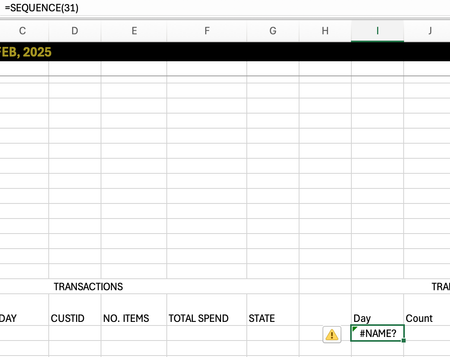
I just switched macbooks and opened my excel to discover I had a few missing functions: MAXIFS, SEQUENCE. This is not a problem regarding the software as mine is MICROSOFT365 and I used the same account previously. Is there any way I can gain these functions back! Thank you!32Views0likes0CommentsGetting started in Excel Labs Custom Modules (missing "publish" step)
First-time poster — please be gentle! Context Excel for Mac I have a large library of LAMBDA formulas and wanted to manage them using Excel Labs In particular, I wanted to organise formulas into custom Modules Issue How to actually activate functions defined in custom Modules in Excel Labs I recently discovered Excel Labs and was very excited to use it to manage and structure a large library of LAMBDA formulas. My goal was straightforward: create custom Modules to organise formulas by purpose, and then use those formulas in the workbook. However, it took several hours of experimentation and debugging — even to get a trivial example like: ABC() = 12 to work when defined in a custom Module. The missing piece (which Copilot, Google searches, and the README all missed) is this: Functions defined in custom Excel Labs Modules are inert until the module is imported into the special Workbook module. Until that import step occurs, functions in custom Modules: do not appear in Excel Labs → Names do not appear in Formulas → Name Manager are not callable from the grid According to Copilot this behaviour is not currently documented, and the UI strongly suggests that custom Modules are “active” by default — which they are not. Working workflow (for others who hit the same issue) This is the workflow that finally made things work for me (possibly sub‑optimal, but reliable): Create and maintain functions in custom modules (e.g. Transformations) Explicitly import the required functions into the Workbook module, e.g.: TransformAtoB = Transformations.TransformAtoB Workbook module now publishes to: Excel Labs → Names Formulas → Name Manager This makes conceptual sense — maintain a large structured library of formulas (or import libraries from GitHub), only activate the formulas required by a particular workbook. But without documentation, it’s very easy to assume custom Modules are active by default. Why I’m posting this When I finally asked Copilot “Why didn’t you say this up front?”, the answer was essentially: This publish step is not documented in the README or the UI, and users are easily led to assume Modules are active by default. So I’m posting here to save others from repeating the same debugging journey. Documentation request It would help enormously if the documentation (README / FAQ) stated explicitly that: Custom Modules are source-only Importing into the Workbook module is the publish step Only the Workbook module is wired to Name Manager and the Excel grid Even a short note would remove a major stumbling block for new users. I’m not a GitHub user, otherwise I would also raise this there — if someone from the community is able to mirror this feedback on GitHub, that would be much appreciated.32Views0likes0CommentsCan Agent 365–registered 3rd-party agents be invoked outside MS 365 clients and still track usage?
Hello, The documentation describes how to register a third-party agent with the Microsoft Agent 365 platform (for example an agent hosted on Google Cloud Run) in order to benefit from capabilities such as observability, governance, security, and centralized management. Does this mean that users must access these agents through Microsoft 365 entry points (such as Copilot Chat, Teams, or other Microsoft clients) in order for those capabilities to apply? Or can the same registered agent also be invoked and interacted with from third-party clients or external services (for example applications running in GCP) while still benefiting from Agent 365 features like observability, governance and/or security? What if third party agent is registered to Agent 365, but it doesn't use EntraID? It's what observability, governance and/or security will be available then? Thank you.49Views0likes0Comments
Agent 365 - can it be used just as a Governance platform for non-OBO agents?
It was mentioned that Agent 365 will allow to combine first-party, partner and third-party agents. Does this mean organizations could use the platform mainly for central visibility and governance of agents, but not necessarily for agent identities, effectively avoiding the need to pay a per-user license for everyone interacting with the agent?12Views0likes0CommentsUsing the Microsoft 365 Connector for Claude
The Microsoft 365 Connector for Claude allows Claude to access SharePoint and OneDrive files, emails, and Teams chats and meetings. The connector is now available to all users, including the free tier for Claude. Installing the connector creates two Entra ID enterprise apps (MCP server and client) and channels Graph requests to Microsoft 365 to fetch information for processing by Claude. Is that a good thing? https://office365itpros.com/2026/04/08/microsoft-365-connector-for-claude/404Views0likes0Comments


Events

You’re passionate about what you do, and we’re passionate about empowering your potential. Microsoft 365 Community Conference - is your chance to keep up with AI, build game-changing skills, and take...
Tuesday, Apr 21, 2026, 08:00 AM PDTIn-Person
0likes
7Attendees
0Comments
Recent Blogs
- Learn how we are leveraging AI to modernize our approach to change management and give you the tools, information, and processes you need to fully realize value from Microsoft 365.Apr 16, 20263.1KViews2likes0Comments
- Building in the era of AI can get very challenging. That’s exactly why we’re here to help you debug, refactor, and level up at the Microsoft 365 Community Conference, happening April 21–23, 2026 in O...Apr 15, 202695Views0likes0Comments