Recent Discussions

Error al modificar una antigua formula
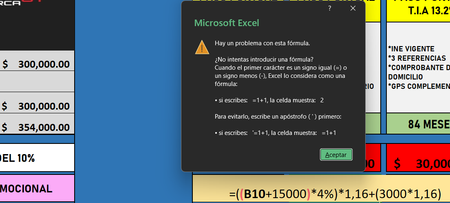
Estoy intentando modificar una formula que tenia antes unicamente cambiando lo que es la cantidad por la que se sumaba a la que tenia la anterior, lo demas de la formula esta completamente igual, pero por alguna razon me salta esa pestaña diciendo que hay algun problema con la formula, estuve buscando si hay algun tipo de error pero no lo encontre, inclusive llegue a copiar la primera formula original y no funciona aun asi, por mas que lo intento siempre me salta la misma advertencia y no me deja agregar la formula como es debido. cabe decir que la formula es la que esta abajo de la pestaña de advertencia y la celda "B10" es la de la cantidad de "300,000" que esta encima de los "354,000"11Views0likes1Comment
microsoft excel import text file template
I used the Text Import Wizard to create an excel document from a text file. My data does not have nice commas, semicolons, tabs, or spaces. My data is a fixed width. My data is by the columns like 5, 10, 12, 14, 20 column. It takes a long time to set the correct columns. I then saved it as a .xltx file to create a template. Then I expected to be able to use the template in the future. I tried to create a new excel file with the .xltx template I just created. When I pasted data into the new excel document my data was not organized. What am I doing wrong? Save as an Excel Template: Go to File > Save As, and select Excel Template (*.xltx) from the "Save as type" dropdown. This saves your layout in the custom templates folder. Use the Template: When you want to import data in the future, open this template (File > New > Personal), then use the import steps above to place the external data into your predefined format.17Views0likes0Comments
Filter Function or TAKE-DROP Function
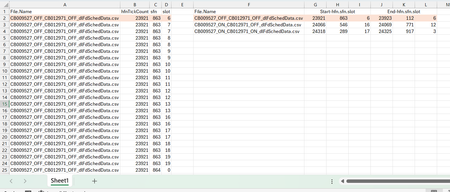
Dear Experts, I have a Data like this:- Column A -> Has the File Names, and Column B,C,D have their corresponding data, In Column F I have the unique File Names and from G/H/I -> I need the start of the hfn/sfn/slot and in J/K/L the end of the hfn/sfn/slot for that File Name as populated , How to achieve this? Thanks & Regards Anupam Shrivastava38Views0likes1Comment
Stacked Excel Formula
Hello everyone. I've spent the past 2-3 hours trying to figure this out on my own without luck. What I'm needing is a formula that will check D11 (highlighted) to make sure that it's within the parameters listed below it (<17), then I need it to do the same for H11 and I11 (highlighted) and enter the number (1-3) that are not "equal to or greater/less than" into K11. K11 reflects how many samples in Row 11 that are outside of those parameters. I'm trying to make this worksheet more automated and this is the one thing that I cant figure out. Example 1: (all numbers are within parameters, so a 0 is entered into column K) Example 2: (column G is not within the parameters, therefor there is 1 entry in column K)Solved362Views0likes8Comments
ADFS - Service Unavaible over WAP
Hi, We have a simple ADFS enviroment with a WAP in a DMZ and an internal ADFS server. Problem is that we are not able to access the Test-Signon-Page (https://fqdn.domain.com/adfs/ls/IdpInitiatedSignon.aspx) or published OWA over the WAP. Internally everything is working fine and also from the WAP I can access the internel ADFS Server with the Test-Signon-Page and OWA with ADFS without problems. But from the internet over the WAP we are always getting: Through WAP we are also publishing Exchange Activesync which is working without problems. I dont see any events in the eventlog, also with tracelogs. I don't see anything interesting in Fiddler on the client. Do you have any ideas? Kind regards Patrick1.1KViews0likes1Comment
VBA events stop working for one user when another user opens the shared workbook
Hi, I’m experiencing a strange issue with VBA in Excel. We use several Excel files as a CRM system, all with VBA (mainly worksheet events). The files are shared so that my employee and I can work on them. Recently, VBA events stopped working only on my computer in some of the files. Important observations: For my employee, everything works normally. Manual macros run correctly on my machine. Worksheet events (like Worksheet_Change) do not fire. Application.EnableEvents returns True. Macro security and Trusted Locations are already configured. The files are almost identical (same structure and VBA code). What makes it even stranger: A file that worked for me yesterday stopped working today immediately after my employee opened it. Since then, the VBA events no longer trigger on my computer in that file, while they still work perfectly for him. So it seems that when another user opens the shared workbook, VBA events stop working only on my machine. Has anyone seen something like this before? Thanks.10Views0likes0Comments
Missing Auto Refresh In Pivot Table
Before updating to the latest version in the Beta Channel, there was Auto Refresh button appear in the PivotTable Analyze tab. After the update to version 2604 (Build 19826.20002) the Auto Refresh is missing, and I have to revert to manually refreshing the pivot table. Any idea why is this happening and how to get it back?33Views0likes3CommentsTaskbar Covering Tabs
Good afternoon, I'm working on an excel sheet but the taskbar is blocking the view of the tabs for some reason. I've tried file > options > advanced > display > 'show sheet tabs' and the box is already ticked. Does anyone know what might be causing this? Thanks.1.4KViews0likes3CommentsLimited to 200 submissions
The helpdesk has confirmed that I have an m365 family subscription. This would allow me to receive 1000 responses in Forms. However, when I log in to Forms with my details, only 200 answers are accepted. In addition, I get a "buy button" on the screen. In other words, Forms "thinks" that I have a free plan. Who can solve this for me?16Views0likes0CommentsConditional Formatting or a Specific Filter Rule
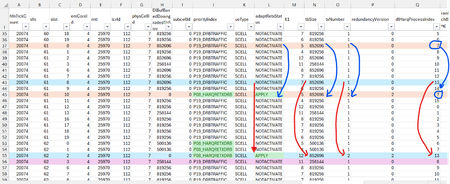
Dear Experts , I have a data like below:- here the Column-O, txNumber can go from 1,2,3 (txNum=2 and 3 means a Retransmission), I want to filter all the pairs for all Transmissions and their corresponding Retransmissions ( either by coloring them all using a conditional formatting) or using a specific filter Rule. How to identify the Transmission and it's corresponding Retransmission for a Specific HarqId( say for dlHarqProcessIndex ==7, the blue color Row-37 is my 1st transmission(txNumber ==1) for the dlHarqProcessIndex==7 with a tbSize of 852696, and adaptRetxStatus == NOTACTIVATE, and it's corresponding 2nd transmission( Retransmission , txNumber==2) Row-45, tbSize remains same(as it's corresponding 1st transmission) in all retransmissions and adaptRetxStatus changes to "APPLY" for all retrans txNumber==2,3) and similarly for other pairs like for dlHarqProcessIndex==13. Attached is the Worksheet.Solved141Views0likes5Comments
Accents & Characters using "Alt+Code" appear twice on Word
Hello everyone I have been struggling with a bug on Word. Everytime I type a character using "alt+code" such as ô which is alt+0244, the character appears a second time at the next stroke of a keyboard key. Has this happened to anyone else? If so, do you have a fix? Many thanks Michael1.6KViews2likes8CommentsIssue printing Multiple spreadsheets at once
I have a file with 7 separate spreadsheets (tabs) and the 1st and last of which use the 2nd tray of my printer (different color paper). the 5 other tabs print off tray 1. I can print each individual tab no issue , but when I try to print all tabs at the same time they come out all out of order, and out of the wrong paper source. any ideas?437Views0likes1CommentNeed help autofilling.
Good morning all, Thought I posted this but I am not seeing it anywhere so I apologize if this is a repeat. I was tasked with filling in a spreadsheet with data including; Our part number, our description, supplier name, supplier number assigned by us, and supplier part number. I noticed that a lot of the part numbers repeat so I am trying to find a way so that when the column with our part number repeats it will auto fill the columns with the supplier name, supplier number and supplier part number automatically when I enter a repeating part number if possible. I am very much not excel savvy but I am pretty computer literate. I have attached the document I am working on, there is no customer data what so ever and all part numbers are internal so are not proprietary. https://gpcompinc-my.sharepoint.com/:x:/g/personal/zachv_gpcompanies_com/IQCj4grl62sHQYohshZJ9Mb2AX7_MknXYW1QiMk8wv2sdfQ?e=duyOxL5Views0likes0CommentsOffice365 Autoupdate on Mac
Last week I had an issue with Autoupdate on Microsoft365 where OneNote failed to update, other app were fine. I tried selecting just this app and updating it but got a download error. Autoupdate indicates "some apps have encountered errors" and retrying just repeats the download error. I've tried machine based fixes but none have worked and I suspect it's something else as I have a Mac mini and MacBook doing the same along with my wife who has a Mac desktop. The issue is still the same a week on.46Views0likes1CommentDisable Auto-Fit/Auto-Wrap on Web?
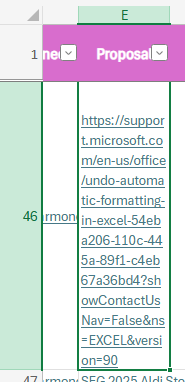
About a week ago Excel rolled out a new feature to me that offered to auto-fit my cells whenever needed. Not knowing what it was, I accepted it and turned it on. Now, I want to turn it off and cannot find it anywhere. I've tried following https://support.microsoft.com/en-us/office/undo-automatic-formatting-in-excel-54eba206-110c-445a-89f1-c4eb67a36bd4?showContactUsNav=False&ns=EXCEL&version=90instructions, but these instructions are for the app, not web, and the issue doesn't replicate on the app. Below in E46 is an example of the issue. I want to paste links without them auto-wrapping my text or auto-fitting the column. I have tried turning wrapping on and off again in this column, but it doesn't work. I could manually disable the wrapping every time I enter a link, but I would much rather just turn this feature off.3.9KViews4likes7CommentsHow do I get repeating part numbers (data) to auto fill data.
Sorry I am not very Excel savy but I was tasked with filling a spreadsheet with data of our part numbers, their description, the supplier we get them from, our assigned supplier numbers, and our suppliers part number for kits we make in our company, there are over 9000 but I have noticed that there are a lot of repeating part numbers so I was hoping there was a way so that I could have that data auto fill. I can post a link to the document it does not have any proprietary data that I can see. https://gpcompinc-my.sharepoint.com/:x:/g/personal/zachv_gpcompanies_com/IQAYSdPfHYQvRp6TRW4hg_xjAYh_4Jjl2Z_aCXX_64zMf50?e=MKDtrR6Views0likes0Comments
Excel Map - One region is recognized but not showing up in color
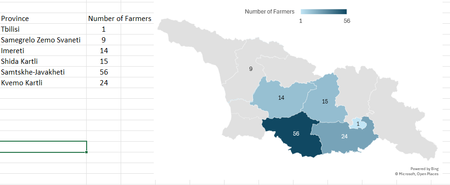
Hi, As shown below, I am trying to map out the number of farmers in our data in each of Georgia's regions. Samegrelo Zemo Svaneti is recognized and the data label appears but the color does not. If I change the map to show only the regions with data, it does show in color but I need the full country map.52Views0likes2Comments



Events

Learn more about the capabilities of Agent 365 in this live 'Ask Microsoft Anything' with product and engineering team experts! Get your questions answered about capabilities for agent observability,...
Wednesday, Mar 18, 2026, 09:00 AM PDTOnline
0likes
11Attendees
0Comments

You’re passionate about what you do, and we’re passionate about empowering your potential. Microsoft 365 Community Conference - is your chance to keep up with AI, build game-changing skills, and take...
Tuesday, Apr 21, 2026, 08:00 AM PDTIn-Person
0likes
3Attendees
0Comments
Recent Blogs
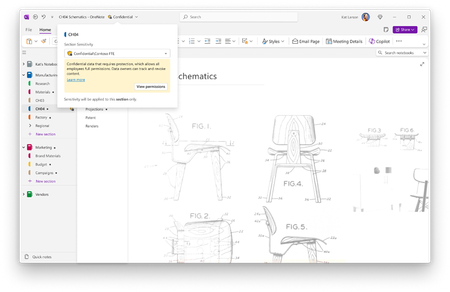
- Sensitivity labels are now generally available in OneNote, helping organizations classify and protect sensitive notes.Mar 05, 202694Views0likes0Comments
- Cross-tenant orchestrated user data migration in Microsoft 365 enables migration of user data and workloads between separate Microsoft 365 tenants.Mar 05, 2026189Views0likes0Comments