
Forum Widgets
Latest Discussions

Outlook Classic - Crashes When Drafting with Copilot in RDS environment
Hi all, I'm interested to see whether anyone else is experiencing this issue, particularly in an RDS environment. We have a number of users who have paid-for Microsoft 365 Copilot licences, including the integration within Office applications such as Outlook, Word and Excel. In Outlook Classic running on our Windows Server 2019 RDS environment, Copilot no longer works correctly. When a user presses Alt + I to Draft with Copilot, or clicks the Copilot pencil icon within the body of an email, and then enters a prompt, Copilot displays "Writing your email" and the blue progress bar starts moving from left to right. At that point it freezes, Outlook crashes, and closes. In some cases Outlook will automatically reopen after the crash. The Copilot integration appears to work fine in Excel and Word. Is anyone else running Outlook Classic in a Windows Server 2019 RDS environment with Microsoft 365 Copilot licences? I would be interested to know if you have experienced the same issue. I've tried repairing and reinstalling Office apps, and always ensure they are fully up to date. Thanks.Chris HouseJul 20, 2026Tin Contributor507Views1like7Comments
关于windows白板停止使用造成的问题
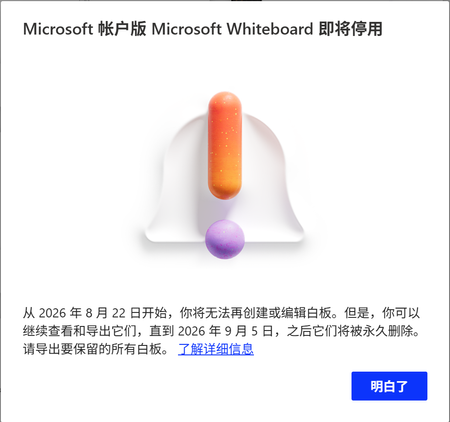
今天我打开Windows白板的时候,出现了提示即将停用,我目前可以导出为pdf或者图片还有压缩包,我想知道有没有办法在其他应用上继续进行编辑,最好可以用手写笔进行编辑 TRANSLATION When I opened Windows Whiteboard today, a message appeared saying it will be discontinued soon. For now, I can export as PDF, images, or a compressed file. I want to know if there's a way to continue editing in other apps, preferably with a stylus.FLYPANDA999Jul 20, 2026Occasional Reader23Views0likes0Comments
Bookings - No more notes or extra fields available
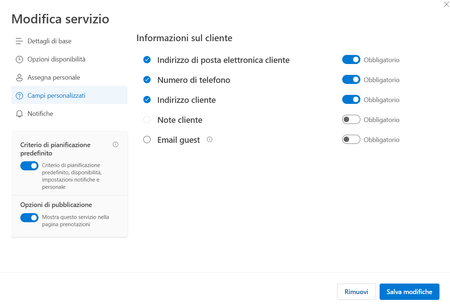
Hi there and happy new year to all. Starting from mid-december, we are facing an issue with our company Microsoft Bookings: basically the custom fields (like address, notes and so on). The book page will just ask for Name & Surname, E-mail Address and Phone Number. On our Administration back-end, the Customer Notes fileds is greyed out (you cannot enable it), and all the custom fields disappeared, you have just the standard ones. We have this issue in all our different booking pages, and all the services are affected. Any hint about this? Thanks!gmicJul 20, 2026Copper Contributor1.4KViews0likes5CommentsUsing User Assigned Managed Identities with Microsoft 365 Automation7
A user assigned managed identity (UAMI) is a secure method to authenticate with many important endpoints, including the Microsoft Graph. It’s like a system assigned managed identity (SAMI), but the big difference is that a UAMI is an Azure resource that isn’t tied to an automation account. It can be used in multiple areas of Azure and a UAMI might be a better option for large organizations that make extensive use of Azure resources. https://office365itpros.com/2026/07/20/user-assigned-managed-identity/5Views0likes0Comments
Edit/Mass Edit Powerpoint linked file addresses
As the title suggests I'm looking for a way to manually edit or ideally mass edit the address to linked files in powerpoint. For context I play several games where I need to keep track of what builds I have on which character, and sometimes their in-game inventory. Unfortunately the games don't really have the greatest inventory management for the in-game item side of things. In addition the only way sometimes to remember a character's build is to log onto that character and pull up their build page. With enough characters it can be pain remember what I have where even though I enjoy the games themselves. To get around some of the flaws I have powerpoints I use to keep track of certain things like inventory and build. One ppt may have photos of all the current builds for each character, another may have photos of their inventory and so forth. Certainly not ideal but once the initial setup was done, it's been fairly easy to maintain and I only have to update an odd photo here or there if something changes. Which brings me to my potential issue here. I've been keeping the ppts on a thumb drive along with the photos so I can have everything in one place. Recently the drive decided it was done and checked into that silicone repository in the sky and no longer works. Fortunately however I was able to move everything over to a newer drive before the old one finally checked out. While I was able to save my data, I also introduced 2 side effects I wasn't thinking of at the time in my haste to avoid losing everything. When moving everything over I moved things over in batches to avoid taxing the failing drive too hard and placed each batch in its own folder to avoid copying the same thing more than once. So think something like Folder 1, Folder 2, Folder 3, and so on. To conserve on file size of the ppt itself I always chose the option of "Link to File" when inserting the photos to the slides instead of the basic "Insert" or "Insert and Link" options. This means 2 things, the drive location is no longer correct, and the folder location is no longer correct in the links. While I could in theory just change the drive letter and make the folder structure the same again, moving it in batches actually let me organize the raw photos better, but means I now need to correct the addresses for the ppts themselves since the old links no longer work. In the program I know we can go to Info, then press the Edit Links To Files button, and try to change stuff there. The problem is that I can only change one thing at the time there. On top of that if I press the Change Source button, it wants me to find the photo individually vs just chanting the text address of the photo. These wouldn't be issues if it was just a few photos we're talking about as I could just go in, relink by hunting each one and roll. However there are around 250 photos that I would have to do this for, and it would be very tedious. Plus the fact the previews don't work anymore either. (yes i'm one of those kinds of gamers) So what I'm hoping you folks can help me with is a way to edit the text addresses manually for the links. Ideally in mass groups, but I can do it one at the time if I have to. For example let's say I have photo one and it's address looks like "D:\Game1\Character Group1\CharacterA\Build1\Photo1" on the old drive. What I want is a way to change it to say "E:\Game1\Batch1\Character Group1\CharacterA\Build1\Photo1" type of thing. Ideally I'm hoping for a way to change those addresses in mass. If I have to text edit them all one by one, that's still alot faster than having to hunt and relink each photo individually. Thanks in advance for any advice.80Views0likes2Comments
What are people using to measure manager effectiveness across the org?
Our CHRO wants to start tracking how effective managers are, things like do they hold regular 1:1s, do they give timely feedback, are their team's goals on track. Right now we have zero visibility into any of this. We can pull some data from Teams usage reports but that just tells us who's chatting a lot, not who's actually managing well. Anyone found a tool or approach within the M365 ecosystem that gives you a real picture of manager effectiveness?22Views0likes1Comment
Msn partner hub program Invitation code inquiry
Hi , I don't have access to any publisher of msn partner hub program. But I just wanted to join it at any cost. This is very important for me join it. Please send me an invite code for it. So, I can join it. Or send me the link of any publisher so I can contact him. Please help me out to join this program. It is very essential for life fulfill my life purpose. I will thankful to you. With my best RegardsMuhammadWaqas0007Jul 18, 2026Copper Contributor515Views0likes2Comments
Activation failed
I have been running MS 365 on my Mac laptop for years with no issue. Suddenly I cannot save an Excel file. I saw the activation button, but activation failed with the code OxO....unknown cause. I cannot find any way to contact MS for support or chat. I checked on my desktop and I do have an active subscription. I am running Tahoe 26.5.2. Excel is 16.7.1. Any suggesstions.JonHuntJul 18, 2026Copper Contributor1.1KViews0likes5CommentsHow do you roll up individual goals into department or company goals in M365?
We’re trying to manage goals across teams using Microsoft 365, but the structure gets messy fast. Individual goals live in different places, and it’s hard to see how they connect to department or company-level objectives. With Viva Goals out of the picture, has anyone built a clean way to roll up goals in M365, or is this something better handled with a dedicated OKR/performance tool? (I honestly wouldnt want to use something third party and much rather keep things in MS 365)ClaireBJul 17, 2026Brass Contributor38Views0likes2Comments(Reposting) Microsoft can you please bring back the new Microsoft rewards dashboard
So I made a post last time where I asked Microsoft before to bring back the new Microsoft rewards dashboard but they didn't bring it back yet sadly so here is a repost The main reason why I want this new rewards dashboard is cause 1 ) I really like the dashboard it's so refreshing and 2) I was going to get a LOT of bonus points (like +1800 points) but I wasn't able to get that cause Microsoft removed the new dashboard and that's all that I will say for now And since they removed the new Microsoft rewards dashboard I am very sad so Microsoft please bring this back and it would be really appreciated if you would give me a reason why you guys removed the dashboard, so thank you guys anyway 🫠Isaiah_Cacho_95Jul 17, 2026Copper Contributor106Views0likes1Comment


Tags
- office 3658,157 Topics
- exchange2,078 Topics
- microsoft 3652,072 Topics
- admin1,452 Topics
- sharepoint1,317 Topics
- microsoft 365 apps1,233 Topics
- microsoft 365 groups795 Topics
- outlook760 Topics
- microsoft teams671 Topics
- security648 Topics