office 365
8170 TopicsAutoSave disabled when opening SharePoint-synced files from Finder after macOS Tahoe 26.6 update
Files stored in SharePoint Online and synchronized locally through OneDrive are opened as local documents when launched from Finder. Office applications display "Saved to my Mac" and AutoSave is turned off by default. However, opening the exact same files through Word/Excel > Open > Sites, or via SharePoint "Open in Desktop App", correctly identifies them as cloud documents. In that scenario, AutoSave is enabled and collaboration/version history features work as expected. Troubleshooting already performed: OneDrive reset and re-linked SharePoint library re-synced Signed out and back into both Office and OneDrive Removed Microsoft credentials from macOS Keychain and re-authenticated Recreated local OneDrive sync relationships Verified OneDrive File Provider extensions are enabled Verified Office applications and OneDrive are fully up to date Tested with newly created files and existing files Tested "Always Keep on This Device" with no change in behavior The issue appears to be specific to the Finder-to-Office launch path after upgrading to macOS Tahoe 26.6. Before upgrading to macOS Tahoe 26.6, opening the same SharePoint-synchronized files directly from Finder correctly preserved cloud document identity and AutoSave was enabled as expected. I discussed this issue in detail with Apple Support, but they quickly dismissed it, saying that the problem is not on Apple's side and that I should contact Microsoft instead.2.1KViews10likes19Comments
SharePoint Online - Copy site pages between site collections - is that possible?
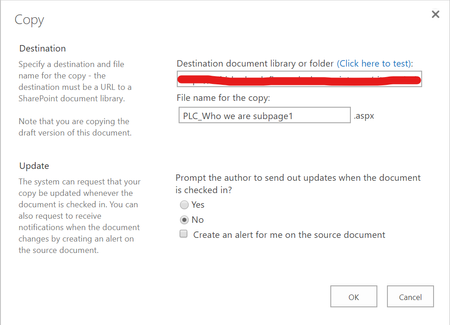
Hello everyone, I have been asked to move some site pages from a Microsoft Team to another Team. In the modern look of SharePoint Online I can select the page (example1.aspx) and when clicking on the three dots I am given the option "Copy to". As you probably know, the page can be copied only on the same site/Team. When I switch to the "classic" look/mode, I am given the option "Copy" and I can type a destination document library or folder (see the screenshot below), but when I try to copy that to another site, I always get an error (refuse to connect). I know that there's a https://sharepoint.uservoice.com/forums/329214-sites-and-collaboration/suggestions/35035618-add-the-ability-to-copy-a-modern-site-page-from-on asking specifically for this feature, but I would like to know if there is some workaround we can try in the meantime, like free migration tools or some scripts via PowerShell. Thank you in advance for your help! Francesco45KViews1like8Comments
Not able to refresh stock data
An error message:" You need to be online to refresh your linked data types. Check your connection and try again" When I refreshed stock data today and not able to get the updated data. They just fixed a week long issue yesterday, another issue happens today, please help to fix it asap.3Views0likes0Comments
Office 365 Application Splash Screen / Start Screen
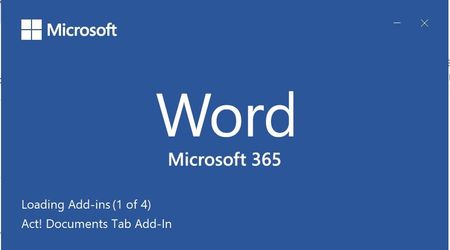
All office applications are opening with an alternate splash screen (the white one) I believe this is because the is a problem with my user's profile. I get the alternate screen when loading all office 365 applications. I have several odd things happening on the user's computer. Can anyone tell me what the alternate screen is telling me?9.3KViews0likes3Comments
Excel Insert Copied Cells Creates Blank Row
Whenever I try to copy row 2 below, right mouse click, and select Insert Copie Cells, I incorrectly get a blank row. This is in Excel safe mode with all add-ins disabled. Does anyone know how to fix this? See sample data below. Thanks. 1 32134 234234 45645 456 456 456 536 4567 456 456 456 456 456 456211Views0likes2CommentsOneDrive Storage Space for O365 E3 1-5TB
I just want to clarify on the OneDrive storage space for O365 E3 subscriptions.... As I've found, I can increase storage per users up to 5TB.... The default is set to 1TB. When I'm checking MS sites, for O365 E3 it mention OneDrive 1-5TB. Is there any extra cost when increasing to 5TB for a user with the existing subscription? I assume it is not, but cannot find any clear mention about it. We have 56 O365 E3 licences and I need to increase to 5TB for one user.Solved44KViews0likes6Comments
Is there a way to create role-specific competency frameworks in Microsoft 365?
We already have a lot of employee information in Entra ID, like job title, department, manager, location, and other user attributes. What I’m trying to figure out is whether we can use those attributes to automatically assign different competency frameworks to different groups of employees. For example, engineers would have one set of competencies, sales another, and managers would have additional leadership competencies. Ideally this would update automatically when someone changes role or department in Entra rather than HR maintaining everything manually. Has anyone built something like this with Entra + SharePoint/Power Automate, or is there a better way to manage competency frameworks while still keeping Microsoft 365 as the source of employee data?162Views0likes2Comments
Microsoft 365 error 7q6ch , can't login to my microsoft account
Microsoft 365 for business account, getting a microsoft popup box everytime I open office to login. I enter my email address and the next screen is always an error "7q6ch" . I can login to office.com no problem. This error will not go away no matter what I do and here's what've done- removed all microsoft credentials, logged out of microsoft account, removed all accounts in settings, signed out of office, rand scannow, ran the fixes to delete the folders in app data, online repair, quick repair, ran the cmd promp and powershell fix, made a new profile, I uninstalled and reinstalled office, keep getting this popup. The only option I'm seeing is to wipe my computer which I really don't want to do. It's a windows 11 pro laptop I downloaded the office setup file from my office account and it's up to date. I believe this stems from microsoft making me enter an account in order to setup my computer and since it doesn't allow work email addresses I had to use my personal account which then logs in to app automatically and the computer get confused. I need help please, any suggestion or fixes are appreciated, thanks1.1KViews1like2CommentsOffice 365 issues
We have an end user that started with us approximately a year ago. Shortly after he started he began noticing that his status would go away on a fairly regular basis on MS Teams. We tried uninstall/reinstall, resetting, repairing and the problem persisted. Since he was a relatively new hire we were thinking it was something with his laptop so we replaced and the issue returned. Turned in a ticket with our Office 365 vendor who in turn opened a ticket with Microsoft. After some initial testing they sent a Teams install file that seemed to fix the issue. Since that time he has regularly had issues with Teams disconnecting, Outlook just stop receiving emails, while showing connected. Typically the only fix was a restart and on some occasions that did not work. Sometimes a reset or repair might fix this issue. Throughout this we did clear credential manager, caches, etc...This got a point yesterday where I created a new user profile for him, basically like a new laptop and it temporarily fixed the Teams and Outlook issue, however when attempting to sign into MS Edge it would just spin and had to use task manager to close the app. Tried a repair on the app as you cannot uninstall and same result it would hang up and have to forcibly closed. Just wondering if someone else has encountered something like this and possible fixes. Thanks259Views1like2Comments