azure ad
322 TopicsMicrosoft to Stop Providing Telephony-Based Authentication Methods for MFA in February 2027
In an important announcement for all tenants, Microsoft revealed that Entra ID will no longer provide SMS one-time codes or voice calls for MFA challenges after February 1, 2027. Tenants can continue to use telephony-based authentication methods after that date, but only by purchasing a service from a telecom provider. This is arguably the biggest change in Entra ID authentication since mandatory MFA for administrative interfaces – and we have a PowerShell script to help identify the affected accounts. https://office365itpros.com/2026/07/14/entra-sms-one-time-code/4.1KViews0likes3CommentsWhy Entra Administrators Cannot Disable Their Own Accounts
When attempting to disable a user account in an interactive Graph session, I was told that the command failed because the accountEnabled property was invalid. The error is obviously incorrect because it’s very possible to update the property to disable or enable an account. However, different rules apply when the account is holds a privileged role, like Global Administrator. Entra imposes some reasonable blocks, even if the error messages are not good. https://office365itpros.com/2026/09/14/strange-accountenabled-error/69Views1like1CommentEntra ID Continuous Access Evaluation and Microsoft 365
Continuous Access Evaluation (CAE) is supported by core Microsoft 365 workloads like Exchange Online, SharePoint Online, and Teams, and the reach of CAE is gradually spreading throughout the Microsoft cloud ecosystem. However, security researchers report inconsistent coverage across first-party apps and clients that take a little gloss off the promise of instant access revocation when critical events like user password changes happen. https://office365itpros.com/2026/09/08/continuous-access-evaluation-cae/134Views0likes1CommentRevoking Access Tokens for Risky Service Principals
A Technical Community post discusses the topic of using the Entra ID continuous access evaluation (CAE) feature to revoke access for service principals when apps become risky or potentially compromised. The Microsoft Graph Command Line Tools app is a good example of a service principal in common use, so we examine the access tokens issued for interactive Graph sessions to discover if they are CAE-enabled. Just for fun! https://office365itpros.com/2026/09/03/cae-service-principals/78Views0likes0Comments
How much of your Microsoft 365 environment can you actually see at once?
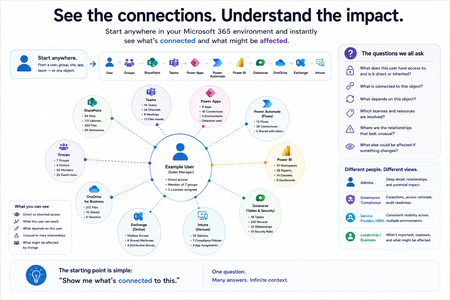
Not how many users you have. Not how many sites, teams, apps or flows you have. How much of it can you actually see connected together? I've been working across Microsoft 365 environments for a while, and I kept running into the same thing. There is no shortage of information. If anything, there is probably too much of it. Users, groups, permissions, SharePoint, Teams, Power Apps, Power Automate, Power BI, Dataverse, OneDrive, Exchange, Intune, licensing, configuration... It's all there. But when you're actually trying to understand how everything fits together, it can be a different story. You open one blade. Find something. Open another. Cross-check it. Go back. Open something else. Before long, you're jumping between different parts of the tenant trying to build the bigger picture in your head. And if you're working with larger environments, that gets difficult pretty quickly. The information isn't necessarily missing. The relationships between the information are what can be difficult to see. That got me thinking about a slightly different question: Instead of "where do I find this information?" "Show me what's connected to this." That's where VisibleState started. Start anywhere. Follow the connections. Imagine starting with a single user. Instead of seeing that user simply as a record with a list of properties, imagine being able to explore the relationships around them: User → Groups → SharePoint → Teams → Power Apps → Power Automate → Power BI → Dataverse → OneDrive → Exchange → Intune Then the questions become different: What does this user have access to? Is that access direct or coming through a group? What resources are connected to them? What depends on something they're associated with? Which licenses are involved? Are there relationships that look unusual? If something changes, what else might be affected? Those questions aren't necessarily about finding another piece of information. They're about putting information that already exists into context. A report can tell you that something exists. A connected view helps you understand what it is connected to. Illustrative example below — not a real customer environment. I'm not suggesting Microsoft 365 doesn't already give us this information Quite the opposite. Microsoft 365 already gives administrators an incredible amount of information and tooling. The thing I've been thinking about is what happens when you want to look across those boundaries. Sometimes I don't want another export. I don't want another list. I don't necessarily want another dashboard. I want to start with something I'm looking at and ask: "What's connected to this?" And then keep following the trail. That's the idea I'm exploring with VisibleState. The interesting part is what happens when you change the viewpoint The same relationships can be useful for completely different reasons. For example: Administrators may want to understand access, permissions and dependencies. Security and governance teams may want to find unusual relationships or exceptions. Compliance teams may need to understand who can access something and why. People managing multiple environments may want a consistent way to understand what's there without rebuilding the picture manually every time. Leadership may not need to see the graph at all. They may simply want to know what's important, what's exposed and what could be affected. It's still the same underlying environment. You're just looking at it from a different angle. And that's where I think things get interesting. Where I'm at with it VisibleState started as something I was building to make my own work easier. I was spending a lot of time investigating environments, tracing access and putting information together for reports. The individual tasks weren't necessarily difficult. It was the jumping between different places and reconstructing the bigger picture that took the time. So I started building something that would let me approach the environment through the relationships instead. It's grown quite a bit from where it started, and I'm continuing to build it. I'm not posting this as a product launch, and I'm not looking for people to sign up. I'm genuinely interested in whether the problem I'm seeing is familiar to other people working with Microsoft 365. So I'm curious... If you could start with any object in your Microsoft 365 environment and immediately see what it's connected to, where would you start? Would it be: Users and access Groups and permissions SharePoint and Teams Power Apps, Power Automate, Power BI and Dataverse Licensing and resources Governance and unusual relationships Something completely different Maybe you've already got a good way of doing this. Maybe you still find yourself jumping between different services and piecing things together manually. Or maybe I'm looking at the problem from the wrong direction. What's the one relationship in your Microsoft 365 environment that you wish you could see instantly?157Views0likes0CommentsRunning a Regular Check for New Graph Permissions
Use PowerShell to Check for New Graph Permissions with a View to Updating Permissions Used by Apps. After Microsoft released some new Graph permissions, thoughts turned to how to discover new permissions after they are released. Code is the best way to perform automatic checks, and this article explains how to use PowerShell to check a last known set (stored in SharePoint Online) against the current set. Any variations are reported to administrators via email. https://office365itpros.com/2026/08/31/new-graph-permissions-check/81Views0likes0CommentsCalculating the Licensing Requirement for Entra Conditional Access Policies
After the discussion about the licensing gap prompts shown in the Entra admin center, here’s a PowerShell script to compute the set of user accounts that should have Entra P1 licenses. The information comes from the conditions property of conditional access policies with group and directory role membership expanded to find individual accounts. The set is checked against the set of users licensed for Entra P1 to find the accounts that need to be licensed. https://office365itpros.com/2026/08/18/find-entra-p1-accounts-to-license/98Views0likes0CommentsEntra Admin Center Flags Licensing Problems with Conditional Access
The Entra admin center is flagging licensing gaps for conditional access. The messages are informational, not the beginning of a new automated billing procedure to charge tenants when Entra ID notices that some accounts use conditional access policies when they don’t have a license. In this article, we discuss the product license insight and how Microsoft measures conditional access usage, and show how to use PowerShell to find who’s using conditional access. https://office365itpros.com/2026/08/13/licensing-gaps-entra-id/288Views0likes0CommentsEntra ID Drops the memberOf Rule Operator for Dynamic Groups and Dynamic Admin Units
MC1448379 (5 August 2026) announces the retirement of the MemberOf rule operator from Entra ID in early November 2026. The removal of the rule operator might affect the membership rules used for dynamic groups, dynamic administrative units, and auto-assigned entitlement management policies. If a tenant doesn’t act, Entra ID will stop processing the rules and memberships will become increasingly inaccurate. And that’s a bad thing! https://office365itpros.com/2026/08/07/memberof-rule-operator/3KViews1like0CommentsEntra ID Enables Blocking for Nested Security Groups
A new Entra ID feature enables the ability to block nesting for security groups. In other words, you can’t include other groups as members of a group. That might not sound important, but it is to those who manage permissions, especially when the time comes to figure out who exactly has access to something confidential. The new feature isn’t fully implemented yet, but it should be very valuable when it’s fully deployed to tenants. https://office365itpros.com/2026/08/03/blocking-for-nested-security-groups/114Views0likes0Comments