User Profile

ErikKohler
Copper Contributor
Joined Jun 18, 2019


User Widgets
Recent Discussions
Disable MFA for User with certain admin roles
Hello all, we have a user with sharepoint administrator role and a self build application support manager role (the suer is allowed to create apps in Azure). We are now at a point where this user has to register an app for our helpdesk tool, but we have to remove the MFA for the registration. We excluded the user from the "MFA is mandatory for all users"-policy, the "MFA is mandatory for admins"-policy and set his MFA in the MFA-per-user setting on disabled. We have no other policy that enforces MFA for this user. Wenn we try to log in with the user (under http://www.office.com), we still get the request to register MFA Authenticator. I am aware that MS enforced MFA for admins, when they try to log in into the admin portals. Does this also apply for sharepoint admins? Does anyone have an idea, where the MFA request for this user could come from. Any help is appreciated. Cheers, ErikOutlook S/MIME issue - encryption makes mail unreadable
Hello all, since a few weeks some coworkers including myself expierence a strange behaviour in Outlook. All Outlook clients are set up to encrypt every mail via S/MIME. Some external contacts can't read those encrypted mails, that's why we deactivate the encryption for those mails over die encryption button in Outlook. If we then send the mail out, the mail appears as encrypted in the "sent mails" folder, the recipient can't open the mail and the sender itself can't even open it. It seems like Outlook has some major issues with the S/MIME encryption. Has anyone experienced any similar behaviour or maybe has a an idea what could cause this problem? Cheers, Erik920Views0likes1CommentTeams Premium mixed licenensing encryption
Hello all, I was wondering what happens, if just a few users in our company have a teams premium license. e.g. a colleague with a premium license and two other with just a standard License are a having a call. Will the recording be encrypted? Does it depend on who will inititate the recording? Any information about mixed licensing will help. Regards, Erik366Views0likes0CommentsFile permissions - strange beahvior
Hello all, I am not quite sure if this is the right place, but I'll give it a try. We have Freelancer, for whom we created an azure ad account in our tenant. He is licensed with a Business Basic license (means he can only use the Microsoft 365 Web Apps). He has a private Office license for the desktop apps. When he is working on Files (Word, Excel, Powerpoint,..) which are created by a user from our azure ad and saved on sharepoint online, he can't edit them in the Desktop apps. But when he tries the same with a file from a customer, who invited him as a guest to their tenant (using the user he has in our Azure AD) he can edit the files. My guess is, that when he opens the file in the desktop app, the app tries to access the file with his private user, which has no permission on that file, so the apps stays in read-only mode (not sure if my guess is correct). But why would it then work while working with the customers files? I'm super confused atm and don't know what could cause the behavior. Any help will be appreciated. Cheers, ErikRe: Teams shared channels cannot add users when guests exist
I can confirm this behaviour. Im going crazy trying to find a way to invite someone in a Shared Channel, who already has a guest user in our tenant. Should't B2B collab and B2B direct work at the same time? There should be way, to enforce searching externalyl, when looking for users to invite in a shared channel. But afaik there is none. When I try to add someone (who already has a guest user) to a shared channel the user sometimes comes up with EXT, sometimes without. Either way Im getting an error, that a user from this org can't be added to this channel. If I try it with a different user from the same external org (who hasn't a guest user yet) it works fine. Feels like MS has some work to do.3.1KViews0likes2CommentsBlock List entry by calculated days
Hello all, we have list for colleagues, which need to travel outside there homecountry. They have announce a travel at least 10 before the starting date. In our list we have the travel starting date and the "entry created on" date. We want to block the entry if the two dates are less than 10 days away from each other. Example: Travel start date 24.01.2023, entry created on: 02.01.2023 = entry can be saved Travel start date 24.01.2023, entry created on: 20.01.2023 = entry cant be saved and the employee must contact HR Is this possible in a sharepoint list? Regards ErikSolved1.3KViews0likes3CommentsWeird behavior with @mentions
Hello all, we've experienced a weird behavior of Outlook (Microsoft 365), when using the @mention. If my colleague mentions a certain contact Outlook crashes(the same happens, when he adds the contact as recipient) . All others work fine. After trying some fixes, we removed Outlook und installed it new. Now he can add the contact as recipient, but the contact won't show up under the @mention feature. The problem is, that this certain contact is his main contact for a project. Does anynone have an idea, what the cause could be or how to solve this? Any help will be appreciated. Cheers, Erik1.9KViews1like3CommentsError when creating a list
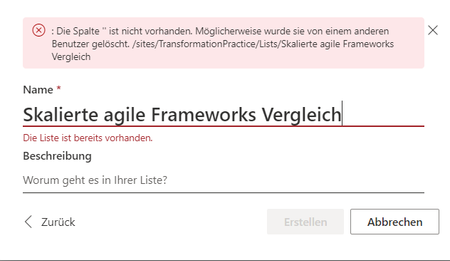
Hello all, when trying to create a list (using an excel file) we run into the following error Translation: The column" does not exist. Maybe someone deletedt it. under the Name it says: "The list already exists". Our problem is that there is only 1 other list in this library, with a different name. I tried different uploading over Sharepoint, directly from my PC. Nothing worked. Does anyone have an idea what the cause could be? Cheers ErikChanging the Role when searching for contact
Hello all, I had to update quite a lot of my colleagues business roles due to promotion. I changed the business role in Azure AD and the organization chart in Teams shows the new business role. But when I search for a contact in Teams it still shows the old role in the list. My question is if this is just matter of time until it changes or isn't this connected to the AD business role and where does it need to be changed? Is it comming from the Outlook business card? Regards ErikSolved737Views0likes1Comment
Recent Blog Articles
No content to show