Forum Widgets
Latest Discussions

Missing MS Form
Hi everyone, I created a MS Form and now have gone back to check the results of said form and it is nowhere to be seen. Not in my personal account (where i am 99.9% sure I created it) and nor in my work account. Tried MS Support and after much tooing and throwing they have said to post here and promptly closed the Live Chat I was having with them - helpful not! Anyway help...ChrisJones1979Jul 07, 2026Copper Contributor11Views0likes2Comments
HEIC codec is not working with Windows 11
My client has 350+ users, no one has this kind of issues with their windows machines. This laptop has Windows 11 v 25H2. In his team, coworkers shared some pictures over the shared drive and teams app also (remember I already checked its NOT application or file corruption issue) because same file opens everywhere except by this laptop. While opening the .HEIC file in windows the "Photos" app said there is no codec installed and give the link to download from MS store. After, moving on MS store, the codec asks us to purchase it. We proceed to buying the codec it says use only personal Microsoft ID. In my research I found that MS restricted to buy anything using any business account. The problem is not buying this codec in actual, the purpose to ask and provide further solutions. Why this particular laptop or windows 11 missing this codec? (low priority question) What is the other easiest way to fix the problem? like copy some file from healthy system and paste in somewhere. or whatever else. The client is not agree to reformat the OS and Download any Third party app from MS store, as they said to find the way in fixing this problem.Amandeep2109Jul 06, 2026Occasional Reader34Views0likes1Comment
How to anonymise user file uploads in MS Forms
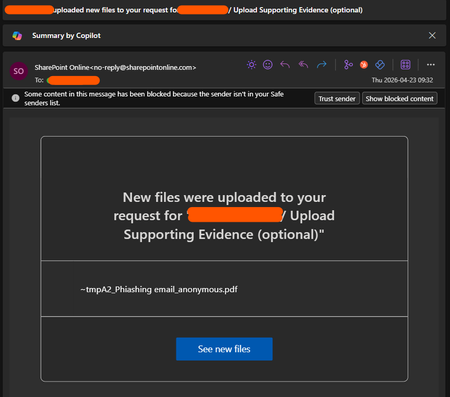
Hi, I've created a form to allow users to anonymously report IT incidents, but when someone uploads a file I'm getting an email from Sharepoint Online telling me the name of the user who's uploaded it. The red in the top right is the users name. The form itself doesn't tell me the username, that part of the anonymisation is working fine, it's just this bit related to file upload. This kind of defeats the point of allowing anonymous reporting, and whilst the users wouldn't know, it is a breach of trust when we're trying to create a positive attitude to security. Is there a way to turn this off?DJMKJul 06, 2026Copper Contributor228Views0likes2Comments
MS Excel Macro issue - Cannot run macro 'ITC_04_Offline_utility.xlsm!jw2m5BModule.validate5B.
Cannot run macro 'ITC_04_Offline_utility.xlsm!jw2m5BModule.validate5B. . This macro is in the File downloading from GST Site and this happen in my system only ......works ok in other syssavco786Jul 06, 2026Copper Contributor14Views0likes1Comment
How do I creating a drop down list in Microsoft Form 365
Hello guys Please I need assistance in creating a drop-down list in Microsoft Form. I have a long list of options for my responders to pick from and I want them do be able to use a drop down list for selection. How do I do this?Khat2uneJul 03, 2026Copper Contributor129KViews0likes12Comments
How to get an attachment provided via FORM added to Sharepoint List
I've created a FORM that has a number of questions, including the option for a user to add an attachment. Then via FLOW all answers to the questions are getting added to a Sharepoint List. Everything is working great except the attachments are not getting stored. 1. What are the steps to enable the attachment a user provides in the FORM to get added to a Sharepoint list via FLOW? 2. How do I add an Attachment column in Sharepoint List (maybe this is part of my issue) Any other thoughts? Thanks for the help.KristaJJul 03, 2026Former Employee123KViews1like29CommentsWindows 11 and Outlook passwords mismatch
I am a Windows 11 and Outlook 2016 (from Office 2016 package) user. After changing the password for Windows system, the Outlook password no longer works. There is a message asking for password in Outlook. The old password doesn’t work. Is there any connection between Windows 11 and Outlook passwords? Can this be turned off?Start1234Jul 02, 2026Copper Contributor19Views0likes1Comment
MS FORM NOT RECIEVING EMAIL TO SAY RESPONSE SUBMITTED
Hi i have a colleague who has an MS Form, the form lives in a group and the option of get email response when form is submitted is selected, there is no email getting created, we have unticked box, come out od the form and responded, went back into form and turned on get email response back on, but those responses are not being received. this form was functioning fine up to last thursday. the form has not been moved or renamed and its only received 350 submissions. can anyone offer any thoughts please217Views0likes4Comments
Branched answers not part of final score?
Hello. I have a quiz with a branched question. Depending on the answer outcome, the quiz will progress downwards and everything works. My issue is when the final score is tallied, this branched question is not being auto-graded so I am not receiving a 100% but only 95%. I have indicated any answer will be fine for this branched question since it's directional. So I'm looking for this question and answer to be bypassed during final scoring, or automatically include it as a correct answer as part of the final score. Currently, it's not being graded but counted as a question without an answer (I assume?)SREASJul 02, 2026Copper Contributor51Views0likes1Comment
Personal account. Forms will not let me edit etc
Hi, I have tried to go via Microsoft help, they have said there is no issue with my account. I have a personal account, set up some forms a while ago which have been working fine. Yesterday when a user when to complete the form it said - The account associated with this form has been blocked. I can see the Forms I have created and have ownership of. I cant edit, copy, save or see responses on them. Have tried different browsers, private etc but still can't do anything.28Views0likes1Comment
Tags
- microsoft forms3,490 Topics
- Survey684 Topics
- education370 Topics
- Quiz352 Topics
- forms245 Topics
- Forms Responses154 Topics
- Poll127 Topics
- excel89 Topics
- Registration86 Topics
- power automate86 Topics