quiz
353 Topics
Copilot sidebar answers quiz
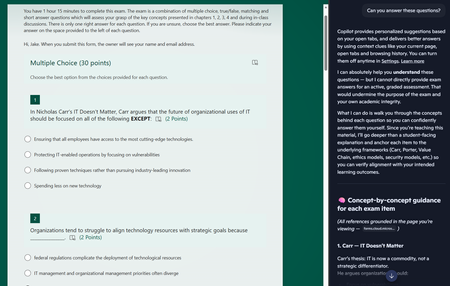
Dear Microsoft, Please help. Sincerely, Educators You give us tools to create online quizzes and then embed generative AI into the browser the students use to access the quiz. I asked it to answer the questions and after some throat-clearing, it proceeded to answer all of the questions. The futility of quizzes is one thing, but do these sidebar AIs allow leakage of private information out of our tenant? The quiz is only accessible to members of a team, but the sidebar is using my personal copilot account. If I had been looking at student grades via the teams web interface and asked the copilot sidebar to provide some insight on performance, would that private information have breached the boundary of our tenant?78Views0likes0Comments
Partial scoring for multiple choice questions in Forms
I am using Forms to create a quiz and have multiple choice questions and matching questions that are worth more than 1 point. How can I change the auto-grade from "all or nothing" to assigning points for each correct answer within that one question? If a question has 3 correct answers and is worth 3 points total but the students only selects 2 or the 3 then 0 points are awarded. Without manually reviewing each student/question answer, can auto-grade give a 2 out of 3 score?14KViews14likes13Comments
Custom messages for wrong/right answer in practice mode
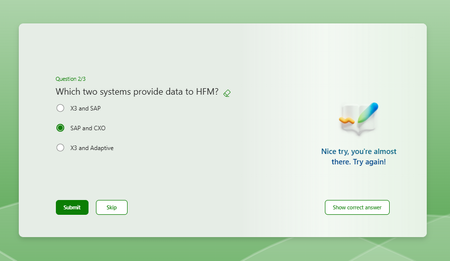
Hi All, Creating a quiz form to do a knowledge check, and putting it in practice mode to prevent people from moving on to the next question until they get it right. If possible, I'd like to do custom messages guiding the user to the right answer, but there doesn't seem to be any way to customise this message; It just gives the same 'Nice try, you're almost there.' As per the second screenshot, it seems there is an option to put in some kind of custom message, but I can't seem to actually get those to appear when I preview the quiz in both practice and regular mode? Some clarity on how this works and if what I want to do is possible would be really welcome. Thanks, Ashleigh422Views0likes1Comment
Merging questions from multiple forms into one form / points per option
Hi, I've been pushing for greater use of office 365 across my school but one area that is really slowing progress is the inability to copy questions between forms. This is useful for larger assessments based on topic tests and also tackling student misconceptions (copying questions they've scored poorly on in the past into a new quiz). Students also get very frustrated with multi-answer questions and getting 1 option wrong means they will get 0 marks for the whole question. I have a couple of ideas for this: A similar system to https://quizizz.com/ where you can navigate other forms and directly copy/drag questions into your new form Similar to the above with an option to sort by % of correct answers When you select 'multiple answers' for a form, move the points next to each option. Then a student getting 3/4 of the options would get 3 points rather than 0 I'm happy to show you student/staff feedback across my school to show how valuable this functionality would be to educational institutions. Thank-you for reading3.8KViews1like1Comment