excel
90 Topics
My Microsoft Form is not able to sync to an Excel file
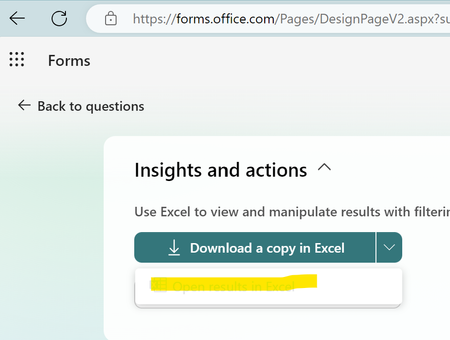
Hi, I am having trouble as when I try to open the results of a form that I made into an Excel is giving me the following error "It wasn't possible to open Excel online, You can still download a copy to visualize the responses on Excel" (translated from my native language so the message might be a bit different). I am able to download the form as an excel but I cannot open a website version of it, this form was made using a personal email address and Microsoft account. I cannot share the link to the forms as it has personal information that would not be allowed to share in a public setting.412Views0likes2Comments
MS Excel Macro issue - Cannot run macro 'ITC_04_Offline_utility.xlsm!jw2m5BModule.validate5B.
Cannot run macro 'ITC_04_Offline_utility.xlsm!jw2m5BModule.validate5B. . This macro is in the File downloading from GST Site and this happen in my system only ......works ok in other sys99Views0likes1Comment
I am Facing Microsoft form related issue
I am Facing Microsoft form related issue, I can see when I am downloading a Excel copy some columns are blank. This is my survey form, and I cannot add manually however this will reflect manipulation in data, as this is technical glitch need assistant from your side on urgent basis360Views0likes1Comment
Insights from Copilot have stopped working for us
We're all licensed (verified) with M365 Copilot, and for about the last week, one of our workhorse intake forms has stopped working with regards to the "Insights from Copilot" feature. When we attempt to refresh the insights, it presents the message, "Your form has XX responses. Copilot is analyzing the data to provide insights.", then spins for about 30 seconds, and then presents the error, "The insights haven't been generated successfully. Please try again." We're syncing responses to an Excel workbook, and that seems fine, but after about a week these "insights" just started failing in this fashion. We've done basic troubleshooting like trying InPrivate browsing, cache clearing, and since we are only at about 100 responses for this particular small form we're not hitting any limits. Regardless, it's wedged stuck in this state. I reported it via the M365 Admin portal and received the usual "No issues found" reply. 🙄 Anyone else seeing this problem? Does anyone actually use this feature? 😜576Views0likes2CommentsExcel Does Not Sync Until Opened
I created a form linked to an Excel spreadsheet in SharePoint as well as a Power Automate approval flow triggered on submission. In addition to sending out confirmation/approval emails, the flow also updates the associated Excel spreadsheet with the approval/denial. The flow was working fine until last week but since then has failed 2 consecutive times. The failures appear to be related to the flow unable to find the automatically generated submission ID in the Excel spreadsheet. When I open the linked spreadsheet, the submission is not immediately present at first but the file does sync at that point and the entry appears. When re-triggered after the sync, the flow completes successfully. Not sure if it is related, but MS form/linked spreadsheets have been updated by Microsoft recently and I was prompted to go through an update process for synced Excel spreadsheets. I completed the update with this specific form last week after the flow failed for the first time. TLDR - my form only syncs with the spreadsheet once opened. Any ideas how to get MS Forms to update the spreadsheet in real-time as opposed to when it is opened?6.3KViews3likes4CommentsResubmitted response overrides original response instead of making a new entry
Hi, I have a Microsoft Form that allows respondents to edit their submissions after submitting. Last week when someone resubmitted their response, it created a new entry in the Excel sheet which is what I prefer since it triggered a Power Automate flow. However, I ran it again this week and now it seems to override the original response in the Excel sheet. This does not trigger the flow, which is a big issue. Does anyone know why this might be happening/how to fix it? Thanks in advance!485Views0likes3Comments
Copying Excel spreadsheet
Hello Have created a group form and would like to use this form as a template for different events. Excel spreadsheet with responses is used with links and formulas in other worksheets. How can this spreadsheet containing the formulas be used as a template to use with other forms ie trying to avoid having to recreate the other worksheets that contain the formulas. Have tried various workaround which don't work: 1 Duplicate form / delete responses = does not delete responses from spreadsheet 2 Copy worksheet to new spreadsheet = does not work as the spreadsheet filename is part of the formula, so refers to the original spreadsheet (have tried find/replace all, but very cumbersome) Any suggestions, would be greatly appreciated. Thanks AndreaSolved231Views0likes2CommentsCan't create the excel file for Form responses
Hello, I have created a Form in a Teams Group and have a few responses. When I open to see the responses in the Excel file I can't create it. How can I fix this? This used to be no problem. The option to create an excel file is greyed out. Our solution depends on this excel file so I hope that this can be fixed soon. I have tried to create multiple forms to see if it will work and also located on my own personal user. It has the same issue.247Views0likes1CommentForms Moving file location of document uploaded and connecting workbooks to sync responses
I have a Microsoft form i made to enter all of our vehicle maintenance and parts into to track it by vehicle as we have 11 vehicles. I Have a upload button on the bottom of form so I can upload from our Dropbox to save all the receipts/invoices/photos of parts to with each entry on the spreadsheet. I need to adjust some of my folders (sub folder) where the files live on Dropbox. will doing this break the uploaded document or will it still be able to be viewed from the excel spreadsheet that is downloaded from Microsoft forms Second Question: I need to auto populate the form responses from the workbook it syncs to that saves on our SharePoint through our office 365 subscription and have it linked to the Vehicle Tracking Workbook that lives in Dropbox in our vehicle file so when the workbook is opened on Dropbox the form responses added in via Microsoft form copies the new entries to the historical page on the Dropbox version. How can i easily sync the two workbooks together311Views0likes1CommentAdjusting of questions in form & connecting responses to another workbook to sync answers
If i needed to adjust the questions in my form how will the previous answers be affected? I need to rearrange some of the questions in my form (for vehicle maintenance) if i move the location of the answer will it affect any previous answers? I also need to sync the workbook that the form responses go to on share point to our vehicle maintenance excel spreadsheet saved on Dropbox to a historical sheet. How can I connect the forms so when new responses are submitted, they will auto populate a copy of the response to our Dropbox excel workbook on the correct worksheet?88Views1like0Comments