Forum Widgets
Latest Discussions

Is there any solution to getting question names yet for a form submission in Power Automate?
It's been about 10 years now. Surely there is a solution to dynamically retrieve question names without needing a janky britttle workaround that may or may not work, not just IDs (get form response etc), without having to rely on a hard coded list of questions with answers inserted in against them.8Views0likes0Comments
Hacked please help
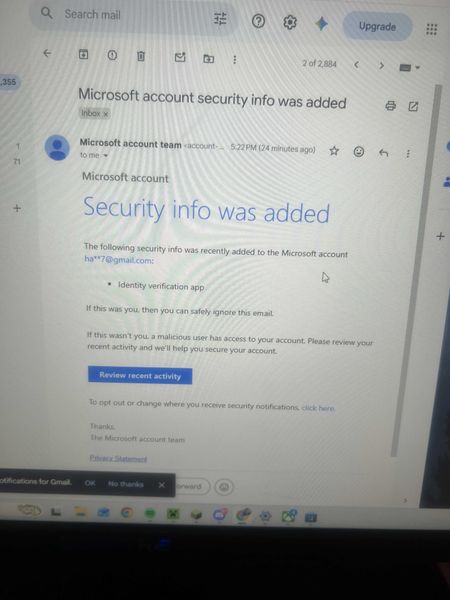
My Microsoft account was hacked today. The attacker changed my sign-in alias to a random Outlook address, removed my phone number, added their own Authenticator app, and changed the recovery email. My original email now says the Microsoft account doesn’t exist. I have the Microsoft security emails proving the changes. I also have other forms of proof. If there is any moderator or anyone who can help me recover my account I had some important stuff on there I would like to get back. It wasn't this email but another one I made this so I can ask for help. When I tried to recover the email they changed it as provided in the screenshots down below. I tried to call support and fill out recovery stuff but since they changed the email for the account there is not much I can do.Hamza298Jul 28, 2026Copper Contributor15Views0likes0Comments
Microsoft Forms Ownership Transfer Redirects to DesignPagev2.aspx Instead of Loading Delegate Page
I am attempting to transfer ownership of Microsoft Forms belonging to a former employee, but the transfer process is not working as expected. The user account still exists in Microsoft Entra ID. The account is disabled in Entra ID. Sign-in is disabled in Microsoft 365 Admin Center. The account is not hard deleted. I am a Global Administrator. I have a valid Microsoft 365 E5 license that includes Microsoft Forms. When accessing the documented Forms transfer URLs using both the user's UPN and Object ID: forms.office.com/Pages/delegatepage.aspx?originalowner=<UPN> forms.office.com/Pages/delegatepage.aspx?originalowner=<ObjectID> the request immediately returns an HTTP 301/302 redirect to: forms.cloud.microsoft/Pages/DesignPagev2.aspx instead of displaying the Forms ownership transfer interface. Could you please confirm: What is the currently supported method for transferring Microsoft Forms owned by a disabled user account? Is the legacydelegatepage.aspxownership transfer mechanism still supported, or has it been retired/replaced? Is the automatic redirect toDesignPagev2.aspxexpected behavior in our tenant? Are there any tenant-level settings, licensing requirements, administrator roles, or backend restrictions preventing the transfer interface from loading? Can Microsoft verify whether the disabled user's forms are still available and eligible for ownership transfer?AnjoJul 28, 2026Copper Contributor18Views0likes0CommentsSubject: Need help reaching support for a compromised account where the email was changed
Greetings! My gamertag is sakhigaming2. My account was compromised a few months ago, and the hacker changed my login email completely. Because of this, the standard recovery system says my gamertag does not exist. I am currently locked out of my home Xbox console. I have my physical console Serial Numbers and hardware data for both of my household Xboxes to prove I am the original owner.Since the automated recovery forms do not recognize my old email anymore, I need a way to contact a live support agent who can escalate this to the account investigation team to track down my profile's backend ID. If anyone knows the correct path to get a live chat or callback for an alias-changed account, please let me know. Thank you, and have a great day!sakhigaming2__name-of-hackedJul 20, 2026Copper Contributor32Views0likes1Comment
My Microsoft Form is not able to sync to an Excel file
Hi, I am having trouble as when I try to open the results of a form that I made into an Excel is giving me the following error "It wasn't possible to open Excel online, You can still download a copy to visualize the responses on Excel" (translated from my native language so the message might be a bit different). I am able to download the form as an excel but I cannot open a website version of it, this form was made using a personal email address and Microsoft account. I cannot share the link to the forms as it has personal information that would not be allowed to share in a public setting.Moony_34Jul 13, 2026Copper Contributor77Views0likes2Comments
HEIC codec is not working with Windows 11
My client has 350+ users, no one has this kind of issues with their windows machines. This laptop has Windows 11 v 25H2. In his team, coworkers shared some pictures over the shared drive and teams app also (remember I already checked its NOT application or file corruption issue) because same file opens everywhere except by this laptop. While opening the .HEIC file in windows the "Photos" app said there is no codec installed and give the link to download from MS store. After, moving on MS store, the codec asks us to purchase it. We proceed to buying the codec it says use only personal Microsoft ID. In my research I found that MS restricted to buy anything using any business account. The problem is not buying this codec in actual, the purpose to ask and provide further solutions. Why this particular laptop or windows 11 missing this codec? (low priority question) What is the other easiest way to fix the problem? like copy some file from healthy system and paste in somewhere. or whatever else. The client is not agree to reformat the OS and Download any Third party app from MS store, as they said to find the way in fixing this problem.Amandeep2109Jul 06, 2026Copper Contributor87Views0likes2Comments
Missing MS Form
Hi everyone, I created a MS Form and now have gone back to check the results of said form and it is nowhere to be seen. Not in my personal account (where i am 99.9% sure I created it) and nor in my work account. Tried MS Support and after much tooing and throwing they have said to post here and promptly closed the Live Chat I was having with them - helpful not! Anyway help...ChrisJones1979Jul 06, 2026Copper Contributor43Views0likes2Comments
MS Excel Macro issue - Cannot run macro 'ITC_04_Offline_utility.xlsm!jw2m5BModule.validate5B.
Cannot run macro 'ITC_04_Offline_utility.xlsm!jw2m5BModule.validate5B. . This macro is in the File downloading from GST Site and this happen in my system only ......works ok in other syssavco786Jul 04, 2026Copper Contributor20Views0likes1Comment

Tags
- microsoft forms3,493 Topics
- Survey684 Topics
- education370 Topics
- Quiz352 Topics
- forms249 Topics
- Forms Responses157 Topics
- Poll127 Topics
- excel90 Topics
- power automate87 Topics
- Registration86 Topics