forms responses
160 Topics
WHY is microsoft support so useless???
I give up at this point. How is it possible for one of the biggest companies in the world to have the worst and most useless support system ever. I'm just trying to get my account back after it got hacked so I can play minecraft. So how is in after sending a paragraph of information about the account and screenshots of receipts and email I received of someone changes the email of the account, it's still not enough information??? The selfhelp system is somehow the worst one I've ever seen and the AI chatbot doesn't even work.38Views0likes0Comments
Copilot sidebar answers quiz
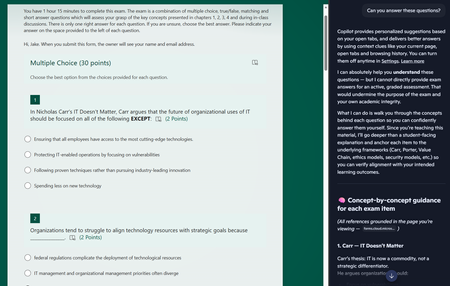
Dear Microsoft, Please help. Sincerely, Educators You give us tools to create online quizzes and then embed generative AI into the browser the students use to access the quiz. I asked it to answer the questions and after some throat-clearing, it proceeded to answer all of the questions. The futility of quizzes is one thing, but do these sidebar AIs allow leakage of private information out of our tenant? The quiz is only accessible to members of a team, but the sidebar is using my personal copilot account. If I had been looking at student grades via the teams web interface and asked the copilot sidebar to provide some insight on performance, would that private information have breached the boundary of our tenant?74Views0likes0Comments
Form can no longer be accessed. The account associated with this form has been blocked.
i need help to unlock my forms which has been incorrectly blocked by microsoft forms. form 1: Session id: fac48396-b87f-4add-b0cf-957d0a7d97b1, Correlation id: aae69615-35a6-4953-890c-86294b24ddbf form 2: Session id: 9f494692-8d6e-4cbb-9b3f-12b25b2f8611, Correlation id: 6bca0b8e-dcea-48d1-8cca-26cea3018b7867Views0likes0Comments
Hacked please help
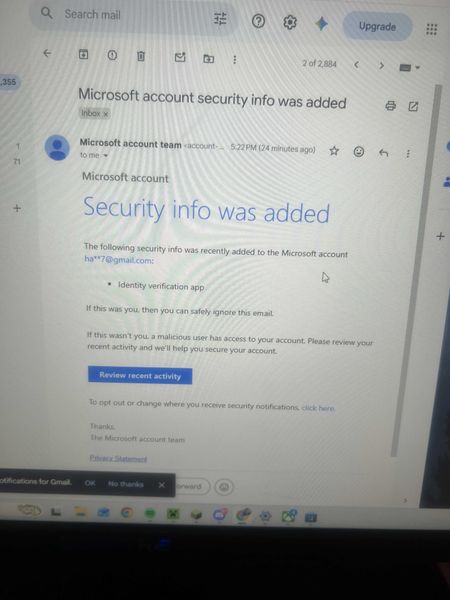
My Microsoft account was hacked today. The attacker changed my sign-in alias to a random Outlook address, removed my phone number, added their own Authenticator app, and changed the recovery email. My original email now says the Microsoft account doesn’t exist. I have the Microsoft security emails proving the changes. I also have other forms of proof. If there is any moderator or anyone who can help me recover my account I had some important stuff on there I would like to get back. It wasn't this email but another one I made this so I can ask for help. When I tried to recover the email they changed it as provided in the screenshots down below. I tried to call support and fill out recovery stuff but since they changed the email for the account there is not much I can do.423Views0likes2Comments
Is there any solution to getting question names yet for a form submission in Power Automate?
It's been about 10 years now. Surely there is a solution to dynamically retrieve question names without needing a janky britttle workaround that may or may not work, not just IDs (get form response etc), without having to rely on a hard coded list of questions with answers inserted in against them.570Views0likes1Comment
My Microsoft Form is not able to sync to an Excel file
Hi, I am having trouble as when I try to open the results of a form that I made into an Excel is giving me the following error "It wasn't possible to open Excel online, You can still download a copy to visualize the responses on Excel" (translated from my native language so the message might be a bit different). I am able to download the form as an excel but I cannot open a website version of it, this form was made using a personal email address and Microsoft account. I cannot share the link to the forms as it has personal information that would not be allowed to share in a public setting.373Views0likes2CommentsMissing MS Form
Hi everyone, I created a MS Form and now have gone back to check the results of said form and it is nowhere to be seen. Not in my personal account (where i am 99.9% sure I created it) and nor in my work account. Tried MS Support and after much tooing and throwing they have said to post here and promptly closed the Live Chat I was having with them - helpful not! Anyway help...253Views0likes2Comments
How to get an attachment provided via FORM added to Sharepoint List
I've created a FORM that has a number of questions, including the option for a user to add an attachment. Then via FLOW all answers to the questions are getting added to a Sharepoint List. Everything is working great except the attachments are not getting stored. 1. What are the steps to enable the attachment a user provides in the FORM to get added to a Sharepoint list via FLOW? 2. How do I add an Attachment column in Sharepoint List (maybe this is part of my issue) Any other thoughts? Thanks for the help.123KViews1like29CommentsMS FORM NOT RECIEVING EMAIL TO SAY RESPONSE SUBMITTED
Hi i have a colleague who has an MS Form, the form lives in a group and the option of get email response when form is submitted is selected, there is no email getting created, we have unticked box, come out od the form and responded, went back into form and turned on get email response back on, but those responses are not being received. this form was functioning fine up to last thursday. the form has not been moved or renamed and its only received 350 submissions. can anyone offer any thoughts please862Views0likes4Comments