Recent Discussions
Teams Delivers a Slack Migration Tool
Microsoft announced the availability of a Slack to Teams migration tool in the Microsoft 365 admin center. The new tool exists to assist the 79 million monthly active users of Slack who might want to move to Teams and don’t know how to get there. ISVs have been helping people move off Slack to Teams for years, so other migration options exist. https://office365itpros.com/2026/01/07/slack-to-teams-migration/288Views0likes1Comment
Teams Personal Bot Identity Cache issue
Hi all — looking for guidance on a Teams custom app + bot naming issue. We have a custom Teams app with a bot. The app catalog/admin/dev portal surfaces show the correct app name, and the manifest + Azure Bot configuration appear correctly aligned, but the Teams personal chat surfaces still show the old/wrong bot name. What looks correct: Teams app manifest name.short / name.full have the correct app name Manifest bots[0].botId points to the expected bot ID Azure Bot resource → Configuration → Microsoft App ID matches that bot ID Azure Bot resource → Bot profile display name has the correct name Teams Developer Portal basic information shows the correct name Teams Admin Center shows the correct app short name What is still wrong: Teams left sidebar chat name shows the old/wrong name Chat top header shows the old/wrong name Inline bot sender/name in the conversation shows the old/wrong name The issue reproduces for multiple users It persists after sign out/sign in, uninstall/reinstall, republish, and retesting We may also be seeing a package/version propagation issue: after publishing an updated app package with a newer manifest version, Teams Admin Center still appears to show the previous version. Has anyone seen this before with personal bot apps? Specifically trying to understand: What is the authoritative source for the personal bot chat roster/header/sender display name?80Views0likes1CommentDropped from meetings
Using Teams v. 26213.1006.5014.9784 on Win 11 laptop fully updated on OS and drivers. Translation: all components have been updated to the point at which there are no longer any updates available. Using mobile Teams Version : 8.15.0 Build : 8.15.77.2026152401/0820 (general) Calling Version: 2026.21.01.16 Release Branch : 2026Aug-T1 on iPhone 16 Pro which is, also, fully updated. Both connected to same 5G Wi-Fi network from same Wi-Fi 6 router with fiber service of 1G up and down. Speed tests from multiple sources on both laptop and phone are above 700 Mbps up and down. When joining meetings from phone, all is well. No call quality issues. No drops from meetings. When joining meetings from laptop, I am commonly disconnected and presented with "Please hold on while we try to reconnect you". The disconnection usually lasts about 10 seconds and I'm reconnected. I have performed a Reset through Windows Settings > Installed Apps. No joy. I have deleted all files in C:\Users\[MYUSERNAME]\AppData\Local\Packages\MSTeams_8wekyb3d8bbwe. No joy. I have removed and reinstalled MS Teams. No joy. Please, assist with the issue above. Thank you.40Views0likes1CommentTeams Events Hosting Assistance (TEHA): Expert Guidance for Business-Critical Teams Events
Hosting a CEO Town Hall, CIO broadcast, company-wide announcement, webinar, or large-scale virtual event or a large meeting? TEHA provides direct access to Microsoft event specialists who help customers plan, prepare, deliver, monitor and optimize business-critical Teams events. From planning and technical readiness to live event monitoring and post-event analysis, TEHA works alongside your organization throughout the entire event lifecycle. How TEHA Can Help Event Planning and Readiness Event scoping and guidance Town Hall, Webinar, and Meeting selection Technical readiness assessments Network readiness reviews Microsoft eCDN guidance and validation Training and Rehearsals Producer and presenter training Moderator guidance Dry runs and event rehearsals Event production best practices Live Event Support Real-time event monitoring Operational guidance during the event Support for Town Halls, Webinars, and Meetings Assistance for executive broadcasts and large-scale events Post-Event Analysis Event summary reports Attendance and engagement insights Recording and playback guidance Quality and network observations Log analysis and issue investigation Recommendations for future events Who Typically Uses TEHA? Organizations frequently engage TEHA for: CEO and CIO Town Halls Leadership broadcasts Global employee communications High-visibility webinars Product launches and Critical meetings Company-wide announcements Business-critical virtual events How to Engage TEHA Customers with eligible Premier or Unified Support agreements can request assistance through the Microsoft Engage Centre: Teams Events Hosting Assistance Request Portal If the Engage Centre option is unavailable, contact your Customer Success Account Manager (CSAM) and request TEHA support for your upcoming event. For highly visible events, we recommend engaging early to maximize readiness and planning opportunities. Deliver your next Teams event with confidence.Teams on RDS - Issue with Meeting Plugin
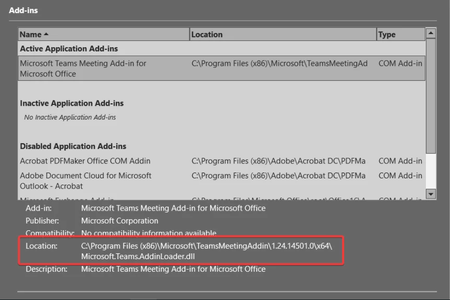
I've installed Teams on Server 2022 RDS and have so far envcountered an issue with the Teams Meeting addon for Outlook. Adminstrator user accounts reference the correct path to the addin Non-admin users reference a different path As a work-around, I made a copy of the folder with the version referenced in user's addin. I am installing the plugin using msiexec.exe /i “MicrosoftTeamsMeetingAddinInstaller.msi” ALLUSERS=1 /qn /norestart TARGETDIR=”C:\Program Files (x86)\Microsoft\TeamsMeetingAddin\x.xx.xxxx\” Version number of the addin1.5KViews0likes1Comment
Assign a phone number for user using Direct Routing
Hello, I have setup a trunk for direct routing. I think I have all the proper licensing in place for my user, ie: phone system and calling plan. I am now trying to assign a phone number however the phone number type drop down ( in the general information section of my user in teams admin ) does not have the direct routing option. The only option given is Calling Plan. I want to use number that is on the Direct Routing trunk, not a Calling Plan number. How can I make it so Direct Routing is an option under Assign Phone number -> Phone number Type?20KViews0likes3Comments
Teams Desktop App stuck at Loading.. during first run after install
Hello everyone, we are experiencing an issue with teams app first run. It is stuck in Loading screen forewer. Distribution is done by Machine-Wide installer across the company computers, either Windows 10 AD joined computers with hybrid AAD join, or Windows 11 AAD join computers. In both cases the behavior is the same. When user tries to run Teams app for the first time (even with brand new windows profile created), Teams is showing Loading.. and nothing happens. If we kill the Teams app and the app process and run it again, it starts fine and login with the AD user account automatically. So the issue is just during first start. Issue is not related to specific version either, since it behaves the same accross different versions tested so far. Obvious recommedations related to cleaning cache are not applicable, since the issue is on fresh Teams install which was not used so far. Any ideas what could be the possible culprit would be much appreciated! Thanks, MichalSolved93KViews1like14Comments
Teams completely freezes after clicking on Contacts.
Hello, Is anyone else experiencing an issue when clicking on Contacts in the Teams desktop client? The Contacts section works without any problems in Teams Web, but not in the desktop application. Thank you in advance for your feedback.2.7KViews9likes6Comments
Sharing sound
Teams screen sharing does not show “Include sound” option for multiple users I’m having an issue with Microsoft Teams screen sharing that I haven’t been able to resolve. I work in a call center, and we use Teams for peer coaching and training. When an agent shares their screen, I need to be able to hear both the agent and the customer they are speaking with through our call-center application (Amazon Connect). The problem is that most of our agents do not have the “Include sound” / “Include computer sound” option when they click Share in Teams. They can share their screen normally, and I can hear the agent speaking, but I cannot hear the audio from the call they are handling. What makes this especially strange is that the option does appear for me when I share my screen. Or if it doesn't show I can simply re-download the desktop version and it will fix itself.... but that doesn't work for anyone else. We have already tried: Reinstalling Teams Using the Teams desktop application Using Teams in a web browser Trying different browsers Restarting the computers Having multiple affected agents repeat the same troubleshooting Nothing has brought the audio-sharing option back for them Any suggestions for what we should check would be greatly appreciated.65Views0likes2Comments
Unable to submit Teams app update
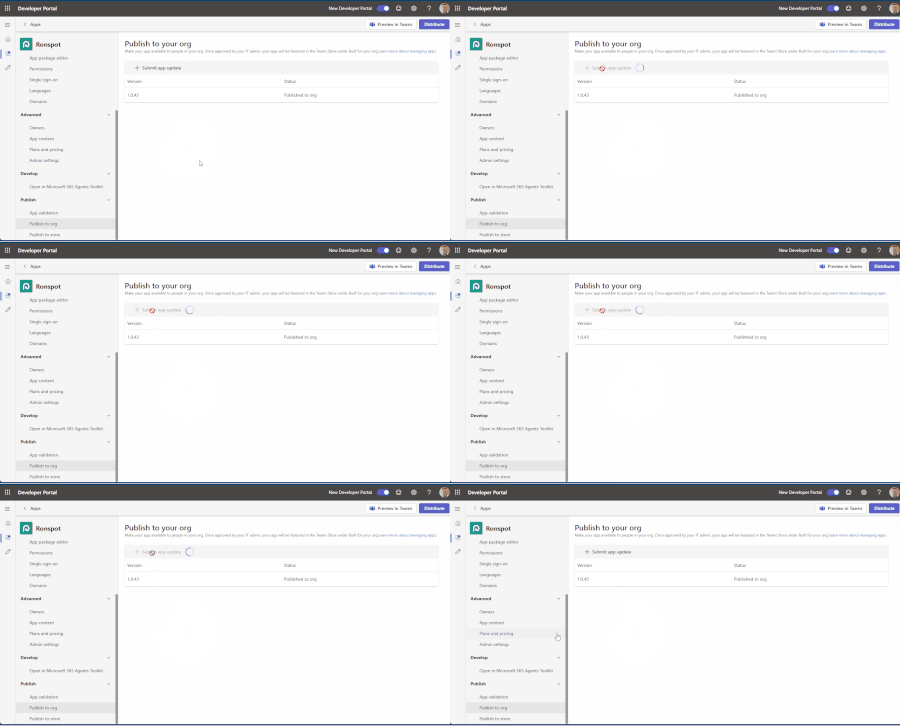
Hello, We have been attempting to submit an update to our Teams app, but we’re experiencing an issue with the submission process. When we click “+ Submit app update,” the loader appears for a few seconds, but then nothing happens. No error message is displayed, and the app update is not submitted. I’ve attached a short video demonstrating the issue. Could you please advise on how we can resolve this? Thank you for your help.78Views0likes1CommentTeams Clamps Down on MOERA-Only Tenants
The latest restriction on tenants using MOERA (service domain) addresses in production is that Teams will restrict external collaboration from September 2026. At this point, there is zero sense in any organization using a MOERA-only tenant for production purposes. Restrictions in Exchange Online and Teams should drive that point home, and the likelihood is that further clampdowns will follow in the future. https://office365itpros.com/2026/09/02/moera-only-tenants-external-collab/50Views0likes0Comments
Teams Powershell Module: [Get|Set|New|Sync]-CsOnlineApplicationInstance and App-Based authentication
Hello there, as stated in the documentation: https://learn.microsoft.com/en-us/microsoftteams/teams-powershell-application-authentication it is not possible to create a new teams application using New-CsOnlineApplicationInstance, if application based authentication is used for the PS Module. Is this planed and/or on the roadmap to implement this? We would desperately need this. Thanks in advance!Solved1.6KViews0likes11CommentsTeams Copying text includes persons name
Hello, sometimes at my work we send each other links to files/folders on our internal server. The only problem is in teams when you do that you get the persons name instead of the link. So they sent me a link to a folder, I select the link in the text and copy it. However if past that into windows explorer I just get the time and their name. [15:12] Firstname Lastname Is there a way to get it to not include the Firstname Lastname when you copy a message? kind regards, AndrewSolved48KViews17likes61CommentsWhat if Teams isn’t too complicated — but simply being compared to the wrong product?
Many users first experience Microsoft Teams through meetings, chat, and file sharing. So it feels natural to compare Teams with messaging apps. But I’ve started to wonder whether that comparison itself shapes how people experience Teams. In markets such as Taiwan, Japan, and Thailand, LINE is deeply embedded in everyday communication. For those unfamiliar with it, LINE is a widely used consumer messaging app in these markets. When users bring that same mental model into Teams, a familiar question appears: “Why does Teams have to be so complicated?” But what if that isn’t quite the right question? I explored the idea in this short interactive page: Maybe We've Been Thinking About Teams the Wrong Way https://teams-vs-line-vinci.vinciwang.chatgpt.site/en/teams-vs-line One analogy sits at the center of it: LINE is like a speedboat. Teams is more like an aircraft carrier. I’m particularly interested in whether people here agree — or think this analogy actually proves the opposite. Is the problem mainly Teams itself, or the mental model we use to judge it?80Views0likes0Comments
Bug? Teams thread permalink does not show the full thread history (Desktop + Web)
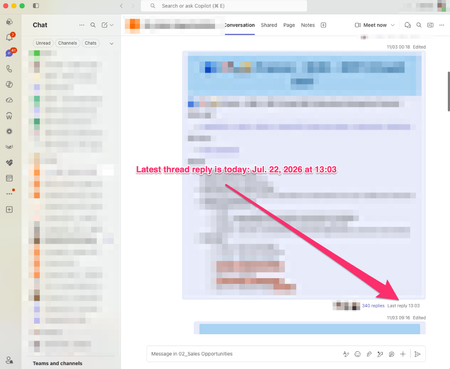
Hi everyone, I believe I've found a bug in the new Teams threaded channel experience and I'm trying to determine whether others can reproduce it. Scenario I have a long-running thread in a Teams channel. If I open the thread directly from the channel by clicking the reply count (e.g."340 replies"), I can see the complete conversation, including the most recent replies. However, if I: Open the thread Use Copy link Open the generated link Teams opens the thread, but only displays part of the conversation. Newer replies are missing even though they exist and are visible when opening the same thread directly from the channel. Note: I cannot share the permalink publicly because it points to content within my organisation. However, the link was generated by Teams itself using the thread's Copy link action. The issue is reproducible with any user who has access to the thread. What I've tested Teams Desktop Teams Web Same behaviour in both clients Opening via the channel reply count shows all recent replies Opening via the permalink shows only a partial thread Expected behaviour A thread permalink generated by Teams should open the same live thread view as clicking the reply count from within the channel. The full conversation history should be available and the latest replies should be visible. Ideally: The full thread history should be available. The latest replies should be visible. The link should open the current state of the thread, not an apparently truncated version. Actual behaviour The permalink opens the correct thread but appears to stop at an older point in the conversation, while newer replies remain accessible only when opening the thread from the channel itself. Has anybody else seen this behaviour with threaded channels? Screenshot 1 and 2: Correct behaviour Open thread via "340 replies" Show: Thread title Reply count (e.g. 340 replies) One or two recent messages (July 2026) Screenshot 3: Incorrect behaviour Open the same thread via the permalink Show: Same thread title Same thread Conversation stopping much earlier Missing recent replies189Views1like4CommentsAllow muting a person only for me
Sometimes I am in a meeting where one of the persons in the meeting is actually near me in the world outside the screen. In this case the sound is a bit maddening since there is a small delay between the sound from the person and the sound through the teams interface. In these cases, I would like to mute the person only for me since I am sitting near and can hear the person fine without headphones. Right now I need to takeoff headphones when the person is talking and putting it back as the person finishes talking.132KViews216likes159CommentsTeams user's webcam is showing black for remote participants
we have a user who has an issue with the teams client on Windows Whenever she participates in a call (one on one or group meeting), she can turn on her webcam, and sees herselves. In the Teams settings, the webcam is availlable under "devices" as well While she has her webcam turned off, other participants in the call see her initials. As soon as she turns on her webcam, the other parties involved just see a black screen. No video image, no user initials. as soon as she turns of her webcam, the remote participants get the users initials again. No other applications are using the webcam, and in the privacy settings of Windows Microsoft Teams has access to the camera When she uses teams on the web, the camera is working just fine. Also when using the ZOOM application for attending to a meeting, the camera is working just fine. Ath that time , other participants can see the videofeed. Troubleshooting done so far: - reinstalled webcam drivers - reinstalled Microsoft Teams - Teams client version on all sides: 1.6.00.4472 - Updated all available drivers for this computer - PC was originally running Windows 11 build 21H2 with patches installed up to the patches released on February's patch tuesday. - we formatted the hard drive and reinstalled Windows 11, but with build 22H2, and february's patch tuesday updates. Updated drivers again No difference. She is the only user in the company experiencing this. We are using a Microsoft 365 tennant with Microsoft 365 E3 licenses applied to the users. We don't have any custom policies applied to this user, nor to other users. All users are using the same settings. Any advices on this would be greatly appriciated.Solved3.2KViews0likes8CommentsVideo Tutorial: How To Use The Microsoft Teams Games For Work App
Microsoft recently added the ability to https://youtu.be/JxKLNVRtIJI. In this Microsoft Teams https://youtu.be/JxKLNVRtIJI, I will demonstrate how to use the Microsoft Teams Games For Work app. This app can be added to MS Teams meetings and allows participants to play from one of four games (at the time of release): Microsoft Solitaire, Microsoft Minesweeper, Wordament and IceBreakers. Note that you cannot use this app outside of meetings (i.e. you cannot play games directly in the MS Teams app) and each game supports 1-250 players. The app can also be used on the Microsoft Teams mobile application and is mobile responsive meaning meeting participants joining from their mobile device can also participate in the games. Lastly, the app can also be used in Microsoft Team meeting breakout rooms. To add the Games For Work App to a Microsoft Teams meeting: Click the “+ Add An App” button Search for and select “Games For Work” What are you thoughts about this app?Solved44KViews1like15Comments







Events
Recent Blogs
- Microsoft Teams Rooms gives organizations the flexibility to create high-quality collaboration experiences across meeting spaces of every kind and size. Often we hear from customers, “which device or...Sep 03, 2026514Views1like1Comment
- Coding where context lives and collaboration happens The best prompt may be the conversation your team has already had or is currently having. Until now, using a coding agent often meant paying con...Aug 21, 20263.1KViews0likes1Comment