town hall
15 TopicsTeams Events Hosting Assistance (TEHA): Expert Guidance for Business-Critical Teams Events
Hosting a CEO Town Hall, CIO broadcast, company-wide announcement, webinar, or large-scale virtual event or a large meeting? TEHA provides direct access to Microsoft event specialists who help customers plan, prepare, deliver, monitor and optimize business-critical Teams events. From planning and technical readiness to live event monitoring and post-event analysis, TEHA works alongside your organization throughout the entire event lifecycle. How TEHA Can Help Event Planning and Readiness Event scoping and guidance Town Hall, Webinar, and Meeting selection Technical readiness assessments Network readiness reviews Microsoft eCDN guidance and validation Training and Rehearsals Producer and presenter training Moderator guidance Dry runs and event rehearsals Event production best practices Live Event Support Real-time event monitoring Operational guidance during the event Support for Town Halls, Webinars, and Meetings Assistance for executive broadcasts and large-scale events Post-Event Analysis Event summary reports Attendance and engagement insights Recording and playback guidance Quality and network observations Log analysis and issue investigation Recommendations for future events Who Typically Uses TEHA? Organizations frequently engage TEHA for: CEO and CIO Town Halls Leadership broadcasts Global employee communications High-visibility webinars Product launches and Critical meetings Company-wide announcements Business-critical virtual events How to Engage TEHA Customers with eligible Premier or Unified Support agreements can request assistance through the Microsoft Engage Centre: Teams Events Hosting Assistance Request Portal If the Engage Centre option is unavailable, contact your Customer Success Account Manager (CSAM) and request TEHA support for your upcoming event. For highly visible events, we recommend engaging early to maximize readiness and planning opportunities. Deliver your next Teams event with confidence.257Views0likes0Comments
Teams Town Hall Q&A with Large in person audiences
Is anyone else struggling to offer q&a for large broadcasts with lots of rooms dialling with in-person large audiences? Currently, for anyone in large groups watching a Town Hall together in a large room, people need to join the Town Hall themselves on their phone. This can cause disturbances as their speaker may be on, and then it does take quite a few screen swipes to get to the q&a section. This is also true for any presenters on a stage who need to view a question/moderate. Our current solution is to use slido as it provides a nice qr code that takes people straight to the section they can ask a question, with no risk of disturbance, as well as a good login method for on stage moderation for an MC. Other times we just use a separate teams chat and an ipad. I would love to be able to use the native Q&A function, especially because it locks peoples teams identity to the question. I.e no anonymous. It would be amazing if their was a separate link/qr code people could scan/follow to view just the Q&A function, or chat function. Without showing the town hall output.172Views0likes0Comments
Teams Town Hall - preventing meeting responses when publishing the event
When publishing Town Hall events, is there some magical switch that needs to be thrown to prevent all of the meeting replies from being sent back to the publisher? Not finding much on this anywhere. I had a person publish an event to 1500 people (via distribution list) to ensure the event was on calendars, and received hundreds of responses. It seems like that would/should default to no responses, but those features are unavailable in the Teams calendar (only in Outlook). Suggestions?1.4KViews2likes3Comments
Participant (people) pop out window for Team's Events (meeting, webinar, townhall).
It would be so helpful if you can change Team events (meeting, webinar, townhall) to allow the participant list to pop out and away from the main window. There is no way to see who's entering the event & move certain people into a breakout room. Unless you use the notifications that appears as a pop up in the top middle of the window for people joining the room, but that can cause a huge problem if they are joining the room unmuted. When doing an event that allows people to join late, and they may not know or haven't learned how to mute or turn off their camera, it can be very disrupting. It would be greatly appreciated if we could move the participant list around, so we have easy access to both the breakout room tab as well as the main room participation list. This way you would be able to see if co-organizers are in the breakout room since they don't appear on the breakout room list and you would be able to allow attendees to join and make sure you have the capability to mute them. (It would also be appreciated if you could add turn off camera since you already have the ability to mute people).304Views0likes1Comment
Teams Live-Event with RTMP ingest
Dear all, I have a couple of questions regarding the new Teams Live-Events with RTMP ingest (using an external encoder). So far I´ve been using MS Stream live-events for professional livestreams with an external encoder and it worked great. But since the Stream live-events will be shut down at some point this year, I have to make the switch to the Teams live-events (with RTMP ingest). Is there an option to disable all automatic audio enhancement functions (like noise reduction, etc.)? If I stream music/spoken language to the live-event it doesn´t sound as good as with the Microsoft Stream live-events. Do teams live-events with RTMP ingest offer a buffer in case one of the viewers has an internet problems? Because to me it seems like the RTMP In live-events work rather like a general Teams Video-Call, so that in case of internet problems the audio will still be audible and the image will freeze. Usually streaming platforms have a buffer that will be filled to prevent audio-video dropouts. How do live-events in MS Teams in general differ from the live-events in MS Stream? Thanks in advance for your help! Best regards.1.3KViews1like1Comment
Audio quality when using Teams Townhall with rtmp-in.
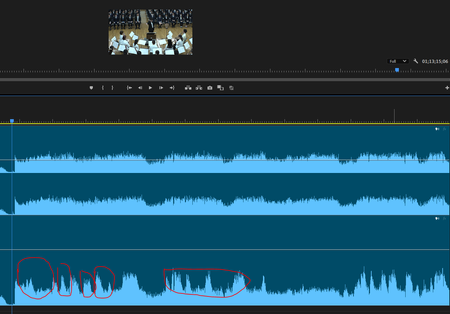
Hi everyone I have broadcast a live music (orchestra) concert using Teams Townhall with rtmp-in (using Blackmagic Design web presenter). When I checked the archive recorded on Teams, I realized that the volume of the music is being ducked automatically. All my audio sources are mixed down with a professional digital mixer before streaming to Teams so basically they have a good balanced. I have another back-up recorded data and it does not have the same problem, so i think it is caused by the algorithm of Teams, and even if I am using an external encoder?? Is there a method to fix this problem? I have compared the data recorded by the external device and teams. The ducking is quite obvious. Lower: Recorded on Teams Townhall Thank you Cheers Carson262Views1like0CommentsAssistance on Microsoft Townhalls, Live events and Webinars
Dear All, We hope you're enjoying our new Teams Town Halls! To further support your event experience, we’re excited to introduce the Microsoft Live Event Assistance Program (LEAP)—a complimentary service designed to help you seamlessly plan and execute your events (New Teams Townhalls, Live events, Webinars) What Does LEAP Offer? This free program connects you with Microsoft event experts who can assist with: Training and demos Configuration support Assistance before, during, and after your Town Halls, webinars, or live events Whether you're transitioning from Teams Live Events to Town Halls or planning future events, our team is here to guide you every step of the way. How to Access Free Support To receive assistance for your Microsoft events, simply log a support case with our experts. Please bookmark or update the following links to submit your request: Microsoft events assist portal (LEAP) Microsoft free support for your events (LEAP) Important Notes for First-Time Users Profile Creation: On your first visit, you may be prompted to create a profile. If redirected to a form that doesn’t mention LEAP, simply revisit Live Event Assist after profile creation. When submitting your support request, please follow these guidelines: Product Family: Cloud and Online Services Product: Live Events Assistance Program (LEAP) Support Type: Professional No Charge Issue Description: Title: Live Events Assistance Request Event Date and Duration Event Location Note: Use your work contact details (corporate email). Personal accounts such as Outlook or Gmail are not supported. If you're an event attendee, please contact your event host for assistance. Additionally, our team can assist with Microsoft eCDN-related queries. Learn More To explore the full benefits of the LEAP program, visit: Microsoft Virtual Event Guidance We look forward to helping you make your events a success!823Views2likes0Comments
Town Hall forced producer view for Teams Room
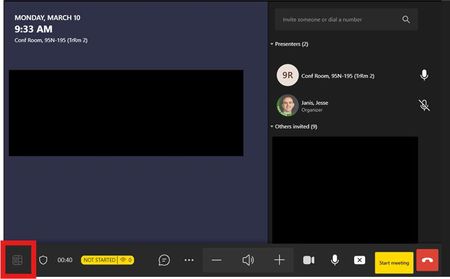
Teams room accounts added as presenters to a Town Hall are joining the meeting in the co-organizer view, no matter what role was assigned. Prior to 03/10/25, Teams Room could join as presenter and had meeting view control. Some change seems to have taken place over the weekend, and now even room accounts scheduled as external presenters are joining in the co-organizer view. The in-meeting change view button is now blocked during a the Town Hall. Has anyone else seen this or know about the change?311Views1like0CommentsUsers appearing as Anonymous User (Guest) in Town Hall Q&A
I am not sure if this is expected behavior or not as I cannot find any documentation related to this. When we host a town hall meeting, we are encountering an issue regarding the Q&A feature. When an external participant joins the meeting without signing in, and for example enters "John Doe" for the users name, when submitting a question in the Q&A section, the submission is displayed as from the user "Anonymous User (Guest)" and associated with the email "email address removed for privacy reasons" instead of the name I entered or my actual email address. This behavior is different from when I invite the same external user to a regular teams meeting in which they appear as "John Doe" in the participant list and in chat. I am seeking clarity on why the name and email address were not displayed as entered, and why they defaulted to anonymous settings despite providing identifiable information upon joining. Additionally, I would like to understand how to configure the settings to ensure that external participants' names and provided emails are correctly displayed when they participate in the Q&A. Any guidance or insights on how to resolve this issue would be greatly appreciated. Thank you!1.6KViews2likes2CommentsEditing a Teams Town Hall Invite
When you send a Teams Town Hall invite you can customize the email to edit everything except that it leaves the domain name of your tenant at the bottom of the invite for example: A*****.com This event is powered by Microsoft Teams, under the direction of the meeting organizer. The data processing that occurs for purposes of this event is subject to the terms of the meeting organizer. https://privacy.microsoft.com/privacystatement There does not seem to be any options in Teams Admin to change this. We have multiple companies using a single tenant and it's displaying a message that includes the tenant domain which we don't want. Any ideas?694Views0likes1Comment