Recent Discussions

line spacing
I'm creating a word doc (w/the help of ChatGPT). I copied and pasted from GPT into a Word doc, but I can't duplicate the spacing from one line to another. When I put the cursor behind a line and hit enter, the next line doesn't match up. Industries We Serve ✔ Medical & Clinical Laboratories ✔ Pharmaceutical & Biotech Facilities ✔ Research Laboratories ✔ Dialysis Centers ✔ Electronics Manufacturing ✔ Industrial Processing Facilities This is what happens when I put the cursor behind Laboratories. The spacing is way bigger and has no checkmark. What gives? ✔ Medical & Clinical Laboratories ✔ Pharmaceutical & Biotech Facilities ✔ Research Laboratories ✔ Dialysis Centers ✔ Electronics Manufacturing ✔ Industrial Processing Facilities9Views0likes0Comments
Looking for help with a single Dynamic Formula Ranking Points by player and dropping lowest score
Name Finishes Andrew 1,1,2,3,7,8 Randy 2,4,5,5,8,9 Chris 1,1,2,3,7,8 Bill 1,4,6,6,7,9 Jeff 2,3,5,7,8,8 Reed 4,4,6,7,7,9 Doc 3,5,5,6,7,9 Steve 1,3,5,6,8,9 Paul 2,2,3,3,4,9 Points (1st, 2nd, etc) 165 105 75 50 35 25 20 15 10 Expected answer with lowest point dropped Name Points Chris 530 Andrew 510 Paul 410 Steve 315 Bill 285 Jeff 250 Randy 240 Doc 190 Reed 16519Views0likes1Comment
Want to add a minus number, alongside the existing formula
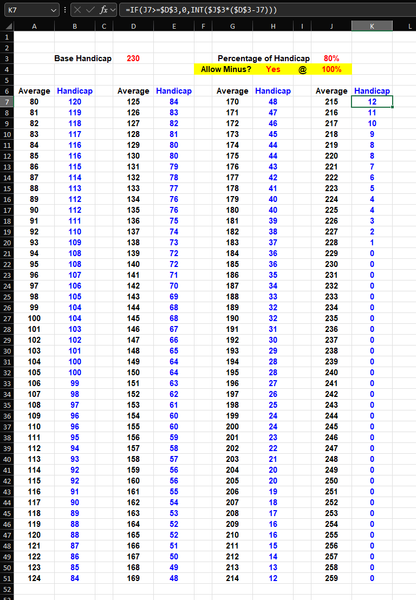
Hi all, I have here a handicap calculator that's primarily used for tenpin bowling and I would like to add an enable / disable (with Yes or No) a Minus Handicap along with the existing formula for each cell (in columns B, E, H & K), plus the option to adjust the percentage to affect only the minus numbers. Hope it all makes sense. Thanks in advance.14Views0likes0CommentsAllow removal of "Copilot Suggestions" from right-click menu
I have been using Excel for decades and CONSTANTLY use the right-click menu for quick access to basic functions (e.g., "Insert"). Ever since "Copilot Suggestions" was added to the drop-down list, it always throws me off due to its placement. I have Microsoft 365 on Windows 11 Pro. I have searched for ways to remove this from appearing there and the result said "go to File > Options > Copilot and uncheck the 'Enable Copilot' box". However, when I attempt to do that, there is NO "Copilot" option available! PLEASE allow removal of "Copilot Suggestions" from the right-click menu OR at least the option to move it to the bottom (so it isn't in the way of things used ALL the time). I realize that Copilot is a great resource for many users, but I am confident in my Excel skills and in my ability to research/learn new skills the "old school" way, so I have little use for this feature now and would prefer to hide it.54Views0likes0Comments
MS Word is throwing up 'Error 4608' I haven't a clue what to do.
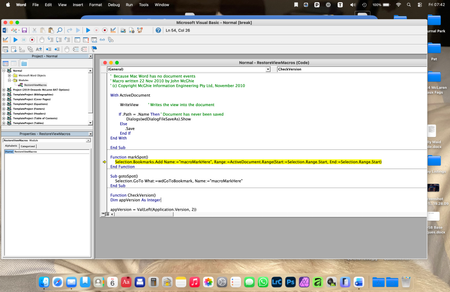
Hello, I wonder if anyone can help me here, because I am at a TOTAL los... I have a Word document that I have been updating for a few years, which is a sort of log. It has worked well up until today. Now, whenever I try to save the updated document, a very old fashioned (looks like Windows 3.1!), error message window appears which is headed 'Visual Basic for Applications' and in the window it says: Run-time error: '4608': Undefined dialogue record field There are then four buttons at the bottom labelled Help, Continue (which is greyed out), End and Debug. I have no idea what this error message means. Clicking on End gets rid of the error message, but prevents me from saving my updated document, and the next time I try to save it the error message just reappears. Clicking on Help takes me to a website with the title 'No F1 help match was found', followed by a load of technical computer-geek stuff I don't understand. Clicking on Debug seems to open a new window, but I do not know what it is... Here is a screen-shot of it: The highlighted text seems to refer to Bookmarks, which is throws me because I only associate Bookmarks with my web browser, not MS Word. I'm sure I haven't added any bookmarks to my document in any case. Can anyone enlighten me as to what is going on here please? Thanks7Views0likes0CommentsSharePoint Online Drops One Time Passcodes for External Access
From July 2026. SharePoint Online and OneDrive for Business will use Entra B2B Collaboration (guest accounts) to control external access to shared files. This change has been coming since 2021, but it takes time for organizations to get their heads around changing the way to grant external access. It’s time to embrace guest accounts, and that means doing some work to manage guest accounts on an ongoing basis. https://office365itpros.com/2026/03/06/guest-accounts-spo/30Views0likes0Commentsequation or function?
+0.3°c -0.1°c +0.4°c Looking for either an equation or function for this, in order to simply enter column A & B and have answer autofill. The number in column A is the constant number that I want column B to be ie: what must happen to column B to equal column A, as you can see in column C you add 0.4 so that column B equals +0.3. As seen below there is variation from positive and negative numbers in both columns therefore at any given time it will be adding or subtracting?? +0.2°c -0.2°c +0.4°c +0.3°c -0.3°c +0.6°c 0.0°c -0.1°c +0.1°c -0.1°c +0.3°c -0.4°c -0.2°c 0.0°c -0.2°c -0.1°c +0.2°c -0.3°c anyone help me out, could save some considerable productivity time?11Views0likes0Comments
microsoft excel import text file template
I used the Text Import Wizard to create an excel document from a text file. My data does not have nice commas, semicolons, tabs, or spaces. My data is a fixed width. My data is by the columns like 5, 10, 12, 14, 20 column. It takes a long time to set the correct columns. I then saved it as a .xltx file to create a template. Then I expected to be able to use the template in the future. I tried to create a new excel file with the .xltx template I just created. When I pasted data into the new excel document my data was not organized. What am I doing wrong? Save as an Excel Template: Go to File > Save As, and select Excel Template (*.xltx) from the "Save as type" dropdown. This saves your layout in the custom templates folder. Use the Template: When you want to import data in the future, open this template (File > New > Personal), then use the import steps above to place the external data into your predefined format.42Views0likes1CommentVBA events stop working for one user when another user opens the shared workbook
Hi, I’m experiencing a strange issue with VBA in Excel. We use several Excel files as a CRM system, all with VBA (mainly worksheet events). The files are shared so that my employee and I can work on them. Recently, VBA events stopped working only on my computer in some of the files. Important observations: For my employee, everything works normally. Manual macros run correctly on my machine. Worksheet events (like Worksheet_Change) do not fire. Application.EnableEvents returns True. Macro security and Trusted Locations are already configured. The files are almost identical (same structure and VBA code). What makes it even stranger: A file that worked for me yesterday stopped working today immediately after my employee opened it. Since then, the VBA events no longer trigger on my computer in that file, while they still work perfectly for him. So it seems that when another user opens the shared workbook, VBA events stop working only on my machine. Has anyone seen something like this before? Thanks.34Views0likes1CommentLimited to 200 submissions
The helpdesk has confirmed that I have an m365 family subscription. This would allow me to receive 1000 responses in Forms. However, when I log in to Forms with my details, only 200 answers are accepted. In addition, I get a "buy button" on the screen. In other words, Forms "thinks" that I have a free plan. Who can solve this for me?25Views0likes1Comment
Error al modificar una antigua formula
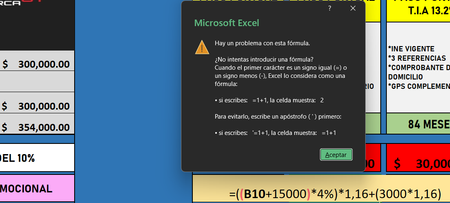
Estoy intentando modificar una formula que tenia antes unicamente cambiando lo que es la cantidad por la que se sumaba a la que tenia la anterior, lo demas de la formula esta completamente igual, pero por alguna razon me salta esa pestaña diciendo que hay algun problema con la formula, estuve buscando si hay algun tipo de error pero no lo encontre, inclusive llegue a copiar la primera formula original y no funciona aun asi, por mas que lo intento siempre me salta la misma advertencia y no me deja agregar la formula como es debido. cabe decir que la formula es la que esta abajo de la pestaña de advertencia y la celda "B10" es la de la cantidad de "300,000" que esta encima de los "354,000"23Views0likes1CommentMissing Auto Refresh In Pivot Table
Before updating to the latest version in the Beta Channel, there was Auto Refresh button appear in the PivotTable Analyze tab. After the update to version 2604 (Build 19826.20002) the Auto Refresh is missing, and I have to revert to manually refreshing the pivot table. Any idea why is this happening and how to get it back?39Views0likes3CommentsHow do I get repeating part numbers (data) to auto fill data.
Sorry I am not very Excel savy but I was tasked with filling a spreadsheet with data of our part numbers, their description, the supplier we get them from, our assigned supplier numbers, and our suppliers part number for kits we make in our company, there are over 9000 but I have noticed that there are a lot of repeating part numbers so I was hoping there was a way so that I could have that data auto fill. I can post a link to the document it does not have any proprietary data that I can see. https://gpcompinc-my.sharepoint.com/:x:/g/personal/zachv_gpcompanies_com/IQAYSdPfHYQvRp6TRW4hg_xjAYh_4Jjl2Z_aCXX_64zMf50?e=MKDtrR32Views0likes1CommentHow to Test a File Against DLP Sensitive Information Types
Sensitive Information types (SITs) are definitions of data like credit card numbers used by DLP rules to detect potential external sharing violations. Knowing what SIT to use in a DLP rule is often difficult, which is why the Purview developers have added a test option to allow tenants to test files against individual SITs or all SITs to see what happens. https://office365itpros.com/2026/03/04/sensitive-information-type-test/17Views0likes0Comments200 answers instead of 1000
The helpdesk has confirmed that I have an m365 family subscription. This would allow me to receive 1000 responses in Forms. However, when I log in to Forms with my details, only 200 answers are accepted. In addition, I get a "buy button" on the screen. In other words, Forms "thinks" that I have a free plan. Who can solve this for me?4Views0likes0CommentsInvitation to March 9 Frontier Transformation event
Join us for a special event with Jared Spataro, Charles Lamanna, and Sumit Chauhan to learn how Microsoft delivers AI built for work. The live stream starts at 8 AM Pacific Time on March 9. aka.ms/MicrosoftFrontierTransformation2026173Views0likes0Comments



Events
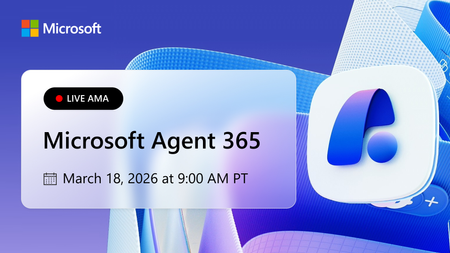
Learn more about the capabilities of Agent 365 in this live 'Ask Microsoft Anything' with product and engineering team experts! Get your questions answered about capabilities for agent observability,...
Wednesday, Mar 18, 2026, 09:00 AM PDTOnline
0likes
39Attendees
0Comments

You’re passionate about what you do, and we’re passionate about empowering your potential. Microsoft 365 Community Conference - is your chance to keep up with AI, build game-changing skills, and take...
Tuesday, Apr 21, 2026, 08:00 AM PDTIn-Person
0likes
3Attendees
0Comments
Recent Blogs
- Microsoft Most Valuable Professionals (MVPs) are the heartbeat of the Microsoft ecosystem—and at Microsoft 365 Community Conference 2026, your impact takes center stage. Imagine connecting face-to-...Mar 06, 202644Views0likes0Comments
- Edit images directly in PowerPoint to enhance, refine, and perfect visuals without leaving your deck.Mar 06, 2026180Views2likes0Comments