Security and AI Essentials
Protect your organization with AI-powered, end-to-end security.
Defend Against Threats
Get ahead of threat actors with integrated solutions.
Secure All Your Clouds
Protection from code to runtime.
Secure All Access
Secure access for any identity, anywhere, to any resource.
Protect Your Data
Comprehensive data security across your entire estate.
Recent Blogs
As a Senior Product Manager | Developer Architect on the App Assure team working to bring Microsoft Sentinel and Security Copilot solutions to market, I interact with many ISVs building agents on Mic...
Apr 02, 2026264Views
0likes
0Comments

What's new in Defender for Cloud?
Kubernetes gated deployment is now generally available for AKS automatic clusters. Use help to deploy the Defender for Containers sensor to use this feature. Mor...
Apr 02, 2026131Views
0likes
0Comments

2 MIN READ
A new standards-based option for identity teams to manage user and group lifecycle in Microsoft Entra.
Apr 02, 20264.3KViews
1like
0Comments

Why Agent Security Alone Is Not Enough?
Foundry‑level controls are designed to prevent unsafe behavior and bound autonomy at runtime. But even the strongest preventive controls cannot answer key go...
Apr 02, 2026101Views
0likes
0Comments
Recent Discussions

Entra CBA Preview Bug: Issuer Scoping Policy fails group claim (AADSTS500191)
I am deploying a zero-trust, cloud-native Certificate-Based Authentication (CBA) architecture for a break-glass emergency access account in Microsoft Entra ID. I am intentionally bypassing Intune/MDM to prevent circular dependencies during an outage. The PKI is generated via OpenSSL (Offline Root CA -> Client Cert). The cryptography is flawless: - The OpenSSL chain verifies perfectly (openssl verify -CAfile...). - The Root SKI and Client AKI are a perfect 1:1 hex match. - The client cert EKU includes TLS Web Client Authentication. - The client cert SAN includes othername: UPN::[break-glass-UPN]. - The Root CA and CRL are uploaded to Entra and publicly accessible via Azure Blob Storage. The Issue: When I attempt to restrict the Root CA using the "Certificate issuer scoping policy (Preview)" targeted to a specific Security Group (e.g., sg_cba), the TLS handshake drops and Entra throws: Error: AADSTS500191: The certificate authority that issued your certificate has not been set up in the tenant. Troubleshooting Performed: 1. Group Architecture: Verified via Microsoft Graph that the user is a direct, static member of sg_cba (Security Enabled, non-dynamic, not nested). 2. Micro-Group Bypass: Created a brand-new cloud-only micro-group with only the break-glass user. Waited for replication. Same 500191 error. 3. The Control Test (Success): If I completely remove the Preview scoping policy and move the targeting to the Generally Available (GA) tenant-wide trust ("All Users"), the login succeeds immediately. (I am securing this via High-Affinity binding matching the SKI to CertificateUserIDs). The Ask: Because the tenant-wide GA policy works perfectly, it mathematically proves the certificates, CRL, and bindings are correct. The failure is entirely isolated to the Preview scoping engine failing to correlate the incoming certificate to the Security Group claim fast enough. - Has anyone successfully deployed the "Certificate issuer scoping policy (Preview)" using a targeted security group without it dropping the trust? - Are there undocumented constraints on group evaluation during the CBA TLS handshake that cause this Preview feature to fail closed?13Views0likes0Comments
Co Authoring with Sensitivity Labels
Hello, I am working with sensitivity labels with my organization. We currently have Standard, Confidential, and Highly Confidential which all are encrypted. I have Co-Authoring turned on but I have some trouble with. We a lot of documents being collaborated on. Standard: Co-Authoring functions normal and Auto-Save is toggled on. Highly Confidential: Custom Permission in Sensitivity Label (View, Edit, Reply, Forward) I asked copilot and it stated even though my permissions are selected custom I have "Edit" on their for my internal users it is reading it as Co authoring; Co-Authoring is on and functioning but internal end users Auto-Save is toggled off and they are being asked to save a copy of the document or excel sheet then upload it again to SharePoint. Why isn't "Auto-Save" toggled on for "Highly Confidential" label? Can it be adjusted so it can be on? Do I have to make adjustments to my permissions in the Sensitivity label? Any help is appreciated. Thank you!7Views0likes0Comments
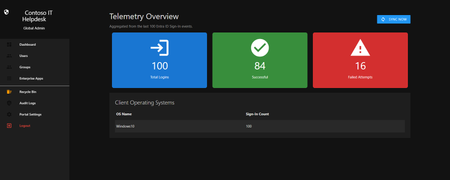
Introducing the Entra Helpdesk Portal: A Zero-Trust, Dockerized ITSM Interface for Tier 1 Support
Hello everyone, If you manage identity in Microsoft Entra ID at an enterprise scale, you know the struggle: delegating day-to-day operational tasks (like password resets, session revocations, and MFA management) to Tier 1 and Tier 2 support staff is inherently risky. The native Azure/Entra portal is incredibly powerful, but it’s complex and lacks mandatory ITSM enforcement. Giving a helpdesk technician the "Helpdesk Administrator" role grants them access to a portal where a single misclick can cause a major headache. To solve this, I’ve developed the Entra Helpdesk Portal (Community Edition)—an open-source, containerized application designed to act as an isolated "airlock" between your support team and your Entra ID tenant. Why This Adds Value to Your Tenant Instead of having technicians log into the Azure portal, they log into this clean, Material Design web interface. It leverages a backend Service Principal (using MSAL and the Graph API) to execute commands on their behalf. Strict Zero Trust: Logging in via Microsoft SSO isn’t enough. The app intercepts the token and checks the user’s UPN against a hardcoded ALLOWED_ADMINS whitelist in your Docker environment file. Mandatory ITSM Ticketing: You cannot enforce ticketing in the native Azure Portal. In this app, every write action prompts a modal requiring a valid ticket number (e.g., INC-123456). Local Audit Logging: All actions, along with the actor, timestamp, and ticket number, are written to an immutable local SQLite database (audit.db) inside the container volume. Performance: Heavy Graph API reads are cached in-memory with a Time-To-Live (TTL) and smart invalidation. Searching for users or loading Enterprise Apps takes milliseconds. What Can It Do? Identity Lifecycle: Create users, auto-generate secure 16-character passwords, revoke sign-in sessions, reset passwords, and delete specific MFA methods to force re-registration. Diagnostics: View a user's last 5 sign-in logs, translating Microsoft error codes into plain English. Group Management: Add/remove members to Security and M365 groups. App/SPN Management: Lazy-load raw requiredResourceAccess Graph API payloads to audit app permissions, and instantly rotate client secrets. Universal Restore: Paste the Object ID of any soft-deleted item into the Recycle Bin tab to instantly resurrect it. How Easy Is It to Setup? I wanted this to be universally deployable, so I compiled it as a multi-architecture Docker image (linux/amd64 and linux/arm64). It will run on a massive Windows Server or a simple Raspberry Pi. Setup takes less than 5 minutes: Create an App Registration in Entra ID and grant it the necessary Graph API Application Permissions (e.g., User.ReadWrite.All, AuditLog.Read.All). Create a docker-compose.yml file. Define your feature toggles. You can literally turn off features (like User Deletion) by setting an environment variable to false. version: '3.8' services: helpdesk-portal: image: jahmed22/entra-helpdesk:latest container_name: entra_helpdesk restart: unless-stopped ports: - "8000:8000" environment: # CORE IDENTITY - TENANT_ID=your_tenant_id_here - CLIENT_ID=your_client_id_here - CLIENT_SECRET=your_client_secret_here - BASE_URL=https://entradesk.jahmed.cloud - ALLOWED_ADMINS=email address removed for privacy reasons # CUSTOMIZATION & FEATURE FLAGS - APP_NAME=Entra Help Desk - ENABLE_PASSWORD_RESET=true - ENABLE_MFA_MANAGEMENT=true - ENABLE_USER_DELETION=false - ENABLE_GROUP_MANAGEMENT=true - ENABLE_APP_MANAGEMENT=true volumes: - entra_helpdesk_data:/app/static/uploads - entra_helpdesk_db:/app volumes: entra_helpdesk_data: entra_helpdesk_db: 4.Run docker compose up -d and you are done! I built this to give back to the community and help secure our Tier 1 operations. If you are interested in testing it out in your dev tenants or want to see the full architecture breakdown, you can read the complete documentation on my website here I’d love to hear your thoughts, feedback, or any feature requests you might have!
Purview EXPORTS unreliable and missing "Top-of-information-store" folder
Has anyone noticed an issue where the exported PST files are either empty or missing folders? I don't normally check every PST file that I export, but after hearing from customers that there are either no emails or missing folders, I started to check after each export. I am noticing that the Seach and Export process seems to be fine and the Downloaded PST file show the correct size, but when i open the PST files, I'm seeing that they contain no emails OR they are missing folders - including the "Top-of-information-store" folder. When i look at the Properties > Folder Size settings, i can see that the PST file thinks that all the folders are there. This is incredibly tough to work with since I am now checking each PST file and then having to rerun the search/export/download all over again. It's been like this for about 3 weeks.169Views0likes4Comments
Do XDR Alerts cover the same alerts available in Alert Policies?
The alerts in question are the 'User requested to release a quarantined message', 'User clicked a malicious link', etc. About 8 of these we send to 'email address removed for privacy reasons'. That administrator account has an EOM license, so Outlook rules can be set. We set rules to forward those 8 alerts to our 'email address removed for privacy reasons' address. This is, very specifically, so the alert passes through the @tenant.com address, and our ticketing endpoint knows what tenant sent it. But this ISN'T ideal because it requires an EOP license (or similar - this actually hasn't been an issue until now just because of our customer environments). I've looked at the following alternatives: - Setting email address removed for privacy reasons as the recipient directly on the Alert Policies in question. This results in the mail going directly from microsoft to our Ticketing Portal - so it ends up sorted into Microsoft tickets. and the right team doesn't get it. SMTP Forwarding via either Exchange AC User controls or Mail Flow Rules. But these aren't traditional forwarding, and they have the same issue as above. Making administrator @tenant.com a SHARED mailbox that we can also login to (for administration purposes). But this doesn't allow you to set Outlook rules (or even login to Outlook). I've checked out the newer alerts under Defender's Settings panel - XDR alerts, I think they're called. Wondering if these can be leveraged at all for this? Essentially, trying to get these Alerts to come to our external ticketing address, from the tenants domain (instead of Microsoft). I could probably update Autotask's rules to check for a header, and set that header via Mail Flow rules, but.. just hoping I don't have to do that for everyone.Impersonation Protection: Users to Protect should also be Trusted Senders
Hey all, sort of a weird question here. Teaching my staff about Impersonation Protection, and it's kind of occurred to me that any external sender added to 'Senders to Protect' sort of implicitly should also be a 'Trusted Sender'. Example - we're an MSP, and we want our Help Desk (email address removed for privacy reasons) to be protected from impersonation. Specifically, we want to protect the 'Help Desk' name. So we add email address removed for privacy reasons to Senders to protect. However, we ALSO want to make sure our emails come thru. So we've ALSO had to add email address removed for privacy reasons to Trusted Senders on other tenants. Chats with Copilot have sort of given me an understanding that this is essentially a 'which is more usefuI' scenario. But CoPilot makes things up, and I want some human input. In theory, ANYONE we add to 'trusted senders' we ALSO want protected from Impersonation. Anyone we protect from Impersonation we ALSO want to trust. Copilot says you SHOULDN'T do both. Which is better / more practical?
Dedicated cluster for Sentinels in different tenants
Hello I see that there is a possibility to use a dedicated cluster for a workspace in the same Azure region. What about workspaces that reside in different tenants but are in the same Azure region? Is that possible? We are utilizing multiple tenants, and we want to keep this operational model. However, there is a central SOC, and we wonder if there is a possibility to utilize a dedicated cluster for cost optimization.Solved39Views0likes1CommentGoverning Entra‑Registered AI Apps with Microsoft Purview
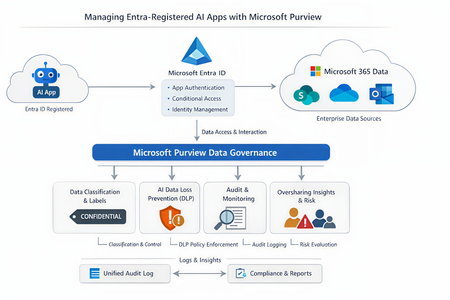
As the enterprise adoption of AI agents and intelligent applications continues to accelerate, organizations are rapidly moving beyond simple productivity tools toward autonomous, Entra‑registered AI workloads that can access, reason over, and act on enterprise data. While these capabilities unlock significant business value, they also introduce new governance, security, and compliance risks—particularly around data oversharing, identity trust boundaries, and auditability. In this context, it becomes imperative to govern AI interactions at the data layer, not just the identity layer. This is where Microsoft Purview, working alongside Microsoft Entra ID, provides a critical foundation for securing AI adoption—ensuring that AI agents can operate safely, compliantly, and transparently without undermining existing data protection controls. Lets look at the role of each solution Entra ID vs Microsoft Purview A very common misconception is that Purview “manages AI apps.” In reality, Purview and Entra serve distinct but complementary roles: Microsoft Entra ID Registers the AI app Controls authentication and authorization Enforces Conditional Access and identity governance Microsoft Purview Governs data interactions once access is granted Applies classification, sensitivity labels, DLP, auditing, and compliance controls Monitors and mitigates oversharing risks in AI prompts and responses Microsoft formally documents this split in its guidance for Entra‑registered AI apps, where Purview operates as the data governance and compliance layer on top of Entra‑secured identities. Lets look at how purview governs the Entra registered AI apps. Below is the high level reference architecture which can be extended to low level details 1. Visibility and inventory of AI usage Once an AI app is registered in Entra ID and integrated with Microsoft Purview APIs or SDK, Purview can surface AI interaction telemetry through Data Security Posture Management (DSPM). DSPM for AI provides: Visibility into which AI apps are being used Which users are invoking them What data locations and labels are touched during interactions Early indicators of oversharing risk This observability layer becomes increasingly important as organizations adopt Copilot extensions, custom agents and third‑party AI apps. 2. Classification and sensitivity awareness Purview does not rely on the AI app to “understand” sensitivity. Instead the Data remains classified and labeled at rest. AI interactions inherit that metadata at runtime Prompts and responses are evaluated against existing sensitivity labels If an AI app accesses content labeled Confidential or Highly Confidential, that classification travels with the interaction and becomes enforceable through policy. This ensures AI does not silently bypass years of data classification work already in place. 3. DLP for AI prompts and responses One of the most powerful but yet misunderstood purview capabilities is the AI‑aware DLP. Using DSPM for AI and standard Purview DLP: Prompts sent to AI apps are inspected Responses generated by AI can be validated Sensitive data types (PII, PCI, credentials, etc.) can be blocked, warned, or audited Policies are enforced consistently across M365 and AI workloads Microsoft specifically highlights this capability to prevent sensitive data from leaving trust boundaries via AI interactions. 4. Auditing and investigation Every AI interaction governed by Purview can be recorded in the Unified Audit Log, enabling: Forensic investigation Compliance validation Insider risk analysis eDiscovery for legal or regulatory needs This becomes critical when AI output influences business decisions and regulatory scrutiny increases. Audit records treat AI interactions as first‑class compliance events, not opaque system actions 5. Oversharing risk management Rather than waiting for a breach, Purview proactively highlights oversharing patterns using DSPM: AI repeatedly accessing broadly shared SharePoint sites High volumes of sensitive data referenced in prompts Excessive AI access to business‑critical repositories These insights feed remediation workflows, enabling administrators to tighten permissions, re‑scope access, or restrict AI visibility into specific datasets. In a nutshell, With agentic AI accelerating rapidly, Microsoft has made it clear that organizations must move governance closer to data, not embed it into individual AI apps. Purview provides a scalable way to enforce governance without rewriting every AI workload, while Entra continues to enforce who is allowed to act in the first place. This journey makes every organizations adopt Zero Trust at scale as its no longer limited to users, devices, and applications; It must now extend to AI apps and autonomous agents that act on behalf of the business. If you find the article insightful and you appreciate my time, please do not forget to like it 🙂25Views0likes0CommentsStuck looking up a watchlist value
Hiya, I get stuck working with watchlists sometimes. In this example, I'm wanting to focus on account activity from a list of UPNs. If I split the elements up, I get the individual results, but can't seem to pull it all together. ===================================================== In its entirety, the query returns zero results: let ServiceAccounts=(_GetWatchlist('ServiceAccounts_Monitoring'))| project SearchKey; let OpName = dynamic(['Reset password (self-service)','Reset User Password','Change user password','User reset password','User started password reset','Enable Account','Change password (self-service)','Update PasswordProfile','Self-service password reset flow activity progress']); AuditLogs | where OperationName has_any (OpName) | extend upn = TargetResources.[0].userPrincipalName | where upn in (ServiceAccounts) //<=This is where I think I'm wrong | project upn ===================================================== This line on its own, returns the user on the list: let ServiceAccounts=(_GetWatchlist('ServiceAccounts_Monitoring'))| project SearchKey; ===================================================== This section on its own, returns all the activity let OpName = dynamic(['Reset password (self-service)','Reset User Password','Change user password','User reset password','User started password reset','Enable Account','Change password (self-service)','Update PasswordProfile','Self-service password reset flow activity progress']); AuditLogs | where OperationName has_any (OpName) | extend upn = TargetResources.[0].userPrincipalName | where upn contains "username" //This is the name on the watchlistlist - so I know the activity exists) ==================================================== I'm doing something wrong when I'm trying to use the watchlist cache (I think) Any help\guidance or wisdom would be greatly appreciated! Many thanks12Views0likes1CommentPURVIEW - SCANNER ACCOUNT MISMATCH
Hello I have a strange issue on Scanner Setup is fine also discover is fine, in activity explorer we see discovered file, issue was in USER column that reports not scanner dedicated user but purview admin user. We also try open a case with MS but no one respond Any suggestions? Thanks Zeno25Views0likes1Comment
Feature Request: Extend Security Copilot inclusion (M365 E5) to M365 A5 Education tenants
Background At Ignite 2025, Microsoft announced that Security Copilot is included for all Microsoft 365 E5 customers, with a phased rollout starting November 18, 2025. This is a significant step forward for security operations. The gap Microsoft 365 A5 for Education is the academic equivalent of E5 — it includes the same core security stack: Microsoft Defender, Entra, Intune, and Purview. However, the Security Copilot inclusion explicitly covers only commercial E5 customers. There is no public roadmap or timeline for extending this benefit to A5 education tenants. Why this matters Education institutions face the same cybersecurity threats as commercial organizations — often with fewer dedicated security resources. The A5 license was positioned as the premium security offering for education. Excluding it from Security Copilot inclusion creates an inequity between commercial and education customers holding functionally equivalent license tiers. Request We would like Microsoft to: Confirm whether Security Copilot inclusion will be extended to M365 A5 Education tenants If yes, provide an indicative timeline If no, clarify the rationale and what alternative paths exist for education customers Are other EDU admins in the same situation? Would appreciate any upvotes or comments to help raise visibility with the product team.Purview DLP Policy Scope - Shared Mailbox
I have created a block policy in Purview DLP and scoped to a security group. The policy triggers when a scoped user sends email that matches the policy criteria but doesnt detect when the user sends the same email from a shared mailbox. Is that a feature of Purview DLP? I had expected the policy to still trigger as email is sent by the scoped user 'on behalf of' the shared mailbox, and the outbound email appears in Exchange Admin as coming from the scoped user.Solved822Views0likes2Commentstelemetryd_v2 High CPU in macOS
I've been seeing this process have consistently high CPU use. According to Activity Monitor, it's a child process of wdavdaemon_enterprise. I tried disabling realtime protection, but that did not decrease the CPU use. The other notable change that I can think of is that I downloaded the Chromium codebase yesterday and built it, so I'm wondering if that's causing the cloud submission process to go crazy. I looked at https://docs.microsoft.com/en-us/microsoft-365/security/defender-endpoint/mac-support-perf?view=o365-worldwide, but it only discusses realtime scanning. Can anyone provide insight on what this specific process is responsible for? Thanks.13KViews0likes7CommentsSent email cannot be viewed by sender when encrypted.
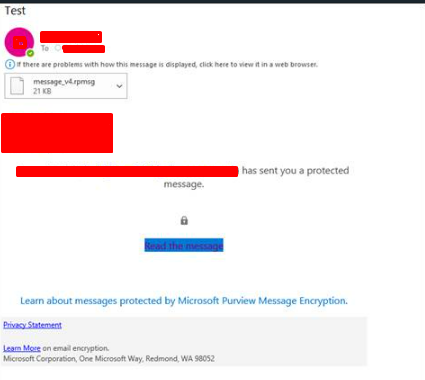
Emails that are sent in outlook are not viewable in the sent items folder of the outlook desktop app but work fine in the outlook web app. The error that shows is the same as the one for when recipients cannot view the email in the email client but if they click on the link it still does not let them view the email. Seems to be affecting only certain members of the organisation but there does not seems to be a pattern of software/admin rights/plugins/etc. Does anyone have any ideas as to what is likely to cause this? Thanks.
Organisational vs model-level AI governance — where's the real gap?
Most AI governance conversations I'm seeing focus on model-level controls, like bias testing and prompt injection defence. These matter enormously for individual AI systems. But I'd argue the bigger gap is one level up: the organisational governance layer. Having the policies, accountability structures, risk frameworks, and oversight mechanisms to govern AI use at enterprise scale. Who is accountable for AI-related decisions? Where is sensitive data being processed? What AI tools are actually being used across the business? Forrester research indicates 60% of organisations still lack a formal AI governance framework. Meanwhile, the EU AI Act reaches full compliance obligations in August 2026, and ISO/IEC 42001 is gaining traction as the certifiable benchmark for AI management systems. Microsoft is building strong technical solutions for the model-level challenge, Purview for data governance, Entra Agent ID, Defender for threat protection, Compliance Manager for regulatory mapping. But in my experience, organisations that jump straight to configuring technical controls without first understanding their organisational maturity end up with tools deployed but governance gaps unchanged. Are we solving the right problem first?25Views1like1CommentI would like to know the complete list of alerts whose serviceSource is MDO
Hi all In order to determine the alerts that should be monitored by the SOC, I would like to identify, from the alerts listed at the link below, those whose serviceSource is Microsoft Defender for Office 365 (MDO). https://learn.microsoft.com/en-us/defender-xdr/alert-policies I couldn’t find where this is documented, no matter how thoroughly I searched, so I would appreciate it if you could point me to the relevant documentation. thxWebinar Cancellation
Hi everyone! The webinar originally scheduled for April 14th on "Using distributed content to manage your multi-tenant SecOps" has unfortunately been cancelled for now. We apologize for the inconvenience and hope to reschedule it in the future. Please find other available webinars at: http://aka.ms/securitycommunity All the best, The Microsoft Security Community Team12Views0likes0Comments
'Microsoft App Access Panel' and Conditional Access with SSPR combined registration bug
Currently, enabling self-service password reset (SSPR) registration enforcement causes the app 'Microsoft App Access Panel' to be added to the login flow of users who have SSPR enabled. This app is not able to be excluded from Conditional Access (CA) polices and is caught by 'All cloud apps', which breaks secure zero-trust scenarios and CA policy configurations. Best way to demonstrate this is through examples... ----Example 1---- Environment: CA Policy 1 - 'All cloud apps' requiring hybrid/compliant device, but excluding [App] (for all non-guest accounts) CA Policy 2 - [App] requiring MFA only (for contractor accounts, etc) CA Policy 3 - [App] requiring hybrid/compliant device (for internal accounts, etc) SSPR registration enforcement (Password reset > Registration) - set to 'Yes' MFA registration enforcement (Security > Authentication Methods > Registration campaign) - set to 'Enabled' Scenario: A new user requires access to web [App] on an unenrolled device and is assigned an account that falls under CA Policy 1 and 2, however [App] is excluded from 1 and shouldn't apply to this login. When accessing [App] for the first time, users must register SSPR/MFA. They see the below message, click 'Next' and are directed to https://accounts.activedirectory.windowsazure.com/passwordreset/register.aspx: Then they see this screen, which will block the login and try to get the user to download the Company Portal app: While behind the scenes, the login to [App] is being blocked by 'Microsoft App Access Panel' because it is seemingly added to the login flow and caught in CA Policy 1 in Req 2/3: CA Policy 1 shows as not applied on Req 1, CA Policy 2 shows as successful for Req 1/2/3 and CA Policy 3 shows as not applied for Req 1/2/3. Creating a CA policy for the 'Register security information' user action has no effect on this scenario and also shows as not applied on all the related sign-in logs. ----Example 2---- Environment: Same as above, but SSPR registration enforcement - set to 'No' Scenario: Same as above, but when accessing the [App] for the first time, they see the below message instead, click 'Next' and are directed to https://accounts.activedirectory.windowsazure.com/proofup.aspx: Then they are directed to the combined SSPR/MFA registration experience successfully: The 'Microsoft App Access Panel' doesn't show in the sign-in logs and the sign-in is successful after registration. From the two examples, it seems to be a bug with the SSPR registration enforcement and the combined registration experience. ----Workarounds---- 1 - Prevent using 'All cloud apps' with device based CA policies (difficult, requires redesigning/thinking/testing policies, could introduce new gaps, etc) 2 - Turn off SSPR registration enforcement and turn on MFA registration enforcement like in example 2 (easy, but only enforces MS MFA App registration, doesn't seem to re-trigger registration if the MS MFA App is removed, no other methods are supported for registration, and doesn't remind users to update) 3 - Disable SSPR entirely for affected users (medium depending on available security groups, and doesn't allow for affected users to use SSPR) ----Related links---- https://feedback.azure.com/d365community/idea/d5253b08-d076-ed11-a81b-000d3adb7ffd https://feedback.azure.com/d365community/idea/1365df89-c625-ec11-b6e6-000d3a4f0789 Conditional Access Policies, Guest Access and the "Microsoft Invitation Acceptance Portal" - Microsoft Community Hub MS, please either: 1 - Allow 'Microsoft App Access Panel' to be added to CA policies so it can be excluded 2 - Prevent 'Microsoft App Access Panel' from showing up in the CA login flow when SSPR registration enforcement is enabled
KQL query not working
Hi everyone, I'm not a kusto expert so bare with me. I'm trying to replace a text to another text... The one in bold is what I'm tryng to use but is not working. Basically the log doesn't make a reference for (9999) which is actually "URL filtering log"... and I need this this to show on the results... not as (9999) but as "URL filtering log". I've been trying to use CommonSecurityLog | where DeviceProduct has 'PAN-OS' | where DeviceVendor =~ 'Palo AltoNetworks' //| where DeviceEventClassID =~ 'correlation' | extend ThreatId = extract('cat=([^;]+)', 1, AdditionalExtensions) | extend ThreatCategory = extract('PanOSThreatCategory=([^;]+)', 1, AdditionalExtensions) | extend str=strcat("9999", "9999", "URL") | extend replaced=replace_string(str, '9999', 'URL') | summarize Amount=count() by ThreatId, ThreatCategory, LogSeverity | top 20 by Amount RESULTS:Solved3.5KViews1like6Comments




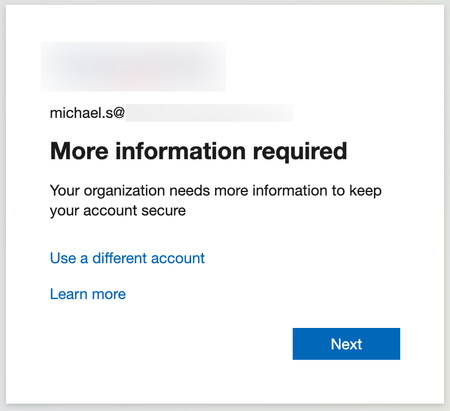
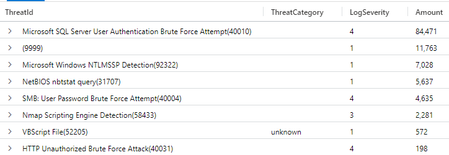
Events

Take your AI security to the next level. Explore advanced techniques and best practices for safeguarding AI-powered applications against evolving threats in the cloud.
What you’ll learn:
Enable...
Wednesday, Apr 08, 2026, 12:00 PM PDTOnline
0likes
4Attendees
0Comments
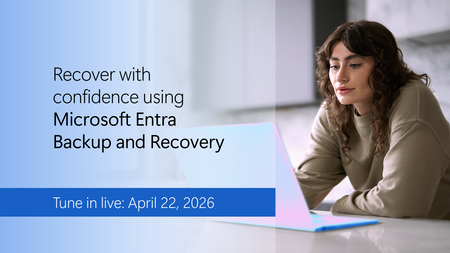
Accidental changes and security compromises can quickly cascade across your tenant. Learn how to recover with confidence using Microsoft Entra Backup and Recovery.
Tune in to see how this Microsof...
Wednesday, Apr 22, 2026, 09:00 AM PDTOnline
0likes
36Attendees
0Comments