Pinned Posts

Forum Widgets
Latest Discussions

Business Verification past the review window — no result, no new document requested
Hello Partner Compliance team, I'd like to request an escalation to the Partner Vetting team. Our company enrollment in the Developer program is stuck at Business Verification. Identity and Employment both passed. We submitted our official incorporation record on 27 July under "Formation documents". The Resolve panel still shows the document as submitted successfully, but the five business day review window has passed with no result and no request for a new document. We have one submission attempt left. What makes this odd: an EV code signing certificate for the same legal entity is already registered and Active on this same account, issued by Sectigo and validated on 22 July. Their EV organizational validation covered legal existence, operational address and authorized signatories. So the same company appears verified on one part of the account and unverifiable on another. Two further points: Our hardware program enrollment shows as Active, but the hardware dashboard returns an access error saying the account is deactivated. I cannot raise an in portal support request either. The Workspace dropdown comes up empty, which leaves Problem type and Review solutions disabled. Our account type is Company, but the Legal Info page has no legal business name field. The only identifier for the legal entity is the VAT ID, and that field does not keep what I enter. I type our tax number, save, get no validation error, and the field is empty again when I reopen it. If the automated check reads VAT ID, it may be matching against nothing. Could someone look at the pending submission and let me know which data point is failing? I would rather not spend the last attempt guessing. Happy to share seller ID, tenant ID, certificate details, registry numbers and screenshots by DM. Thank you.SolvedBahadirAlpAug 03, 2026Tin Contributor34Views0likes2Comments
Partner Program enrollment blocked by automated trust filter Trust Code: 715-123160
Hi, Please can I get some help with getting unblocked? I've raised a support ticket. Please see ticket ID below.. Support Ticket ID: 2607030010001143 Thanks!SolvedaliirtezaJul 03, 2026Copper Contributor111Views0likes2Comments
Blocked during MAICPP partner enrollment - reference 715-123160
Hello, I'm trying to enroll in the Microsoft AI Cloud Partner Program (MAICPP), but my enrollment was blocked immediately after submitting my company information, with an automated trust check message. Because the enrollment was blocked at this stage, no Partner Center workspace was created for me, so I'm unable to open a support ticket through the normal in-portal method. Details of my case: - Reference number: 715-123160 - Transaction ID: 52601ebe-8eaf-4282-b462-120fc7e2d9fe - Legal company name: DOVOCOM - Tenant ID: 9079181e-d59a-4ae6-91a6-dd9c9d0325e6 - Tenant domain: DOVOCOM391.onmicrosoft.com - Sign-in email: email address removed for privacy reasons I have my legal documentation ready to provide (company registration/incorporation document, valid for more than 2 months), and I want to make sure the legal name and registered office address I've entered match exactly what's on file. Could someone please escalate this to the Partner Trust & Safety / Vetting team for a manual review, or let me know what specifically triggered the automated block so I can correct it? Thank you for your time and help. Best regards, William SIMON Gérant +33612155786SolvedDOVOCOMJul 02, 2026Copper Contributor122Views1like6Comments
Edge extension developer enrollment blocked by "Runs on Trust" — requesting manual vetting review
Hello, My Microsoft Edge Add-ons developer enrollment in Partner Center was blocked by the automated "Runs on Trust" system at the registration/vetting step. The exact message was: "Microsoft runs on trust. We engage in a rigorous set of evaluation and certification processes; as a result your request was blocked." I can't raise this through the normal channel: after the block, Partner Center shows no workspaces, and the support intake for this topic ends at "Sign in to Partner Center to provide issue details" — the very resource the block locks me out of. Could someone please escalate this to the Partner Center Vetting / Trust & Safety team for a manual review? I'm happy to provide any identity or business-verification documents required. Case identifiers: Reference number: 715-123225 Transaction ID: 830719cb-5c12-4517-9e73-bbbeaf3be77a Correlation ID: ef620177-4c55-42c2-acbc-6f61ceea2843 Enrollment details: Program: Microsoft Edge Add-ons (browser extension) developer registration Account type: Individual developer Developer / legal name: Lewis Hadden (sole trader), United Kingdom Microsoft account email: happy to share privately with a moderator / MS staff For context and legitimacy: I'm the developer of "Sidenote," an AI reading assistant browser extension that is already published on the Chrome Web Store. I'm simply trying to publish the same extension to the Edge Add-ons store. Thank you for any help getting this reviewed. — Lewis HaddenSolvedlewishaddenJul 02, 2026Copper Contributor113Views2likes2CommentsPartner Center Verification keeps getting rejected
I am trying to get my company verified in Microsoft Partner Center but I keep getting rejected because I originally signed up for MS 365 and Entra using my common first name (Randy), but when I upload my ID it contains my legal first name (Randall). I have changed my name in Azure and MS 365, but in the partner center > Account Settings > Legal Info it still shows Randy . After changing my name to Randall in MS 365 and Azure I tried to verify again and was rejected for the second time. I reached out to support but they just keep sending me instructions to go to the partner center and select "Fix Now". This link just takes to the page to upload my ID. If I get rejected for a 3rd time I will be unable to attempt again, I will be permanently rejected. Support doesn't respond other than to keep sending me the same link and it takes 5 days every time I explain the situation to them again. I need help clearing my common name in Partner Center Legal Info and anyplace else that is linked to Partner Center, I am losing revenue due to this and it's been about 4 weeks of trying to resolve the issue. My account ID is:7126119SolvedRandyPeaseJul 01, 2026Copper Contributor144Views1like2CommentsThe Indentity Verification step failed due to Microsoft Trusted IDV AU10TIX issue
JillArmour is there a way to get this resolved? My company has been and still Authorized and Active Microsoft Partner for more than 8 year. Without any reason (no changes to Legal Info, no changes in Primary or Security Contacts, etc.), the Indentity Verification was triggered in Partner Dashboard on June 24, 2026. I followed the steps to verify via Microsoft's only trusted IDV AU10TIX ( https://www.au10tix.com ). The driver's license was correctly OCR-ed, etc. Yet, the VerifiedID that was issued by AU10TIX platform had the Last Name completely missing! As the result the Indentity Verification failed due to a basic name mismatch, the Verification status switched to Rejected, and the Resolve button no longer available for me to retry again. I opened two support tickets already 2606250010001105 (this one was closed without even reading my request details, and I re-opened it again and re-sent the details asking to re-start the Indentity Verification step, so I could retry) and 2606260010001921 (since there has been no reply at all to the first ticket, despite 8 business hours of response SLA that is mentioned in the official support ticket confirmation email) My company's benefits package is up for renewal and we cannot now publish our ISV offering on the Marketplace also. Now, I'm not even sure how the retry is going to work, will the trusted IDV AU10TIX issue a new VerifiedID or it will tell me that it already issued one for that email address...?Solved221Views1like7Comments
URGENT: Enrollment blocked with Trust error 715-123160 – no workspace to create ticket
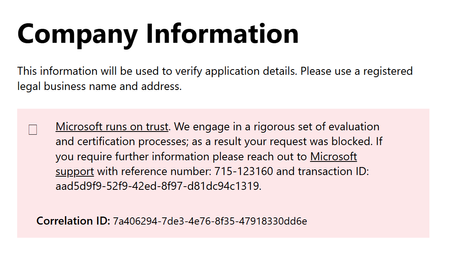
I am trying to registrar a business to Partner portal, but rolling gives this error: "Microsoft runs on trust. We engage in a rigorous set of evaluation and certification processes; as a result your request was blocked. If you require further information please reach out to Microsoft support with reference number: 715-123160 and transaction ID: 275008d3-60a1-4e52-a820-95d879223f75." Please escalate to Partner Onboarding / Trust Review team for manual review and unblock. Details: reference 715-123160 transaction id: 275008d3-60a1-4e52-a820-95d879223f75 Correlation id: 6d6c52ef-ab4c-480a-9abe-1e3fe420657f Business: FI21142489 and Manmade Software OySolvedristomatikainenMar 18, 2026Tin Contributor188Views2likes3CommentsIssue Accepting Microsoft Partner Agreement
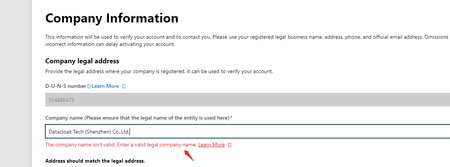
Hello, having an issue accepting the cloud partner agreement while enrolling in Partner Center. I am currently applying for our company's driver signing permissions on Microsoft. While filling out information on the following webpage: https://partner.microsoft.com/en-us/dashboard/account/exp/enrollnow/partner, I encountered an issue. When the webpage pulled our company name from Dun & Bradstreet, Microsoft deemed our company name invalid. I noticed that there is a comma in the name, as shown in the screenshot. However, when we applied for a signature from DigiCert, we used the same company name with the comma as the signing name. Therefore, I cannot remove the comma at this point because if I do, Microsoft might reject the signed certification file later due to a mismatch in the company name. Could you help resolve this issue?SolvedFranketYinMar 01, 2026Copper Contributor176Views1like1Comment
Unable to complete Partner Center Enrollment
Hello, I am trying to enroll in the Microsoft AI Cloud Partner Program. I can get through the process (fill out company information, etc.) but when I go to the final acceptance form and click submit, it constantly throws an error: I can sign in to the Partner Center but cannot open a support ticket because the "contact support" dialogue has no entry for workspace and will not let me enter anything: Is there a workaround to submit a ticket on this?SolvedPrivatusBryanJan 21, 2026Copper Contributor383Views0likes9CommentsApplied Skills Missing in Training Report
As a Microsoft Solutions Partner (approx 400 employees) we are working on creating a dashboard for managers to see how we are faring from a skilling perspective. This also helps us in the tracking and working towards retaining our specializations and designations. So far we have used the Trainings Report derived from the downloads hub to feed our database with applicable certifications that are held by our employees. That database we then used to also report on our skilling requirements for the solution area's and the specializations. Recently Microsoft introduced new specializations (Copilot) and those specializations require Applied Skills to be held by employees. These applied skills do not show in the trainings report offered by Microsoft. (E.g. APL-4002: Prepare security and compliance to support Microsoft 365 Copilot,APL-7008: Create agents in Microsoft Copilot Studio or DW-101: Copilot for Microsoft 365 Deployment Workshop ) As such we're wondering whether Microsoft is working on including these applied skills in the trainings reporting?SolvedMarnixMoorNov 11, 2025Tin Contributor418Views1like11Comments


Tags
- verification164 Topics
- support122 Topics
- Partner question78 Topics
- compliance54 Topics
- partner center8 Topics
- employment-verification7 Topics
- Employment verification6 Topics
- Microsoft Partner Center6 Topics
- Microsoft Partner6 Topics
- partner4 Topics