Recent Discussions

New Outlook Office.js CoercionType.Html body insert returns HtmlSanitizationFailure code 9011
Could you please look at the https://learn.microsoft.com/en-us/answers/questions/5975232/new-outlook-windows-office-js-coerciontype-html-bohere, because the format verification here is so resticted.16Views0likes0Comments
The advertising choices...
Ramming advertisements into Outlook was always weird, but actively doing this is just straight up messed up. While I cant fathom how people fall for these or other scammy behavior.... People do and its in poor taste to basically host click bait adverts. But I know microsoft dont give a a frick. Also who even uses McAfee!? Do they simply still exist through these practices?11Views0likes0Comments
How to Permanently Remove the Wunderlist Add-in from Outlook Classic (2026 Fix)
How to Permanently Remove the Obsolete Wunderlist Add-in from Outlook Classic Validated workaround for Windows and Outlook Classic Important: This workaround was successfully validated on Outlook Classic with Office Home & Business 2024, Windows 11 and a personal Microsoft account. Other Outlook or account types may behave differently. At a glance Item Details Estimated time 10–15 minutes Difficulty Intermediate Risk Low Outlook restart required Yes Windows restart required Yes Tested environment Outlook Classic, Office Home & Business 2024, Windows 11, personal Microsoft account When to use this guide • Wunderlist and Quick Add appear on the Message tab when an email is opened. • Clicking Wunderlist produces an add-in loading error. • Removing Wunderlist from Customize Ribbon only works temporarily. • Clearing or renaming the Office WEF cache does not permanently remove it. • Wunderlist does not appear as a normal COM add-in. Before you start Close Outlook and every other Microsoft Office application. Open Task Manager and confirm that OUTLOOK.EXE is not running. Step 1 – Open PowerShell Open Windows PowerShell or PowerShell 7. Administrator rights are not normally required. Step 2 – Locate the cached Wunderlist manifest Copy and paste the complete command below into PowerShell, then press Enter: $matches = Get-ChildItem "$env:LOCALAPPDATA\Microsoft\Office\16.0\Wef" -Recurse -File | Where-Object { $_.Name -notlike "*.metadata" } | Select-String -Pattern "Wunderlist" -SimpleMatch $matches | Select-Object -ExpandProperty Path -Unique | ForEach-Object { Write-Host "`nFILE: $_" Get-Content -LiteralPath $_ -TotalCount 25 } Expected result: PowerShell should show a manifest containing entries similar to: <Id>56d1645a-c00a-4c3b-b676-63bde48359c3</Id> <Version>1.7</Version> <ProviderName>Wunderlist</ProviderName> <DisplayName DefaultValue="Wunderlist" /> If PowerShell returns no result, stop here. Open Outlook once, open an email, close Outlook completely and then repeat Step 2 so Outlook has an opportunity to rebuild the web-add-in cache. Step 3 – Copy the manifest to the Desktop Run the following PowerShell command. It automatically finds the Wunderlist manifest and copies it to the Desktop as Wunderlist-manifest.xml: $source = Get-ChildItem "$env:LOCALAPPDATA\Microsoft\Office\16.0\Wef" -Recurse -File | Where-Object { $_.Name -notlike "*.metadata" -and (Select-String -LiteralPath $_.FullName -Pattern "<ProviderName>Wunderlist</ProviderName>" -SimpleMatch -Quiet -ErrorAction SilentlyContinue) } | Select-Object -First 1 if (-not $source) { Write-Error "The Wunderlist manifest could not be found. Re-run Step 2 and confirm that the manifest exists." } else { $destination = Join-Path $env:USERPROFILE "Desktop\Wunderlist-manifest.xml" Copy-Item -LiteralPath $source.FullName -Destination $destination -Force Write-Host "Wunderlist manifest copied to: $destination" } Expected result: a file named Wunderlist-manifest.xml appears on the Windows Desktop. Step 4 – Add the manifest as a custom Outlook add-in 1. Open Outlook Classic. 2. Go to Home > Get Add-ins. In some versions, use Home > All Apps > Get Add-ins. 3. Select My Add-ins. 4. Scroll to Custom Add-ins. 5. Choose Add a custom add-in > Add from file. 6. Select Wunderlist-manifest.xml from the Desktop. 7. Accept the warning if Outlook asks whether the add-in should be trusted. Expected result: Wunderlist appears under Custom Add-ins and is marked Added. Step 5 – Remove the custom add-in 1. Under Custom Add-ins, locate Wunderlist. 2. Click the three-dot menu beside Wunderlist. 3. Choose Remove. 4. Confirm the removal. This is the critical step. Adding the cached manifest as a custom add-in exposes a working Remove option for the otherwise orphaned Wunderlist registration. Step 6 – Verify the fix 1. Close every Outlook window. 2. Use Task Manager to confirm OUTLOOK.EXE has stopped. 3. Reopen Outlook and open an email. 4. Check that Wunderlist and Quick Add are absent from the Message ribbon. 5. Close and reopen Outlook a second time and check again. 6. Reboot Windows, open Outlook and open an email one final time. Success criteria • Wunderlist no longer appears on the Message ribbon. • Quick Add has disappeared. • The add-in remains absent after two Outlook restarts. • The add-in remains absent after a full Windows reboot. Optional cleanup • Delete Wunderlist-manifest.xml from the Desktop after the fix is confirmed. • If you previously renamed the WEF folder to Wef.old and Outlook has created a new working Wef folder, you may delete Wef.old after confirming all add-ins work normally. Do not delete individual manifest files from the active WEF folder. It contains manifests and resources for several Office add-ins, not only Wunderlist. Why ordinary removal methods failed Removing the ribbon group only hid the visible command. Clearing the WEF folder removed the local cache, but Outlook recreated the cache and restored the obsolete Wunderlist manifest. Temporarily importing that same cached manifest as a Custom Add-in allowed Outlook to expose a valid Remove command for the orphaned registration. On the tested system, removing it this way survived multiple Outlook restarts and a full Windows reboot. Technical reference Property Value Provider Wunderlist Manifest ID 56d1645a-c00a-4c3b-b676-63bde48359c3 Manifest version observed 1.7 Temporary filename Wunderlist-manifest.xml Troubleshooting The search command finds no Wunderlist manifest Open Outlook, open an email containing the Wunderlist ribbon command, close Outlook fully and repeat the search. Also confirm that the folder %LOCALAPPDATA%\Microsoft\Office\16.0\Wef exists. Outlook refuses to add the XML file Confirm that the copied file contains <ProviderName>Wunderlist</ProviderName> and that the filename ends in .xml. Re-run Step 3 rather than manually renaming a different file. The Remove option is missing Confirm that Wunderlist appears under Custom Add-ins and is marked Added. If it appears only in the general catalogue with an Add button, it has not yet been imported from the XML file. Wunderlist returns after the reboot Repeat Steps 4 and 5 and confirm that the custom add-in was removed through its three-dot menu. If it still returns, the account may be reprovisioning the add-in and Microsoft Support may need to remove the server-side registration.67Views0likes0Comments
Feature request: meeting cancellation by organizer in M365 Copilot
During a recent usage of M365 Copilot, I identified a capability gap that significantly limits calendar-related automation. Current situation Copilot can: find meetings in my calendar, identify meetings where I am the organizer, interactively ask which meetings should be processed. However, Copilot is currently not able to cancel organizer-owned Outlook meetings and send cancellation notifications, although this is a natural next step in the workflow. Requested capability Cancel individual meetings organized by the user Cancel recurring meetings or selected instances Send a custom cancellation message to attendees Support bulk processing (e.g. vacation preparation) Example use case Before a planned absence, a user asks Copilot: Find all meetings during my vacation. Show only meetings where I am the organizer. Ask me for each meeting whether it should be cancelled. Cancel the selected meetings and send a predefined message such as: "Florian planned absent." This would be a valuable productivity enhancement for Outlook and Copilot users who manage large numbers of meetings. Could you please advise whether this capability is already planned, whether a feedback channel exists, or which product team would be the appropriate owner for this request?19Views0likes0Comments
Outlook for Mac 16.113 Search not functioning in Legacy View
Title says it all. I have reindexed Spotlight, I have reverted backwards to .112 and .111 and no matter what I do, I can not get the search function to work again in Legacy view. I promise, I am NOT going to use the new view, it is hideous. Please help me, someone! I knew there were discussions about .112 search not working, and XML messages, but I haven't found this issue posted anywhere. Doesn't anyone actually test these releases before they send them out? :)40Views0likes0CommentsLog in issues
I am having issues logging in and switching microsoft accounts between personal Hotmail account and microsoft work account. If I sign into one or the other on one device whether a phone, mac or PC. It logs in but then when i try to log into another on the other device it states I have logged in too many times which is not correct. I never had the same phone number on both accounts for sso but microsoft picked up my work number to my personal account. Fix the issue please or give me a resolution, in the meantime I am using a Gmail account. Thanks12Views0likes0Comments
Outlook doesn't show the picture correctly in mail body, AGAIN
Original Post: Outlook Signature Images Missing / Not Displaying Correctly | Microsoft Community Hub This problem was temporarily solved at the 9th of June, but after Office 2016 security update package installed this week, it appeared again.24Views0likes0Comments腾龙公司游戏官网
现场负责人威性【 u a a 2 2 0 0】 🐧 【 3 9 8 1 1 1 5 1 0 1】 1、注恻流程详细了解微信: 【a a 9 9 9 5 521 1 1 】 开设腾龙公司的账户通常涉及以下几个步骤, 2、填写申请表格,您可以在腾龙公司的官方网站-点——浏览器——上下载并填写申请表格,或直接在腾龙公司的营业现场部填写。 3、提交开户所需文件:完成申请后准备所需的文件,这通常通过身份证明文件以及地址证明文件、银行账户信息等。这些文件需要提交给腾龙公司,可以选择在营业部现场提交或通过邮寄方法提交。 4、开设账户,提交必要的文件后,您需要按照腾龙公司的指示进行开户流程,这可能包括提供手机号码、验证短信、设置密码等步骤。 5、账户验证,完成所有必要的信息并同意相关协议后您的账户即可开通。 6、请注意,具体的开户流程可能因公司和地区的不同而有所不同,因此建议直接访问腾龙公司的官方网站获取最准确的信息74Views0likes0CommentsNew Outlook Offline Mode: Add and open attachments while offline
Microsoft has been rolling out offline functionality in phases, and the latest update now allows users to add and open attachments while offline. I created a short walkthrough covering what works offline now, what users need to know about attaching files from OneDrive versus local drives, and which features still require an internet connection. I also shared my discoveries when creating a calendar event that you don't want to miss. Video: https://www.youtube.com/watch?v=SYsraZBTack traccreations4e-p26 6/15/202694Views1like0CommentsNew Way to Insert Graphics in New Outlook
If you’re using New Outlook or Outlook on the web, you may have noticed a change in the Insert ribbon while composing an email. Microsoft has added a Graphics option to the Insert Ribbon when composing an email. The new Graphics button gives users a single place to insert Emojis, Stock images, and Stickers. I put together a quick breakdown covering: What the Graphics button actually adds Where to find Online Pictures now Which Classic Outlook illustration tools are still unsupported Full post here: https://traccreations4e.com/new-outlook-graphics-button/ If you find this post helpful, please like it to help others. traccreations4e-p26 4/30/2026151Views0likes0Comments
Personal Microsoft account security code
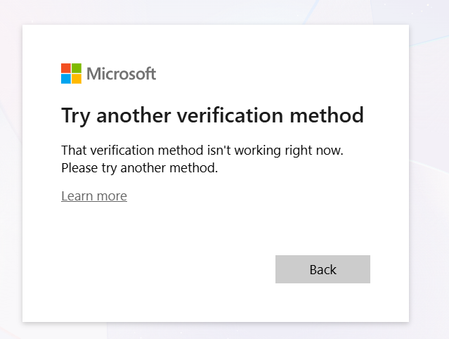
Dear Microsoft Outlook Support Team, I am currently facing an issue while trying to reset my Outlook account password. I have forgotten my password and attempted to reset it, but I am encountering problems during the verification process. The system is asking for mobile verification codes multiple times, and I am receiving an error message stating that the service is not available. Because of this, I am unable to complete the password reset process. I kindly request you to assist me in resolving this issue and help me regain access to my account as soon as possible. Thank you for your time and support.89Views0likes0CommentsClassic Outlook: The People Card Is Not Retiring, Just the Expanded View
One part of this Classic Outlook update could easily confuse people, so it is worth clearing up. In June 2026, Microsoft is retiring the People Card Expanded View in Classic Outlook. The full People Card is not going away. Users will still be able to open the standard contact card. What is changing is the expanded view, which gives users a little more context and a few extra details in one place. It may seem like a small change at first, but these types of updates can still affect how users look up contact information and move through their daily work. I put together a full blog post that explains what is changing, what stays, and where users can still get the richer contact experience. Read the full post here: Classic Outlook Is Retiring the People Card Expanded View traccreations4e-p26 4/7/2026293Views0likes0Comments
Outlook For Android Search Not Working with IMAP Folders
There has been a BUG with Outlook For Android Search and IMAP email accounts for many years. If you use an Outlook or Gmail email address all seems Ok. But if you use a different IMAP email provider, and use Folders to save read emails in, the Outlook Search function will never find those emails in the folders. It will find emails within the Inbox, but the moment you move them to another folder nothing will ever be found. I have reported this to Microsoft many times, and have had confirmation from them there is a BUG and they are aware of it... But the BUG never gets fixed, and the next time I report the BUG they start all over again saying they have never heard of such a BUG and it must be my phone, etc., etc... But a quick Google finds many users have issues with the exact same BUG - I guess Microsoft Support don't know how to use Google??? Anyway, I am stuck in this loop with Outlook For Android Support yet again! So I have a request: CAN EVERYONE PLEASE REPORT THIS BUG TO OUTLOOK FOR ANDROID SUPPORT??? Please use the "Settings/Help & feedback/Contact Outlook mobile support" option within the app, and report you have the "IMAP Folder Search BUG". Maybe, just maybe we can get Microsoft to take this years old bug seriously! (I have found reports of the BUG back to 2019...)264Views0likes0CommentsMajor journal's email does not pass Microsofts arbitrary standards nothing I can do about this
https://learn.microsoft.com/en-us/answers/questions/5755307/emails-not-being-recieved-from-sender-******@hotcr And to everyone thats defending this please tell me one advantage this has over putting it in the spam folder with warnings and blocking links etc. Tell me how this isn't the technological equivalent of not letting you buy laundry detergent because its poisonous if consumed. Look at all the people that were hospitalized from eating laundry detergent, clearly laundry detergent needs to be baned.23Views0likes0CommentsOutlook for Mac issue with contacts when saved
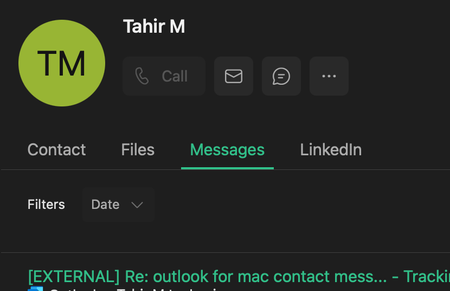
very strange issue with outlook for mac, if I add to contacts, the FILES, Messages and Linkedin tabs disappear. I contact microsoft support and they said this is a outlook for mac limitation but will look into it with internal team. Can anyone confirm they have the same issue ?65Views0likes0CommentsOutlook - 2 step verification on Android device
I received an email on my phone from Microsoft that I needed to sign in and go through their app and fill out info or I would not be able to access my email. Instructions were nonexistent or not intuitive and ended up in a rabbit hole. I ended up with 2-step verification and would like to get rid of it. Every time I have to access my phone I have to go through entering email and passwords. I need to get out of this mess38Views0likes0CommentsOutlook solution 50+ email accounts?
I'm looking for a solution for the following: I have about 50 email accounts that I want to manage from a single interface. I'd also like to add some rules so that certain messages containing, for example, a specific word in the subject line are automatically archived. In Outlook Classic, I can only add a maximum of 10 email accounts. Or rather, I can add 50 accounts, but messages from only the first 10 are loaded via IMAP. Is that correct? What's the solution if you have, for example, 50 email accounts? In Outlook Light/365 (1.2026.114.100), I can add more than 10 email accounts, but the order of the accounts can't be changed and creating rules is not possible. Does anyone know a good solution?188Views0likes0Comments






Events
Recent Blogs
- Hello, Outlook community. I’m Vicki Milton, a Principal Product Manager on the Outlook team. Over the last year, we’ve added important capabilities across areas such as offline support, shared mail...Jun 03, 20265.4KViews1like8Comments
- Copilot in Outlook is now agentic, taking on the ongoing work of running your inbox and calendar. It triages emails, reschedules conflicts, and surfaces what matters most before you even ask. ...Apr 27, 202662KViews10likes6Comments