Recent Discussions

Multi-Language Closed Captions in Webinars?
Hi community! Here is an interesting one. We are planning to use Microsoft Teams' webinar functionality for our upcoming events. Are translated captions a thing? Can we hold a webinar in English and have Teams generate closed captions in Spanish, for example? The latest interpreter features really have my hopes up for this one5Views0likes0Comments
Teams Hotline (PLAR) Phones and Kari’s Law Compliance – Is Direct 911 Dialing Guaranteed?
We are reviewing Microsoft Teams hotline (PLAR) phones that automatically dial a non‑emergency number (for example, a security desk). It is unclear whether all Teams hotline configurations allow a user to manually dial 911 from the phone. Since Kari’s Law requires direct 911 dialing on MLTS endpoints, we’re looking for clarification on the following: Are Teams hotline/PLAR phones guaranteed to allow manual dialing of 911? Does this behavior vary by Teams certified device model? Thanks in advance for any help.22Views1like0Comments
Formal Complaint: The UX Failure of Microsoft Authenticator and Teams Guest Access
To the Microsoft Product & Engineering Teams, I am writing this not just as a frustrated user, but as a systems engineer and developer who has just spent several hours navigating the Kafkaesque labyrinth that is your current authentication ecosystem. The transition to a new mobile device while maintaining "Guest" access to an external organization (Rihter d.o.o.) has been an exercise in systemic failure. Specifically, I would like to highlight the following critical UX flaws: The Identity Paradox: Your system’s inability to gracefully handle a personal Outlook account acting as a Guest in an Entra ID tenant is baffling. Receiving the error "You can't sign in here with a personal account" while trying to access a tenant I am already a member of is a fundamental logic failure. Visual Inconsistency (The "Briefcase" vs. "Initials"): The fact that an account can appear in Authenticator as a "One-time password" nalog with initials, yet be completely non-functional for Teams until it is manually re-added as a "Work/School" nalog with a briefcase icon, is a UI disaster. The "Action Required" Loop: I was trapped in a cycle where the app demanded action but provided no path to resolution within the mobile environment. I had to resort to using a desktop browser in Incognito mode just to force the system to generate a valid QR code for the new hardware. Mandatory Hardware Security (Passwordless): Forcing users to implement device-wide PINs or biometrics on their private hardware just to use the "Approve" notification feature is overreach. There should be a clear, frictionless fallback to TOTP codes within Teams without degrading the entire app's functionality. App vs. Web Desynchronization: It is unacceptable that a web browser (in Desktop mode) can successfully authenticate a session while the native Teams app on the same device remains stuck with stale tokens and cached AADSTS90023 errors. As someone who designs low-level architectural specifications (DREL), I find the lack of interoperability and the "black box" nature of these errors (like AADSTS90023) to be a significant step backward for professional productivity. I hope this feedback reaches someone who prioritizes user flow over bureaucratic security layers. Best regards, Milan Lakatoš Petrović Systems Engineer & Freelance Programmer64Views0likes0Comments
Teams crops previewed image
On Teams app for Mac, the previewed image in chat is being cropped. The image preview itself displays full image as shown below (see all numbers 1-7 visible): However, after clicking on the image itself to view it, the image is cropped (notice the number 7 no longer being displayed): You have to manually click a zoom out button and then the image becomes uncropped.22Views0likes0CommentsTeams Voicemail appended recording missing in audio attachment (Exchange 2019 on-prem)
Hello, We are experiencing a very specific issue with **Microsoft Teams Phone System voicemail** in a hybrid environment and I’m trying to determine if this is a limitation or a configuration problem. ### Environment * Microsoft Teams Phone System (Cloud Voicemail) * Resource Accounts, Auto Attendants and Call Queues * SBC (Direct Routing) – working normally * Hybrid identity (AAD Connect) * **Exchange Server 2019 on-premises mailboxes (NO Exchange Online mailbox)** Voicemail messages are delivered successfully to users in Outlook via email and transcription works. --- ### The problem When a caller leaves a voicemail and simply records a message → everything is normal. However, if the caller uses the **voicemail review menu** after recording: > presses **#** and then selects **“4 – continue recording”** the caller records a second part of the message (appended recording segment). Result we observe: | Component | Behavior | | ---------------------------------- | ---------------------------------- | | Voicemail transcription | Contains BOTH parts of the message | | Audio attachment in Outlook (.wav) | Contains ONLY the first recording | | Delivery | Successful (no NDR) | So the voicemail transcription is complete, but the audio attachment is truncated to the first segment. This only occurs when the caller chooses **continue recording** and creates a multi-segment voicemail. Has anyone else seen appended or multi-segment voicemail recordings being truncated when delivered to **Exchange on-premises mailboxes**? Is this a known limitation of Cloud Voicemail delivery to legacy/non-Exchange Online mailboxes, or is there a configuration required to properly render appended voicemail recordings? Any confirmation from others running Teams Phone with Exchange on-prem would be greatly appreciated. Thank you.31Views0likes0CommentsMulti-app camera - Stops Teams from detecting webcams
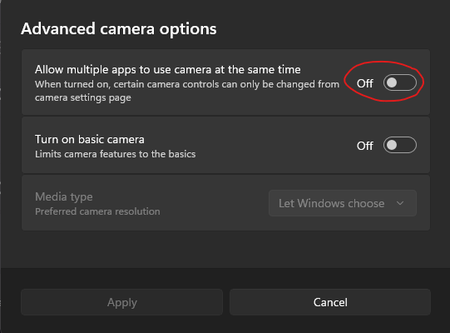
Hi. We have a load of shared meeting rooms that are setup with Jabra panacast webcams. When you open Teams it shows that no devices are connected but if you open the camera app or any other app like zoom the camera works fine. The only way to get it to work is to enable this setting. This settings for Multi-app camera cannot be enabled by Intune or powershell/regedit. There are some posts on reddit that suggest I am not alone and there are others having this issues too. So.. its either a bug with the Teams app itself or the windows OS Thanks, Cam64Views0likes0CommentsShared Number Group Channel Operator Options Missing in Microsoft Teams 260043.403
After updating to Microsoft Teams version 260043.403, options in Group Channels related to shared number / calling queue operator availability appear to have changed. Previously, when selecting a channel associated with a calling queue, operators could: View a list of all queue operators See each operator’s availability for that specific calling queue (not general Teams presence) Change their own availability for that queue With this update, the ability for operators to change their availability now appears to be located under Settings → Calls. However, the channel-level view that displayed the availability of other operators seems to have been removed entirely. Can someone confirm whether the operator availability view within Group Channels has been deprecated, or if it is now accessible elsewhere in Teams?48Views0likes0Comments
Teams Calls using Transfer with consult
Hi all, I have a Yealink MP56E2 desk phone with the extension EXP50. When adding "Consult Transfer" to a line key on the extension then the text "Consult with" plus the contact name is added to display on the extension. Consult with is displayed on the first of two lines, taking away a lot of space. Even worth if you change the language to German. Then only 3-4 characters remain to display the contact name. See pictures below. Has anyone managed to change the leading text? In my opinion, no text is needed as the Icon already indicates the "Consult Transfer" function.54Views0likes0Comments
Can upload file from Teams chat files to Posts but not to Shared
I was working on an Excel file shared in a chat with members of a small workgroup. When it was ready to share with the larger team, I navigated to the appropriate Team > Channel, created a Post, clicked on + > Attach file > selected the file (which had been modified recently, so displayed on the pop-up). The team lead asked me to save it in a particular folder in the team's files, so I navigated to Shared (formerly Files)... and did not see it. I could briefly see it if I selected the "In messages" filter, but then after a moment that bugged out and displayed the "Something went wrong" error screen. This behavior persisted (briefly visible file list, then error screen) even after quitting Teams via the task bar and opening it back up. I did not want to create a separate version (especially now that the original file was linked in the Post), so I tried a few different methods to get it into Shared. I tried copying a link, but couldn't figure out a good way to paste it into Shared. I tried pasting it in a new Link, but that preserved it as a link/URL rather than a file -- serviceable but awkward. I checked whether there was an easier way to do it by opening in the web version, where Files is still active rather than Shared (same behavior, except no "In messages" filter so I couldn't test that). I poked around in SharePoint but didn't see anything interesting. I tried uploading a copy from within Shared by pasting the filepath from the "Save a Copy" dialog in Excel... ...and that's when I noticed a possible cause of the issue: another member of the original workgroup chat had created the file, and it was living in her Teams chat files, not mine. I then had her try doing it by navigating to her Teams chat files and selecting her copy, and then hallelujah, it appeared in Shared. I was able to drag it to the appropriate folder normally. Ultimately, I see two questions: Why does the file appear when the "In messages" filter is selected, but not otherwise? Why can I add a file saved in someone else's Teams chat files to a Post, but I can't upload it in Shared? Bonus: any idea why the "In messages" filter caused an error message to display?90Views0likes0CommentsScheduling Channel Meetings with the Microsoft Graph PowerShell SDK
Channel meetings are a type of meeting specifically intended for channel members to attend. Creating normal meetings is easy, but can you create channel meetings with the Graph API? As it turns out, you currently cannot. The suggested workaround is to create a normal (private) meeting and then post the details of that meeting in the channel for channel members to see. That doesn't make the meeting show up in the channel calendar, but at least you can meet. https://practical365.com/channel-meeting-powershell/38Views0likes0CommentsTeams Webinars: Org name vs brand name – how are people handling this?
Has anyone else hit this with Teams webinars? Microsoft recently changed how webinar emails are sent, and the sender name now seems to come from the tenant Organisation Name. You can change that in M365 admin, but that’s where the problem starts. In a lot of companies, the organisation name is a legal/billing entity, not the public-facing brand. Example: Legal / tenant name: FedEx Corporate Services, Inc. Brand: FedEx Teams webinar emails now go out showing the legal entity, which isn’t great for external, customer-facing events. Changing the org name just to fix webinar emails can have knock-on effects for billing, contracts, and governance. As far as I can see: No way to set a brand-specific sender name No per-webinar or per-mailbox sender identity Org name is global and used across multiple services The only real workaround seems to be not using Teams-generated emails at all, and sending custom emails via Power Automate / Graph / a marketing platform, while still using Teams for the actual event. Curious how others are dealing with this: Are you just living with it? Changing the org name with legal sign-off? Or bypassing Teams emails completely? Feels like a gap for larger, multi-brand orgs.63Views0likes0Comments
Out-of-warranty Lenovo MTR Reimage - can't upgrade to Windows 11
Hello everyone. Got a couple of Lenovo MTR NUCs that we needed to reimage. Cause they are out of warranty, Lenovo only provides the image that it was shipped with for reimage (I can't use Cloud Deploy). The problem is, when trying to run the Windows 11 update, I get the error code "0x0000400". This is because these come with the Windows 10 IoT Enterprise edition, which is known to have this problem. The issue is that I can't use the ISO file or load the Windows 11 image, as this will get rid of the MTR system. Does anyone know a way around this/is there an image available? Thanks!35Views0likes0CommentsTeams Revamps Premium Licensing
Microsoft announced a set of Teams licensing changes to take effect in April 2026. The changes affect devices, Microsoft Places, and Teams events. Webinars and Teams town halls will be easier to manage without Teams Premium licenses, and organizations will be able to buy capacity packs to host events for up to 100,000 participants. The changes will leave some Microsoft 365 tenants cold while others will be delighted. https://office365itpros.com/2026/01/26/teams-licensing-changes-0426/222Views0likes0Comments
Teams admin centre - add the ability to setup a team completely (shared channels and/or groups)
I think the current teams setup workflow in admin centre is a bit flawed. We're trying out to create a team for every project that we do, but since these projects are done by many different departments it makes sense to use Shared Channels within each project and divide the data in such a way that it is stored in the site library of the channel that is the most fitting. For example creative documents in the channel for the creative department, and business documents in the business channel. To make things clearer to the end user we would like to structure each project the same. So it would be logical if an admin could create these shared channels while creating the project and not have to trust that a project manager is able to set things up correctly after they get assigned. (so being able to create a template would be nice...) So IMHO what is missing from admin centre: -ability to add shared channels. -ability to add teams (in this case department teams) to these shared channels. -ability to create a template with shared channels configured (is a little bit complex, because channel names need to be unique, so some sort of variables need to be taken into account... maybe these can be distilled from the main project team name...which is basically what we also intend) (maybe this could be done with Power automate if the ability to create shared channels is being added to an admin's abilities...) Another option, which would actually be much sweeter would be to skip Shared Channels altogether and add the ability to add Office 365 groups to the main Team, now we can only add members... I would like to work with Team groups, as it's much easier to manage and remove a user from a group than to have this user have to be removed from each project individually. But actually I think both options are a necessity...45Views0likes0CommentsTeams Integrates Viva Engage Communities
A new integration with Viva Engage is available for Teams. The integration adds communities to the Teams navigation bar. It’s kind of odd when a separate highly functional Communities app exists. It’s unclear who is demanding another point of integration between Viva Engage and Teams. The suspicion is that this work is due to internal politics rather than to facilitate better collaboration. https://office365itpros.com/2026/01/23/viva-engage-teams-integration/110Views1like0Comments
Channel Meeting Chat can only be viewed from the channel
Why can't chats from a meeting channel appear in the chat section of Teams? Our project team have decided against holding meetings in channels due to this reason because it's a hassle to navigate back to the Team. I have the view set up correctly an you cannot see the chat where we would do all other regular meeting chats. Apparently this is by design? Why...?48Views0likes0CommentsMicrosoft Teams Call Recording: Why Native Isn’t Enough & How Imagicle Solves It
🚀 New Video: Microsoft Teams Call Recording – Compliance, Security & AI Explained If your organization relies on Microsoft Teams for internal and external communications, call recording is no longer optional — especially in regulated industries like finance, healthcare, insurance, and government. In my latest video, I break down: 🔹 Why native Teams call recording isn’t enough for compliance 🔹 The key regulatory requirements (GDPR, HIPAA, MiFID II, PCI‑DSS) 🔹 How modern solutions fill the gap with advanced security, governance & automation 🔹 How AI-driven analytics can transform call data into actionable insights 🔹 A deep dive into Imagicle’s compliance recording solution and what makes it stand out As Teams adoption continues to grow, organizations must ensure their communication channels remain secure, compliant, and future-proof. This is where powerful third‑party tools step in — offering encryption, role-based access, policy-based recording, advanced search, sentiment analysis, and more. 🎯 Whether you're an IT leader, compliance officer, or UC specialist, this is information you’ll want to stay ahead of. 👉 Watch the full video here: https://youtu.be/GTxAIS8f45U 💬 Let me know your thoughts or experiences with Teams call recording in the comments! #MicrosoftTeams #Compliance #CallRecording #Security #AI #Imagicle #UnifiedCommunications #DigitalTransformation #TeamsVoice #CollaborationTools95Views0likes0CommentsThe Channel Agent Brings AI Interactions to Teams Channels
Chat and meetings have their agents, and now the Teams channel agent is available to help members understand what happens inside channels. Like any AI agent given limited sets of data to reason over, the channel agent does a good job of finding nuggets hidden in conversations. The issue is that the channel agent doesn’t currently work for channels that have external members, like guest accounts. That’s a big downside. https://office365itpros.com/2026/01/12/teams-channel-agent/89Views0likes0CommentsRemoving Teams from a Specific User Profile via Script in Intune
Hi, Working on a process with using PowerShell to remove Microsoft Teams from a specific user that is not the primary user of that computer on multiple Windows 11 devices using Microsoft Intune. However, I need a script to make this happen. Can I get some help from the community on this? Has anyone else seen this before? Thanks, ZC4647Views0likes0Comments





Events
Recent Blogs
- Welcome to the February edition of What’s new in Microsoft Teams. This month’s updates are all about helping you stay in flow: getting the most useful information to you faster, and reducing a few ev...Feb 26, 2026333Views0likes0Comments
- The latest Microsoft Teams and Microsoft 365 expert community briefings, podcasts and upcoming community events. Expert Briefings: Microsoft Places in 2026: APIs, Desk Booking, and Copilot Contex...Feb 20, 2026140Views0likes0Comments