Recent Discussions

Word Writing Problem
Hello, I am experiencing a problem with the web version of Microsoft Word on my Android phone and tablet. For about a week, I have noticed issues when typing in Word. After typing something and pressing the Enter key, the text I wrote sometimes disappears. In some cases, even though I press Enter, the cursor does not move to the next line and the words start overlapping each other. This issue occurs both when I use the on-screen keyboard and when I use a physical keyboard. I have tried several different browsers and devices, but the problem still persists. I also tested it with a different Microsoft account and the same issue occurred. What could be causing this problem, and how can I fix it?5Views0likes1Comment
Copy and Paste Will Not Using the Destination Formatting
I am writing a book in Wood and will submit it to Amazon KDP, and I have set up the document per KDP guidelines. I am working on an English version and a Spanish version at the same time as two separate documents. The text is justified. Both documents have Normal/Modify settings set up exactly the same. The Fonts and Paragraph settings are exactly the same. I have gone into the Options/Advanced area of Word and played with all of the Cut, Copy, and Paste settings to try to fix my problem. But I can't figure out what is going on. I created the Spanish document by using Google Translate to take English paragraphs, translate them, and pasted them into the Spanish document The Spanish document is completed, and all of the formatting looks fine. So I already have paragraphs that are a certain size in the document, meaning they take up a certain number of lines. I am now editing the book using the English document. Something has changed with the Spanish document! If I make a small edit in an English paragraph, use Google Translate to deal with the edit and do a new translation, and then copy and paste that edited Spanish paragraph from Google Translate back into the same place as the original paragraph in the Spanish document, the words are slightly more compressed together, so the paragraph gets shorter! This happens if I even change just a single word in a paragraph, which has not really changed the length of the translation. The paragraph will become shorte by a half of a line, or a full line on long paragraphs. This is all becasue the words are being spaced slightly closer toegether now, versus when I originally crated the document. Also, when I start to do the paste, from Paste Option only get the option for "Keep Text Only." I don't get the multi-paste option box. Something has changed in my setup of Word from the time I created the original Spanish document, and what is happening now. I can't figure out why the formatting of the destination, or using merge formatting, is not working! It's making up it's own jutification spacing all of a sudden. I can't figure out why now a cut and pasted paragraph from Google Translate is making the spread between the words just slightly tighter. The latest thing I tried was Review/Language and choosing Spanish for the Spanish document, and that did not work. Any ideas? Gordon70Views0likes2CommentsData Formatting
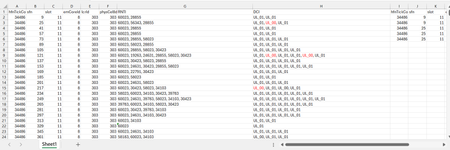
Dear Experts, I have a Data like below :- Each row can have 1 or more RNTIs( seperated by ",") and their DCI( UL_01 or UL_00), I want to put them in a format like in Col - I~P gave examples for the 1st two entries. Attached worksheet. Thanks & Regards Anupam ShrivastavaSolved51Views0likes3CommentsRequest for Best Practices on Using Microsoft Agent 365
Hello Community, I am seeking guidance on best practices for effectively using Microsoft Agent 365. Specifically, I am interested in recommendations related to governance, security and access control, agent monitoring, and integration with Microsoft 365 services. If you have practical experience or proven approaches in these areas, your insights would be greatly appreciated. Thank you, Mohammad Shohal Bhuiyan13Views0likes0Comments
Allow removal of "Copilot Suggestions" from right-click menu
I have been using Excel for decades and CONSTANTLY use the right-click menu for quick access to basic functions (e.g., "Insert"). Ever since "Copilot Suggestions" was added to the drop-down list, it always throws me off due to its placement. I have Microsoft 365 on Windows 11 Pro. I have searched for ways to remove this from appearing there and the result said "go to File > Options > Copilot and uncheck the 'Enable Copilot' box". However, when I attempt to do that, there is NO "Copilot" option available! PLEASE allow removal of "Copilot Suggestions" from the right-click menu OR at least the option to move it to the bottom (so it isn't in the way of things used ALL the time). I realize that Copilot is a great resource for many users, but I am confident in my Excel skills and in my ability to research/learn new skills the "old school" way, so I have little use for this feature now and would prefer to hide it.467Views6likes6Comments
unpivot data and handle merged cells without using Power Query (Unpivot_Toolkit)
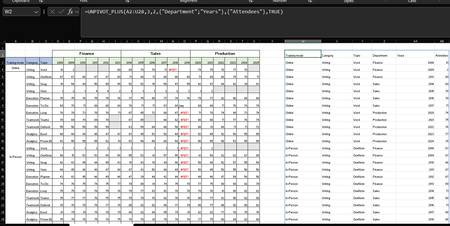
Hey, guys!! I’ve been working on a set of functional Excel Lambdas to solve a common headache: transforming "Wide" human-readable data into "Long" database formats without having to open Power Query every time. =UNPIVOT_PLUS(table, [no_of_cols], [no_of_headers], [attribute_names], [value_name], [remove_errors], [remove_blanks],[pad_blanks_with],[pad_errors_with]) Don’t worry about the full list, most use cases only require 5 arguments. I've included a table of default values at the end. Merged Cell Support: Automatically handles fill-down/fill-right logic for merged headers/columns. Bonus Helper: SPLIT_INJECT =SPLIT_INJECT(array, target_indices, delimiter, [ignore_empty], [match_mode], [pad_with]) It targets specific columns, splits them by a delimiter (like TEXTSPLIT), and expands the entire table horizontally while keeping all other columns perfectly stable. Optional arguments match TEXTSPLIT defaults. Feel free to tear this apart or adapt it for your own edge cases. I’d love to hear how you end up using it! You can grab both functions from my GitHub Gist https://gist.github.com/Medohh2120/f8553c149684e39bb499249e39f01017. Argument Description Default Behavior table The array or range of data to unpivot. Required argument (no default) [no_of_cols] Fixed left columns to keep as identifiers. 1 [no_of_headers] Top rows used as headers, handling merged cells. 1 [attribute_names] Header name for the unpivoted attributes . "Attribute" [value_name] Header name for the unpivoted values. "Value" [remove_errors] Excludes grid rows with formula errors. FALSE [remove_blanks] Removes grid empty cells and empty strings. TRUE [pad_blanks_with] Value to substitute for empty cells. Leaves cell blank [pad_errors_with] Value to substitute for errors. Leaves error as-is309Views2likes3CommentsCorrelation Study with Filters
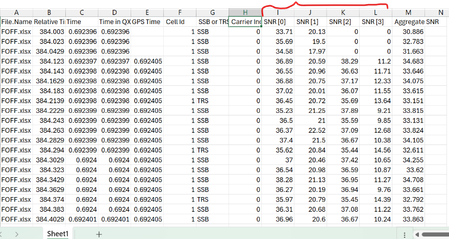
Dear Experts , I have a data like below( Attached worksheet) And want study the correlation between SNR[0~3], there will be 6 combinations as below:- I want make like this but with Filters/Slices for the "File.Name" & "SSB or TRS" & "Carrier Index", different colors for different Carrier Index(0 &1) Thanks & Regards Anupam Shrivastava16Views0likes0Comments
3044 error in Access
I have two computers networked Windows 10 together and have moved to two new computers windows 11. I have also moved from Microsoft 365 to 2024 office professional plus. Everything seems to work on the new computers except one Access database. That file has a front and back built in. I get a 3044 run error and the data base will not open. The error says it can not find the data base. I think in the transfer the old computer may have a different name than the new, It appears that is the problem. In the network I can see both new computers, it seems they are set up correctly but that could be a problem as well. I simply do not know how to fix it. I hope someone here may have a solution.19Views0likes1Commentequation or function?
+0.3°c -0.1°c +0.4°c Looking for either an equation or function for this, in order to simply enter column A & B and have answer autofill. The number in column A is the constant number that I want column B to be ie: what must happen to column B to equal column A, as you can see in column C you add 0.4 so that column B equals +0.3. As seen below there is variation from positive and negative numbers in both columns therefore at any given time it will be adding or subtracting?? +0.2°c -0.2°c +0.4°c +0.3°c -0.3°c +0.6°c 0.0°c -0.1°c +0.1°c -0.1°c +0.3°c -0.4°c -0.2°c 0.0°c -0.2°c -0.1°c +0.2°c -0.3°c anyone help me out, could save some considerable productivity time?Solved103Views0likes4CommentsWhy is my create file from OneDrive for Business node isn't working?
I have a power automate cloud flow that, in some point, gets a word .docx from my sharepoint site, then it creates the same document in onedrive so that I can convert it to PDF then returns it to sharepoint. This idea came from the necessity of converting a .docx to .pdf without the need of premium conectors. I have 2 scenarios: 1° Scenario: Flow: I get the data from the word that I need > I create the same file on OneDrive > I convert the file to .pdf > then I create the file on Sharepoint. Problem: When I run my flow, it gets a 404 error: "message": "File Not Found\r\nclientRequestId: y-f695-48b1-9556-xc\r\nserviceRequestId: x-e051-b000-efc3-y" Error image: 2° Scenario: Flow: The same as the above, the only thing I did after research, is that the node that I get content from file from my sharepoint site also returns the "$content-type", so I specified that for the create file from OneDrive I'll only want the "$content" attribute. In resume, it creates the file in onedrive but I can't open it, it appears to be corrupted, at first I thought my sharepoint file was also broken, but then I could open it with no errors as on OneDrive. Problem: When I run my flow, it gets the error that it can't convert that kind of file (as I wrote above, the file creates corrupted), the main problem is understanding why it gets corrupted, it even returs the content-type that I'm not passing anymore. Error image: Message: "message": "Error from microservice: {\"status\":406,\"message\":\"Não há suporte para a conversão desse arquivo para PDF. (cannotOpenFile / Error from Office Service. Url=https://wordcs.officeapps.live.com/document/export/pdf HttpCode=BadRequest)\",\"source\":\"api.connectorp.svc.ms\"}\r\nclientRequestId: y-13f3-4e1a-a77a-x\r\nserviceRequestId: y-a09f-b000-f272-x" NB: This flow actually worked for more than 1 year with no problems like that, the last time it ran without errors was last week (6-7 days from today).25Views0likes1Comment
Excel workbooks keep breaking
Hi All, Sorry if this is not the right place to ask, I'm new here. Since a couple of days, my Excel workbooks keep breaking. When opening specific files, Excel states the file needs to be repaired. Everytime certain formulas are being deleted and the values are just pasted as is. I haven't had any issues with these files in the past. Previously I used a license which I bought online via a third party. It seems the issues started after an update. I switched to a license which I bought directly from Microsoft. I did a clean installation, removed all the previous versions files but the issue still exists. For a couple of days I can open the files without problems. And then yesterday excel showed an update was available and excel had to be reopened. After doing so, the issues came up again. I have a Office Home 2024 License, Excel version 16.106.1, on macOS Tahoe 26.2. T.I.A83Views1like1CommentMicrosoft 365 Backup Launches File-Level Restore
The Microsoft 365 Backup solution will soon be able to restore individual files and folders instead of complete sites. That’s a welcome upgrade to restore capabilities to cover situations like the inadvertent deletion of a file. It’s a wonder why Microsoft didn’t make more about this capability when they celebrated SharePoint’s 25th anniversary last week when they discussed departmental billing for Microsoft 365 Backup. https://office365itpros.com/2026/03/11/microsoft-365-backup-file-restore/10Views0likes0CommentsPython in Excel - Missing from desktop Excel but exist in web Excel
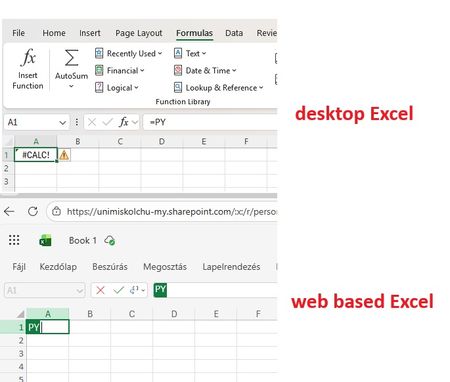
Good Morning! Yes, again this topic :-( When I join to a professional forum I also search for the topic I having a problem with. Found a lot of similar questions but I could not find a post with a solution. Maybe I was not enough attentive and patient but I did not. Well, we are a University in Hungary, and we have Microsoft 365 A1, A3 and A5 licenses. I attahced a screenshot which shows: in the desktop Excel I got #CALC! error msg when I type =PY and press TAB. But it works in Excel on the Web version. So the root of the problem cannot be the license, right? Of course I saw this article about "Python in Excel availability": https://support.microsoft.com/en-us/office/python-in-excel-availability-781383e6-86b9-4156-84fb-93e786f7cab0 Our licenses are based on user, not device so no, it cannot be that the computer is a device with shared license: My Excel version is on: So the version and the channel are also OK. (OK?) I am also a Global Adminisitrator in our tenant, so I could check if the Connected experiences and Optional connected experiences and all related possibilities are disabled or not: no, it is not disabled. On "Microsoft 365 Apps admin center" : https://config.office.com/ ... I did not find any policies which controls those options so in "Policies for all users" policy I modified all these settings from "Not configured" to "Configured" and "Enabled". In my Excel the Trust center related settings looks like this: Of course my Office package up to date, I ran the Update Office and Update License command from Excel. Did not help. I went also to https://admin.microsoft.com site if I can find any related setting, but did not. I also tried to Sign out and Sign back in Excel - did not help. Finally, as our computers are in Hybrid environment (so our users are logging in inti on-prem AD, and their properties are synchronised to Azure) I have cerated a Group Policy object (I am also a Domain Admin), which also allows connected and optional experiences for all domain users: I should not mention: did not help :-( I have checked if the GPO is applied or not by running GPRESULT /R, it applied, it is in the registry. But despite all the settings so far - nothing helped. The Python in Excel feature in desktop Excel do not want to work. But it does in web based Excel. I would be very happy to receive any ideas from anyone. Or if U say I should go to official Microsoft support, then I go. Have a nice day! Regards, Andras /sorry for the very detailed case description, but maybe easier and quicker if I "aswer" all usual questions in advance/19Views0likes0CommentsLooking for help with a single Dynamic Formula Ranking Points by player and dropping lowest score
Name Finishes Andrew 1,1,2,3,7,8 Randy 2,4,5,5,8,9 Chris 1,1,2,3,7,8 Bill 1,4,6,6,7,9 Jeff 2,3,5,7,8,8 Reed 4,4,6,7,7,9 Doc 3,5,5,6,7,9 Steve 1,3,5,6,8,9 Paul 2,2,3,3,4,9 Points (1st, 2nd, etc) 165 105 75 50 35 25 20 15 10 Expected answer with lowest point dropped Name Points Chris 530 Andrew 510 Paul 410 Steve 315 Bill 285 Jeff 250 Randy 240 Doc 190 Reed 165Solved216Views0likes12CommentsExcel file problem
When I download an Excel file from iCloud (on my Mac laptop), I get a message saying: "We found a problem with some content in the file. Do you want us to try to recover as much as possible? Click "yes" if you trust the source of this workbook." I click yes, but the file then opens in a corrupted or unusable state. How can I retrieve the original file as it was before? Please recommend a solution.7Views0likes0Comments
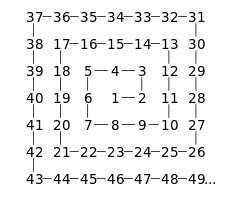
Formula Challenge: The most efficient way to generate a Number Spiral (Ulam spiral) ?
The goal: Ulam spiral - Wikipedia The trick is creating a function capable of producing the largest matrix of numbers possible (this may rule out the recursive approach). The approach I took: The approach I took was creating 'frames' and working inward with REDUCE essentially performing repeated addition: REDUCE works its way through an array of odd numbers in descending order (1 is omitted) with 3 different situations: 1. The odd number is the largest so the matrix does not require padding. 2. The odd number is 3, the anomaly, so a 'padded core' is created. 3. The odd number is not the greatest nor 3 so a padded matrix is generated Spiral Lambda: =LET( s, ODD(INT(SQRT(n))), arr, UNIQUE(ODD(SEQUENCE(s - 1, , s, -1))), arrCore, {5, 4, 3; 6, 1, 2; 7, 8, 9}, IFERROR( REDUCE( 0, arr, LAMBDA(a, v, LET( TopBottomPadding, EXPAND(0, (s - v) / 2, s, 0), SidePadding, EXPAND(0, v, (s - v) / 2, 0), top, SEQUENCE(, v, (v - 1) ^ 2 + 1, -1), bottom, SEQUENCE(, v, (v - 1) ^ 2 + v, 1), left_frame, EXPAND(SEQUENCE(v - 2, , (v - 1) ^ 2 + 2), , v - 1, 0), right_frame, SEQUENCE(v - 2, , (v - 1) ^ 2 - (v - 1), -1), core_stuffing, EXPAND(0, v, (s - v) / 2, 0), core, VSTACK( TopBottomPadding, HSTACK(core_stuffing, arrCore, core_stuffing), TopBottomPadding ), center, HSTACK(left_frame, right_frame), nopad, VSTACK(top, center, bottom), pad, VSTACK( TopBottomPadding, HSTACK(SidePadding, VSTACK(top, center, bottom), SidePadding), TopBottomPadding ), a + IF(v = s, nopad, IF(v = 3, core, pad)) ) ) ), "Please enter a number 17 or greater" ) ) The accuracy checks The highest number I've been able to get away with for n is 300,001. I'm interesting in any suggested improvements or different approaches to this task!6.4KViews1like23Comments





Events

Learn more about the capabilities of Agent 365 in this live 'Ask Microsoft Anything' with product and engineering team experts! Get your questions answered about capabilities for agent observability,...
Wednesday, Mar 18, 2026, 09:00 AM PDTOnline
1like
182Attendees
0Comments

You’re passionate about what you do, and we’re passionate about empowering your potential. Microsoft 365 Community Conference - is your chance to keep up with AI, build game-changing skills, and take...
Tuesday, Apr 21, 2026, 08:00 AM PDTIn-Person
0likes
4Attendees
0Comments
Recent Blogs
- Quickly find Word, Excel, and PowerPoint files on the web by typing keywords in the app header search.Mar 11, 2026178Views0likes0Comments
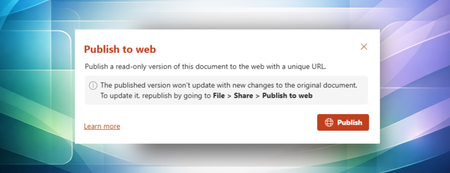
- Publish to web makes it easy to share clean, polished documents externally without revealing internal edits, comments, or version history.Mar 10, 2026381Views1like1Comment