Recent Discussions
Request for Best Practices on Using Microsoft Agent 365
Hello Community, I am seeking guidance on best practices for effectively using Microsoft Agent 365. Specifically, I am interested in recommendations related to governance, security and access control, agent monitoring, and integration with Microsoft 365 services. If you have practical experience or proven approaches in these areas, your insights would be greatly appreciated. Thank you, Mohammad Shohal Bhuiyan14Views0likes0Comments
Correlation Study with Filters
Dear Experts , I have a data like below( Attached worksheet) And want study the correlation between SNR[0~3], there will be 6 combinations as below:- I want make like this but with Filters/Slices for the "File.Name" & "SSB or TRS" & "Carrier Index", different colors for different Carrier Index(0 &1) Thanks & Regards Anupam Shrivastava17Views0likes0CommentsMicrosoft 365 Backup Launches File-Level Restore
The Microsoft 365 Backup solution will soon be able to restore individual files and folders instead of complete sites. That’s a welcome upgrade to restore capabilities to cover situations like the inadvertent deletion of a file. It’s a wonder why Microsoft didn’t make more about this capability when they celebrated SharePoint’s 25th anniversary last week when they discussed departmental billing for Microsoft 365 Backup. https://office365itpros.com/2026/03/11/microsoft-365-backup-file-restore/10Views0likes0Comments
Python in Excel - Missing from desktop Excel but exist in web Excel
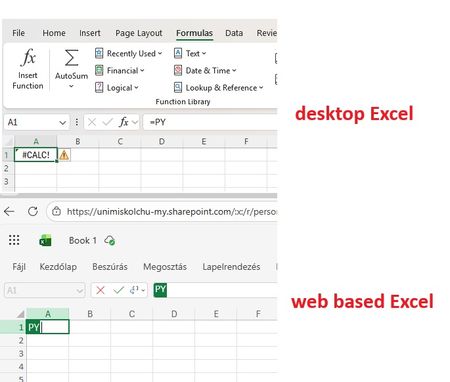
Good Morning! Yes, again this topic :-( When I join to a professional forum I also search for the topic I having a problem with. Found a lot of similar questions but I could not find a post with a solution. Maybe I was not enough attentive and patient but I did not. Well, we are a University in Hungary, and we have Microsoft 365 A1, A3 and A5 licenses. I attahced a screenshot which shows: in the desktop Excel I got #CALC! error msg when I type =PY and press TAB. But it works in Excel on the Web version. So the root of the problem cannot be the license, right? Of course I saw this article about "Python in Excel availability": https://support.microsoft.com/en-us/office/python-in-excel-availability-781383e6-86b9-4156-84fb-93e786f7cab0 Our licenses are based on user, not device so no, it cannot be that the computer is a device with shared license: My Excel version is on: So the version and the channel are also OK. (OK?) I am also a Global Adminisitrator in our tenant, so I could check if the Connected experiences and Optional connected experiences and all related possibilities are disabled or not: no, it is not disabled. On "Microsoft 365 Apps admin center" : https://config.office.com/ ... I did not find any policies which controls those options so in "Policies for all users" policy I modified all these settings from "Not configured" to "Configured" and "Enabled". In my Excel the Trust center related settings looks like this: Of course my Office package up to date, I ran the Update Office and Update License command from Excel. Did not help. I went also to https://admin.microsoft.com site if I can find any related setting, but did not. I also tried to Sign out and Sign back in Excel - did not help. Finally, as our computers are in Hybrid environment (so our users are logging in inti on-prem AD, and their properties are synchronised to Azure) I have cerated a Group Policy object (I am also a Domain Admin), which also allows connected and optional experiences for all domain users: I should not mention: did not help :-( I have checked if the GPO is applied or not by running GPRESULT /R, it applied, it is in the registry. But despite all the settings so far - nothing helped. The Python in Excel feature in desktop Excel do not want to work. But it does in web based Excel. I would be very happy to receive any ideas from anyone. Or if U say I should go to official Microsoft support, then I go. Have a nice day! Regards, Andras /sorry for the very detailed case description, but maybe easier and quicker if I "aswer" all usual questions in advance/23Views0likes0Comments
Excel file problem
When I download an Excel file from iCloud (on my Mac laptop), I get a message saying: "We found a problem with some content in the file. Do you want us to try to recover as much as possible? Click "yes" if you trust the source of this workbook." I click yes, but the file then opens in a corrupted or unusable state. How can I retrieve the original file as it was before? Please recommend a solution.7Views0likes0Comments
Transitioning from Barracuda to Office 365 for Modern Email Management
Migrating from Barracuda to Office 365 is a strategic step for organizations looking to modernize their email infrastructure and improve collaboration. Many businesses use Barracuda for email security, archiving, or backup, but moving to Office 365 allows them to consolidate these capabilities within a single cloud-based productivity platform. Office 365 offers advanced email services through Exchange Online along with collaboration tools like Outlook, Teams, OneDrive, and SharePoint. The migration process typically involves transferring archived emails, mailboxes, and user data from Barracuda systems into Office 365. Careful planning is required to ensure data integrity, maintain compliance requirements, and avoid disruptions to daily communication. During the migration, administrators map user accounts, validate domains, and verify that all archived data remains accessible after the transition. One of the major advantages of moving to Office 365 is the enhanced security and management capabilities. Businesses gain access to features such as advanced threat protection, data loss prevention, and centralized administration. These tools help organizations protect sensitive information while simplifying IT management. For companies planning this transition, working with experienced providers can help ensure a smooth process. Many organizations rely on Apps4Rent to support Barracuda to Office 365 migrations, ensuring secure data transfer, minimal downtime, and reliable access to Microsoft 365 services after the migration is complete.14Views0likes0CommentsMoving from Kerio to Office 365 for Modern Email and Collaboration
Migrating from Kerio to Office 365 is a practical step for businesses looking to upgrade their email and collaboration infrastructure. While Kerio Connect provides basic email, calendar, and messaging capabilities, Microsoft Office 365 offers a comprehensive cloud-based platform that includes Outlook, Exchange Online, Teams, OneDrive, and SharePoint. This transition enables organizations to benefit from enhanced productivity tools and improved communication across teams. During a Kerio to Office 365 migration, essential data such as emails, contacts, calendars, and folders are transferred from the Kerio server to Exchange Online. The process typically involves configuring Microsoft 365 accounts, securely migrating mailbox data, and updating DNS records to ensure uninterrupted email delivery. Careful planning helps minimize downtime and ensures that users maintain access to their information throughout the migration. Another key advantage of moving to Office 365 is improved security and scalability. Microsoft provides advanced protection features such as spam filtering, multi-factor authentication, data loss prevention, and built-in compliance tools. These capabilities help organizations protect sensitive information while meeting modern security standards. Businesses often rely on experienced providers like Apps4Rent to manage Kerio to Office 365 migrations efficiently. With expert planning and support, organizations can ensure a smooth transition, maintain data integrity, and fully leverage the benefits of the Microsoft 365 ecosystem.14Views0likes0CommentsHow to Remove Sensitivity Labels from SharePoint Files at Scale
It’s easy to remove sensitivity labels from SharePoint Online files when only a few files are involved. Doing the same task at scale requires automation. In this article, we explain how to use the Microsoft Graph PowerShell SDK to find and remove sensitivity labels from files stored in SharePoint Online and OneDrive for Business. https://office365itpros.com/2026/03/10/remove-sensitivity-labels-from-file/17Views0likes0CommentsSharePoint Online Drops One Time Passcodes for External Access
From July 2026. SharePoint Online and OneDrive for Business will use Entra B2B Collaboration (guest accounts) to control external access to shared files. This change has been coming since 2021, but it takes time for organizations to get their heads around changing the way to grant external access. It’s time to embrace guest accounts, and that means doing some work to manage guest accounts on an ongoing basis. https://office365itpros.com/2026/03/06/guest-accounts-spo/127Views0likes0CommentsHow to Test a File Against DLP Sensitive Information Types
Sensitive Information types (SITs) are definitions of data like credit card numbers used by DLP rules to detect potential external sharing violations. Knowing what SIT to use in a DLP rule is often difficult, which is why the Purview developers have added a test option to allow tenants to test files against individual SITs or all SITs to see what happens. https://office365itpros.com/2026/03/04/sensitive-information-type-test/24Views0likes0Comments
200 answers instead of 1000
The helpdesk has confirmed that I have an m365 family subscription. This would allow me to receive 1000 responses in Forms. However, when I log in to Forms with my details, only 200 answers are accepted. In addition, I get a "buy button" on the screen. In other words, Forms "thinks" that I have a free plan. Who can solve this for me?10Views0likes0CommentsInvitation to March 9 Frontier Transformation event
Join us for a special event with Jared Spataro, Charles Lamanna, and Sumit Chauhan to learn how Microsoft delivers AI built for work. The live stream starts at 8 AM Pacific Time on March 9. aka.ms/MicrosoftFrontierTransformation2026295Views0likes0CommentsMicrosoft Celebrates SharePoint 25th Anniversary with a Bunch of Announcements
Microsoft celebrated the 25th anniversary of SharePoint with a batch of announcements, including AI in SharePoint, intended to help administrators to manage all aspects of SharePoint Online through natural language. Other interesting announcements included department-level payments for Microsoft 365 Backup and the renaming of the Connections app in Teams as the SharePoint app. Well, the last wasn’t that interesting… https://office365itpros.com/2026/03/03/ai-in-sharepoint/49Views0likes0CommentsSharePoint 2013 Workflow Retirement: What It Means for Your Business
Microsoft has officially entered the final chapter of SharePoint 2013 workflows, and for many organizations, this update is more than just another lifecycle announcement — it’s a wake-up call. The retirement of SharePoint 2013 workflows in SharePoint Online marks a decisive shift away from legacy automation toward modern, cloud-first workflow platforms. For businesses that still rely on approval flows, notifications, and automated processes built years ago, the message is clear: those workflows will stop working, and planning can no longer be postponed. This updated news article explains what the retirement means, what changes technically after the deadline, and — most importantly — how organizations can migrate and modernize their workflows step by step. https://dellenny.com/sharepoint-2013-workflow-retirement-what-it-means-for-your-business/67Views0likes0CommentsPlanner’s Newly Redesigned Interface
Microsoft has launched a redesigned user interface for the Planner app. The big news is the inclusion of task chat. Goals are also available, but only to people with a Microsoft 365 Copilot or Planner Premium licenses. Task Chat is a nice feature, and I am sure that it will be popular. UX redesigns often disappoint. At least this one offers new features. https://office365itpros.com/2026/02/27/planner-new-ux/34Views0likes0CommentsExtending Protection for Confidential SharePoint Online Files
Sensitivity labels offer great protection against unauthorized access, but sometimes files that aren’t encrypted escape from a document library. SharePoint Online can now use sensitivity labels configured with user-defined permissions (UDP) to extend protection to downloaded files. The magic works by configuring permissions on download based on the membership of the user who downloads a file. https://office365itpros.com/2026/02/26/sensitivity-label-extend-protection/32Views0likes0CommentsHow to Use Scoped Graph Permissions with SharePoint Lists
This article explains how to use scoped Graph permissions to restrict app access to lists and list items in SharePoint Online and OneDrive for Business sites. It's a follow-up to other articles covering how to restrict app access to SharePoint Online sites and files. Scoping app access to specific objects is important because otherwise apps can access everything in SharePoint Online, and that isn't good. https://office365itpros.com/2026/02/25/scoped-graph-permission-lists/24Views0likes0CommentsMicrosoft Extends DLP Policy for Copilot Protection to All Storage Locations
Microsoft has enhanced the DLP policy for Copilot to cover Office files held in any storage location instead of only Microsoft 365 locations like SharePoint Online and OneDrive for Business. The change is made in the Office augmentation loop, a little-known internal component that coordinates use of connected experiences by apps. Extending the DLP policy to cover all locations makes perfect sense. https://office365itpros.com/2026/02/24/dlp-policy-for-copilot-storage/141Views0likes0CommentsMicrosoft Takes Aim at ChatGPT
Microsoft would very much like Microsoft 365 tenants to use Copilot instead of ChatGPT. A recent comparison between Copilot and ChatGPT outlines some areas that Microsoft thinks are important when deciding which AI tool to use. Microsoft has a point because Copilot is embedded into Microsoft 365 whereas ChatGPT is more of an add-on. The competition for hearts and minds is very intense in the AI space. https://office365itpros.com/2026/02/20/copilot-and-chatgpt/60Views0likes0Comments







Events
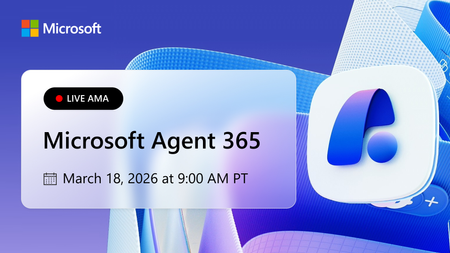
Learn more about the capabilities of Agent 365 in this live 'Ask Microsoft Anything' with product and engineering team experts! Get your questions answered about capabilities for agent observability,...
Wednesday, Mar 18, 2026, 09:00 AM PDTOnline
1like
184Attendees
0Comments

You’re passionate about what you do, and we’re passionate about empowering your potential. Microsoft 365 Community Conference - is your chance to keep up with AI, build game-changing skills, and take...
Tuesday, Apr 21, 2026, 08:00 AM PDTIn-Person
0likes
4Attendees
0Comments
Recent Blogs
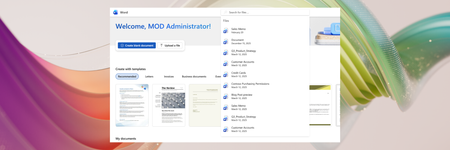
- Quickly find Word, Excel, and PowerPoint files on the web by typing keywords in the app header search.Mar 11, 2026248Views0likes0Comments
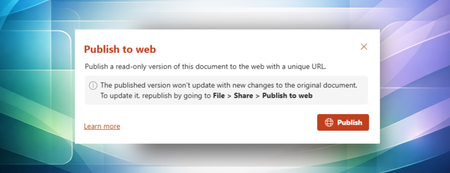
- Publish to web makes it easy to share clean, polished documents externally without revealing internal edits, comments, or version history.Mar 10, 2026428Views1like1Comment