Recent Discussions

Why Businesses Choose Rackspace to Office 365 Migration
Businesses are increasingly adopting Rackspace to Office 365 Migration to improve collaboration, scalability, and security in modern work environments. As organizations grow, they require cloud platforms that offer advanced communication tools, centralized management, and seamless accessibility across devices and locations. One major reason companies prefer Rackspace to Office 365 Migration is access to Microsoft’s integrated productivity suite. Applications such as Outlook, Teams, SharePoint, OneDrive, Excel, and Word provide businesses with powerful collaboration capabilities. Employees can communicate, share files, and manage projects efficiently from virtually anywhere, supporting both remote and hybrid work models. Another advantage of migrating from Rackspace to Office 365 is enhanced security and compliance. Microsoft 365 includes advanced threat protection, multi-factor authentication, data encryption, and compliance management tools that help businesses secure sensitive information. These features are especially valuable for industries with strict regulatory requirements. Scalability is also a key factor driving Rackspace email to Office 365 migration projects. Organizations can easily add users, expand storage, and integrate additional Microsoft services as business demands evolve. This flexibility helps companies avoid costly infrastructure upgrades while maintaining operational efficiency. Businesses also benefit from improved reliability and uptime with Microsoft’s global cloud infrastructure. A properly planned migration ensures minimal disruption while transferring emails, contacts, calendars, and other business-critical data securely. For organizations seeking professional migration assistance, Apps4Rent provides expert support to ensure a smooth and secure transition with reduced downtime. Overall, Rackspace to Office 365 migration enables businesses to modernize communication systems, strengthen security, improve collaboration, and build a scalable foundation for long-term growth and productivity.11Views0likes0Comments
Why is Microsoft 365 setup (Groups + SharePoint + Domains) still so complex?
Microsoft 365 Setup Feedback Summary Summary of Experience: Setting up two small business workspaces (Cork & Clarity and Stone Clarity Consulting) in Microsoft 365 required navigating multiple disconnected systems including the Admin Center, Outlook, SharePoint, and an external DNS provider. The process was significantly more complex than expected and not intuitive for a non-technical user. Key Issues Encountered: 1. Identity and Account Confusion - Unclear whether to create separate users or use one account with aliases - Creating multiple users caused login confusion, broken permissions, and access issues 2. Domain and DNS Setup Complexity - Required switching between Microsoft and external DNS (Looka) - Instructions were unclear and required manual troubleshooting - No clear distinction between required and optional DNS records 3. Default Domain Confusion - New groups defaulted to the wrong domain - No visible option to change domain during group creation - Required changing global default domain (non-intuitive) 4. Inconsistent Group Behavior - Outlook groups and Teams-backed groups behave differently - No indication of differences or consequences - Groups appeared in some places but not others 5. Membership and Ownership Issues - Group creator was not consistently added as member - Ownership did not always persist after changes - Groups existed but were inaccessible or invisible 6. Outlook UI Limitations - Groups not visible despite existing and being correctly configured - No clear instructions on how to 'activate' or 'follow' groups 7. SharePoint Site Not Created Automatically - SharePoint sites were not created when groups were created - Required hidden steps: Outlook → Files → Open in SharePoint - No indication that the site did not exist yet 8. SharePoint Discovery Issues - Sites do not appear until manually accessed or followed - No onboarding or guidance for discovering sites 9. Ghost/Deleted Items Still Visible - Deleted group (Cork & Clarity Hub) remained visible - No clear distinction between deleted vs followed sites 10. Fragmented User Experience - Required switching between multiple platforms - No single place to manage or understand setup status - High cognitive load for basic configuration Conclusion: While Microsoft 365 is a powerful platform, the initial setup experience is overly complex and fragmented, especially for small businesses. Simplifying group creation, making SharePoint provisioning automatic and visible, and improving UI consistency across apps would significantly improve usability and adoption.7Views0likes0CommentsPython integrado con excel
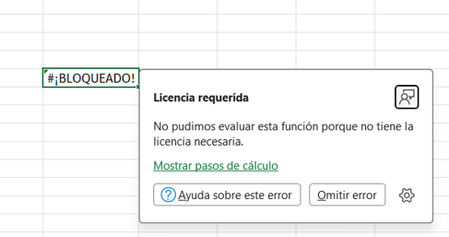
Tengo una suscripción de Microsoft 365 Empresa Estándar, ya estoy dentro del grupo de Microsoft Insider 365, tengo habilitado el Canal Beta pero aún así no me esta funcionando Python integrado con excel ya que escribo el código pero no me muestra el resultado, en su lugar me muestra el mensaje "BLOQUEADO" indicando que no tengo la licencia requerida. He hecho de todo lo que me ha salido de consejos en la web, incluso cerré sesión y volví a ingresar pero el resultado es el mismo:5Views0likes0CommentsASAP utilities in power automate cloud flow
I have one server machine that installed ASAP Utilities for Excel. I want to eliminate individual server logins and allow users to run only 5 specific ASAP Excel plugin functions automatically, just by dropping an Excel file into a common server folder, so the backend processes it and returns the result—saving time. Will Office 365 excel with power automate cloud flow help? Thanks for you answers for my clarifications.4Views0likes0CommentsUsing the Microsoft Graph PowerShell SDK to Update User Profiles
Now rolling out to Microsoft 365 tenants is the ability to update user profile cards with details of awards and certifications held by users. Usually, HR departments would provide the source data and probably arrange for the data to be ingested into the Graph through a Copilot connector, but it’s possible to add awards and certifications for individual users using Microsoft Graph PowerShell SDK cmdlets. All explained in great detail with working examples here. https://office365itpros.com/2026/05/08/user-profile-card-awards/26Views0likes0CommentsAn Explosion of Audit Events for Legacy SharePoint Online Authentication
Microsoft phased out the legacy IDCRL authentication mechanism from SharePoint Online on May 1, 2026. Sounds good, until you notice the explosion of IDCRLBlockedDueToSoftEnforcement events created by SharePoint Online in the unified audit log. The events are associated with Microsoft Office apps like Word, which SharePoint appears to think are still using IDCRL. For whatever reason, the audit log is now cluttered with unwanted events generated by the interaction between SharePoint and Office. https://office365itpros.com/2026/05/07/idcrl-audit-events/65Views0likes0CommentsAgent 365 adoption resources now available
We've created a Getting Started Guide for Agent 365! You can find it on our new Agent 365 Adoption Resources page, as well as links to articles for getting started with Agent 365 in Microsoft 365 Admin Center, Microsoft Defender, Entra, and Purview. Would love to hear what you think -- or what we've missed! Please leave a comment on this post. Thank you! -- Nichole Microsoft Agent 365 – Microsoft Adoption55Views0likes0CommentsTues, May 12: Live AMA with Agent 365 Product Team
How to Participate Register/RSVP/Add to Cal at: Live AMA: Microsoft Agent 365 | Microsoft Community Hub Visit the AMA page on Tuesday, May 12 at 9am Pacific time to join the conversation. You can post your questions in the comments, and product team members will respond live during the AMA. Live AMA: Microsoft Agent 365 | Microsoft Community Hub35Views0likes0CommentsGranular Restore for Microsoft 365 Backup Reaches General Availability
Eighteen months after the product became generally available, Microsoft 365 Backup has delivered granular restore for SharePoint Online and OneDrive sites. It’s the kind of feature that most tenant administrators might have assumed is already in the program, but at least it now is. The next step is apparently the ability to restore files in place. That isn’t available yet. https://office365itpros.com/2026/05/06/microsoft-365-backup-granular/22Views0likes0CommentsNo More All-or-Nothing: Smarter, Granular Data Recovery in Microsoft 365 Backup
Data recovery has long carried a kind of quiet dread in the IT world. When something goes wrong whether it’s a user accidentally deleting an important file, a sync error wiping out folders, or a security incident compromising data the recovery process often feels like a blunt instrument. Historically, administrators have had to choose between restoring everything or nothing, even when the problem affected only a small portion of the environment. That kind of all-or-nothing decision isn’t just inefficient it can be disruptive, time-consuming, and, in some cases, risky. https://dellenny.com/no-more-all-or-nothing-smarter-granular-data-recovery-in-microsoft-365-backup/26Views0likes0CommentsHow File-Level Archiving Works for SharePoint Online
SharePoint Online supports file-level archiving, meaning that you can send individual files (most types) to Microsoft 365 Archive to be held in cold storage. Individual users can make the decision about what files need to be online instead of forcing administrators to decide whether to archive complete sites. If needed, archived files can be retrieved, but it might take 24 hours for this to happen. https://office365itpros.com/2026/05/05/file-level-archiving-spo/29Views0likes0Comments- 23Views0likes0Comments

A new Excel Think Tank
After nearly 30 years of using Excel commercially, I am now coming to retirement. But before I finally hang up my Excel boots, I have setup a small Excel think tank. The idea being people can send me their issues and I will work with you to build your permanent solution in Excel. I have created a number of solutions from Email Validator, Automatic dashboard creators, Fraud analysis, Auto resume makes, Music Syns (All in Excel), so if give it try.51Views0likes0CommentsMicrosoft Cloud Revenues Reach $54.5 Billion in FY26 Q3
Microsoft’s FY26 Q3 results produced $54.5 billion revenue for the Microsoft Cloud, the part of the business that includes Microsoft 365, Azure, LinkedIn, and other services. The annualized run rate of $218 billion proves just how vital these revenues are to Microsoft. Lots of time was spent talking about Microsoft 365 Copilot, which now has “over 20 million” paid seats. Sounds good, and it’s up five million from the last quarter, but Copilot still has a long road to travel to profitability. https://office365itpros.com/2026/04/30/microsoft-cloud-fy26-q3/101Views0likes0Comments
Closing VBA module is crashing excel
If I open a macro enabled workbook, go to developer>visual basic and try closing any VBA module windows, excel closes. If I then start excel, open a blank workbook, go to developer> visual basics and insert several blank modules, and then close one, excel closes. If I reboot my PC, open a blank workbook, go to visual basic and insert modules, now I can close them ok. But once I open an existing macro enabled workbook the problem starts over again. Weirdly, if I start from scratch, open a new workbook, then developer and insert just one module and then delete it, that's ok. I can do that repeatedly. Opening and closing form windows in the developer doesn't show the same problem. It isn't just one particular macro enabled workbook that is triggering the problem. Sometimes the workbook opens without macros enabled and I close it without enabling macros and the problem has been triggered. I have switched off all addins. I did recently activate the Inquire COM addin. My excel version is MS Excel for.365 MSO (Version 2604 Build 16.0.19929.20096) 64-bit running on Windows 11. I don't know when I first saw this but I think within the last month. It's a company laptop with phone IT admin support so I'm limited on the trouble shooting I can do myself. Office 365 has been uninstalled and reinstalled but did not help. Other users in my organisation are not seeing the same issue when they open the same workbooks. The IT admin however told me they did see the issue. Updated. Starting from a clean state after reboot, I open a new workbook, add several blank VBA modules then save as xlsm and close. Then when I open a new workbook the problem is triggered again. No VBA code has been run or written. Updated If I maximise the VBA module windows before closing them then I can close them without crashing!37Views0likes0CommentsLightweight Governance Models for Small-to-Mid-Sized Organizations in Microsoft 365
Governance in Microsoft 365 (M365) often gets a bad reputation. For many small-to-mid-sized organizations, it conjures images of rigid policies, endless approval workflows, and heavy administrative overhead. But governance doesn’t have to be complicated or burden some to be effective. https://dellenny.com/lightweight-governance-models-for-small-to-mid-sized-organizations-in-microsoft-365/40Views0likes0Comments






Events
Recent Blogs
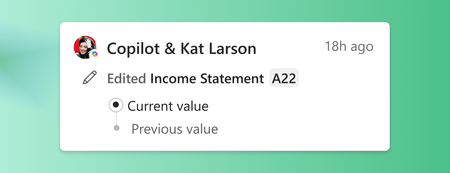
- Edits made with the help of Copilot are now visible to users and collaborators, bringing transparency to the changes made in your workbook.May 12, 2026126Views0likes0Comments
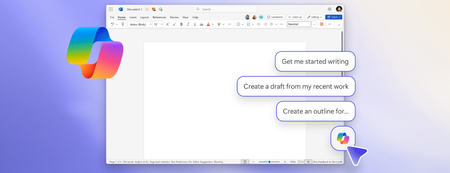
- The ability for Copilot to better connect to your content when using a keyboard and screen readers has evolved.May 11, 20261.1KViews4likes8Comments