domains
16 Topics
M365 Admin Center Global Administrator Lockout
Hello Microsoft Community, I am seeking urgent assistance and guidance regarding a critical Microsoft 365 tenant lockout that has been ongoing for several days without a resolution or proper communication from the support team. Our organization manages Microsoft 365 services for a business with more than 200 active users who depend on Microsoft 365 for their daily operations. Issue Description We have been locked out of our Microsoft 365 tenant's administrator account. This prevents us from properly managing our Microsoft 365 environment and restoring normal access to essential business services. Our business-critical data, including important documents and operational information, is stored in SharePoint. The inability to access and manage these services has significantly disrupted our business operations. Microsoft Support Ticket References We have raised multiple support tickets and followed up repeatedly, but the issue remains unresolved. Tracking ID: 2610050040001149 Tracking ID: 2610090010001066 Tracking ID: 2610050040001222 Despite these support cases and repeated follow-ups, we have not received a satisfactory resolution or a clear recovery timeline. Support Experience So Far Following a discussion with the support team, we were expecting a call to assist with unlocking the administrator account and providing a temporary password through the appropriate recovery process. However, we have not received the expected call or a meaningful update. Our main concerns are: Complete loss of access to the Microsoft 365 tenant administrator account. More than 200 users affected by the ongoing incident. Critical business data and documents stored in SharePoint. Multiple support tickets without a concrete resolution. Lack of clear communication regarding the root cause and recovery timeline. No clear escalation path or confirmation of the next recovery steps. Our Concerns We understand that technical issues can occur, but leaving a business-critical environment inaccessible for an extended period without meaningful updates is extremely concerning. We purchase Microsoft 365 licenses through a partner and expect appropriate technical support and escalation assistance when critical incidents occur. Our organization previously used Google Workspace and recommended migrating to Microsoft 365 because of its enterprise capabilities. This incident has seriously affected user confidence and business continuity. If access cannot be restored promptly, we may have to consider alternative email hosting arrangements to minimize further disruption. Request for Assistance I would appreciate guidance from Microsoft engineers, Microsoft 365 administrators, and community members who have experienced similar situations. What is the appropriate escalation process when all available tenant administrator accounts are inaccessible? How can we expedite tenant ownership verification and administrator account recovery? Is there a dedicated Microsoft team that handles critical tenant lockout incidents affecting business operations? What is the recommended recovery process when the administrator cannot access the Microsoft 365 Admin Center? How can we obtain urgent assistance when multiple support tickets and repeated follow-ups have not resulted in a clear resolution? Can the three referenced support tickets be escalated for urgent review by the appropriate Microsoft support team? We are not looking for workarounds that compromise tenant security. We need Microsoft's official recovery process to restore authorized administrative access safely. Microsoft Support Team: If any Microsoft support representatives are monitoring this community, we would appreciate your guidance on the appropriate escalation channel for this incident. We can provide additional information privately through the appropriate official channels. Thank you for your time and assistance. Any guidance that helps us restore our services and protect business continuity would be greatly appreciated. Best regards, Microsoft 365 Tenant Administrator7Views0likes0Comments
Why is Microsoft 365 setup (Groups + SharePoint + Domains) still so complex?
Microsoft 365 Setup Feedback Summary Summary of Experience: Setting up two small business workspaces (Cork & Clarity and Stone Clarity Consulting) in Microsoft 365 required navigating multiple disconnected systems including the Admin Center, Outlook, SharePoint, and an external DNS provider. The process was significantly more complex than expected and not intuitive for a non-technical user. Key Issues Encountered: 1. Identity and Account Confusion - Unclear whether to create separate users or use one account with aliases - Creating multiple users caused login confusion, broken permissions, and access issues 2. Domain and DNS Setup Complexity - Required switching between Microsoft and external DNS (Looka) - Instructions were unclear and required manual troubleshooting - No clear distinction between required and optional DNS records 3. Default Domain Confusion - New groups defaulted to the wrong domain - No visible option to change domain during group creation - Required changing global default domain (non-intuitive) 4. Inconsistent Group Behavior - Outlook groups and Teams-backed groups behave differently - No indication of differences or consequences - Groups appeared in some places but not others 5. Membership and Ownership Issues - Group creator was not consistently added as member - Ownership did not always persist after changes - Groups existed but were inaccessible or invisible 6. Outlook UI Limitations - Groups not visible despite existing and being correctly configured - No clear instructions on how to 'activate' or 'follow' groups 7. SharePoint Site Not Created Automatically - SharePoint sites were not created when groups were created - Required hidden steps: Outlook → Files → Open in SharePoint - No indication that the site did not exist yet 8. SharePoint Discovery Issues - Sites do not appear until manually accessed or followed - No onboarding or guidance for discovering sites 9. Ghost/Deleted Items Still Visible - Deleted group (Cork & Clarity Hub) remained visible - No clear distinction between deleted vs followed sites 10. Fragmented User Experience - Required switching between multiple platforms - No single place to manage or understand setup status - High cognitive load for basic configuration Conclusion: While Microsoft 365 is a powerful platform, the initial setup experience is overly complex and fragmented, especially for small businesses. Simplifying group creation, making SharePoint provisioning automatic and visible, and improving UI consistency across apps would significantly improve usability and adoption.373Views0likes2Comments
Emails from our custom domain ends up in quarantine
Hello, I have an issue with emails coming from one of our custom domains being detected as phishing for identity theft reason. We've got the main domain on Microsoft 365, let's call it: "domain-example.com" and the second domain on IONOS : "domainexample.com" When we receive emails from this second domain it is detected as phishing since it is a domain name very close to our main domain, therefore those emails are placed into quarantine. How do I resolve this issue? Can I indicate Microsoft 365 that this second domain is owned by our company, therefore the emails coming from this domain aren't identity theft attempts? I found how to add a domain on Microsoft 365 Admin Center but I don't know what are the consequences of this action, I want to keep my domain on IONOS and send emails from their web server. All I want is to stop emails from our company to end up into quarantine or spam folder. Thank you.Solved429Views1like4Comments
Need assistance: Unable to Remove GoDaddy as Partner/Reseller and Unfederate the Domain actus.law
I have been trying to resolve this issue for nearly four weeks, and been through many troubleshooting sessions and telephone calls with Microsoft Support, but this seems extremely complicated: The domain actus.law is owned by the Danish law firm Actus Law, and is registered with GoDaddy as the domain registrar. The Microsoft 365 tenant was originally created and federated by GoDaddy, who acted as the delegated administrator (via DAP/GDAP). On advice from a Microsoft Sales Advisor, Actus Law purchased a Microsoft 365 Business Standard license directly through Microsoft connected to the above tenant with the goal of managing the tenant independently through the Microsoft 365 Admin Center — without GoDaddy's involvement, beyond being the registrar. After the purchase it was impossible to manage users/licenses/domains in the Microsoft 365 Admin Center, as the domain is federated and therefore all requests always get redirected to GoDaddy. It was therefore not possible to verify the domain or create any users. I contacted Microsoft Support on 8 May, where I was told that the way forward was to delete current DNS records and remove GoDaddy's partnership privileges in the Microsoft 365 Admin Center. We therefore deleted all GoDaddy's delegated administrative privileges (GDAP/DAP) on 8 May 2025 and requested GoDaddy to end the reseller relationship. After this the support agent closed the ticket. This was handled through Support Ticket #2505081420003154. GoDaddy afterwards confirmed that they have removed all rights and that the domain is free to be unfederated. However, this did not solve the problem, since GoDaddy is still registered as partner and the domain is still federated. Therefore I am not allowed to make any changes and I always get redirected to GoDaddy when trying to manage anything in Microsoft 365 Admin Center. On 9 May I contacted Microsoft Support again and asked to disconnect the tenant from GoDaddy so I can manage everything in Microsoft 365 Support Center. This was under the Support Ticket #2505091420000046. The assigned agent tried during multiple weeks to troubleshoot and fix the problem with PowerShell commands using both MsolService and Microsoft.Graph, but always ended up getting access errors or insufficient privileges to perform the change in authorization from federated to managed. It has also not been possible to delete GoDaddy as partner. On 20 May I was asked to contact GoDaddy again to make sure that they had removed themselves as partner, and I got the following confirmation in writing from GoDaddy's Advanced Technical Support: "The Microsoft 365 organization for actus.law is no longer associated with GoDaddy. You can now reach out to Microsoft directly and receive support for a password reset for any admin user you need to access, or any other support issues. NOTE: If the domain is still set to use GoDaddy’s email login system you will need to ask Microsoft to “un-federate” the domain." On 21 May I explained GoDaddy's response in an email to the assigned agent, but now the agent simply stopped responding to my emails. I sent a reminder after 5 days, but did not get any response. On 28 May I called Microsoft Support and was assigned a new agent. That agent told me to contact GoDaddy, as it seems they still have visible GDAP, and only GoDaddy can remove that. Then the agent closed the ticket. I tried to contact GoDaddy afterwards, but they told me that the reseller relationship/GDAP was completely removed from GoDaddy's side on 8 May 2025 and all changes have propagated. However, since all GDAP/DAP had already been deleted at that point (which was done on 8 May, see above under number 4), GoDaddy could not remove it in Microsoft's systems according to the normal procedure so it is correctly reflected in the Microsoft 365 tenant. So they asked me to contact Microsoft Support again and explain the situation. WHAT I WANT TO ACHIEVE: I want GoDaddy completely removed as partner/administrator from my tenant and the domain actus.law to be "managed" and not "federated", so I can manage everything directly in the Microsoft 365 Admin Center and use my Microsoft 365 Business license. CURRENT STATUS: GoDaddy says everything has been removed on their end and that only Microsoft can now unfederate the domain. Microsoft Support says GoDaddy still needs to remove DAP/GDAP — but I cannot see their DAP/GDAPS anywhere in the Admin Center, and GoDaddy says they’ve already done it. Does anyone have an idea of what to do in this situation? I would appreciate any help, I feel completely stuck, and I am unable to set up any users or mails 😒763Views0likes2CommentsUnable to whitelist quarantined emails
We have an email that is being constantly quarantined from a webform. The email comes from the email of the web form server, but is spoofing an internal address in our tenant by design. The email keeps getting blocked, and nothing we've tried as far as transport rules, whitelist additions, etc has been able to discernably affect this. There is a option to create a tenant allow list entry but the maximum duration is 45 days. We need a way to reliably whitelist an email indefinitely.263Views0likes1Comment
Adding Outlook add-ins and permissions
Wonderoig if someone can answer a question for me. I'll use the process in this link as context https://help.draftable.com/hc/en-us/articles/46382047949977-Configuring-Redline-in-Email-Outlook-with-Draftable In short when adding an Outlook Addin and selecting a group to assign the add-in too and the accepting the permission requests does this: Apply the permissions to ONLY those nominated users' mailboxes; or Applies the permissions to ALL mailboxes and applies "security" by limiting the users who can see the add-in I assume it does one of the two. Any ideas?395Views0likes2Comments
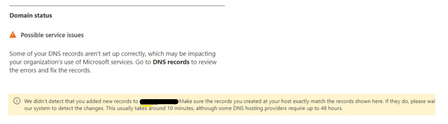
Domain Status show Possible service issues with MX having Error but checked MX Record its the same
Hi, Just found out that Microsoft 365 Admin Centre > Domains show custom domain having Possible service issue status. When clicked into it, it shows MX status having error. Did a nslookup -type=MX "xxxx.com" and did a comparison with DNS MX Record, It shows exactly the same value as Microsoft 365. Not sure what is exactly the issue. We did not make any amendment to any settings.520Views0likes1CommentInability of Service Provider to be a Multi-Tenant Organization (PREVIEW)
Hello, I'm new here, so pardon me if I'm doing this wrong. My boss has asked me to check into this Multi-Tenant Organization thing and I was able to create it on our tenant. However we are a Service Provider organization and upon inviting another Tenant, I was awarded with this error: "Error-Action 103: Service providers cannot be part of a multi-tenant organization." Is this reall a thing, and we won't be able to configure this to ourselves? I mean, we are a group and we have two tenants, we need to allow comunication between them both, and this seemed like a good starting point. Can you guys help me out on this?956Views0likes3CommentsRedirect SharePoint Website to new Homepage.
Hello, my problem is that if you follow the URL (created by system account): "https://companynamexyz.sharepoint.com" (Page A) via mobil, as a normal user you will end on: "https://companynamexyz.sharepoint.com/_layouts/15/touchapp.aspx?Mode=TeamSite&Page=ListOfApps&Path=" (Page B) But I want to redirect the User to our original Intranet Homepage. (Page C) So I managed to at a webpart script and redirect the User if they open Page A on a Computer. Unfortunately this doesn't work for mobil devices. Page C is already set as Homepage. I can't edit Page A in Admin-Center. Is there a different way to successfully end on Page C if you open Page A on any device? Thank you in advance. Best Regards, Adrian1.2KViews0likes2Comments