Recent Discussions

Outlook for Mac - Google Calendar Interop
Hello! We seem to be having a slight issue where we (Google Workspace) and our sister company (Microsoft 365) have set up Calendar Interop using the Microsoft Graph API connector. Current Setup: Calendar Interop is configured to share free/busy time between Google Workspace and Microsoft 365 users. The interop is configured correctly and working as expected across most platforms. Our Issue: Users on the newest version of Outlook for Mac cannot seem to view the Google Workspace calendars correctly. Instead of seeing free/busy time slots, the entire calendar appears fully blocked out (as if all time is marked as busy). Tested already, and confirmed: OWA — works perfectly, free/busy displays correctly Outlook for Mac in Legacy Mode — works perfectly, free/busy displays correctly New Outlook for Mac — entire calendar blocked out This leads me to believe the interop configuration, permissions, and data are all correct. It almost looks like some kind of rendering issue, perhaps a bug, but I cannot be sure. I am also wondering if this has anything to do with any new security on the newer versions of Outlook for Mac? We are using the Graph API connector (not EWS), which is the recommended way for setting up the interop, but still have this issue. Has anyone else experienced this, or is there a known fix or workaround short of reverting to Legacy Mode? Any help or insight would be greatly appreciated. Thanks in advance!27Views0likes1Comment
Classic Outlook Keeps "Not Responding" and freezing
Hi there, I tried to scour for something similar, but I couldn't find anything and/or it didn't work - so here I am - hopefully someone can help. Okay the facts - I use Classic Outlook (CO moving forward) and I run 5 email address in it - 3 are a domain for my company that I run and 2 are POP emails brought in from AOL. I run Windows 11. This is happening to 3 or my 5 work stations, all three are the ones on Windows 11. This started slow a few weeks ago, thought it was just low memory so went through and cleaned up old emails. I am not seeing these issues when using the 2 pop emails - just my company domain ones. Can open CO, taking some extended time but it is getting there. As soon as I try to send an email, reply to an email, change a signature within a new email - it either takes 5-10 minutes to load if we do not click again and just let it sit and think. The second I try and click something or try and scroll while waiting - it goes into 'Not Responding'. Some times it will load after 1 minute and sometimes it just get stuck. I have updated my CO, I tried the advanced 'online repair' through my system, I have tried disabling all my add-ons, I tried deleting my email account from CO and re-loading/logging in, I have checked my graphics card (something on google said to check it for updates), I have ran command prompts to check for internal Windows errors and I have come up short on everything.1.9KViews2likes19CommentsMy Outlook Not Receiving Emails in Office 365
Hi everyone, I’m having an issue where Microsoft Outlook is not receiving any new emails in Office 365. Sending emails works fine, but incoming messages don’t show up in the inbox, even though my internet connection is stable. I’ve already checked spam and restarted Outlook, but the problem is still there. Has anyone experienced this before or knows what might be causing it? Any suggestions would help a lot. Thanks! -Mary5Views0likes0Comments
Problems with Quick Steps in Outlook New
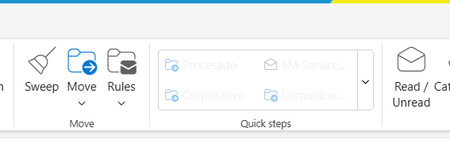
Sure! Here is the translation: "I am having issues with Quick Steps in the new version of Outlook. I have recreated them, but they appear blocked or as if they cannot be executed. However, sometimes they become available in a somewhat random manner. Can someone help me?"Solved2.6KViews0likes9Comments
Office outlook 365 .. where are emails saved?
I have office outlook (not the desktop version), i.e. https://outlook.office.com/mail/ After hours of searching I have found no way to save/export all my emails to a new computer. The office outlook does not have any export function even for the archive folder. The new computer has a 365 desktop outlook.52Views0likes1Comment
There needs to be a way to disable the Editor for Outlook.
Let me first offer a preemptive apology about the tone of this post. I rarely get this aggravated over a feature. The Editor, which provides "refinements" like conciseness, clarity, etc., is possibly the most infuriating, useless, piece of garbage I've ever had to experience. Let us walk through this experience. - Ahh, time to respond to an email. As a human who has interacted with this human I am responding to and understand our rapport and level of formality, and as someone with a modicum of brain power, I know how to address this person! I know the type of language this person and I use, and I use this to inform how I speak to this person, as I do with anyone. Hmm, type type type. I tell this person, "Alright, looks-" - SOUND THE ALARM. SOUND THE ALARM. Why not "all right"? That's more formal! Enjoy a purple underline. - Uh, I'm fine, thank you. Let me click "Ignore". - Okay, I'll remove the purple underline! *2 seconds later* Why not "all right"? That's more formal! Enjoy a purple underline. - I said I'm fine, thank you. "Ignore". - Okay, I'll remove the purple underline! *2 seconds later* Why not "all right"? That's more formal! Enjoy a purple underline. - PLEASE STOP. Let me click "more options". Oh! Let's click "Stop checking for this." - What? I didn't hear you. I can't stop checking for this, you've committed a cardinal sin in email etiquette! Keep the purple underline to remind yourself what a terrible emailer you are. - Goodness, okay. I'll just keep writing then. - You IDIOT! Did you mean "investigated" instead of "looked into"? It's more letters and syllables, but its less words, and we CANNOT have two words when we could have one! - No, stop doi- - "Play things by ear"? Did you mean "playthings", moron? Playthings is one word! I bet after you send this email you'll go back to your playthings because you're a stupid child that can't write! I have seen elsewhere that there are certain aspects of this under my control (such as the tone of writing casual/formal, although I can't find this fix on Outlook). But from my searching, there is absolutely no way to turn these off or permanently remove the underlines. And even if there is, the product is terrible enough whether or not it is optional. As someone with ADHD and OCD, this is beyond distracting, and at times genuinely debilitating to my productivity when my email is littered with useless underlines. It is also extremely insulting to the user to assume that they MUST have their hand held, and to assume that these automatic, often terrible, suggestions should take precedence over their human judgement. I cannot fathom why people would create a product so revolting and FORCE it upon users. It has created such a hostile email writing environment that I now have to just draft emails in a notepad and paste them into Outlook. If you want this much control over what I write, why not just let an AI summarize everything I write after I send and spit it out in your sanitized Copilot writing style of preference? Let's just remove the human from everything.45Views1like1Comment
Classic outlook - Teams add-in not loading
We recently had a partner experience an issue that is causing the teams add-in feature to not load properly in classic outlook when creating a new meeting. For some background info, we are using a Virtual environment within remote desktop running windows 11. Our servers are provided by AWS. The issue only began as recently as December, as far as we can ascertain with the customers information. I have noticed this issue occurs with numerous partners but is inconsistent, as some load and others do not. I followed troubleshooting steps such as an uninstall/reinstall, verifying the load behavior in the registry was set to 3, and tried to re-register the related teams.addinLoader.dll. A colleague did implement a script to the environment task scheduler that will run every time outlook is launched to re-install that add-in as a break fix, but this still requires closing outlook and reloading it to work. I was curious if anyone else had encountered this within remote desktop with classic outlook, and if they had any success in fixing it. The easiest thing, obviously, is moving over to new outlook since teams' integration is native, but we have some that prefer classic. Though, with it being retired in 2029 it may be worth starting the move away while in a remote environment.15Views0likes0CommentsOutlook Not Syncing
Outlook is not syncing my emails properly. New emails are not coming, and sometimes sent emails stay in the outbox. I also get connection or server error messages. I have checked my internet connection and restarted Outlook, but the problem still continues. Please suggest how to fix this issue.90Views0likes3CommentsLogin not possible
Since the beginning of the year, I have had the problem that I cannot log into my email account via Outlook. I have contacted Microsoft support several times, and they have repeatedly told me to contact Outlook support directly, but I am unable to do so. I have already cleared my cache several times and tried using other browsers. I have also tried incognito modes, as well as using my cell phone. Whenever I try to log in, I get the following error message: That's why I hope that someone here can help me somehow. UTC Date: 2026-02-22T02:15:19.184Z Client Id: 7A828C91B2DA4E399FF041930501246B Session Id: 4ec12d8b-3707-444b-9f57-50efe72ef5cf Client Version: 20260213001.06 BootResult: fail Back Filled Errors: None err: System.Runtime.Serialization.SerializationException esrc: StartupData et: ServerError estack: Newtonsoft.Json.JsonSerializationException st: 500 ehk: X-OWA-Error efe: AS4P190CA0013 ewsver: 15.20.9632.15 emsg: ErrorUnexpectedFailure46Views0likes1Comment
Outlook Deleting Certain Email Before Delivering to my Mailbox (Not Even Going to Junk)
Hi, I've been trying to troubleshoot this issue for 4 months now. I have become aware that since at least May, 2025, there are some emails which are not making it to my mailbox (neither by inbox or even my junk), Outlook is preventing them from being delivered (or perhaps deleting them before they show up to my mailbox). I have tried changing my Junk email settings, I have tried adding senders who have sent me email (e.g. verification codes from travel booking sites) to my safe senders list or contacts list but nothing is working. This has caused major issues to me, as I'm not seeing vital emails. How do I troubleshoot/solve this? Thanks140Views0likes6Comments
Outlook Desktop ignores or inactivates From address in programmatically generated files
I’m programmatically generating emails using Python within a Flask application. These emails are intended to be sent from a shared mailbox via the desktop Outlook application. In the code, the From: field is explicitly set to the shared email address (e.g. email address removed for privacy reasons). The application generates and downloads an .eml file, which is then opened in Outlook for review and manual sending. However, when the .eml file is opened in Outlook, one of two undesired behaviors occurs: The From field automatically switches to my individual default user email, ignoring the shared email specified in the code The From field visually displays the shared email, but Outlook treats it as not actually selected / not connected, and the email cannot be sent. In this case, manually selecting a different From address and then re-selecting the shared email allows the message to send successfully. In other words, even when the shared email appears in the From field, Outlook does not seem to treat it as an active or authenticated selection unless it is manually toggled. Has anyone encountered this behavior and have suggestions on how to rectify? Thank you!59Views0likes2Comments
Outlook Classic problem setting up Group Contact list
I have successfully imported a csv file into Outlook classic, but when I try to set up a Group Contact list, it puts email addresses into BOTH the Name section and the email section. How do I get it to put the actual names in the Name section. The names show correctly in the address list, but don't transfer to the Group Contact list.29Views0likes1CommentChange of Meeting Location
When a meeting has been sent in the past, an update/change of the meeting location (eg. another meeting room) forces the user to re-accept again the meeting. Seems more logic that the users who already accepted the meeting, stay on "Accepted" and are not moved to "Didn't respond". Thx for updating.51Views0likes2CommentsOutlook For Android Search Not Working with IMAP Folders
I have been trying to get Microsoft to fix Search not working for IMAP email account folders for a number of years. Even though Microsoft support have confirmed the BUG multiple times no fix has ever been provided. I am again in a discussion with Outlook For Android support via the support Live Chat option within Outlook but the support engineer basically says I am the only person to have ever reported this bug to Microsoft... Now obviously a quick Google shows may users complaining about the same bug from around 2019 onwards... but for some reason Outlook support do not seem to be able to use Google... For those that may not know of the issue, the Search function will only work with Outlook email accounts or Gmail whne an email has been moved from the Inbox to another folder. If you use a different IMAP email provider and use Folders to move email into from the 'Inbox', the Search function will not find those emails - ever. (The Search function seems to work for the inbox only with IMAP accounts.) So I have a request! Please, any Outlook for Android users that have this issue PLEASE report the BUG to Outlook for Android Support via the 'Settings/Help & Feedback/Contact Outlook mobile support' option. The more users that report this ongoing issue the better, and we may get Microsoft to take it seriously, rather than fobbing users off with a 'no-one else has the issue' response!71Views0likes2Comments
email highlight color too
I am using Version 16.106 (26020821) of Outlook for Mac in the Office Home and Business 2024 package. Recent changes within the app have made selecting an email to read or delete very challenging. When you click on an email, or multiple emails for deletion, the color that's used for highlighting is much too pale. It's like a very light blue on a white screen background. Is it possible adjust the highlight color?26Views1like2CommentsQuick Parts are Now Available in New Outlook
Quick Parts have officially arrived in the New Outlook experience, and many users have been asking how they work and what has changed from Classic Outlook. I put together a short walkthrough covering how to create, insert, and manage Quick Parts, along with a few notes on features that didn’t make it into the new version. 🔗 Video overview: https://youtu.be/k3rVgpGmSFs?si=rvEdCK_WgBhjlLcj 🔗 Blog post: https://traccreations4e.com/new-outlook-quick-parts Hope this helps anyone transitioning to New Outlook or supporting others who are. If you’ve already tested Quick Parts in the new interface, I’d love to hear what you think. #traccreations4e-p25 2/15/2026581Views4likes3Comments
email highlight color too pale
I am using Version 16.106 (26020821) of Outlook for Mac in the Office Home and Business 2024 package. Recent changes within the app have made selecting an email to read or delete very challenging. When you click on an email, or multiple emails for deletion, the color that's used for highlighting is much too pale. It's like a very light blue on a white screen background. Is it possible adjust the highlight color?63Views0likes2CommentsAnyone else hate the New Desktop Outlook?.
Hello people I was wondering if anyone else Hated the Desktop version of Outlook?. To me its slower and unresponsive compared to previous versions. Even Windows Mail was faster and the brings up old email accounts that you deleted and no longer use long ago. It seems while good intentions this one has not been tested properly. Just shoved out the door. And lastly trying to find Emails that your sent or received is another nightmare. You have to restart twice before it finally decides oh look there emails.6KViews41likes62CommentsOutlook support - human
I posted an issue last week with no resolution or comments. I have tried to contact any support mechanism with microsoft and there is No way of getting ahold of any support. How do we get a support issue resolved? I just spent 2500 on a studio2 and have used microsoft forever and now have this issue with Outlook 365 and can't seem to get ahold of any method to get this issue resolved.468Views0likes9Comments


Events
Recent Blogs
- We’re excited to announce that the new Outlook for Windows, Outlook for Mac, and Outlook for iOS and Android now support easier iCloud Mail, Calendar, and Contacts access. You no longer need to cre...Oct 30, 20253.4KViews2likes14Comments
- As technology moves forward, so do the ways we communicate. The world is rapidly changing with cloud computing, hybrid ways of working, and generative AI. To keep up with all these changes, Outlook i...Jun 24, 202510KViews2likes37Comments