Recent Discussions

MS Teams crashes *sometimes* during Video calls/meetings
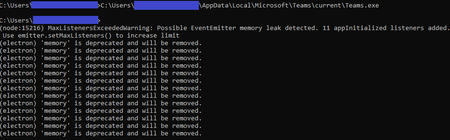
I've been researching an issue where several users are experiencing periodic Teams crashes always during a Video call/meeting. A call that crashes once is often successful right after, and the crashes don't follow any pattern. I haven't found any commonalities across hardware or drivers, and have been checking network quality pretty closely. It really seems like it's a Teams software issue. Is anyone else dealing with this kind of inconsistent stability? The errors in logs (that I've seen) are always: Renderer process crashed; rendererName=mainWindow; crashType=crashed; url=https://teams.microsoft.com; restarting app=YES Other forum threads haven't been useful; they usually point to a software glitch that has since been patched, or some common hardware issue with a specific laptop model (Surface) or webcam (Logitech). I tried to figure out if I could disable GPU rendering (just as a test) and that doesn't appear to be an option. Is there another test we could try? This seems to be related to graphics rendering, particularly since it always happens during a beginning of a Video call or meeting, and the detail in the error logs... I opened a Microsoft support case, but it's going no where fast, particularly since the issue isn't reproducible on-demand. In my various testing and research, I tried launching Teams from a command prompt window (thinking maybe "--disable-gpu" would be an option to launch with). It launched and then I stumbled upon this strange output; I eventually canceled with Ctrl+C and Teams closed. I think this is totally unrelated, but figured I'd share it in case it ends up being relevant. The messages sure look like Teams is experiencing a memory leak ("MaxListenersExceededWarning: Possible EventEmitter memory leak detected."). In any case, this output was on a system where Teams has never crashed as described before, so probably not the best clue.Solved124KViews0likes52Comments
Student chat disabled?
Hi there, I’ve started testing and setting up Teams for my education customer. I’ve gotten reports that teachers have a “This chat has been disabled. You can’t send send a message , but can view past messages.” Message when going to message a student. I have tried re-assigning policies but nothing that I’ve tried has worked. Any resolutions? Help is greatly appreciated. Thanks, Jessie M. Hadaller EDIT: This issue only appears on the iPad app version of Teams. Version#:3.10.02.4KViews0likes3CommentsSync unread notifications between desktop and mobile
Running iOS 15.5. In the actual Teams app on my phone, conversations that were read on desktop show as read, however the challenge I'm facing is related to the notification center on my phone (i.e. the notifications that show up on the lock screen). Even though the app knows those messages have been read, the notifications on the lock screen still show up. The challenge is if I'm working on my desktop for a few hours, the next time I look at my phone I'll have a slew of Teams notifications in the notification center for messages that have already been read and it's annoying and time consuming to clear them. I've already blocked notifications in the app using the "when active on desktop" setting, but it seems as though this doesn't always work and I still end up with notifications on my phone for conversations I've had on desktop. Is there anything I can do about this or is it a bug?3KViews0likes2Comments
The webinar description has disappeared from the registration page.
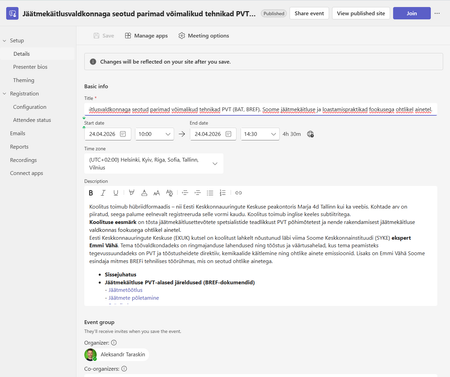
Today I discovered that the seminar description has disappeared from the registration page for our seminar. The description itself is in the original form in Teams desktop, but it is missing from the registration page. The same thing happens on registration pages for events from other organizations. I'm attaching screenshots. For example https://events.teams.microsoft.com/event/001cac17-2954-48d0-9857-b3b1bc52a970@d52e4e8e-7dc3-45d9-a6c2-d0bc694268be. Please help us with a solution, we need to have a description of the event on the registration website.2Views0likes0CommentsTeams Suppresses Sentiments in Meeting Chats
In December 2024, Microsoft introduced a control to block responses to sentiment-related prompts in Teams meeting chat. Now that block extends to every Teams user following a consolidation of the Teams meeting implementation of chat with Microsoft 365 Copilot. Basically, the block stops Copilot responding to prompts that look for opinions about emotions, judgement, or evaluations of other meeting participants. It’s a good thing. https://office365itpros.com/2026/03/13/sentiment-related-prompts/11Views1like0Comments
Teams availability status - admin way to manage this?
We have some staff here who seem to be abusing the Teams status feature: they indicate they are "available" when they are away from their desk/computer. Management here as inquired if there is a way to enforce the Teams feature where it normally shows inactive after a few minutes. Is this possible?37Views0likes3Comments
Group email addresses for Teams sometimes contain “+” or “/” characters
We are using Microsoft Teams in our organization. When creating multiple Teams with exactly the same team name, using ASCII alphanumeric characters only, we occasionally see that the automatically generated group email address contains unexpected characters such as “+” or “/”. I would like to know whether this behavior is expected or if it is specific to our environment. This issue seems to have been occurring since around August 2025. We manually create Teams using the Windows Teams client. For example, if we create several Teams with a simple name such as “example2026”, the corresponding group email addresses are generated in the following format: email address removed for privacy reasons However, in some cases, the XXXXXX portion includes characters like “+” or “/”. When creating around 50 Teams, this issue appears in a few of them. This causes two problems for us: A “+” character interferes with plus-addressing behavior. When a “/” is included, we cannot create events inside the Team. Has anyone else encountered this issue or knows why this happens? Any insights would be appreciated.57Views0likes3Comments- 148Views0likes2Comments

Best External Access configuration
I’m looking for guidance on the best Microsoft Teams configuration for the following goal: Objective Prevent random external domains from: Looking up users in Teams Sending 1:1 chats Making direct audio/video calls At the same time: External users invited to Teams meetings should not appear as Anonymous64Views0likes2CommentsAuto-saving transcription files in a folder?
I'm currently working in a project which requires the usage of meeting transcription files (not recordings!), and I couldn't find a foulder at OneDrive, or Sharepoint that contains the transcription files (.vtt), I know I can manually download it at the meeting recap but manually downloading it would make my project kinda pointless, is there any way that I can configure it to automatically save the transcription file at a folder like it happens with recordings? Thank you!Solved68Views0likes1Comment
Customize the Basic Approval Request
Is there any way that I can customize the Basic Approval Request in Teams? For example, at the top, it states Approvals. Can this be changed to state Acknowledgement instead? Is there anything else that can be customized just by using the MS Teams Basic Approval template?53Views0likes1CommentCannot delete organisation from Teams
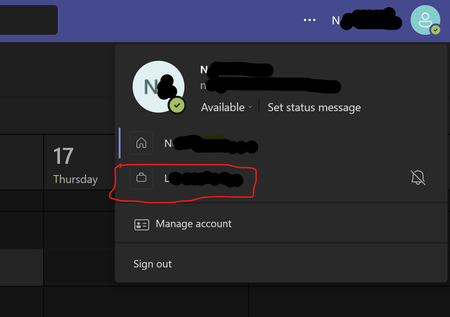
Hi, It appears to be impossible to delete an organization from Teams Please see the picture below. I am unable to remove the organization beginning with L. I have used my personal email for many years, so I should be the one in control of it! I am the owner/ admin of the email account. However there is no way to delete the rogue /linked organization to which I no longer have access. How can I take back full control of my email/Teams account and remove this rogue organization? I've clicked on everything I can find and nowhere else mentions this organization. Clicking on the organization in Teams just takes me to a page saying "Microsoft Teams Free (Classic) is no longer available" with options to upgrade. I don't want to upgrade I want it deleted! TIA84KViews12likes70CommentsUpcoming change: disabling Teams meeting recording expiration notification emails
Hello, We wanted to share an important update regarding email notifications for expired Microsoft Teams meeting recordings. Based on valuable feedback from our community, we’ve decided to make a change to how notifications are handled. What’s changing: Starting June 1st, we will stop sending email notifications for expired Microsoft Teams meeting recordings. We are making this change due to complaints we received from many customers about the high volume of notifications which they deemed low value. This change allows us to respect your preferences while ensuring critical communications remain accessible. Recording expiration and deletion policies remain unchanged and items that expire will be deleted even when notifications are not being sent. How to keep receiving notifications: For those customers that would like to continue receiving email notifications, we will create a new setting and make it available before June 1st. This will be a per-tenant setting. We will send another message center post once this setting is available and update our documentation in this discussion and on our support page. After June 1st: If you didn’t change notification settings before the deadline, you can still re-enable them at any time by running the PowerShell command. Note: Our original message center post incorrectly asked recipients to fill out a survey and failed to include a link to the survey. We are committed to providing options that work for your organization, and we would like to hear from you. If you have questions or additional feedback about this change, please complete this survey and join the discussion: Teams Meeting Recording Notification Changes – Fill out form Thank you for being part of our community.491Views1like2CommentsNew Audio-Only Recording Option for Teams Meetings
A new audio-only recording option for Teams meeting suppresses the video feed from meeting participants to generate the MP4 file for the meeting recording. The idea is to better preserve user privacy during recording playbacks. Few will miss the video stream because the audio is usually more important. The audio is also the basis for the meeting transcript, and that leads to AI-generated outputs like meetings summaries and action items. https://office365itpros.com/2025/10/20/audio-only-recording-teams/1KViews0likes4CommentsTeams stuck in "Loading latest updates..." error
I have been having the same error with Teams for the past few months, across two different computers, and with me having uninstalled and reinstalled Teams several times. Effectively, Teams works fine the first time it is reinstalled, but when I go to use it the following day, even if the computer has not been shut down in the meantime, I get a "Loading latest updates... in the meantime, you can still send and respond to messages" line in the toolbar. I cannot actually send or respond to messages (or receive them) while this is going on, though. If anyone has any suggestions, I would really appreciate the guidance - Teams is effectively unusable for me right now, which is a problem given how much we use it to communicate in my department.40KViews8likes16Comments
Allow muting a person only for me
Sometimes I am in a meeting where one of the persons in the meeting is actually near me in the world outside the screen. In this case the sound is a bit maddening since there is a small delay between the sound from the person and the sound through the teams interface. In these cases, I would like to mute the person only for me since I am sitting near and can hear the person fine without headphones. Right now I need to takeoff headphones when the person is talking and putting it back as the person finishes talking.129KViews196likes153CommentsWhen I install my app to a second channel in Teams, the this.onMessage will nto trigger
I have a bot which when installed to a channel will read messages using this.onMessage, if I add another channel to the same team it will also read the messages without installing the bot on that channel. However if a user installs the bot again, to the second channel which some users do, the second channel will not trigger the onMessage listener except when using the @botname command. I cant log errors anything because it just wont trigger. I feel like the context gets screwed up, all the other listeners fire on other channel Any help please?Solved91Views0likes3Comments




Events
Recent Blogs
- The latest Microsoft Teams and Microsoft365 expert community briefings, podcasts and upcoming community events. Expert Briefings Real AI Use Cases in the Contact Centre with Luware Nimbus - Costs...Mar 12, 202645Views0likes0Comments
- Microsoft Teams is where people, Microsoft 365 Copilot, and agents come together to collaborate, communicate, and get work done—before, during, and after every interaction. Contributing to and benefi...Mar 11, 2026359Views0likes0Comments