Recent Discussions

Calculating Two Cells Based on each other
I have a basic task i am trying to complete and i am going through the web to learn how to solve this. Looking for help. I have CAD Currency and USD Currency. I have two cells side by side and depending on what i put in one i want the other to adjust. So if enter to dollars CAD in once cell the other cell will adjust to the equivalent in USD based on a exchange rate in another cell. Any assistance on this would appreciated or even a link to resource to learn how5.1KViews1like12Comments
Fixing Hyperlinks in a Copied Worksheet (on an Apple Mac)
I have scoured this forum’s discussions about hyperlinks in a copied worksheet referencing back to the original sheet. Perhaps I missed it, but I didn’t find a solution to my specific problem, so I will start a new discussion. Apologies if a community wizard already answered it. I have a workbook with monthly worksheets, each showing the transactions into and out of a savings account. Each transaction goes into (and out of) one of several “virtual” accounts to reflect the purpose for which the money is earmarked, like property taxes, travel, etc. (called Account 1, Account 2, and so on in the attached) Each month’s worksheet has a section of hyperlinks, each of which ideally jumps to a specific account in the same worksheet. The attached example contains only four accounts, but my actual one has 23 with 31 columns and 98 rows. So the hyperlinks are helpful in navigation. Each month, I make a copy of the latest worksheet and rename it for the new month. The problem: the hyperlinks in the new, copied worksheet reference back to the “source” worksheet. With 23 hyperlinks, changing each one’s sheet reference (Edit Hyperlink...) every month is not efficient. Question: how can I (efficiently) make the hyperlinks in the new worksheet reference cells in their new worksheet? These are hyperlinks that are internal to the workbook, not to external URLs, so DonBici’s Feb 21, 2024 suggestion of a helper column doesn’t seem like it would work in this case, and I am not advanced enough for his VBA suggestion. Thanks!59Views0likes7Comments
Grouping data sourced from another sheet in that workbook.
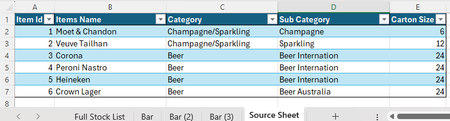
I am trying to make a monthly inventory count workbook through excel nut am having trouble consolidating the counts. I have a made a simple version of what I need but am getting stuck on the final sheet trying to group the data together. In my workbook I have a sheet with all my input data which I have attached below. I have fed this through PowerQuery so that the information from this Sheet can go into all other sheets on that workbook, and I only need to update one Sheet if new stock comes in, or leaves. From there I have the "Bar" Sheets where the counts get entered. As I will be dealing with a lot of stock, felt better to make a "Loose" & "Cartons" column and then just sure make an extra column where the calculations can be made giving a full total amount. Last Sheet is where I would like to consolidate all the totals from the "Bar" sheets into one area. which I have used the formula ="SheetName"[@Cell] as I do not know any other ways of bringing across this data. And here lies the problem. As on the "Full Stock List" sheet i have cells that are not actual values, the rows are not grouped, and if I try to sort by Item Name alphabetically, only the original 5 columns will sort, leaving the new columns untouched. If anyone can help explain how I can get around this, that would be most helpful, as I need to make this Workbook much much bigger.65Views0likes3Comments
Vlookup with If And statement
This one has me stumped but excel is awesome and I feel like this should be possible. Thank you in advance for any help! I'm not sure the best way to go about this, I'm thinking a vlookup with with nested if and statements between 2 excel spreadsheets. I have a slightly large spreadsheet with names that are repeating and events repeating thus the file first needs to determine the class so it pulls the right time. The data contains Classes (class A, B and C), Name, Event and Time. Spreadsheet A is the times. Everyone's times are recorded on Spreadsheet A. Spreadsheet B is to track the times per participant on a different tab per participant. In Spreadsheet A, column A is the participant number, column C is event name, column G is the time and column H is the class. In spreadsheet B, (the formula will be in Spreadsheet B). First, I need the formula to look at the class listed in spreadsheet B Column C Row 4 (Class A), then the formula needs to look at column H in spreadsheet A for Class A. Then it needs to look for the rider number on spreadsheet B, Column C row 2 (1234), needs to search spreadsheet A column A for rider 1234, and last it needs to look for the event (Runs) in spreadsheet B, and searches spreadsheet A column C for runs. After it matches all 3 then it needs to return the time in column G. If it does not find all 3 matches, then it needs to leave it blank. IE: Spreadsheet B, Class "A", Rider "1234", Event "Runs", if it meets all three criteria's then return the time in Column G.65Views0likes7CommentsCompute elapsed time
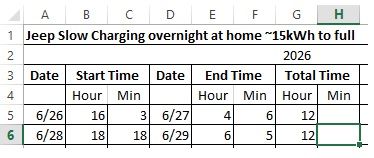
I have a spreadsheet of charging time for my Jeep. I would like to calculate the duration of the charging period but am having problems coming up with a formula that would work. It would have to account for the minutes where the start time minute is greater than the end time minute. Unless someone has another way of computing this.43Views0likes4CommentsWhat are people using to measure manager effectiveness across the org?
Our CHRO wants to start tracking how effective managers are, things like do they hold regular 1:1s, do they give timely feedback, are their team's goals on track. Right now we have zero visibility into any of this. We can pull some data from Teams usage reports but that just tells us who's chatting a lot, not who's actually managing well. Anyone found a tool or approach within the M365 ecosystem that gives you a real picture of manager effectiveness?10Views0likes0Comments
How do you roll up individual goals into department or company goals in M365?
We’re trying to manage goals across teams using Microsoft 365, but the structure gets messy fast. Individual goals live in different places, and it’s hard to see how they connect to department or company-level objectives. With Viva Goals out of the picture, has anyone built a clean way to roll up goals in M365, or is this something better handled with a dedicated OKR/performance tool? (I honestly wouldnt want to use something third party and much rather keep things in MS 365)26Views0likes2CommentsMicrosoft Authenticator receives repeated unexpected sign-in requests from different countries.
I have received multiple unexpected Microsoft Authenticator number-matching requests over the last few weeks. The requests came from different countries (Mexico, France, and Spain), and I denied all of them. I changed my password after the first incident. My password is unique and stored in Bitwarden. I have Microsoft Authenticator enabled, and I do not use passwordless sign-in. The strange part is that these authentication requests do not appear in my Recent Activity page. Is there anything I can do to stop these requests? I came here because a support representative told me to. I appreciate all your help beforehand.25Views0likes1CommentHow to wrap table, not vector (WRAPCOLS for tables)
Dear colleagues I have a long table of 5 columns and maybe 200 rows. The task is to wrap the table after a specified number of rows to see the table in landscape on a new sheet. I was thinking about WRAPCOLS, but it works only for vector (one column). Is there a way to wrap whole table using M365 functions? If not, the next option can be Power Query. See example attached. Thank You very much for any hint. Zdenek Moravec Cesky Krumlov, Czechia3.3KViews0likes10Comments
Index not formatting correctly when using the Latin Symbol small letter "e" with acute
Hi, I'm writing a document with Latin based names that require symbols and creating an index. I am having trouble with the index in regards to the name "Vélez." It gives multiple entries instead of one entry with with all the page numbers and subentries. In troubleshooting the issue, I find that if I replace the "é" with "e" in the entry field, it works like it should, but then the name is incorrect in the index. Another name, using the Latin small letter "i" with acute (í) also works fine in the index. Seems to be a bug, but does anyone have any ideas?35Views0likes1CommentHow do I get balloon commenting on the right side of the page?
I'm using Word 2024 because I don't want AI in my interface. Now commenting all appears in the tab side bar. I can click on the "Comment" pulldown in the ribbon to show comments properly, but I can't write in them. This is aggressively hostile to people with vision difficulties. Even with my glasses, that's much smaller than I'm comfortable with. How can I get the comments that were so good and useful back? If not, how can I change the type size in the sidebar so I can read and write comments? Microsoft, please, don't ruin your products because you want to make us use AI for things that it's not helpful for. I don't use Word for anything I want AI in and deal with documents I cannot legally allow to be exposed to unverified servers like AI chatbots.Solved24Views0likes1Comment
currency format Excel 360
I highlight a column and click on the format for "currency" and choose options for use 2 decimal places, show dollar sign, then for negative number, no minus sign, no red. Aside from the currency format tab, I choose to format the column in red and bolded using the "home" button. The problem is this format is inconsistently applied. Sometimes it shows a leading minus sign, sometimes it shows a hidden minus sign, and sometimes there is no minus sign at all. This causes me problems when I try to total a column by highlighting it and looking on the lower right for the value. Why is it doing this and how can i stop it?17Views0likes1Comment
One time purchase 2022 Office Home Edition failed to activate
I bought a 2022 Office Home Edition on a one time basis in 2022 and installed on my Mac which has worked well over the year. Then, suddenly on 13 July this year, its Excel disallowed me to save and edit, saying I need to subscribe Office 365, etc in order to activate. I don't know what is going on. Can this be fixed?13Views0likes1Comment
Spacing on stacked bar charts
Hi all, I searched for a solution, but changing to 'text' axis doesn't work and that's the only solution I have seen offered. Issue: When using a date axis, there is too much white space / bars are too skinny to be legible despite gap width set all the way at 0. When switching to a text axis, the bar spacing is perfect, but the spacing between dates are at times nonsensical or for some reason it thinks the range is way different than what is highlighted. Here is how the data is highlighted, I only hid columns to make the picture a reasonably proportion the screenshots from above are when no columns are hidden. Is there a way to re-scale the gap-width when using a data axis to effectively to go something like -50%? Or to somehow manipulate the range and the months between labels when using a text axis? Thank you for the help. Matt36Views1like4CommentsAdd-in Error of complements in Word Online with my Personal Account
Hi, I am getting an error when trying to insert any add-in (such as Mendeley Cite) in Word Online using my personal account. Error message: "Add-in Error: We couldn't connect to the catalog server for this document" (Original Spanish error: "Error de complemento: no pudimos conectarnos con el servidor del catálogo {0} para este documento") Here are the details and the troubleshooting I've already done: - Account-specific: It works perfectly with my old University account, but fails with my new Personal account. - Platform-specific: The add-in works fine on the Word Desktop App, but fails on Word Online (web browser). - Browsers: I have tried different browsers (Chrome, Firefox) and the issue persists. It seems to be a configuration or permission restriction specific to my personal account on the web version. How can I fix this? Thank you!2Views0likes0Comments(Reposting) Microsoft can you please bring back the new Microsoft rewards dashboard
So I made a post last time where I asked Microsoft before to bring back the new Microsoft rewards dashboard but they didn't bring it back yet sadly so here is a repost The main reason why I want this new rewards dashboard is cause 1 ) I really like the dashboard it's so refreshing and 2) I was going to get a LOT of bonus points (like +1800 points) but I wasn't able to get that cause Microsoft removed the new dashboard and that's all that I will say for now And since they removed the new Microsoft rewards dashboard I am very sad so Microsoft please bring this back and it would be really appreciated if you would give me a reason why you guys removed the dashboard, so thank you guys anyway 🫠102Views0likes1CommentOne time purchase 2022 Office Home Edition failed to activate
I bought a 2022 Office Home Edition on a one time basis in 2022 and installed on my Mac which has worked well over the year. Then, suddenly on 13 July this year, its Excel disallowed me to save and edit, saying I need to subscribe Office 365, etc in order to activate. I don't know what is going on. Can this be fixed?13Views0likes1CommentRuler Feature Disappeared from Microsoft Word on Android Tablet
Hello everyone, My father recently bought a new Android tablet specifically to use Microsoft Word for his work because he relies heavily on the Ruler feature. When I first installed Word, the Ruler was available and worked perfectly. However, after restarting the tablet, it disappeared. Since then, I have uninstalled and reinstalled the app several times, tried different versions of Word, checked all the settings, and confirmed that we had an active Microsoft 365 subscription, but the Ruler is still missing. My father has also tried adjusting to different document layouts and workarounds, but unfortunately none of them are practical for his workflow. He simply cannot work efficiently without the Ruler feature. Has anyone experienced this issue? Is the Ruler still supported in Microsoft Word for Android, or has it been removed? If it's still available, is there any way to restore it or install a version that includes it? My father bought this tablet mainly for Microsoft Word, so this feature is essential for his work. Thank you for any help or clarification.23Views0likes1Comment[52 week high] formula not working
I have a spreadsheet where I track my portfolio data. I have attached a sample. It appears that the "[52 week high]" formula is not working properly. It shows up as the same price as the current "Price" for most securities. While this is in theory possible, the "Price" is below the "[Previous close]", so therefore it appears incorrect. Is this a known issue? How can it be resolved?3.6KViews0likes7Comments



Events
Recent Blogs
- SharePoint Online is introducing a new tenant-level setting that allows organizations to choose whether heading permalinks should appear on SharePoint pages.Jul 14, 2026551Views1like0Comments
- 2 MIN READPowerPoint is getting easier to use with new SmartArt, fresh themes, a cleaner Design ribbon, and a more modern file open experience.Jul 13, 2026746Views2likes0Comments