Recent Discussions

Reopen rejected MAICPP verification - MPN 7117566 - owner-operator LLC, remediation done
Hello Partner Compliance team, I am requesting an escalation to reopen and re-verify my Microsoft AI Cloud Partner Program (MAICPP) enrollment. My application was rejected at the Employment Verification stage and the application has been closed with the banner indicating "no appeals available." However, I have completed substantial remediation since the rejection, and I am requesting a manual review by the Partner Trust & Safety / Vetting team. ACCOUNT DETAILS - Legal entity: Smith Computer Services LLC - State of registration: Illinois, USA - IL SOS File Number: 17193902 - DUNS Number: 142698584 - MPN ID: 7117566 - Tenant: SmithComputerServices.onmicrosoft.com - Business website: https://smithcomputerservices.com - Primary contact: Jamieson Smith, Partner / Member of LLC (please reach out via forum DM for direct contact info) VERIFICATION STATUS - Identity Verification: Passed (completed via IDVS) - Employment Verification: Rejected - Overall status: Rejected (application closed) - The Legal Info page Verification Summary shows "Get support" only; no Fix Now or Resolve path is available in the UI. LIKELY ROOT CAUSE OF EMPLOYMENT VERIFICATION FAILURE I believe Employment Verification failed for two compounding reasons: 1. DOMAIN/IDENTITY MISALIGNMENT (now resolved): At the time of submission, the tenant used only the default .onmicrosoft.com domain, and my primary contact email used a custom domain that was not yet associated with the tenant. This is a known signal that Microsoft's vetting system flags as inconsistent. 2. OWNER-OPERATOR LLC STRUCTURE (structural): I am a Partner / Member of the LLC, not a W-2 employee. As the principal of an owner-operated LLC, I do not appear in third-party employment verification databases (such as The Work Number / Equifax), because as a Member I receive owner distributions rather than W-2 income. This is standard for new small businesses but appears to be a gap in the automated Employment Verification process. There is no separate "employer" to verify me against because I am the principal. REMEDIATION COMPLETED AFTER REJECTION 1. Added smithcomputerservices.com as a verified custom domain in the Microsoft 365 tenant (status: healthy, default). 2. Changed my Global Administrator UPN to align with the verified custom business domain, so the admin login, primary contact email, business domain, and live business website are now fully aligned. 3. Confirmed the business is verifiable in third-party registries (DUNS matches Illinois Secretary of State filing for SMITH COMPUTER SERVICES LLC). 4. Confirmed the live business website is hosted at the matching custom domain. REQUEST Please escalate to the Partner Trust & Safety / Vetting team to: 1. Reopen the rejected MAICPP application for MPN ID 7117566 2. Trigger a fresh re-evaluation now that the domain alignment is in place 3. Treat this as an owner-operator LLC case, where principal verification (not employee verification) is appropriate 4. If additional documentation is required, please specify exactly what document type and where to upload it DOCUMENTATION AVAILABLE ON REQUEST (via DM or support ticket) Appropriate for an owner-operator LLC: - IL Articles of Organization (shows me as Member/Organizer) - IRS EIN Confirmation Letter (CP 575) listing me as Responsible Party - LLC Operating Agreement - Business bank account documentation - Domain registration receipt (Squarespace) showing me as registrant - Government-issued photo ID Thank you for your time. I am building a small managed services provider and need MAICPP active so I can proceed to CSP Indirect Reseller enrollment to support my first client. Jamieson Smith Partner, Smith Computer Services LLC12Views0likes0Comments
Students See Admin-Completed Modules After Redeeming Course Code
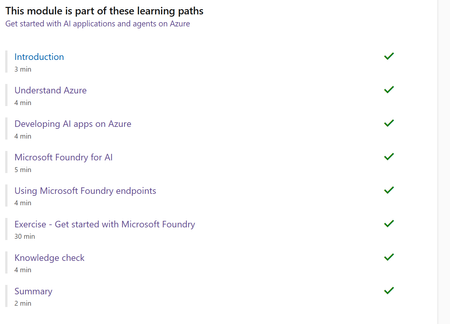
Is there a way to reset a Code Admin Account (e.g. the email address removed for privacy reasons) used for Microsoft Learn learner course and achievement code generation including distribution? Preparation completed by a TSP using the Code Admin Account appears to be carried over to students when they claim their codes. As a result, modules that were previously previewed by the admin are already marked as completed in the students’ module lists once their codes are activated. I may be missing something, but I’ve attached an image showing how students see some course modules already ticked as completed after redeeming their course code. I also have a related question: are trainers able to view their students’ progress for Microsoft Learn training materials redeemed through these course codes? Specifically, can trainers see whether their students are progressing through the self-paced learning modules? If these questions have already been answered elsewhere, I would appreciate being pointed in the right direction. Any input or guidance would be greatly appreciated to resolve any or all of the above. Thanks in advance.
Training session for CSP benefits
Hello Team, I am looking for Training session for CSP benefits, please help on this. email address removed for privacy reasons Bhaskar B9Views0likes0CommentsNew Learning Journeys now live
Explore new CSP SMB and Microsoft Agent 365 + ME7 Learning Journeys designed to help sales, technical, and delivery teams move faster from skilling to real-world execution. Microsoft 365 Copilot + BSKUs (SMB) Sales + Tech Deal Ready Build the skills to land and expand Copilot opportunities. Microsoft 365 Copilot + BSKUs (SMB) Project Ready Build the skills to deploy, configure, and scale solutions with confidence. Microsoft Agent 365 & ME7 Partner Skilling Sales Ready Learn to position and sell AI agents with Microsoft 365, from opportunity to close. Microsoft Agent 365 & ME7 Partner Skilling Project Ready Learn to implement, secure, and manage AI agents with Microsoft 365 in real-world scenarios. Explore all Learning Journeys here: GCPS Catalog | Partner Skilling Catalog25Views1like0CommentsICYMI: Build the skills to strengthen customer conversations with Microskilling
Microskilling supports partners throughout their skilling journey as an autonomous learning modality, offering a holistic, curated experience through short, high-impact videos and podcasts. Read more in the blog: Get started with Microskilling, the autonomous learning modality built to speed deals13Views1like0CommentsUnable to download files in Training Services Partner Community Calls
Hi Team, I am experiencing an issue when trying to access and download materials from the Training Services Partner Community Calls page. I am able to access the site and log in correctly using my Microsoft-associated account. I can see the available videos and PowerPoint presentations without any problem. However, when I attempt to download the files, I receive the following error message: "Unfortunately, you don't have permission to access this page." This issue occurs consistently for all downloadable content. Could you please review my access permissions or advise on how to resolve this issue so I can download the materials? Thank you in advance for your support.33Views2likes1Comment
Publishing readiness for AI apps and agents in Microsoft Marketplace
Discover how to prepare AI apps and agents for publishing in Microsoft Marketplace. This Marketplace Community article explains why readiness starts before Partner Center, focusing on the operational, technical, and organizational foundations required to ensure solutions can be evaluated, purchased, and operated reliably. As AI systems manage identity, data, runtime behavior, and subscription lifecycles, gaps in readiness can create friction during certification and customer adoption. Clearly defined identity boundaries, consistent data handling practices, and predictable responses to subscription events help ensure solutions behave as expected across environments and tenants. Learn how to establish publishing readiness that supports smooth certification, reliable operations, and confident customer adoption at Marketplace scale. Read more: Publishing readiness for AI apps and agents on Microsoft Marketplace24Views1like0CommentsDesign CI/CD pipelines for AI apps and agents in Microsoft Marketplace
Discover how to design CI/CD pipelines for AI apps and agents selling through Microsoft Marketplace. This Marketplace Community article explains why controlling how changes reach production is essential for maintaining predictable behavior, reliability, and customer trust. As AI systems evolve through updates to code, models, prompts, and agent logic, behavior can change in ways that impact cost, performance, and outcomes. Structured pipelines that isolate change, validate behavior, and enable safe promotion and rollback help ensure updates are introduced deliberately—without unexpected impact across environments or tenants. Learn how to design CI/CD strategies that support safe iteration, controlled releases, and consistent behavior as AI solutions scale in Marketplace environments. Read more: Design CI/CD for AI apps and agents selling through Microsoft Marketplace34Views1like0CommentsDesign reliable environment strategies for AI apps and agents in Microsoft Marketplace
Discover how to design a reliable environment strategy for AI apps and agents selling through Microsoft Marketplace. This Marketplace Community article explains why structured Dev, Stage, and Production environments are essential for safe updates, predictable behavior, and long‑term customer trust. As AI systems evolve through prompt updates, model changes, and shifting data contexts, behavior can vary across environments. Clear environment separation, controlled promotion paths, and consistent configuration boundaries help prevent regressions, support validation, and ensure changes can be introduced safely without impacting production workloads. Learn how to design environment strategies that enable confident iteration, support Marketplace readiness, and help customers operate solutions predictably at scale. Read more: Designing a reliable environment strategy for Microsoft Marketplace AI apps and agents23Views1like0CommentsEnforce AI entitlements using Marketplace commerce signals
Discover how to enforce entitlements in AI apps and agents using Microsoft Marketplace commerce signals. This Marketplace Community article explains why purchase and subscription data must be integrated at runtime to ensure customers only access what they’ve paid for. As AI apps and agents dynamically invoke tools, expose capabilities, and operate without constant user input, static enforcement approaches fall short. Translating Marketplace signals into deterministic runtime behavior—across SaaS, containers, virtual machines, and managed applications—ensures access is controlled, auditable, and aligned with subscription state. Learn how to design entitlement enforcement that remains consistent through plan changes, scaling workloads, and real‑time agent decisions. Read more: Integrate Marketplace commerce signals to enforce entitlements in AI apps28Views1like0CommentsDiscover how AI-powered agents on Microsoft Fabric are accelerating retail merchandising decisions
Retail organizations are under increasing pressure to move faster and make smarter, data-driven decisions at scale. In this latest Marketplace Partner Spotlight, Microsoft highlights how AI agents built on Microsoft Fabric are helping merchandising teams transform complex operational data into actionable insights—without leaving the security of their existing data environment. By leveraging Microsoft Fabric and OneLake as a unified data foundation, partners like Lucid Data Hub are enabling retailers to automate time-intensive reporting processes and shift toward continuous, insight-driven workflows. These business-ready AI agents can analyze large volumes of sales and operational data, surface meaningful trends, and deliver clear recommendations—empowering buyers and store leaders to act faster and with greater confidence. The impact is tangible: merchandising teams can reduce hours of manual analysis into minutes, uncover item-level performance insights, and identify opportunities across store clusters to optimize outcomes. If you’re exploring how AI agents, Microsoft Fabric, and the Microsoft Marketplace ecosystem can drive intelligent automation in retail, this article offers practical insights and real-world examples to help you get started. 👉 Read the full article AI agents on Microsoft Fabric for faster retail merchandising decisions
Waiting for Business Verification (2605270040007016)
Hi all, We registered a new company tenant in the MPN program several weeks ago and submitted all required business verification documents, but the verification status remains unresolved. I've opened support ticket 2605270040007016 in the Partner Center portal, but wanted to flag this here as well given the urgency. The MPN ID is a hard dependency for our Azure App registration — without it, we cannot begin testing our product on external tenants. We're completely blocked at step one. Any guidance on what may still be needed to get the documentation approved, or an escalation to the verification team, would be greatly appreciated.35Views0likes1Comment🎉 Save the Date: FY26 Fabric Partner Community Year‑End Celebration
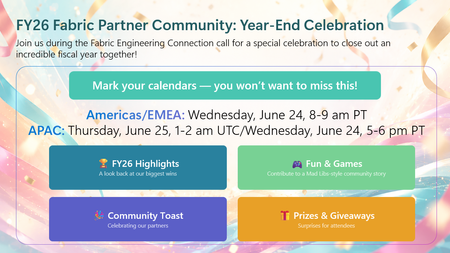
As we prepare to wrap up FY26, we’re closing the year the same way we built it — together. This year‑end celebration will be held as part of the final Fabric Engineering Connection calls of FY26, giving us space to pause, look back on what we built together, and celebrate the partners who make this community what it is. 🌎Americas & EMEA Wednesday, June 24 | 8:00–9:00 AM PT 🌍APAC Thursday, June 25 | 1:00–2:00 AM UTC / Wednesday, June 24 | 5:00–6:00 PM PT) ✨ What to expect: A look back at the moments that defined FY26 along with partner updates to take you into FY27 Fun & games — including a Mad Libs–style community story built live by partners A community toast and a few surprises along the way 👉 Important: This call is open to members of the Fabric Partner Community on Microsoft Teams. If you’re not already a member, you can join here: https://aka.ms/JoinFabricPartnerCommunity This isn’t just a year‑end recap. It’s a thank‑you to the partners who showed up, shared openly, asked great questions, and helped each other grow real Microsoft Fabric practices. Mark your calendars. We can't wait to celebrate with you! 🥳 🥂
Partner Center Registration Issues - Loop - Urgent
Hello Microsoft Support, We are trying to register our company for Microsoft Partner Center / Microsoft AI Cloud Partner Program, but the enrollment is blocked during the trust verification step. Error message: “Microsoft runs on trust. We engage in a rigorous set of evaluation and certification processes; as a result your request was blocked.” Details: Reference number: 715-123160 Transaction ID: d07f6738-42d1-47c6-ae43-dd4dadd06db9 Correlation ID: 964639c5-58a7-49a5-9f14-12585f5c2a27 Country: UAE The purpose is that we want to develop App Visuals on Power BI AppSource Marketplace, please let us know what is required from our side and review the blocked enrollment manually and advise what document or company verification step is required to unblock the registration.28Views0likes1CommentFree > Paid licensing question
Hi, I am doing a big overhaul to my app and in the process I plan to also switch from external licensing to using Microsoft for licensing. Will the user who have my app already downloaded when I update will they now own the new paid license? Thanks,12Views0likes0Comments2026 Microsoft Partner of the Year Awards: nomination window opens 6/1!
The 2026 Microsoft Partner of the Year Awards nomination window opens June 1. Are you a Microsoft partner that has embraced Microsoft Marketplace as key to your GTM and joint selling opportunities? Whether you have sold digital direct, through channel partners, or co-selling with Microsoft, we want to celebrate you! Now is the right time to start preparing your strongest submission. We encourage you to go ahead and explore this year’s official guidelines, rules, FAQs, and program resources to understand award categories, submission requirements, and how to build a compelling nomination. Review the resources here, including guidelines specific to the Marketplace award.51Views2likes0CommentsAccelerate SaaS deals and streamline onboarding with auto activation in Microsoft Marketplace
Discover how the new auto activation capability for SaaS subscriptions in Microsoft Marketplace helps partners close deals faster and scale transactions with less friction. When enabled, subscriptions activate and billing begins immediately at purchase—eliminating manual steps, reducing delays, and enabling faster customer onboarding and time-to-value. This article walks through how auto activation works, when to use it, and how to configure it in Partner Center to align with your offer strategy. Learn how real-time purchase notifications and streamlined onboarding flows can improve conversion rates, enhance the buyer experience, and support more efficient, scalable Marketplace growth. Read the full article to understand how to take advantage of this new capability and optimize your SaaS sales motion in Microsoft Marketplace: Now available: Close deals faster and transact at scale with auto activation for SaaS subscriptions
Microsoft Hardware Program Enroll
Team, I am trying to enroll in the Microsoft Hardware Program through Partner Center. The enrollment itself is failing/stuck. Your responses are repeatedly asking me to upload the EV certificate and referring to the standard documentation. However, the EV certificate upload option is NOT visible in my portal currently. As per the enrollment flow: Hardware Program enrollment must first complete successfully. Only after successful enrollment does the EV certificate association/upload option become available. Since the enrollment itself is not completing, I cannot proceed to the EV certificate step. I already followed the shared documentation before opening the ticket. Please review this as a backend enrollment issue instead of an EV certificate upload issue. I request you to: Verify my Hardware Program enrollment status from backend Check whether the account/program is partially provisioned Confirm whether the EV certificate step is being incorrectly enforced before enrollment completion Escalate this case to the Partner Center / Hardware Dev Center backend team I have already opened multiple tickets over the last month and received the same generic response repeatedly without resolution. Please review the actual portal state instead of sharing the same article again Ticket numbers: 2605040040001840 2604090040002224 2604290040001239 Error Code: unable to register Microsoft hardware program. getting this error Something went wrong. Please contact support. (ReferenceId: 351839c0-b44a-49df-08ec-08de913793cc) Thanks83Views1like5CommentsMS-900 Vouchers still being offered for Virtual Training Days
Hello, I'm looking to attend a virtual training day and to get a voucher for the MS-900 (or its closest equivalent AB-900). When I go onto the training website to book a virtual training day, the MS-900 vouchers are still being advertised and linked to despite the exam no longer being purchasable or available to be taken. Can this be updated please? Thanks, bearclover66Views1like1Comment
How to get discounted Exam voucher codes as a Microsoft AI Cloud partner
Dear Team, I would like to know as a Microsoft AI cloud partner with solution designation, how can we get discounted Exam vouchers for certifications. Is there any methods or portal were we can achieve this? I couldn't see anything from Microsoft Partner portal




Events
Recent Blogs
- 1 MIN READAccess the latest Instructor-Led Training (ILT) updates anytime at http://aka.ms/Courseware_Title_PlanMay 29, 202660Views0likes0Comments
- 3 MIN READIn this guest blog post, Ilya Krutov, Senior Product Marketing Manager at F5, considers the evolution of cloud architectures and how F5 NGINXaaS for Azure in Microsoft Marketplace unifies delive...May 28, 202697Views2likes0Comments