Recent Discussions

SharePoint List "Lookup" columns not available in Get Items in Flow
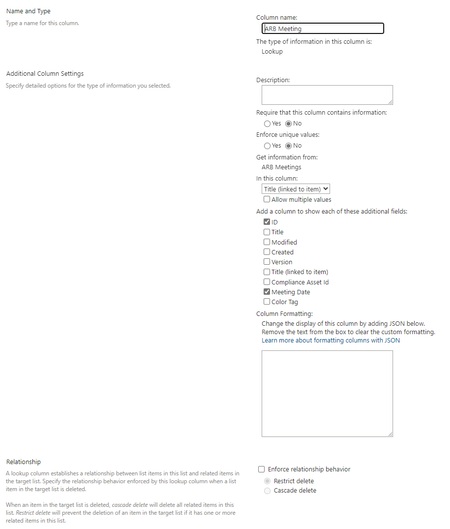
I have seen this discussion before (see https://jgvjg48436.lithium.com/t5/General-Power-Automate/Missing-Columns-from-SharePoint-List-in-Flow/td-p/239360) but suggested solutions have not resolved my issue. So, I am looking for some more guidance or suggestions. I have a SharePoint list with a Look-up column. Using Get Items in a cloud flow this field does not display. Setup SharePoint List called "ARB Meetings" SharePoint List called "Decision Register", this has a lookup column to the ARB Meetings list. Get Item Note, I have tried using Limit columns by View and created a new view including the required lookup column, without success. In the Decision Register SharePoint List, there are some items where the ARB Meetings column is blank, I don't know if this could cause an issue? Co-Pilot Help I have asked Co-Pilot for help, which gave me plently of good options I have tried the following without success: If your lookup column is not showing in the Get items action in Power Automate, here are a few steps you can try to resolve the issue: Check List Views: Ensure that the lookup column is included in the default view of your SharePoint list. Sometimes, columns not included in the view might not appear in Power Automatehttps://jgvjg48436.lithium.com/t5/Building-Flows/Get-items-not-showing-lookup-column/td-p/859264. Refresh the Flow: After adding the lookup column to your list, refresh your Power Automate flow. You might need to close and reopen the flow designer to see the updated columnshttps://jgvjg48436.lithium.com/t5/General-Power-Automate/Missing-Columns-from-SharePoint-List-in-Flow/td-p/239360. Limit Columns by View: In the Get items action, use the Limit columns by view option to select a view that includes the lookup column. This can help ensure that the column is retrievedhttps://jgvjg48436.lithium.com/t5/General-Power-Automate/Missing-Columns-from-SharePoint-List-in-Flow/td-p/239360. Check Column Settings: Verify that the lookup column is properly configured in SharePoint. Ensure it is not hidden or restricted in any wayhttps://jgvjg48436.lithium.com/t5/Building-Flows/Get-items-not-showing-lookup-column/td-p/859264. Pagination Settings: If your list has a large number of items, enable pagination in the Get items action settings. This can help retrieve all items, including those with lookup columnshttps://learn.microsoft.com/en-us/sharepoint/dev/business-apps/power-automate/guidance/working-with-get-items-and-get-files. If these steps don't resolve the issue, you might want to try creating a new flow from scratch to see if the lookup column appears. Sometimes, starting fresh can help Power Automate recognize new or updated columns. Let me know if you need further assistance or if there's anything else I can help with! References [1] https://jgvjg48436.lithium.com/t5/Building-Flows/Get-items-not-showing-lookup-column/td-p/859264 [2] https://jgvjg48436.lithium.com/t5/General-Power-Automate/Missing-Columns-from-SharePoint-List-in-Flow/td-p/239360 [3] https://learn.microsoft.com/en-us/sharepoint/dev/business-apps/power-automate/guidance/working-with-get-items-and-get-files Thank-you, Irene4.2KViews1like3CommentsNew List Version History broken
Microsoft has updated how version history is displayed for SharePoint Lists. In my tenant the changes are not showing for changes made by a power automate flow. SharePoint did create a version but no changes are showing. There must have been changes or else a new version would not have been created.24Views0likes0Comments
PowerPoint Brand Images: folders appear as tabs, but images only show under “All”
Hi, I’m testing PowerPoint Brand Images with a SharePoint Organizational Asset Library and I’m seeing unexpected behaviour with folders. The image library is registered correctly as an ImageDocumentLibrary. PowerPoint detects the library and all images are visible under All. I created several first-level folders in SharePoint, for example: Photos Icons Logos Test PowerPoint correctly reads these folders and shows them as separate tabs in Insert > Pictures > Brand Images. The issue: the tabs remain empty. For example, I created a completely new folder called Test directly in SharePoint and uploaded a new PNG directly into that folder. Result: Test appears as a tab in PowerPoint the PNG appears under All the PNG does not appear under Test I see exactly the same behaviour in PowerPoint Desktop and PowerPoint for the web. I have already checked: OrgAssetType: ImageDocumentLibrary Private CDN: enabled library registered as Private CDN origin CopilotSearchable: enabled SharePoint Online Management Shell: 16.0.27515.12000 PowerPoint Microsoft 365 Beta Channel, version 2609, build 16.0.20416.20004, 64-bit direct upload through SharePoint instead of OneDrive/File Explorer completely new folder and image manual reindexing of the SharePoint library So PowerPoint finds both the folder names and the images, but the folder-to-image relationship does not seem to work in Brand Images. Has anyone successfully used first-level SharePoint folders as working tabs in the new PowerPoint Brand Images experience? Is there an additional configuration step required, or could this be an issue with folder-scoped retrieval in the current rollout?99Views0likes1CommentStrengthening Security in SharePoint Document Libraries: 5 Essential Best Practices
SharePoint Online has become a critical platform for storing, managing, and collaborating on documents across Microsoft 365 environments. Its flexibility and ease of access make it invaluable to modern organisations. However, if document libraries are not properly managed, businesses can face risks such as unauthorised access, accidental sharing of sensitive data, and compliance challenges. Effective SharePoint security is not about restricting productivity. It is about creating a secure framework that allows teams to collaborate confidently while ensuring business information remains protected. This article was written by https://www.bridgeall.com/a leading https://www.bridgeall.com/microsoft-365-consultancy/sharepoint/offering https://www.bridgeall.com/microsoft-365-consultancy/sharepoint/sharepoint-document-management-systems-implementation/ Five Ways to Improve SharePoint Document Library Security Limit Access Using Role-Based Permissions One of the most effective ways to secure SharePoint is by restricting access to only those who genuinely need it. Many organisations grant broad permissions across sites, creating unnecessary exposure. Following a least-access approach ensures users receive only the permissions required for their responsibilities. Rather than assigning permissions to individual files and folders, consider using Microsoft 365 Groups or SharePoint Security Groups to manage access centrally. This not only improves governance but also makes ongoing administration significantly easier. Review and Restrict External Sharing External collaboration is often necessary, but it can also become a source of data leakage if not controlled appropriately. Review sharing settings at both the tenant and site level to ensure they align with your organisation's security requirements. Good practices include: Preventing anonymous sharing links for libraries containing confidential information. Allowing access only to verified external users where appropriate. Applying expiry dates to shared links so access is automatically revoked after a defined period. Regularly auditing active external sharing relationships. By tightening these controls, organisations can reduce the likelihood of sensitive information being exposed outside the business. Protect Content with Sensitivity Labels Protecting the library itself is important, but protecting the documents within it adds another layer of security. Microsoft Purview Sensitivity Labels enable organisations to categorise content according to its sensitivity and automatically apply protection measures. Depending on the classification, labels can: Encrypt files. Restrict downloading, printing, or copying. Display visual markings such as headers, footers, or watermarks. Maintain protection even when a document is shared or moved outside SharePoint. This approach helps ensure security travels with the information rather than relying solely on where it is stored. Strengthen User Authentication Document-level security should always be backed by strong identity protection measures. Multi-Factor Authentication (MFA) remains one of the most effective ways to prevent unauthorised access resulting from compromised credentials. Combining MFA with Microsoft Entra Conditional Access policies provides even stronger protection. For example, organisations can: Block access from unmanaged devices. Restrict downloads on non-compliant endpoints. Trigger additional verification requirements for sign-ins from unfamiliar locations. Apply risk-based access controls based on user behaviour. These safeguards help ensure only trusted users and devices can access critical information. Continuously Monitor and Review Access Security is not a one-off project. Permissions and risks evolve over time, making ongoing monitoring essential. Microsoft Purview auditing capabilities provide visibility into activities such as file sharing, downloads, edits, deletions, and permission changes. Regular access reviews help identify: Outdated permissions. Dormant guest accounts. Excessive access rights. Unnecessary group memberships. Routine governance reviews help maintain a secure SharePoint environment and reduce the risk of privilege creep. Building a Secure and Collaborative SharePoint Environment A well-secured SharePoint platform should balance protection with usability. Organisations that invest in strong governance, identity controls, information protection, and ongoing monitoring are better positioned to support collaboration without compromising sensitive business data. By implementing these best practices, businesses can significantly reduce security risks while ensuring employees continue to work efficiently within Microsoft 365. At Bridgeall we offer a range of https://www.bridgeall.com/microsoft-365-consultancy/sharepoint/sharepoint-document-management-systems-implementation/ that help you build and maintain a secure platform of SharePoint document librarires.49Views0likes0Comments
SharePoint modern page, can you adjust responsive design?
Specifically, is there any way to control the window width at which webparts start to stack? My specific situation is similar to the one in this discussion. In my case, I have 3 tall, thin photos that need to display on a page. I have placed 3 image webparts, one in each column of a 3-column section. This looks fine in a wide window. But as I narrow the window, at far too wide of a window width, the section switches to stack the "columns," leaving the user looking at the top 25% of the first photo only. (Which not surprisingly is pretty useless; one needs to see all of a photo.) In both my case and the previous discussion, the problem is that the responsive design thresholds are far too wide (often wider than the physical computer monitor that some are using). Is it possible to fix the thresholds?283Views0likes2CommentsNew List Version History broken
Microsoft has updated how version history is displayed for SharePoint Lists. In my tenant the changes are not showing for changes made by a power automate flow. SharePoint did create a version but no changes are showing. There must have been changes or else a new version would not have been created.55Views0likes0Comments
SPO New UI: cannot copy content in multi-line text columns
After the SPO GUI update my users cannot copy text in custom multi-line text columns anymore. That is impacting productivity at a large scale. Please solve this backend issue. Joachim Freitag IseoLabs SharePoint Admin CMS83Views0likes2CommentsAndroid Webview not rendering the headers of SharePoint page
Workspace one Web Browser which is a secure enterprise browser app is built on Android System WebView, we have an Android WebView in which I am trying to load a SharePoint page. However, certain elements of the page are not being rendered or displayed correctly in the WebView. The same SharePoint page renders correctly in a Chrome browser, where all the expected elements are visible. Please refer to the attached image for comparison and reference. In Chrome In Android System Webview based Web Browser (for example Workspace ONE Web) We mainly wanted to know why is this behaviour specific to Android System WebView based browser.105Views0likes1Commentis a payment method now mandatory for all newly provisioned E5 Instant Sandboxes?
I have an active Visual Studio Professional subscription and can successfully link it to the Microsoft 365 Developer Program. During E5 Instant Sandbox provisioning, the setup requires creation of a Billing Account and entry of a credit card/payment method. The documentation states the E5 Developer subscription is free and billing is used for verification. Is there an alternative verification process for Visual Studio subscribers that does not require a credit card, or is a payment method now mandatory for all newly provisioned E5 Instant Sandboxes?77Views0likes1Comment
Custom Formatter for Read-Only Fields conditional based on other columns
Hello! Does anyone know if it's possible with the fieldsettings, readonly formatting, to make it conditional based on a Person field? It's a multi people field if that makes a difference? I ideally want to make certain fields read only based on who is viewing it (without having to use a Power App customised form!). This is what I want (but I know the syntax is likely all wrong!) but not sure if it's possible to use an IF statement with boolean statements? { "sections": [ {} ], "fieldsettings": [ { "name": "Comments", "readonly": "=if([$People.email] == me, false, true)" } ] }192Views0likes2Comments
SharePoint Migration Tool issue
Got an issue that one of the endpoints for SPMT is not working or part of the firewall. When they try to add it, it doesn't see it as valid: https://api.office.com I've seen various comments that this api.office.com has been deprecated, but it is still listed in the KB article as needing to be opened in the firewall. Can I get confirmation that this is still a needed endpoint? https://learn.microsoft.com/en-us/sharepointmigration/spmt-prerequisites?utm_source=openai Thanks!Solved156Views0likes1Comment
Copilot answers in Sharepoint search results?
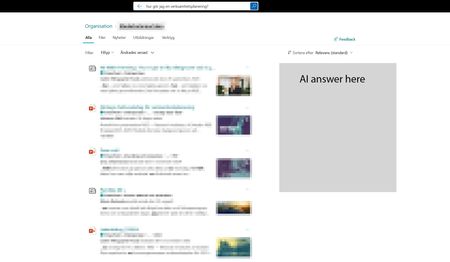
I would really like to add a copilot AI answer in the Sharepoint search result page, mainly for the intranet hub, to help our users better find answers across the intranet and also make the search bar a more complete search experience. Something we could toggle on and maybe we could point out a specific agent we've created for the intranet. I feel people are quickly starting to expect to have an AI summary in their search. Would also make sense when so many use the search bar i Sharepoint to incorporate it there, instead of having to go to a different place to use Copilot. It would make search easier.176Views0likes1CommentID Calculated Column Not Showing
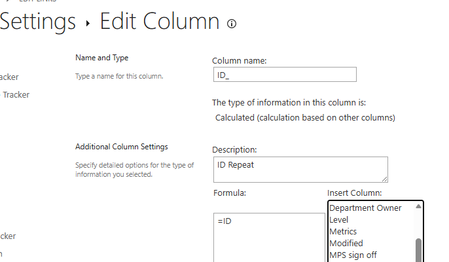
I have created a calculated column to show the ID in an opened List item. This is using =ID in the formula box. However, in the actual List item, the vasty majority are showing ID as 0: There does not seem to be a pattern for this, Does anyone have an explanation for this?176Views0likes1CommentStruggling to fix 2013 workflows
I build a new farm. I installed 2013 worfklows. I cannot get them to run. I can't find a fix. I'm exhausted from trying with SharePoint. :( I need a consitent way to make sharepoint work. It's terrible. Anyone have a current checklist of things to do to reverse engineer all the problems? I can only go so far as follow the flipping instructions. Ugg.85Views0likes1CommentSharePoint Online / PnP Modern Search - Mudança no ranking dos resultados
Olá pessoal, Estou enfrentando um comportamento estranho em um ambiente SharePoint Online utilizando PnP Modern Search. Recentemente realizamos: Reindexação de uma biblioteca de documentos; Criação de novos mapeamentos no Search Schema para propriedades gerenciadas (RefinableString); Ajustes em refinadores da Busca Avançada. Após essas alterações, os documentos continuam sendo encontrados pela busca, porém percebemos uma mudança significativa no ranqueamento (relevância) dos resultados. Exemplo Existe um documento chamado: Manual - Chave de Segurança.pdf Ao pesquisar: Manual - Chave de Segurança, a busca retorna dezenas de resultados, porém esse documento não aparece entre os primeiros colocados. Entretanto, ao pesquisar com aspas: "Manual - Chave de Segurança", o documento é retornado imediatamente nas primeiras posições. O mesmo comportamento foi observado com outros documentos. O que já validamos O documento está ativo e vigente; O documento está indexado; O PnP Search Results utiliza a fonte LocalSharePointResults; Não existe ordenação customizada configurada; A busca retorna o documento corretamente quando utilizamos o termo exato entre aspas; O problema parece estar relacionado apenas ao ranking/relevância dos resultados. Dúvidas Uma reindexação de biblioteca pode alterar temporariamente o ranking dos resultados do SharePoint Search? Existe algum período de estabilização da relevância após uma reindexação? É recomendado utilizar XRANK para aumentar o peso dos campos Title ou Filename em cenários como esse? Existe alguma forma de priorizar documentos cujo nome do arquivo possua correspondência exata com o termo pesquisado sem perder os benefícios da relevância padrão do SharePoint? Alguém já passou por comportamento semelhante após reindexação ou alterações no Search Schema? Obrigado!189Views0likes2Comments
Microsoft 365 E5 configuration grayed out - TrackingID#2607060030007237
Hello Team, We are currently facing an issue while setting up the Microsoft 365 E5 Sandbox through Microsoft 365 Developer Program. Users are only seeing the option to create an Instant Sandbox, which appears to require billing details. However, the Configurable Sandbox option, which does not involve any cost, is currently grayed out and cannot be selected. We tested this with multiple users within our organization, and the same behavior was observed for both users. This issue was not encountered earlier, as users were previously able to view and select both options — Instant Sandbox and Configurable Sandbox — by default. All impacted users are signing in with organizational email accounts associated with valid Visual Studio Dev Essentials, Professional, or Enterprise subscriptions. We also raised a MS Support case regarding this issue. However, we were informed that this falls outside the scope of a break/fix support case and were advised to post the issue in Microsoft 365 Developer Community forum. This is surprising, as the issue appears to be impacting multiple organizational users and may potentially affect many more members. Requesting your support to review this issue on priority and advise on why the Configurable Sandbox option is disabled, along with the recommended resolution or next steps. Previous Microsoft Support Case related to M365 Developer program different issue: 2601080030003703 Thank you.279Views0likes2Comments
SharePoint Permissions Management
Over the last 3 years of managing permissions across a suite of sites, I have uncovered more new issues with the way SharePoint permissioning is designed at every turn. A few examples, before the question: If I "Share" a file or folder somewhere on the site (breaking permissions inheritance), it is very inconvenient to find it again. If I "copy link" in this one particular way, permissions inheritance is broken. When looking at site-level permissions, I see site-level permissions groups, but there could be hundreds of other users who have been added to my site(s) without my knowing. If I want to reset permissions in an area (set of folders or library), I have to do it file-by-file or folder-by folder. If I want to get an excel snapshot of - anything really - IT has to pull it and it takes a couple days. Not to mention the permissions interface is incredibly clunky. All-in-all, there seem to be a million ways to break permissions inheritance, creating an access tracking and security nightmare. AND there's no easy way to truly see and understand who has access to what or what is broken, without spending hours with IT to pull a bunch of narrow-visibility reports. So my question is: what is the best way to navigate full permissions visibility? Am I doing something wrong? Is anyone else experiencing these issues? We have resorted to having a very strict "no outsides besides a few exceptions" policy and only managing permissions at the site-level, which really hampers on the collaboration benefits that SharePoint is trying to enable. It is also very administratively intensive. One of the benefits to SharePoint is that users don't really need to understand how it works to use it, but that's becoming less and less true with the increasing lack of security we feel in the platform.438Views3likes4CommentsPersonalize WebPage - Access Denied CU 16.0.19725.20522 KB 5002893
Hello, with the current CU August 2026 (2016/2019/SE) users can't "Personalize this Page" (old layout 2010). After the user takes the action "Edit my WebPart" it redirects to Access Denied page. The user needs the right to the site "Add and Customize Pages"; this is not an option. Permission check failed. asking for 0x40000, have 0x1b03c4312ef Access Denied. Exception: Attempted to perform an unauthorized operation., StackTrace: at Microsoft.SharePoint.SPSecurableObject.CheckPermissions(SPBasePermissions permissionMask) at Microsoft.SharePoint.WebPartPages.ToolPane.OnInit(EventArgs e) at System.Web.UI.Control.InitRecursive(Control namingContainer) at System.Web.UI.Control.AddedControl(Control control, Int32 index) at Microsoft.SharePoint.WebPartPages.WebPartPage.CreateToolPane(Control ctrl) at Microsoft.SharePoint.WebPartPages.WebPartPage.ToolPaneCreationAndInitialization(HtmlForm form, WebPartDisplayMode displayMode) at Microsoft.SharePoint.WebPartPages.WebPartPage.OnInit(EventArgs e) at System.Web.UI.Control.InitRecursive(Control namingContainer) at System.Web.UI.Page.ProcessRequestMain(Boolean includeStagesBeforeAsyncPoint, Boolean includeStagesAfterAsyncPoint) at System.Web.UI.Page.ProcessRequest(Boolean includeStagesBeforeAsyncPoint, Boolean includeStagesAfterAsyncPoint) at System.Web.UI.Page.ProcessRequest() at System.Web.UI.Page.ProcessRequest(HttpContext context) at ASP.DEFAULT_ASPX_337397335.ProcessRequest(HttpContext context) at System.Web.HttpApplication.CallHandlerExecutionStep.System.Web.HttpApplication.IExecutionStep.Execute() at System.Web.HttpApplication.ExecuteStepImpl(IExecutionStep step) at System.Web.HttpApplication.ExecuteStep(IExecutionStep step, Boolean& completedSynchronously) at System.Web.HttpApplication.PipelineStepManager.ResumeSteps(Exception error) at System.Web.HttpApplication.BeginProcessRequestNotification(HttpContext context, AsyncCallback cb) at System.Web.HttpRuntime.ProcessRequestNotificationPrivate(IIS7WorkerRequest wr, HttpContext context) at System.Web.Hosting.PipelineRuntime.ProcessRequestNotificationHelper(IntPtr rootedObjectsPointer, IntPtr nativeRequestContext, IntPtr moduleData, Int32 flags) at System.Web.Hosting.PipelineRuntime.ProcessRequestNotification(IntPtr rootedObjectsPointer, IntPtr nativeRequestContext, IntPtr moduleData, Int32 flags) at System.Web.Hosting.UnsafeIISMethods.MgdIndicateCompletion(IntPtr pHandler, RequestNotificationStatus& notificationStatus) at System.Web.Hosting.UnsafeIISMethods.MgdIndicateCompletion(IntPtr pHandler, RequestNotificationStatus& notificationStatus) at System.Web.Hosting.PipelineRuntime.ProcessRequestNotificationHelper(IntPtr rootedObjectsPointer, IntPtr nativeRequestContext, IntPtr moduleData, Int32 flags) at System.Web.Hosting.PipelineRuntime.ProcessRequestNotification(IntPtr rootedObjectsPointer, IntPtr nativeRequestContext, IntPtr moduleData, Int32 flags) .96Views0likes1CommentMicrosoft Graph -admin -exchange
Since 11 August we have been seeing incomplete responses from the mailbox item delta operation in Microsoft Graph. The request returns a 200 but the body is cut short and cannot be parsed. A folder with no items responds normally, but as soon as one item is present the response breaks. It behaves the same way in Postman as in our own client. Has anyone else run into this recently? Happy to share more detail.67Views0likes1Comment





Events
in 2 days
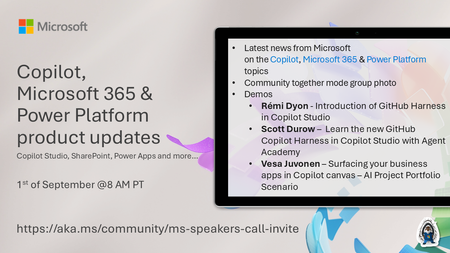
💡Copilot, Microsoft 365 & Power Platform product updates call concentrates on the different use cases and features within the Microsoft 365 and in Power Platform. Call includes topics like Microsoft...
Tuesday, Sep 01, 2026, 08:00 AM PDTOnline
0likes
2Attendees
0Comments
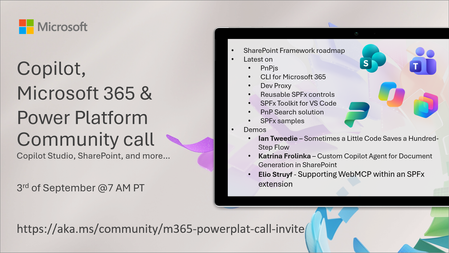
💡 Copilot, Microsoft 365 & Power Platform weekly community call focuses on different use cases and features within the Microsoft 365 and Power Platform - across Microsoft 365 Copilot, Copilot Studio...
Thursday, Sep 03, 2026, 07:00 AM PDTOnline
0likes
1Attendee
0Comments
Recent Blogs
- 8 MIN READAI becomes most impactful when it helps with the work teams already do every day. The challenge is rarely a lack of information. It is turning trusted information into a clear, repeatable proces...Aug 27, 2026400Views0likes0Comments
- See how ACP's SCOPE team and its ACP Intranet Accelerator Kit help organizations transform SharePoint Online into a modern, engaging digital workplace - faster, with less custom development.Aug 26, 2026232Views1like0Comments