User Profile

ErikVet
Brass Contributor
Joined Dec 03, 2018


User Widgets
Recent Discussions
KQL help Exchange Online
Hello, I need help in buildinga KQL Query as I'm fairly new to this. I have a set of 2 keyword list like Set 1 = "A","B","C" Set 2 = "1","2","3" I want a KQL Query that matches any combinations those 2 sets match. I have tried ("A" OR "B" OR "C") AND ("1" OR "2" OR "3") but that does not seem to work. Many Greetings Erik453Views0likes1CommentGraph CloneTeam // Async operations stays very very very long time "inProgress" since 2-3 days
Hello, you can clone a team via graph - which works well. https://graph.microsoft.com/v1.0/teams/TO_BE_CLONED_GROUPID/clone In the response you will get the async Operations Location header where you can check the status via a new graph call. Since 2-3 days we have seen that the status stays for a very very long time "inProgress" and the lastActionDateTime is not updated. Although the team is created perfectly - Has anybody seen this behaviour before - what to do .. any good workaround e.g. crawl the document library. Many Greetings and thx Erik744Views0likes3CommentsPowerShell Graph cmdlet Get-MgGroupTeamChannelTab
Hello, as per documentation the powershell cmdlet Get-MgGroupTeamChannelTab should return all Tabs listed in the specific group and channel. so doing Get-MgGroupTeamChannelTab -GroupId $groupid -ChannelId $channelid should return all tabs. I get Get-MgGroupTeamChannelTab_List1: 404 page not found Of course I'm connected and can do a Get-MgGroupTeamChannel to list the channels. So no connection issue. Any hints ? Greetings ErikSolved585Views0likes1CommentDataverse for Teams - Made with Power Apps Store - Deeplinking
Hello, to deeplink to an App in the "Microsoft Teams App Store" is easily possible via https://teams.microsoft.com/l/app/<appid> But now the question. Is this also possible with the App Store "Built with the Power Plattform" for a group shared Dataverse for Teams App. The normal link says "App not found" Many Greetings ErikRe: Hybrid Azure AD joined Devices WITHOUT Intune show up as Non Compliant
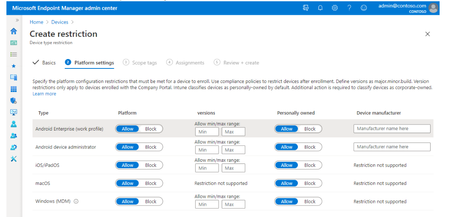
Rudy_Ooms_MVP Ketzpatel I guess I have found something that may have something to do with this ... MS changed the Device restriction to bei more granular (Could not find since when). Before you have device platform polices into one Policy as seen here in an old screenshot. If i look now into the Intune device restriction portal we have different possibilities per platform (e.g Android, Windows) If i look in our tenant i can see the restriction policy for windows, mac and ios with a weird behavior. The groups are not displayed correctly as they should. Maybe here is a issue and it happend when MS rollout out the new restriction policys - from general to platform specific. Only Android works correctly Greetings Erik16KViews0likes0CommentsRe: Hybrid Azure AD joined Devices WITHOUT Intune show up as Non Compliant
Rudy_Ooms_MVP Indeed that is pretty weird. It looks like only devices which where "setup" in last couple of months. But also older ones are affected. As they show not in intune it is just guessing what compliance rules trigger it. Is this somehow possible of the Graph API but I have look for that in detail. Maybe some Intune/Device/AzureAD MVP can ask the product team .. I do not have those connections . Or even MS is reading this and can give some hints as this is definitely not normal. Thx Erik16KViews0likes1CommentRe: Hybrid Azure AD joined Devices WITHOUT Intune show up as Non Compliant
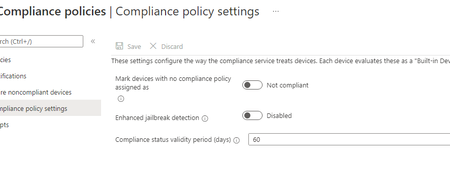
Rudy_Ooms_MVP .. thanks for you comments Default Compliance is configured as "not compliant" but the effected "Not Compliant Devices" without and MDM Scope (AADHJ devices) under AzureAD Devices do not show up in Endpoint Mgr. But changing this would also effect not only windows devices right ... all the mobile devices too ... Scope for Windows Enrollment is set to "Some" but is 100% sure that none of the affected devices/user where in that group.16KViews0likes11CommentsRe: Hybrid Azure AD joined Devices WITHOUT Intune show up as Non Compliant
NielsScheffers Thx for you reply. Sadly not .. their not managed and the do not show in Intune/Enpoint under non compliant devices. Devices (multiple) no scheme recognizable 😞 Of course CA Policy are in place and are applied to those devices.16KViews0likes0CommentsHybrid Azure AD joined Devices WITHOUT Intune show up as Non Compliant
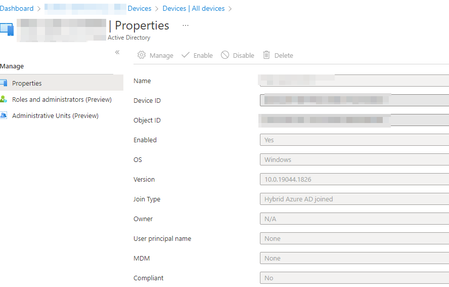
Hello, We do not use Intune for Windows at the moment. Everything is blocked e.g. Enrollment Polices, not Autopilot etc. At the moment we are seeing some devices in AAD under Devices that show up with a Compliance Status No but others not. For example a valid device: and a Device that with the Compliance Status We do not know how this happens. We do have Compliance Polices for testing AzureAD joined devices but only via staged rollout (groups). How is it possible that some devices get a compliance status without Intune ? Many Greetings and thanks for any hint. Erik19KViews0likes21CommentsTeams // External Access - Federation
Hello Teams Community, just a quick question. Tenant A and Tenant B have configured a whitelist regarding Federation // External Access from Tenant A to Tenant B. Tenant A uses different Subdomains in it's organisation. PrefixA.contoso.com PrefixB.contoso.com Does Tenant B has to whitelist just the domain contoso.com or all subdomains which Tenant A is using. Or say it with other words, does External Access // Federation work on Domains or also subdomains. Many Greetings ErikSolved2.3KViews0likes2CommentsAAD Dynamcis and License GUID
Hi, I'm trying to construct a dynamics group which contains user with a specific plan and struggle a little bit. For example I want to group all Users which have the License O365 Business Essential. I have done this with Dynamcis License before but now I have problem. If for example I want to group all Business Essential Users and select a servicePlanID (the Exchange for example, then of course all other users from different Plans get selected also e.g from an O365 E3 Plan . The ID from the servicePlanFeature Exchange (9aaf7827-d63c-4b61-89c3-182f06f82e5c) is the same in all different Products It looks like we can't use GUID from the Product itself e.g. 3b555118-da6a-4418-894f-7df1e2096870 (O365 Business Essential). Is it possible to group by Product License GUID and not the the different Products from a plan itself ? Or any hint how to do that. Many Greetings ErikBest Practive for Admin Accounts with ADFS / AAD - OnPremise ones or Cloud based
Hi, i just wanted to know from a technical standpoint if there are any disadvantages from using synced accounts (of course specials accounts) and asign them admin roles in the cloud or should you always choose cloud-only users for admin purposes. Yes I know there should be a cloud admin without MFA for "Just in case". I'm asking this if we could run into any problems later in the whole MS cloud environment. e.g. for some tasks you need a cloud only user. For example I remember that for specific use cases you have to use Cloud Only Groups in the Dynamics area. Is there any documentation around this ? Many thx Erik Are the any specialSolvedAdding a Subdomain Problem
Hello, we have problem adding a subdomain to our environment. It is a ADFS enviroment and we have added the Domain always via PowerShell -> New-MsolFederatedDomain. If we add a specific subdomain we get the following error. Any other subdomain within the root domain works without any problems. What does this mean, has somebody setup a O365 environment and this is an unmanaged azuread with this subdomain and do we have to do an admin takeover ? We have found some blog posts about this. Many Greetings ErikSolved1.5KViews0likes1CommentAssigning Microsoft 365 Phone System License fails with strange/confusing error message
Hello, for internal tests we currently assign the Microsoft Phone 365 License via the Admin Portal manually. All other Licenses are assigned automatically via synced AD Groups. If we now assign the Microsoft 365 Phone System License by hand via we get the error message (Names replaced, tough mailto:username@contoso is exactly the same). The email address username@contoso.com is being used as an alternative email address by user (Lastname, Firstname) username@contoso.com. Use a different email address. We can't add the license via Powershell or AzureAD. In Powershell nothing happens, though the commandlet runs successfully. In AzureAD -> Licenses their is also just a generic error. On some users it works on some not. Their is now visual difference eg. with the upn etc. It is also the case with the Audio Conferencing License. We have done this many times before with Audio Conferencing and for a couple of users with Phone System without any problems. We have no clue and it seems MS Support also not 😞 any hints ? Many Greetings Erik1.4KViews0likes1CommentRe: Azure AD Guests - Invitation vs. non Invited - Share Links
This was all caused by this feature Azure B2B Integration with SharePoint Online is now Generally Available which is now generally available. This feature was turned by error/mistake on in our tenant but the UI or Powershell didn't reflect this . We had to turn this option off complety off to get the old "Feature" in External Identities | All identity providers e.g. If you share file no guest ist automatic created Shared Files will get the OTP as before Normal guests can be added via Invitation Many Greetings Erik ErikVet1.8KViews0likes0CommentsQuestion regarding MC261534 and MC282480
Hello, in the MC261534 (and later one) was communicated that SharePoint Permission Option Menu will be gone from "Private Channel Sites" aka "Teams connected team sites". Permission for a Teams connected teams sites should be managed in Teams. So far so clear ! Can please somebody tell me a little bit more about this at this is not 100% clear for me. Does only the Members or Owner Groups (SharePoint Group e.g. "Member of xyz Site" or "Owner of xyz Site" on the SharePoint (Private Channel Site) be managed automatically ? e.g. the groups will be managed automatic with the settings from Teams will other, additional SharePoint Groups be deleted which were created before ? after Microsoft has turned on the automatic "managment" will it be possible to add SharePoint Groups via PnP or other API's ? Many thx for clarification if somebody already has seen this in real life ? Erik1.1KViews0likes1CommentRe: Exchange Online / Relayy suddenly stopped working with error 4.4.3 Temporary server error.
Hello, thx for the quick reply. that's what we did after after eliminating all possibilities on our side. After calling with MS ... they did some "diagnostics" and after that immediately after that it worked again. Whatever it was ..... they did not tell us. Many Greetings Erik4.5KViews1like1CommentExchange Online / Relayy suddenly stopped working with error 4.4.3 Temporary server error.
Hello, we have an Relay Connector (IP based) for our OnPremise Systems (e.g. MFP ). Suddenly Emails are not delivered anymore through the Exchange Connector which we used. The Exchange Online Servers (random of course) senden the following Error message after the FROM Connect: 451 4.4.3 Temporary server error. Please try again later ATTR3.1 [*****************.prod.protection.outlook.com] Delete and reconfigure the connector does not work. On the Internet their is not much about this error message. Many Greetings ErikSolved4.8KViews1like5Comments


Recent Blog Articles
No content to show