office graph
194 Topics
Guidance Needed: Syncing Appointments Between New Outlook and Web App via Outlook Add-in
Hello Community, I need guidance on syncing appointments between New Outlook and our Web Application. We have an Outlook Add-in where users log in using only their Web Application credentials. When an appointment is created from the add-in, we need it to: Create the appointment in the Web Application (via SOAP API). Create the same appointment in the user's Outlook calendar. Keep updates synchronized in both systems. We previously achieved this using EWS in Classic Outlook, but EWS is not supported in New Outlook. We are now exploring Microsoft Graph API. My understanding is that Graph API requires each Outlook user to be authenticated and authorized before calendar operations can be performed. We have thousands of users across different organizations, and we do not want to require every user to complete a separate Microsoft authentication flow or implement SSO. Is my understanding correct about Microsoft Graph API functioning? If so, what is the recommended approach to create and synchronize Outlook calendar Appointment/Event from a New Outlook web Add-in while minimizing outlook user authentication requirements in Microsoft Graph API? Note: We don't want to suggest every organization (and users in it) to implement SSO now (not sure if this is needed or forced or recommended.), to be able to use the application in Outlook and sync data. So, I am looking for any previous experiences on who this is handled or what can we do differently. Any suggestions or implementation experiences would be greatly appreciated. Thank you in advance for your help. Thanks & Regards, SM111Views0likes1Comment
Copying pages in OneNote not working
I've been using the CopyToSection function, which copies a OneNote page to another section, to great benefit until about two weeks, when it suddenly stopped working - in Graph Explorer, one can replicate it using POST beta with query https://graph.microsoft.com/beta/me/onenote/pages/{page id}/copyToSection and request body { "id": "{destination section id}" } Any ideas how to make it work again? Any help would be greatly appreciated. Thank you, Jan37Views0likes1Comment
Retrieve all Teams transcripts a bot has attended to using Graph API
Hi there, I've been struggling for a lot of time trying to get this done. Has anyone been able to achieve something like this ? I wanted to : 1- Get all the meetings and transcripts of the tenant 2- Filter on those where the bot was attending 3- Get the transcripts when available. 4- Add rules to restrict the bot's access Right now I am stuck with the OAuth : The application 'bot-transcript' asked for scope 'OnlineMeetings.Read.All' that doesn't exist on the resource '00000003-0000-0000-c000-000000000000'. But this permission was added, and really seems to exist. Right ? Thanks in advance for any kind of help you could give me.546Views0likes1Comment
Slow UI update for deleted events
I've built an integration that continuously syncs events between an external scheduling system and Exchange Online using Microsoft Graph. I'm observing a recurring issue when deleting calendar events via Graph: A DELETE request to Graph returns success (204 No Content). A subsequent GET /events/{id} returns 404, confirming the event is deleted server-side. However, the event continues to appear in the Outlook UI (both Outlook Web and desktop) for an extended period (sometimes hours), even after page reloads or app restarts. The odd behaviour The event is still displayed in the user interface for up to several hours The event persist through page reloads If the user clicks the event it opens briefly and immediately closes, the event disappears from the UI afterward. Additional details Delete endpoint: /users/{id}/events/{id} Graph response: 204 No Content Verified deletion via GET → 404 Reproduces in both Outlook Web and Outlook desktop Questions Is this a known Outlook client caching or calendar view indexing issue? Is there a way to force client reconciliation after deletes? Are there Graph or Exchange constraints around rapid create/update/delete cycles that could cause this UI inconsistency?543Views2likes1Comment
Getting available time slots in Booking API
I am dumbfounded by the process of getting available/bookable time slots for a service in the Bookings API. As I understand it, and as I have it working, I have to: Fetch information about the service to get the SchedulingPolicy and its General and Custom availabilities. Fetch information about the staff members connected to the service. Fetch information from getStaffAvailability Manually enumerate the time slots according to time slot interval, respecting the minimum lead time and maximum advance time. Manually verify for each time slot whether any staff is available given the availability information. (I could fetch the calendarView information but that only shows booked appointments, and so if a staff member is busy or out of office with another calendar event, that is not taken into account and the customer risks booking a time slot that was never possible to begin with.) All this while managing time zone conversions at every step. Is there really not one endpoint that just returns which time slots are available for booking right now for a given service within a given date/time range?332Views0likes0Comments
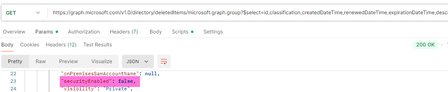
Deleted security groups return "securityEnabled": false, appear as ‘unrecognized’ in Entra admin
When retrieving the list of soft-deleted groups with Graph, both M365 groups and security groups are returned. However, the securityEnabled flag is returned as false for security groups. Is this a bug? This likely leads to displaying them in the Entra admin center as 'Unrecognized' type.309Views0likes0Comments
O365 Group email settings
I am in the middle of trying to create some automated routines that create groups in O365 and add/remove members from them as needed. One of things I ran into is that when an email is sent to the group, the emails are not going into each members' inbox and are only visible in Outlook through "Go to groups" in the left hand menu. I can see the settings that need to be set but can't set them because either, A: it just doesn't do it or B: says I don't have permission. Doing this through C# and the Graph SDK The two items I think I need to turn on are below. What permissions are needed to be able to manage those settings but NOT be able to have access to anyone and everyones' email boxes, emails, etc or is there another way to do this? IsSubscribedByMail AutoSubscribeNewMembers486Views0likes1Comment
Entra Conditional Access Issue
Hi Guys, Our Outlook add-in relies on the Graph API to fetch emails. Due to customer-side Conditional Access (CA) Policies, we are seeing critical failures where Continuous Access Evaluation (CAE) demands user interaction (InteractionRequired code) to resolve challenges like LocationConditionEvaluationSatisfied or TokenCreatedWithOutdatedPolicies. Since this authentication occurs backend-to-Entra, we lack a frontend mechanism to prompt the required user interaction. Is there a recommended pattern, method, or architectural change that allows our backend to redirect or challenge the user for interactive sign-in, thereby satisfying these CAE requirements and unblocking customers? Exact error messages: 1. Continuous access evaluation resulted in challenge with result: InteractionRequired and code: LocationConditionEvaluationSatisfied 2. Continuous access evaluation resulted in challenge with result: InteractionRequired and code: TokenCreatedWithOutdatedPolicies336Views0likes0Comments403 Forbidden when sending mail with app-only token via Microsoft Graph
Hello, I am trying to send emails from my Outlook account using a registered enterprise application in Azure AD. We created an application registration in our tenant, assigned the relevant users, and granted admin consent for these Microsoft Graph application permissions: Mail.Send and Mail.ReadWrite and Mail.Send.Shared. I authenticate with application credentials (client_id, client_secret, tenant_id) and successfully retrieve an app-only access token using MSAL in Python: def get_access_token() -> str: load_dotenv() client_id = os.getenv("CLIENT_ID") client_secret = os.getenv("CLIENT_SECRET") tenant_id = os.getenv("TENANT_ID") authority = f"https://login.microsoftonline.com/{tenant_id}" scopes = ["https://graph.microsoft.com/.default"] # app-only token app = msal.ConfidentialClientApplication( client_id=client_id, client_credential=client_secret, authority=authority ) result = app.acquire_token_for_client(scopes=scopes) if "access_token" not in result: raise RuntimeError(f"Auth failed: {result.get('error_description') or result}") return result["access_token"] The token is retrieved successfully. However, when I try to send an email with: GRAPH_BASE = "https://graph.microsoft.com/v1.0" def send_email(access_token: str, from_user: str, to_address: str, subject: str, body_text: str, save_to_sent: bool = True) -> bool: """ Sends a plain-text email via POST /users/{from_user}/sendMail using an app-only token. Returns True on success; raises HTTPError on failure. """ payload = { "message": { "subject": subject, "body": {"contentType": "Text", "content": body_text}, "toRecipients": [{"emailAddress": {"address": to_address}}], }, "saveToSentItems": bool(save_to_sent), } r = requests.post( f"{GRAPH_BASE}/users/{from_user}/sendMail", headers={"Authorization": f"Bearer {access_token}"}, json=payload, timeout=20, ) r.raise_for_status() return True …I get this error: 403 Client Error: Forbidden for url: https://graph.microsoft.com/v1.0/users/{from_user}/sendMail File "C:\mail\src\mail.py", line 53, in send_email r.raise_for_status() ~~~~~~~~~~~~~~~~~~^^ File "C:\mail\src\mail.py", line 111, in <module> send_email(token, from_user, to, "Hello from Microsoft Graph", "Hello Human") ~~~~~~~~~~^^^^^^^^^^^^^^^^^^^^^^^^^^^^^^^^^^^^^^^^^^^^^^^^^^^^^^^^^^^^^^^^^^^ requests.exceptions.HTTPError: 403 Client Error: Forbidden for url: https://graph.microsoft.com/v1.0/users/{from_user}/sendMail where {from_user} is my actual mailbox address (e.g., email address removed for privacy reasons). Since the app has Mail.Send (Application) permission with admin consent, my understanding is that the app should be able to send mail on behalf of any user in the tenant using /users/{user}/sendMail. Is there another configuration step I am missing (e.g., Application Access Policy or mailbox-level Send As requirement)? Any guidance on why this 403 happens despite having Mail.Send application permissions with admin consent would be very helpful. Thank you!706Views0likes1CommentThe requesting principal is not authorized to set group preferred data location
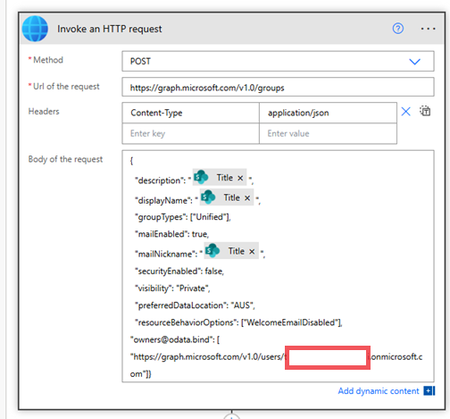
We have our tenant with 4 Geo locations. And inside power automate flow I am sending this Graph Api to create a new security group under specific Geo location:- but I am getting this error:- The requesting principal is not authorized to set group preferred data location. Now if i remove this parameter:- "preferredDataLocation": "AUS", the Office 365 group will get created under the default location, but I need to add it to the specific location. the service account running the graph Api call has SharePoint, group and teams admin permissions. any advice? Thanks190Views0likes0Comments