Recent Discussions

Word - Same Line Page Breaks Visibly Change Formatting
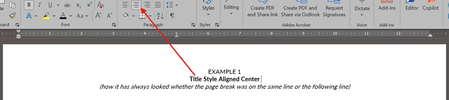
Within the last week or so, Word suddenly has started changing the formatting of visible text when a page break is used on the same line. How can this be corrected? (To be clear, yes, a page break could moved to the next line or deleted if there is not room for the extra line, but this impacts dozens of templates I have been using for years and I just want to set the formatting back to how it has worked in the past, where a page break inserted at the end of a line with centered text did not change the formatting of the visible text in said line.) Example 1 below is how it always used to appear whether the page break was on the same line as the centered title text or not. Example 2 below is how it looks now when the page break is on the same line.229Views2likes7CommentsSharePoint 2013 Workflow Retirement: What It Means for Your Business
Microsoft has officially entered the final chapter of SharePoint 2013 workflows, and for many organizations, this update is more than just another lifecycle announcement — it’s a wake-up call. The retirement of SharePoint 2013 workflows in SharePoint Online marks a decisive shift away from legacy automation toward modern, cloud-first workflow platforms. For businesses that still rely on approval flows, notifications, and automated processes built years ago, the message is clear: those workflows will stop working, and planning can no longer be postponed. This updated news article explains what the retirement means, what changes technically after the deadline, and — most importantly — how organizations can migrate and modernize their workflows step by step. https://dellenny.com/sharepoint-2013-workflow-retirement-what-it-means-for-your-business/19Views0likes0Comments
File always corrupt
Anyone have the same problem with me? I use microsoft excel 365 on my mac. At the beginning everything alright, until i use formula and then save the file. When i want to re-open the file, the messagebox showed up "we found something wrong in your content...". It gives 2 option, yes and no. If i click no, the file wont open. If i click yes, the file open, the excel do the recovery, the file open but end up with all the formulas is gone, deleted by excel and just left the value. What should i do? Do the file can still be fixed?40Views0likes2Comments
Excel Macros Issues
Hi all, A few years ago, a friend wrote a Macros for an excel sheet we use to populate an action plan. The concept is very simple. The Macros goes through the tab and pulls relevent cells through to an another tab creating an action plan. Each item goes under a heading and creates a new line. This has worked like a dream for the last 5 years. Just recently, the macros has started throwing up errors when i run it. Its having issues with Row Height, and doesn't finish running the script, and Excel just hangs. I've replicated this issue on a number of computers, new and old, and tried to swap between Mac and PC. This issue remains the same. The only commonality is the latest version of Excel. Unfortunately rolling back a version is not an option. Have MS updated something that would affect the way this Macros works? Can anyone suggest a solution? Any assistance is appreciated. Many thanks D.39KViews0likes2CommentsAnnouncing Office 365 for IT Pros (2026 Edition)
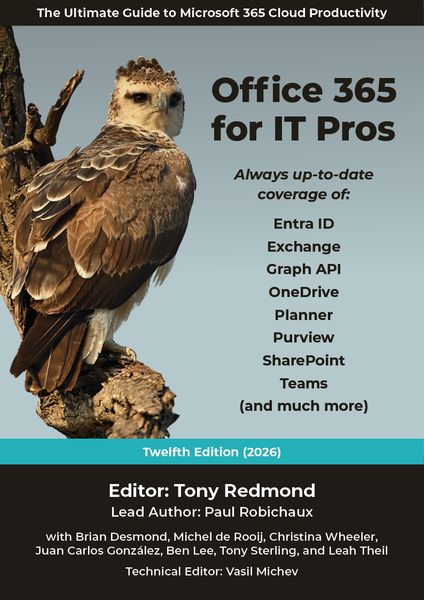
Office 365 for IT Pros (2026 edition), the 12th in an eBook series going back to May 2015, is now available. Covering all the essential aspects of Microsoft 365 tenant management from Entra ID to Exchange Online, SharePoint Online, OneDrive for Business, Teams, data lifecycle management, information protection, and more, Office 365 for IT Pros is an indispensable companion for tenant administrators who want to understand how Microsoft 365 really works. https://office365itpros.com/2025/07/01/office-365-for-it-pros-2026-edition/1.1KViews6likes8CommentsXLOOKUP search w/multiple output
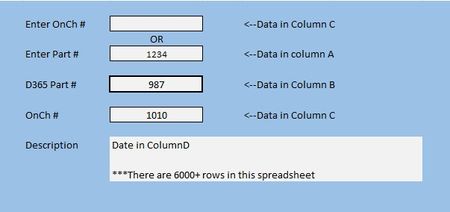
I've been working on a project and I am completely stumped. I cannot wrap my brain around how to get this to work. In the example below, I want to Enter a number in either of the top two field and have the last three fields populate. Now, I can get this to work for one, but not the other and for some reason when I switch from bottom search to the top search the old data doesn't clear and the search doesn't work. This is the formula I have so far //=XLOOKUP(H8,A2:A10606,B2:B10606) Anything I have done after has been a disasterSolved146Views0likes8CommentsOffice365 Autoupdate on Mac
Last week I had an issue with Autoupdate on Microsoft365 where OneNote failed to update, other app were fine. I tried selecting just this app and updating it but got a download error. Autoupdate indicates "some apps have encountered errors" and retrying just repeats the download error. I've tried machine based fixes but none have worked and I suspect it's something else as I have a Mac mini and MacBook doing the same along with my wife who has a Mac desktop. The issue is still the same a week on.8Views0likes0CommentsEXCEL 360 COMPATABLE WITH 2010 XLSM FILES? THE MACROS IN VBA?
EXCEL 360 COMPATABLE WITH 2010 XLSM FILES? THE MACROS IN VBA? I developed a complete workbook the excel 2010 for my business and was wondering if I can use the new version of excel? Hoping that all the macros will work... Thanks for any help !! DaveSolved53Views0likes2Comments
Side load office add-in?
I've created an office.js add-in that I can test with debugging in VS Code. I have deployed it including the manifest to a web site, but now I can't find the option to add it to my Excel anymore, where has that option gone? I'm on Microsoft® Excel® for Microsoft 365 MSO (Version 2602 Build 16.0.19725.20126) 64-bit Thanks GJ24Views0likes0Comments
unpivot data and handle merged cells without using Power Query (Unpivot_Toolkit)
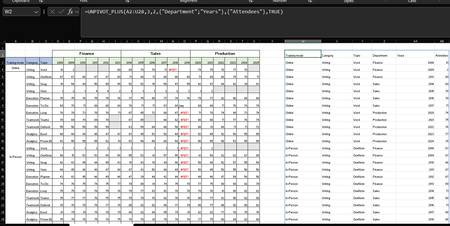
Hey, guys!! I’ve been working on a set of functional Excel Lambdas to solve a common headache: transforming "Wide" human-readable data into "Long" database formats without having to open Power Query every time. =UNPIVOT_PLUS(table, [no_of_cols], [no_of_headers], [attribute_names], [value_name], [remove_errors], [remove_blanks],[pad_blanks_with],[pad_errors_with]) Don’t worry about the full list, most use cases only require 5 arguments. I've included a table of default values at the end. Merged Cell Support: Automatically handles fill-down/fill-right logic for merged headers/columns. Bonus Helper: SPLIT_INJECT =SPLIT_INJECT(array, target_indices, delimiter, [ignore_empty], [match_mode], [pad_with]) It targets specific columns, splits them by a delimiter (like TEXTSPLIT), and expands the entire table horizontally while keeping all other columns perfectly stable. Optional arguments match TEXTSPLIT defaults. Feel free to tear this apart or adapt it for your own edge cases. I’d love to hear how you end up using it! You can grab both functions from my GitHub Gist https://gist.github.com/Medohh2120/f8553c149684e39bb499249e39f01017. Argument Description Default Behavior table The array or range of data to unpivot. Required argument (no default) [no_of_cols] Fixed left columns to keep as identifiers. 1 [no_of_headers] Top rows used as headers, handling merged cells. 1 [attribute_names] Header name for the unpivoted attributes . "Attribute" [value_name] Header name for the unpivoted values. "Value" [remove_errors] Excludes grid rows with formula errors. FALSE [remove_blanks] Removes grid empty cells and empty strings. TRUE [pad_blanks_with] Value to substitute for empty cells. Leaves cell blank [pad_errors_with] Value to substitute for errors. Leaves error as-is181Views0likes0Comments
Copy and Paste Will Not Using the Destination Formatting
I am writing a book in Wood and will submit it to Amazon KDP, and I have set up the document per KDP guidelines. I am working on an English version and a Spanish version at the same time as two separate documents. The text is justified. Both documents have Normal/Modify settings set up exactly the same. The Fonts and Paragraph settings are exactly the same. I have gone into the Options/Advanced area of Word and played with all of the Cut, Copy, and Paste settings to try to fix my problem. But I can't figure out what is going on. I created the Spanish document by using Google Translate to take English paragraphs, translate them, and pasted them into the Spanish document The Spanish document is completed, and all of the formatting looks fine. So I already have paragraphs that are a certain size in the document, meaning they take up a certain number of lines. I am now editing the book using the English document. Something has changed with the Spanish document! If I make a small edit in an English paragraph, use Google Translate to deal with the edit and do a new translation, and then copy and paste that edited Spanish paragraph from Google Translate back into the same place as the original paragraph in the Spanish document, the words are slightly more compressed together, so the paragraph gets shorter! This happens if I even change just a single word in a paragraph, which has not really changed the length of the translation. The paragraph will become shorte by a half of a line, or a full line on long paragraphs. This is all becasue the words are being spaced slightly closer toegether now, versus when I originally crated the document. Also, when I start to do the paste, from Paste Option only get the option for "Keep Text Only." I don't get the multi-paste option box. Something has changed in my setup of Word from the time I created the original Spanish document, and what is happening now. I can't figure out why the formatting of the destination, or using merge formatting, is not working! It's making up it's own jutification spacing all of a sudden. I can't figure out why now a cut and pasted paragraph from Google Translate is making the spread between the words just slightly tighter. The latest thing I tried was Review/Language and choosing Spanish for the Spanish document, and that did not work. Any ideas? Gordon22Views0likes0Comments
Can't access Microsoft Authenticator for business accounts
Hello. I am the tech support for a small church, where I am the admin for our MS 365 accounts, which are set up as "business accounts". I have been using Microsoft Authenticator for MFA for years. Recently I switched to a new phone and installed Microsoft Authenticator. All of my personal Authenticator accounts transferred over just fine, but all of the church's business accounts say "Scan the QR Code provided by your organization to finish recovering this account". The thing is, I am the "organization" and I don't know how to generate any QR code to recover the accounts. It was suggested that I could do something about this by logging into my Microsoft 365 administrator account, but when I try to log into my admin account, the only MFA option is "enter the code from Microsoft Authenticator". It's not offering a text or alternate email, only Microsoft Authenticator, which is what I'm locked out of. So I'm stuck in a loop. I opened a ticket with Microsoft Support nine days ago. I have received one phone call since then. The support person insisted that they needed to talk to the account's "alternate administrator", which I set up as my pastor, who is pretty computer savvy but not a deep IT person. They tried to call him one time, but he was not available to answer right then. There has been no communication since then. I'm hoping someone in this group can help me figure this out.31Views1like1Comment
Macros open server file hyperlinks in 2nd instance
Macros open server file hyperlinks in 2nd instance, preventing macros from seeing and interacting with the newly opened file. Manual clicking of hyperlink opens the files in the same instance as expected. Users with fresh login have no trouble with the macros opening the files in the same instance. Esoteric macro and/or Microsoft 365 Active Directory problem. Macros using hyperlink in a cell to .follow them to open. Then the next line is a sheet selection of a sheet in the new workbook. Error thrown because the new workbook is not visible to the macro and does not see the sheet name. This works for everyone everywhere. Including on fresh logins. Recently User1 started having the 2nd instance problem. I thought it was isolated and fixed it by removing and recreating his profile. Worked fine for a week. Then it came back. Then User2 logged in on the same machine had the issue. Then the next day User3 on a separate machine had the issue. All 3 users have no issues if they just use a clean login on a different machine. If you manually open all the necessary files, THEN run the macro, it still errors because when it tries to open the already-open-file, it gives the standard Read only Notify me Cancel dialogue. It says [self user] is using it and the file is locked. So is it even a macro problem or is it a server problem? Our server admin says it's not his problem and he has no idea what's happening and it's probably our crappy macros. Yes, our macros are crappy, recorded decades ago. But they work as expected except in these rare but spreading cases, seemingly due to some background environment development.32Views0likes1CommentI am getting the message "WORD did not save the document C:\...\AutoRecovery save of...
Recently I am getting the message "WORD did not save the document C:\...\AutoRecovery save of..." This happens when I am working on large WORD documents, of about 700 pages. I have gotten the message when using WORD on two computers, in different locations. I have worked on these large documents for months without getting this message. I will appreciate advice.80Views0likes6Comments





Events

You’re passionate about what you do, and we’re passionate about empowering your potential. Microsoft 365 Community Conference - is your chance to keep up with AI, build game-changing skills, and take...
Tuesday, Apr 21, 2026, 08:00 AM PDTIn-Person
0likes
3Attendees
0Comments
Recent Blogs
- Here's a summary of bug fixes in the latest version of Access: Bug Name Issue Fixed Monaco query editor applied unwanted autoformatting to passthrough queries The Monaco SQL edit...Mar 02, 202617Views0likes0Comments
 As organizations continue to scale Microsoft 365, protecting data has become a technical and operational requirement. Microsoft 365 Backup delivers fast, native recovery for SharePoint, OneDrive, and...Mar 02, 2026152Views0likes0Comments