Recent Discussions

Make an alert icon of new messages from other accounts/Orgs on top right in TEAMs
The icon of activity in other accounts and orgs moved to bottom left sucks, user would easily miss noticing new messages from other accounts/org. It's better to keep an alert icon next to user icon on top right for easier notification.25Views0likes0CommentsTeams PowerShell Embraces Web Account Manager and Imposes Control Over Federated Chat
Teams released a new version of their PowerShell module on July 19. The new module contains WAM support and cmdlets to limit federated chat for specific users and tenants. The new controls are welcome, but it’s a sad state of affairs that to configure the settings you must install a new version of a module that doesn’t work so well alongside other Microsoft 365 modules. https://office365itpros.com/2026/07/24/federated-chat-controls/22Views0likes0CommentsHow to Schedule Teams Meetings from Shared Mailboxes
It is possible to schedule Teams meetings from shared mailboxes without incurring the need to license the shared mailboxes. However, Microsoft’s recent clampdown on unlicensed OneDrive for Business accounts creates a problem because Teams meeting recordings are stored in the OneDrive account for the organizer (shared mailbox). And if that account remains unlicensed for 365 days, it will be removed along with all the recordings. https://office365itpros.com/2026/07/16/schedule-teams-meeting-shared-mbx/46Views0likes0CommentsWhat the DragonForce Attack Against Teams Is All About
Recent reports from security companies and others about an attack by the DragonForce ransomware group against a U.S. services company highlighted the use of Teams. It’s true that Teams was involved in this very artful attack, but the most critical point is that the network was compromised well before the attackers went near Teams. And when your network is compromised, all sorts of bad things happen. Stop account and other compromises and stay safe! https://office365itpros.com/2026/06/26/dragonforce-attack-teams/73Views0likes0CommentsHow to Use PowerShell to Identify Inactive Teams Channels
It’s common to find that tenants have many inactive channels in their Teams deployment. Becoming inactive is a natural side-effect of time eroding interest in the topics people discuss in channels. And if you don’t go looking for inactive channels, they’ll remain silently in place doing nothing except acting as a container for potentially obsolete long-over discussions. But we can find inactive channels with PowerShell. What you next is up to you! https://office365itpros.com/2026/06/24/find-inactive-channels/31Views0likes0CommentsHow to Remove Teams Chat Threads with PowerShell
Sometimes, Microsoft 365 tenants need to remove problematic Teams chat threads from user view. The usual reason is because someone posted some bad or objectionable content to Teams. This article covers how to use Microsoft Graph PowerShell SDK cmdlets to find chat threads, to check thread messages for targeted content, and to remove matching chat threads. The code can be run interactively by an administrator to clean up Teams. https://office365itpros.com/2026/06/15/delete-teams-chat-threads/50Views0likes0Comments
Regarding Teams Meeting Media Transport Behavior in VDI Optimization Scenario
Hello Microsoft Teams Engineering Team, I am currently working on a Browser Content Redirection / media offload implementation for a VDI environment, where WebRTC media transport is handled through a local native component while the Teams application continues running inside the virtual desktop session. While testing, I observed that: 1:1 calls successfully receive audio and video media But in meetings auido / video RTP is never forwarded despite successful ICE, DTLS, and SRTP establishment DTLS ApplicationData traffic is present during meetings, suggesting DataChannel/SCTP activity Based on transport-level observations, it appears that Teams meetings may rely on SCTP/DataChannel communication for SFU video subscription management, while 1:1 calls do not require the same subscription flow. I wanted to ask whether: Teams meeting video forwarding depends on active bidirectional SCTP/DataChannel connectivity Meeting video subscriptions are expected to be coordinated over the WebRTC data channel/control plane Split ownership of media transport and control-plane transport could affect expected Teams meeting behavior in VDI optimization scenarios Thank you for your time and guidance. Best regards,Rajdev23Views0likes0Comments
Feature Request: Real-Time Multilingual Voice Translation in Microsoft Teams
Hello Microsoft Teams Community, I would like to suggest a feature for Microsoft Teams that could help multilingual users communicate more naturally during meetings. Feature Idea: Each participant can speak in their own native language, and Teams will automatically translate and play the speech audio in the listener’s selected language in real time. Example: Telugu speaker talks in Telugu Kannada user hears Kannada audio Hindi user hears Hindi audio English user hears English audio This would be more powerful than subtitles because users can continue conversations naturally in their mother tongue without needing to read captions constantly. Possible Technologies: Speech-to-Text AI Translation Text-to-Speech Real-Time Voice Streaming Benefits: Better communication in multilingual countries like India Improved accessibility Easier collaboration for global teams More inclusive meetings I believe this feature could significantly improve communication in international and regional meetings. Thank you.48Views0likes0CommentsMicrosoft Teams Consecutive Interpretation Explained (NEW Copilot Feature for Multilingual Meetings)
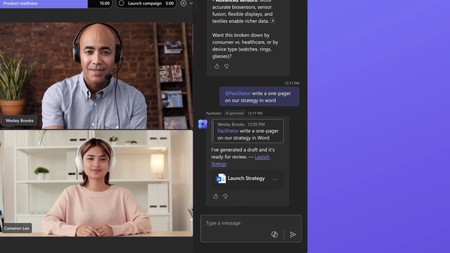
🚀 New in Microsoft Teams: Consecutive Interpretation (powered by Copilot) Microsoft Teams just introduced consecutive interpretation, a new way to run multilingual meetings that feels far more natural than real-time translation. 🎧 Instead of translating while someone is speaking, Teams now: Lets one person speak Translates after they finish Enables real, turn‑by‑turn conversation In my latest video, I explain: • What consecutive interpretation is How it differs from real-time (simultaneous) interpretation When to use one vs the other Why this matters for international teams 👉 Watch the video here: https://youtu.be/u-fH_00nFuU #MicrosoftTeams #Microsoft365 #Copilot #AIatWork #MultilingualMeetings #FutureOfWork300Views0likes0CommentsMicrosoft to Retire Together Mode for Teams Meetings
In a somewhat surprising decision, Microsoft announced plans to retire the Together mode feature for Teams meetings in June 2026. Based on personal experience, it didn’t seem that many people used Together mode. It seemed like it was something that people tried a couple of times before giving up. Maybe it’s just the meetings I attend, but I haven’t seen Together mode used in years. https://office365itpros.com/2026/05/04/together-mode-retirement/227Views0likes0Comments
Transforming Microsoft Teams into a Project Management Hub
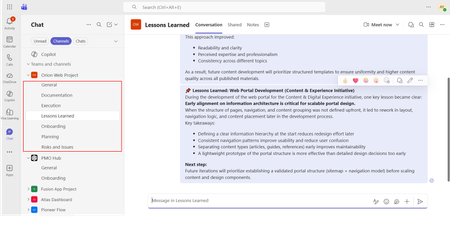
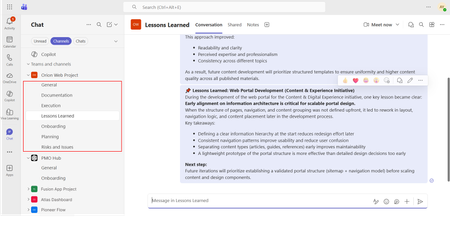
If you use Microsoft Teams only for chats and meetings, you’re missing much of what it can actually do. While Microsoft Teams is often seen as a communication tool, it can also function as a central workspace for managing projects - from planning and brainstorming to execution and documentation - all in one place. When combined with tools like Microsoft Planner, SharePoint, and Microsoft Loop, Teams can become a practical project management hub that keeps work organized and reduces the need to switch between systems. This article walks through a clear, practical approach to setting up and using Teams for real-world project delivery. Why Use Microsoft Teams for Project Management? Organizations often hesitate to introduce new tools due to cost, training effort, or resistance to change. Microsoft Teams offers a strong advantage: it is already widely adopted in many organizations as part of Microsoft 365. Using Teams for project management allows you to: Centralize communication and documentation Reduce tool fragmentation Improve team visibility and collaboration Leverage existing infrastructure without additional cost Instead of switching between multiple platforms, teams can manage conversations, files, tasks, and workflows in one place. Structuring Your Project in Teams A well-structured Team is the foundation of successful project management. Create a Dedicated Team Start by creating a Team specifically for your project. Avoid mixing multiple projects in one Team, as it leads to confusion and poor organization. Recommended channels structure: General (announcements and overview) Planning (timelines, scope, requirements) Execution (daily work discussions) Risks and Issues Documentation Onboarding Lessons Learned This structure ensures clarity and separates strategic discussions from operational ones. Managing Tasks with Planner Task management is a critical part of any project. Inside Microsoft Teams, you can add a Planner tab to manage tasks visually within the same workspace where communication and files are stored. How to use Planner effectively: Create buckets (e.g., To Do, In Progress, Completed, or structured by topic) Assign tasks to team members for clear ownership Set due dates and priorities Attach files and add comments directly to tasks Use labels to categorize work (e.g., Design, Frontend, Backend, Testing) for better filtering and tracking Planner also provides multiple views beyond the basic board: Board view (Kanban-style) for workflow tracking Charts view for progress and workload overview Schedule (Calendar) view to track deadlines visually across time This combination allows teams to switch between operational tracking and higher-level planning depending on the need. This visual approach improves accountability, transparency, and makes task tracking easier even for non-technical users. Document Management with SharePoint Every Team in Microsoft Teams is backed by a SharePoint site. This means all files shared in Teams are stored and managed through SharePoint. Using SharePoint effectively allows you to: Structured storage of project documentation through folders and metadata Maintain version control Role-based access management Centralized file organization Control access permissions Enable real-time collaboration Best practices: Create clear folder & metadata structures (e.g., Contracts, Designs, Reports) Avoid duplicate files Use naming conventions Instead of sending documents via email, teams can collaborate directly within Teams, ensuring everyone works on the latest version. SharePoint Lists in Microsoft Teams SharePoint Lists in Microsoft Teams provide a structured way to store, manage, and track information directly within the collaboration workspace. A SharePoint List is essentially a flexible data table, where each item represents a record with defined fields (such as status, owner, due date, priority, or category). They are especially useful for: Project roadmaps and milestone tracking Action item tracking with ownership and status Checklists for delivery and execution steps Simple status registers and progress tracking Unlike free-form messages or documents, SharePoint Lists keep information structured, filterable, and easy to update, which makes them suitable for ongoing tracking and reporting. When used inside Microsoft Teams, Lists help teams move from discussion to execution by turning decisions into trackable items with clear ownership, status, and visibility. Embedding SharePoint Pages in Teams Beyond file storage, Microsoft 365 allows SharePoint pages to be embedded as tabs within Teams, making key project information easily accessible in one place. SharePoint pages can be added as tabs inside Microsoft Teams channels, providing structured and persistent access to key project information without leaving the collaboration space. In practice, organizations often use SharePoint pages for: Project home page with key links and overview Governance page with rules and standards Onboarding page for new team members Documentation hub for core resources Centralized knowledge hubs This helps ensure that essential information is not scattered across chats or files, but is instead organized and always available within the project workspace. SharePoint is better suited for structured, stable, and long-term information. Microsoft Loop for Real-Time Collaboration Microsoft Loop introduces a more dynamic layer of collaboration inside Microsoft Teams, designed for fast, interactive work where content is continuously evolving. Loop components (such as notes, tables, task lists, and meeting agendas) can be embedded directly into Teams conversations and edited in real time by all participants. It is especially useful for: Live meeting notes Quick decision-making and feedback collection (including simple polls or inputs) 1:1 discussions and follow-ups Brainstorming sessions and idea capture Shared task tracking during discussions In practice, teams can collaborate on meeting notes or brainstorming pages during calls, with updates visible instantly to everyone. This removes the need to switch between documents or wait for post-meeting summaries. Unlike structured tools like SharePoint, Loop is designed for fluid, real-time collaboration, where information is shaped and refined as the discussion happens. Automating Workflows with Power Automate Manual processes can slow down project execution. With Power Automate, you can streamline repetitive tasks. Common automation examples: Notify the team when a task is completed Send reminders for upcoming deadlines Automatically save email attachments to SharePoint Trigger approval workflows Example scenario: When a task in Planner is marked as “Completed,” a notification is sent to the project manager and logged in a tracking list. This reduces manual follow-ups and improves efficiency. Power BI Dashboards Power BI can be integrated into Teams as a tab, allowing teams to access real-time reporting directly within their project workspace. It is commonly used for: Project status dashboards KPI and performance tracking Resource and workload visibility Financial or delivery reporting Instead of switching to a separate reporting tool, teams can monitor progress and insights directly inside Teams, ensuring better visibility and faster decision-making. Microsoft Whiteboard Microsoft Whiteboard provides a visual collaboration space for real-time ideation and planning. It is especially useful for: Brainstorming sessions Process mapping and flow design Workshop facilitation Visual planning during meetings Whiteboard supports freehand drawing, sticky notes, and structured diagrams, making it effective for capturing ideas during live discussions and workshops. Integration with Other Tools (Microsoft & Third-Party) Microsoft Teams can be extended with a wide range of Microsoft 365 services and external applications, allowing it to function as a central hub for project work, reporting, and collaboration. Teams also supports many external tools, allowing organizations to align existing systems without fully replacing them. Common examples include: Jira – agile project and issue tracking Trello – lightweight task and board management ServiceNow – IT service management workflows GitHub – development and repository tracking Salesforce – CRM data and customer-related workflows Communication and Collaboration Effective communication is essential for project success. Microsoft Teams provides multiple ways to facilitate this: Channel Conversations Keep discussions organized by topic instead of using scattered chats. Meetings and Calls Schedule regular check-ins, sprint reviews, or stakeholder updates directly within Teams. Mentions and Tags Use @mentions to notify specific team members and ensure accountability. Practical Use Case Consider a company implementing a new internal intranet. Using Microsoft Teams: A Team is created for the project Planner tracks tasks such as design, content migration, and testing SharePoint stores documents and site assets Power Automate sends reminders for deadlines Teams meetings are used for weekly progress reviews This setup enables the team to manage the entire project lifecycle without introducing additional tools. Best Practices for Success To maximize the effectiveness of Microsoft Teams for project management: Keep your structure simple and consistent Avoid creating too many channels Encourage team members to use channel conversations instead of private chats Regularly review and clean up tasks Use automation where it adds clear value Adoption is just as important as functionality. A well-designed system only works if the team actively uses it. Limitations to Consider While Microsoft Teams is powerful, it has limitations: Not suitable for highly complex project scheduling Limited dependency management compared to dedicated PM tools Reporting capabilities are basic without Power BI For large-scale or highly regulated projects, a dedicated project management tool may still be required. Professional Context and Applied Perspective The approach described in this article reflects practical experience in designing and implementing collaboration environments using Microsoft Teams within real organizational settings. It is based on applied use of integrated Microsoft 365 capabilities, including SharePoint, Microsoft Planner, and Microsoft Loop, to support structured project execution and improve cross-functional collaboration. Rather than relying on isolated tools, this approach focuses on designing a unified digital workspace that aligns communication, task management, documentation, and automation within a single environment. Microsoft Teams is more than just a communication platform. When used strategically, it becomes a practical and efficient tool for managing projects. By combining Teams with Planner, SharePoint, and Power Automate, organizations can create a unified workspace that supports collaboration, task management, and process automation. For teams looking to simplify their toolset while maintaining productivity, Microsoft Teams offers a compelling solution for modern project management.1.3KViews1like0CommentsTransforming Microsoft Teams into a Project Management Hub
If you use Microsoft Teams only for chats and meetings, you’re missing much of what it can actually do. While Microsoft Teams is often seen as a communication tool, it can also function as a central workspace for managing projects - from planning and brainstorming to execution and documentation - all in one place. When combined with tools like Microsoft Planner, SharePoint, and Microsoft Loop, Teams can become a practical project management hub that keeps work organized and reduces the need to switch between systems. This article walks through a clear, practical approach to setting up and using Teams for real-world project delivery. Why Use Microsoft Teams for Project Management? Organizations often hesitate to introduce new tools due to cost, training effort, or resistance to change. Microsoft Teams offers a strong advantage: it is already widely adopted in many organizations as part of Microsoft 365. Using Teams for project management allows you to: Centralize communication and documentation Reduce tool fragmentation Improve team visibility and collaboration Leverage existing infrastructure without additional cost Instead of switching between multiple platforms, teams can manage conversations, files, tasks, and workflows in one place. Structuring Your Project in Teams A well-structured Team is the foundation of successful project management. Create a Dedicated Team Start by creating a Team specifically for your project. Avoid mixing multiple projects in one Team, as it leads to confusion and poor organization. Recommended channels structure: General (announcements and overview) Planning (timelines, scope, requirements) Execution (daily work discussions) Risks and Issues Documentation Onboarding Lessons Learned This structure ensures clarity and separates strategic discussions from operational ones.138Views0likes0Comments
Failure to sign in
First of all, I have TEAMS on my old computer. However, I bought a new computer, and I am unable to gain access to the TEAMS file on my new computer. I gain access to TEAMS, it asks me to sign in again. But the sign-up page does not open. It ends there. I have read the instructions and have spent over an hour trying everything without success. It shouldn't be so difficult.47Views0likes0CommentsHow to Report Single-User Teams Online Meetings
In 2024, I wrote a script explaining how to report details of Teams online meetings, including participants. Now someone wants to report single-user meetings. Their reason is that company management believe that some remote workers schedule online meetings that only they attend with the intention of appearing active if anyone checks. It’s an odd ask, but we can do the job with PowerShell. https://office365itpros.com/2026/04/28/single-user-meetings/66Views1like0CommentsDirect Routing PSTN calls to Teams Auto Attendant does not forward to Shared Voicemail
Hi all, I’m running into a strange issue with a Teams Auto Attendant and I’m hoping someone here has seen it before. We have a Direct Routing number where business hours calls go to a Call Queue, which works, and after hours calls should go to Shared Voicemail for a Microsoft 365 Group. If I call the Auto Attendant from inside our Teams tenant, the after-hours Shared Voicemail works correctly. I can leave a message and the voicemail is delivered to the group inbox as expected. If I call the same number from the PSTN over Direct Routing, I hear the after-hours greeting, so the schedule and call flow are clearly being hit, but once the greeting finishes I get: “Sorry, we cannot connect your call at the moment, please try again later.” I have already verified that the resource account has the correct Teams Phone Resource Account license, Enterprise Voice is enabled, the LineURI is assigned, the Online Voice Routing Policy is assigned, the Direct Routing route and SBC look healthy, the Auto Attendant is associated with the correct resource account, the after-hours call flow points to the correct Microsoft 365 Group, and the group mailbox exists and is healthy. What makes this more confusing is that redirects to internal or tenant-side destinations work, but redirect to Shared Voicemail from a PSTN-originated call does not work. I also tested redirect to an external PSTN number, and that fails with the same error as well. Because the after-hours greeting plays correctly, and because internal Teams calls can successfully leave voicemail in the shared mailbox, I do not think the issue is with the Auto Attendant configuration itself or with the Microsoft 365 Group mailbox. At this point it looks more like the handoff or redirect path for PSTN-originated calls over Direct Routing is where things break. Has anyone run into this with a Teams Auto Attendant, Shared Voicemail, and inbound PSTN over Direct Routing? I’m trying to figure out whether this is a known limitation, a bug, or if there is some specific setting related to PSTN-originated redirects that I am missing. Thanks!187Views1like0Comments
Inaccessible colour contrast for high text in Microsoft Teams in Dark mode on desktop
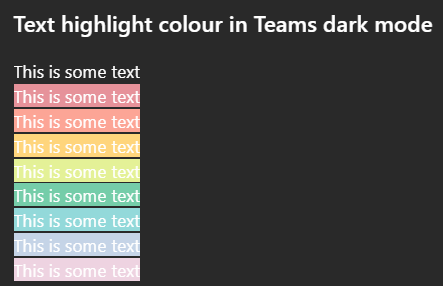
Issue: All highlighted text in Teams has poor colour contrast when in Dark mode on desktop. While some may be readable, none of the highlight colour options meet WCAG colour contrast minimums. How to reproduce Go to MS teams app on Win 11 and set appearance to dark mode. Create any default coloured text (this is white in dark mode) and apply any text highlight colour The result is inaccessible: it does not meet WCAG colour contrast thresholds and is very hard to read. Notes on behaviour On mobile (android MS Teams app) - the text colour changes to black which does meet the colour contrast minimum. This behaviour (illegible white text) on light backgrounds is also found on high contrast mode. This is different behaviour from MS word, which meets colour contrast minimum in a different way. Here highlight colours in dark mode are adjusted (e.g. the background highlight ffff00 --> is shifted to 393900 when dark mode is selected), and the text colour remains unchanged so there is enough contrast between the highlight and the white text colour. What happens next This needs a fix in make this accessible to users in dark mode so content can be read if another user has highlighted text. I'm not sure if this is the right place to post this but I was unable to register my MS account on the https://learn.microsoft.com/en-gb/answers/226Views1like0Comments
Teams & channels names are blank
So fun UI issue on Desktop application (26072.519.4556.7438).. Teams and channels are blank and not clickable.. I've reset & repaired app, cleared the cache and reinstalled (temp fixed but same issue came back) Web version works good, but user wants a fix not a "workaround" Any ideas?94Views0likes0Commentsattach file option not visible with bot joined call
I have created bot using azure and recall.ai When bot joins adhoc or schedule team meetings, it is appearing as an external user. While we have created bot email as well in azure AD. And I think due to this we are not able to see attach file option in teams chat when bot gets invited into the adhoc or schedule meeting47Views0likes0CommentsCan no longer "log out" (signing out is not logging out)
Hello, Up until recently, when right clicking the Teams icon on the task bar, there was an option to Log Out of teams, which had the effect of logging out (re-opening the program would instantly lead to LOGGING IN). On the most recently release, this is gone. There is now only an option to SIGN OUT, which is done through a menu in the program itself, and has further consequences (namely a full Sign in (with username/password etc) is required, themes disappear etc). How to log out of current session, but not SIGN OUT?70Views0likes0Comments


Events
Recent Blogs
- Most people don't need more meetings—they need meetings that lead to action. At their best, meetings drive decisions and keep work moving forward. But poorly managed meetings can actually slow progre...Aug 11, 2026951Views0likes1Comment
- 8 MIN READMicrosoft has been recognized as a Leader in the 2026 Gartner® Magic Quadrant™ for Unified Communications as a Service—our eighth consecutive year with this recognition. We’re also excited to sha...Aug 06, 2026967Views0likes0Comments