Forum Widgets
Latest Discussions

Windows 10 ESU enrollment lost after factory reset – previously purchased and working fine
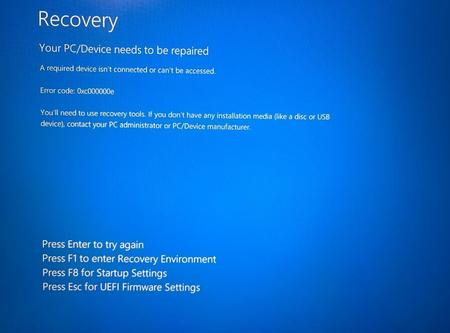
Hello, I purchased the Extended Security Updates (ESU) for my Windows 10 (version 22H2) device in November 2025 through the official Windows Update enrollment process (linked to my Microsoft/Outlook account). Everything worked perfectly at the time: the enrollment appeared in slmgr /dlv output, the "Your device is enrolled for Extended Security Updates" message showed in Windows Update, and I was receiving the monthly ESU security patches (including the latest ones up to early 2026). Recently, I performed a factory reset (reset to factory settings / "Reset this PC" with the option to remove everything) on the same hardware. After the reset and setting up Windows again (signed in with the same Microsoft account), the ESU enrollment is no longer active or recognized. From what I've read, a factory reset / clean reinstall wipes the local ESU entitlement data (since it's device-specific activation tied to the hardware ID and registry), even though the purchase is linked to my Microsoft account. Questions / what I'm hoping for: Is there a way to re-activate / re-enroll the existing paid ESU subscription on this reset device without repurchasing? (Since it's the same hardware and same Microsoft account.) Should running cmd /c ClipESUConsumer.exe -evaluateEligibility (as admin) + reboot + check Windows Update restore it automatically? If not, does Microsoft Support need to manually re-link the entitlement on their backend?Jan1Feb 18, 2026Copper Contributor51Views0likes2CommentsWindows won't boot - error code 0xc000000e - windows system32 winload.efi
Messed up the SSD while trying to recover lost data and got this screen on next boot I made bootable USB to get into CMD prompt and tried almost every solution online but it always ends in an error. Disk 0 should be the one with windows but can't locate any windows or boot files on it. I don't even know if drive is MBR or GPT because it doesn't have the asterisk however under Fs column, type is FAT32. Disk 1 just has games files on it. I will list some issues i am having when trying cmd solutions: bcdedit - The Boot config. data store could not be opened. The system cannot find the file specified bootrec /fixboot - access is denied bootrec /rebuildbcd - total identified windows installations: 0 Basically main problem is that windows and boot files are lost somehow, i tried dir /a still couldn't locate windows files. I have seen a lot of people saying V: /FS:FAT32 then C:\windows /s V: /f UEFI (V is vol with EFI partition) works but i don't want to lose the data in the SSD. Please help, I have been trying to fix this since yesterday. Is it even possible to fix this issue without losing the data??HolawayFeb 16, 2026Steel Contributor236Views0likes5Comments
Windows Defender Cannot Be Activated After Uninstalling Comodo Anti Virus– Help Needed (Windows 10)
Hello Community, I’m experiencing a problem with my Windows 10 laptop and hope to get some guidance. Official support is no longer available for my system, so I’m turning to the community for help. Problem Comodo Anti Virus /Internet Security / Internet Security Essentials had been installed on my laptop for a long time. While Comodo was active, I could not load certain websites properly, and games like League of Legends would not run. For this reason, I recently uninstalled Comodo. After the uninstallation, the previously blocked websites and games work again. Current issue: My Windows Defender Antivirus cannot be activated. In Windows Security, it shows: “Virus & threat protection: Action required” “The threat service has stopped. Start it now” Clicking “Start now” only shows a loading indicator and then an “An unexpected error has occurred” message. I have administrator rights, but Defender still cannot be activated. Steps I’ve Tried 1. Registry checks Path: HKEY_LOCAL_MACHINE\SOFTWARE\Policies\Microsoft\Windows Defender Checked entries like DisableAntiSpyware and DisableRealtimeMonitoring Modifications often failed → access denied 2. PowerShell commands Set-MpPreference -DisableRealtimeMonitoring $false → errors: “Parameter not found” or “Access denied” Other commands like Set-ItemProperty or Set-Content → errors: “UnauthorizedAccessException” or “InvalidArgument” 3. CMD / SC commands sc config WinDefend start=auto Error: “SC Open Service Error 5 – Access denied” 4. Service check Get-Service WinDefend | Select-Object Status, StartType → Status: Running, StartType: Automatic Despite the service running, Defender cannot be enabled in Windows Security 5. System restore point created (For Comodo Revomal Tool) Drive C: protection enabled Backup created as a precaution Insights / Analysis (Speculations) After uninstalling Comodo, websites and games work again → this suggests that Comodo previously installed network filters or drivers that blocked them. It is possible that remnants of Comodo (drivers, services, registry entries) are preventing Windows Defender from starting. Firewall, App & Browser protection, and Exploit protection are active → partial protection, but Defender is not functional. I am not certain if there are other causes, but based on my experience, it seems strongly related to leftover Comodo components. Has anyone experienced similar issues where Defender remains blocked after uninstalling Comodo? Are there safe methods to fully reactivate Defender without risking system stability? Should I use the official Comodo Removal Tool to remove all remnants? Are there alternative steps to try before using a removal tool? I would greatly appreciate any guidance, tips, or steps I can try to get Windows Defender working again. Thank you in advance!Username6Feb 16, 2026Copper Contributor33Views0likes0CommentsRegistry is mess. How can I clean registry in windows 10?
Hello Microsoft Community, I am looking for guidance on how to safely address registry issues on my Windows 10 PC. I believe my registry has become cluttered and potentially corrupted over time, which may be causing general system sluggishness and occasional application errors. Is there any easy way to clean registry in windows 10? My Goal: I want to clean up obsolete, invalid, and broken registry entries to improve system stability and performance. However, I am aware that manually editing the registry is extremely risky, and I've heard mixed opinions about third-party registry cleaner software.TexasOasisFeb 16, 2026Iron Contributor3.7KViews0likes8Comments
Where has the Edge Browser Share button gone ?
Recently the Share button has vanished from MS Edge. Everywhere I search shows how to turn on and off the button from the tool bar, or the context menu , but these opotions are not visible to me at all. So has this option been removed from Edge ? OS : Windows 10 Browser : MS edgemarcusobFeb 15, 2026Copper Contributor65Views0likes2CommentsSudden crashes and BSOD in Win10
Hello! I have an Asus Vivobook 15, that came with Keep-OS and I installed Windows 11 using the official website and step by step. Last week it started crashing and having BSOD's, getting stuck on boot and sometimes not even recognizing the OS (win11). It started after a Win Update. Since I haven't found a solution and Asus does not care for the consumer, had no alternative and downgraded to Win 10. I'm still facing some crashes and BSOD. I checked the SDD, manually and with Crystal Disk Info (98% health), checked the fan... I really don't know what else to do. https://1drv.ms/u/c/7f13816d644baeb5/IQCrQrt8VfRkRZAOG5BT6By0ASV3wLkzdMiLZ-ctbrSsW84?e=PTUVlN Here is the System Events Log.GabsBtFeb 14, 2026Copper Contributor42Views0likes1Comment
No Audio output device is installed
Recently, I tried to update my windows (version 20H2) which was unsuccessful and I had this "No Audio output device is installed" with no sound on my laptop. I tried to update the windows again and it worked out fine. Still, I have the same issue with my sound and running troubleshoot sound problems or reinstalling the audio driver doesn't work at all. I have no hardware issue because I have no problem with ubuntu on the same system. I searched a lot and all of them suggested uninstalling, reinstalling the audio driver which doesn't work. Any suggestion is much appreciated. Kind regards, EhsanehsanshahiniFeb 13, 2026Copper Contributor6.8KViews0likes4CommentsCtrl + C and Ctrl + V stopped working
After working perfectly for years usin my Lenovo laptop, now when I try to copy or paste using the keyboard shortcuts they do not work. For instance Ctrl +V ends up simply as "v" not what I was trying to paste. How did this stop working all of a sudden? How can I fix it? For now I have been using Right Click and then choosing the option to cut or paste and that still works. Thank you for your help! LarryZinck77Feb 11, 2026Copper Contributor127KViews2likes17Comments
Latest Windows 10 build 10.0.19045 not recognizing Brother MFC-8440 printer
Windows recently did updates on my Desktop and two laptops. All of them have Windows 10 build 10.0.19045 as of this writing. I cannot make the Brother MFC-8440 printer working any of these computers. When I remove the USB printer and hook is back I hear the bell. In fact from Windows Scanner and Fax, I can scan a document from my MFC-8440 printer. But when I try to print something the printer is not listed. I see the MFC-8440 printer listed under Device Manager -> Software Devices - Which is very unusual. Shouldn't the printer be listed under Printers or Print Queues? I tried to add the Printer Driver under Settings->Printers and Scanners -> +Add a printer or scanner -Search does not bring up the MFC-8400 printer clicked 'The printer that I want isn't listed' -clicked 'Add a local printer or network printer with manual settings' -I can see the MFC-8400 listed in 'Choose a printer Port' list, and I selected that -Clicked the 'Windows Update' in the next 'Install the printer driver' screen MFC-8440 driver is not even getting listed This same thing happens in all 3 machines I have with Windows 10 build 10.0.19045 update.MSKPEEFeb 11, 2026Copper Contributor206Views0likes3Comments
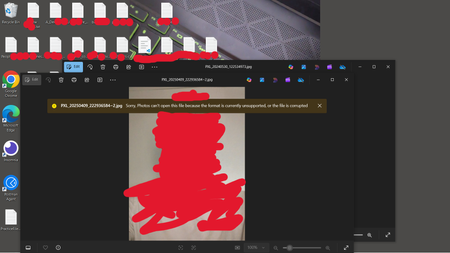
Photos app opens images sometimes without all of the file info, and displays this error message.
I thought this was interesting. This doesn't regularly occur but seems to be some sort of error or failsafe. I used a .bat file to open some images, which I've done about 100 times without any error message. This last time it displayed this error message and failed to populate all of the file info. I captured the screenshots, and you can see in the last screenshot that when I view the file in the File Explorer directly the file contains the missing info. The system opened the image, displayed the error message but still allowed me to interact with the image, only not populating all of the file info.Michael82353Feb 09, 2026Copper Contributor28Views0likes0Comments


Tags
- windows 10154 Topics
- community41 Topics
- Windows1026 Topics
- Microsoft13 Topics
- win1013 Topics
- suggestion10 Topics
- VPN10 Topics
- accessibility9 Topics
- file explorer9 Topics
- Hyper-V8 Topics